DP83867IS: Inquiry regarding Ethernet speed degradation issue

Guru 12585 points

Part Number: DP83867IS

Hello,

My customer reported that when performing a 1:1 iPerf test between the DP83867IS and the 88x3310 (marvell), an issue occurred where reception degraded to the 10Mbps level.

Has there ever been a report of this issue between the two devices?

Please provide advice on the cause and solution of this issue.

Thank you.

  • Hi JH,

    This is not a known issue. Can you please share a register dump from 0x0 - 0x1E of the DP83867?

    Best regards,

    Greg

  • Hi Greg,

    Thank you for your reply.

    Below is the customer's response.

    root@cl-rfsoc-v2021_2:~# for r in $(seq 0 31); do

    >     v=$(phytool read eth0/3/$r)

    >     printf "0x%02x: 0x%04x\n" $r $((v))

    > done

    0x00: 0x1140

    0x01: 0x796d

    0x02: 0x2000

    0x03: 0xa231

    0x04: 0x09e1

    0x05: 0xc5e1

    0x06: 0x006d

    0x07: 0x2001

    0x08: 0x4801

    0x09: 0x0300

    0x0a: 0x3800

    0x0b: 0x0000

    0x0c: 0x0000

    0x0d: 0x401f

    0x0e: 0x00a8

    0x0f: 0x3000

    0x10: 0x5048

    0x11: 0xae02

    0x12: 0x0000

    0x13: 0x0000

    0x14: 0x2bc7

    0x15: 0x1437

    0x16: 0x0000

    0x17: 0x0040

    0x18: 0x6b50

    0x19: 0x4444

    0x1a: 0x0002

    0x1b: 0x0000

    0x1c: 0x0000

    0x1d: 0x0000

    0x1e: 0x0202

    0x1f: 0x0000


    root@cl-rfsoc-v2021_2:~# ethtool eth0

    Settings for eth0:

            Supported ports: [ TP    MII ]

            Supported link modes:   10baseT/Half 10baseT/Full

                                    100baseT/Half 100baseT/Full

                                    1000baseT/Half 1000baseT/Full

            Supported pause frame use: Transmit-only

            Supports auto-negotiation: Yes

            Supported FEC modes: Not reported

            Advertised link modes:  10baseT/Half 10baseT/Full

                                    100baseT/Half 100baseT/Full

                                    1000baseT/Half 1000baseT/Full

            Advertised pause frame use: Transmit-only

            Advertised auto-negotiation: Yes

            Advertised FEC modes: Not reported

            Link partner advertised link modes:  10baseT/Half 10baseT/Full

                                                 100baseT/Half 100baseT/Full

                                                 1000baseT/Full

            Link partner advertised pause frame use: Symmetric

            Link partner advertised auto-negotiation: Yes

            Link partner advertised FEC modes: Not reported

            Speed: 1000Mb/s

            Duplex: Full

            Auto-negotiation: on

            master-slave cfg: preferred slave

            master-slave status: slave

            Port: MII

            PHYAD: 3

            Transceiver: external

            Link detected: yes

    root@cl-rfsoc-v2021_2:~# dmesg | grep DP83867

    [    5.159824] macb ff0b0000.ethernet eth0: PHY [ff0e0000.ethernet-ffffffff:03] driver [TI DP83867] (irq=POLL)

    [    5.230292] macb ff0e0000.ethernet eth1: PHY [ff0e0000.ethernet-ffffffff:0c] driver [TI DP83867] (irq=POLL)

    [    7.448802] macb ff0b0000.ethernet eth0: PHY [ff0e0000.ethernet-ffffffff:03] driver [TI DP83867] (irq=POLL)

    [    7.513164] macb ff0e0000.ethernet eth1: PHY [ff0e0000.ethernet-ffffffff:0c] driver [TI DP83867] (irq=POLL)

    root@cl-rfsoc-v2021_2:~# dmesg | grep eth0

    [    2.378276] macb ff0b0000.ethernet eth0: Cadence GEM rev 0x50070106 at 0xff0b0000 irq 36 (2a:6c:23:95:c8:2e)

    [    5.159824] macb ff0b0000.ethernet eth0: PHY [ff0e0000.ethernet-ffffffff:03] driver [TI DP83867] (irq=POLL)

    [    5.159838] macb ff0b0000.ethernet eth0: configuring for phy/rgmii-id link mode

    [    7.448802] macb ff0b0000.ethernet eth0: PHY [ff0e0000.ethernet-ffffffff:03] driver [TI DP83867] (irq=POLL)

    [    7.448816] macb ff0b0000.ethernet eth0: configuring for phy/rgmii-id link mode

    [   14.627206] macb ff0b0000.ethernet eth0: Link is Up - 1Gbps/Full - flow control off

    [   14.627238] IPv6: ADDRCONF(NETDEV_CHANGE): eth0: link becomes ready

    [   19.745723] macb ff0b0000.ethernet eth0: Link is Down

    [   26.914511] macb ff0b0000.ethernet eth0: Link is Up - 1Gbps/Full - flow control off

    root@cl-rfsoc-v2021_2:~#


    root@cl-rfsoc-v2021_2:~# iperf -s -i 1

    ------------------------------------------------------------

    Server listening on TCP port 5001

    TCP window size:  128 KByte (default)

    ------------------------------------------------------------

    [  4] local 10.2.2.1 port 5001 connected with 10.2.2.11 port 33394

    [ ID] Interval       Transfer     Bandwidth

    [  4]  0.0- 1.0 sec  9.22 MBytes  77.3 Mbits/sec

    [  4]  1.0- 2.0 sec  7.02 MBytes  58.9 Mbits/sec

    [  4]  2.0- 3.0 sec  0.00 Bytes  0.00 bits/sec

    [  4]  3.0- 4.0 sec   581 KBytes  4.76 Mbits/sec

    [  4]  4.0- 5.0 sec  22.4 MBytes   188 Mbits/sec

    [  4]  5.0- 6.0 sec  6.57 MBytes  55.1 Mbits/sec

    [  4]  6.0- 7.0 sec  7.89 MBytes  66.2 Mbits/sec

    [  4]  7.0- 8.0 sec  4.93 MBytes  41.4 Mbits/sec

    [  4]  8.0- 9.0 sec  7.51 MBytes  63.0 Mbits/sec

    [  4]  9.0-10.0 sec  6.49 MBytes  54.5 Mbits/sec

    [  4]  0.0-10.0 sec  72.6 MBytes  60.8 Mbits/sec

    root@cl-rfsoc-v2021_2:~# iperf -c 10.2.2.11 -i 1

    ------------------------------------------------------------

    Client connecting to 10.2.2.11, TCP port 5001

    TCP window size:  170 KByte (default)

    ------------------------------------------------------------

    [  3] local 10.2.2.1 port 49156 connected with 10.2.2.11 port 5001

    [ ID] Interval       Transfer     Bandwidth

    [  3]  0.0- 1.0 sec   109 MBytes   916 Mbits/sec

    [  3]  1.0- 2.0 sec   109 MBytes   918 Mbits/sec

    [  3]  2.0- 3.0 sec   110 MBytes   925 Mbits/sec

    [  3]  3.0- 4.0 sec   110 MBytes   927 Mbits/sec

    [  3]  4.0- 5.0 sec   111 MBytes   929 Mbits/sec

    [  3]  5.0- 6.0 sec   111 MBytes   929 Mbits/sec

    [  3]  6.0- 7.0 sec   110 MBytes   922 Mbits/sec

    [  3]  7.0- 8.0 sec   110 MBytes   926 Mbits/sec

    [  3]  8.0- 9.0 sec   110 MBytes   927 Mbits/sec

    [  3]  9.0-10.0 sec   110 MBytes   923 Mbits/sec

    [  3]  0.0-10.0 sec  1.08 GBytes   924 Mbits/sec

    root@cl-rfsoc-v2021_2:~#

    Thanks,

    JH

  • Hi JH,

    Thank you for sharing the register dump. I will look over it and will get back to you as soon as possible.

    Best regards,

    Greg

  • Hi Greg,

    Is there an update? Thanks!

  • Hi JH,

    Apologies for the delay. I am still checking over the report to see anything of note. In the meantime, if 100Mbps speed is forced on the PHY, does the link stay at that speed or does it still downgrade to 10Mbps?

    [   26.914511] macb ff0b0000.ethernet eth0: Link is Up - 1Gbps/Full - flow control off

    Also, does this indicate the link is still negotiating to 1Gbps, although the actual data rate becomes 10Mbps?

    Best regards,

    Greg

  • Hi Greg,

    Here are the customer responses.

    Apologies for the delay. I am still checking over the report to see anything of note. In the meantime, if 100Mbps speed is forced on the PHY, does the link stay at that speed or does it still downgrade to 10Mbps?

    If the speed is forcibly set to 100Mbps, the link speed remains at 100Mbps. It is confirmed as 100Mbps in ethtool, and the iperf3 speed also shows approximately 100Mbps in both directions.

    Also, does this indicate the link is still negotiating to 1Gbps, although the actual data rate becomes 10Mbps?

    Yes, that is correct. The link speed is 1Gbps, but transmission is over 900Mbps, and reception is at the level of tens of Mbps.

    Additionally, the same problem occurred when connected to a QNAP hub (QSW-3216R-8S8T).

    rfsoc - DP83867 – RJ45 - QNAP – other (pc or cpu)

    Suspecting a compatibility issue, there is no problem when a 1G SFP module is connected to the QNAP's optical port.

    rfsoc - DP83867 – RJ45 – 1G SFP - QNAP – other (pc or cpu)

    Thanks,

    JH

  • Hi JH,

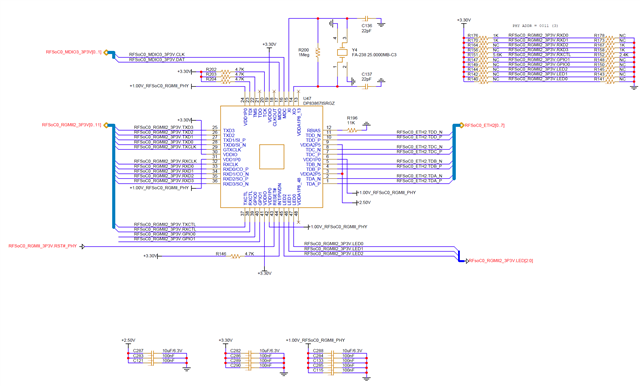
    In the register dump you shared, it can be seen that 0x0015 is measuring RX errors. This indicates the issue could be caused on the MDI side. Is it possible to share a schematic of the system? Are any issues seen with 88x3310 and other link partners?

    Best regards,

    Greg

  • Hi Greg,

    Here is the customer response.


    Regarding the 88x3310, since it was manufactured by a different company, we are not aware of whether the same issue has occurred.

    Thanks,

    JH

  • Hi JH,

    I will review the schematic and respond with any comments soon.

    Best regards,

    Greg 

  • Hi Gregory,

    Are there any updates? Thanks!

  • Hi JH,

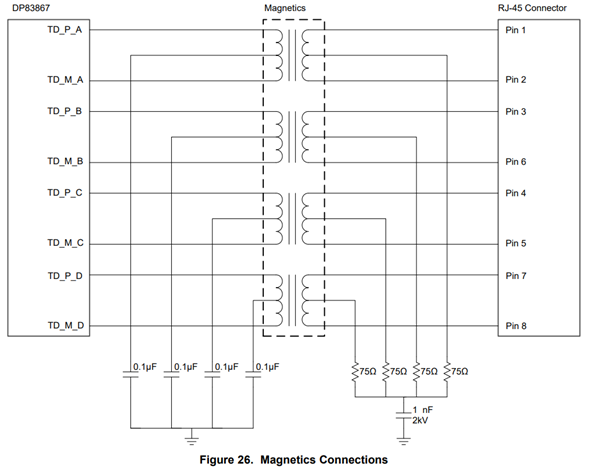
    Apologies for the delay. Is there any additional schematic for the MDI configuration? It should be implemented as so - 

    Please let me know if I am missing it in the attached pictures.

    Best regards,

    Greg

  • Hi Greg,

    Here is the customer's response.

    The circuit diagram previously provided includes the circuit diagram for component 2301996-7, which contains an RJ45 connector and a transformer. If you look at the 2301996-7 datasheet, you can confirm that it is designed as Figure 3.

    Please review the design to see if there are any errors.

    Regards,

    JH

  • Hi Greg,

    Are there any updates? Thanks!

  • Hi JH,

    I attached a schematic checklist with my comments. Pleas ensure all points on the checklist are followed.

    Best regards,

    Greg

    DP83867_Schematic_Checklist_6_30.xlsx