DP83869HM: DP83869HM working at 1000MBps but not working at 100MBps

Part Number: DP83869HM
Other Parts Discussed in Thread: DP83869, DP83869EVM

Hi,

We are using DP83869HM in our design 
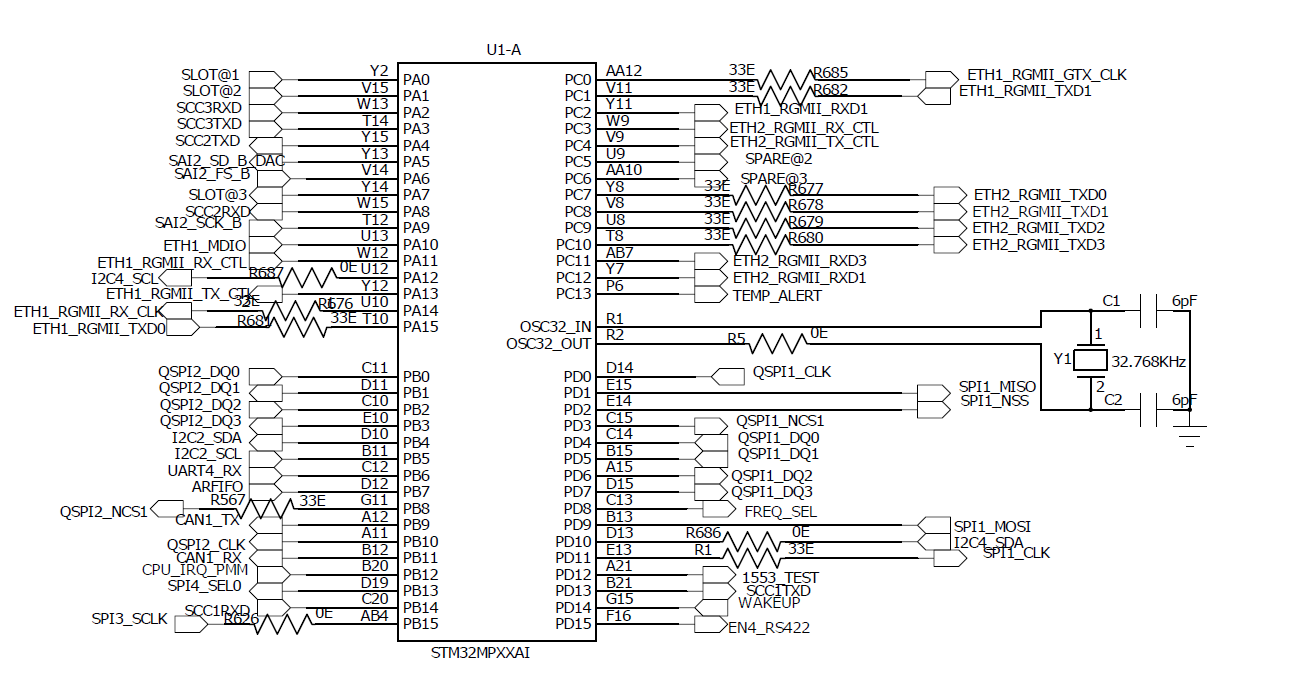
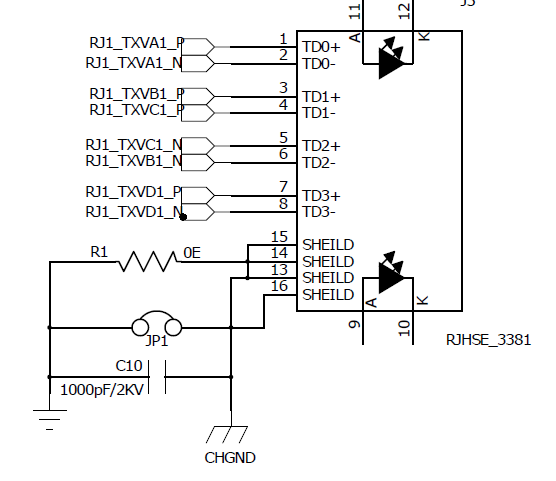
STM.png

PHY.png

image.png

1)Using DP83869 along with STM32MP257D Processor in RGMII to copper mode,firstly Link got established in 10/100/1000MBPS  from link partner side. 

2)In 1000MBPS ping test has passed and data transmission is properly working,

3)But in 10/100MBPS mode ping test is getting failed and data  transmission is not happening 

 4)In forced mode 10/100 Mbps link is not established.

5)we are thing that basic software and hardware were in a good position because 1000mbps is working

6)what are the possible causes for happening these issues?


  • Hi Babu,

    Its unexpected that data passes ok at 1G but fails on 10/100M. Here are a few ideas for narrowing this down:

    1. Loopback testing: Perform MII loopback at 10M and 100M to see if packets are being received on the MAC error-free. If this passes, perform a reverse loopback test with a link partner attached, and make sure packets are received back at the link partner error-free. Loopback modes are described in the datasheet as well as the DP83869 troubleshooting guide

    2. Check for RX errors (register 0x0015) and idle errors (0x000A[7:0]) when you are sending data from the link partner to the PHY in 10/100M modes. If either of these are incrementing, it suggests errors are coming from the link partner.

    I am noticing some things in the schematic as well:

    1. you have a 4.7K RBIAS resistor to GND, however this should be 11K. Please change this to the correct value:

    2. DP83869 integrates termination resistors on the RX lines of the RGMII. You have external termination resistors on these lines as well, however I'd like to see if replacing the external resistors with 0-ohm resistors has any effect. This would avoid any possibility of double termination, which could slow rise/fall times by increasing the impedance on the line:

    Best,

    Shane

  • Hi Shane,

    Thank you for Response,

    We have tried the suggested hardware modifications and performed additional debugging. The observations are as follows:

    1. RBIAS Resistor Modification

      • Changed the RBIAS resistor value from 4.7 kΩ to 11 kΩ as recommended.

      • No improvement was observed in the 10/100 Mbps issue.

    2. RGMII Series Resistors

      • Changed all series resistors on the RGMII interface to 0 Ω.

      • The issue still persists.

    3. MII Loopback Test

      • Performed an MII loopback test using the following configuration:

        • 100 Mbps

        • Full Duplex

        • Auto-Negotiation Disabled

        • Loopback Enabled

      • The test failed.

    4. Loopback Observation

      • Ethernet frames are transmitted from the MAC towards the PHY.

      • However, no looped-back data is received from the PHY back to the MAC.

      • This indicates that the transmit path from MAC to PHY is active, but the receive path from PHY to MAC is not functioning correctly during loopback operation.

    5. Gigabit Operation

      • 1000 Mbps operation continues to work normally:

        • Link establishment is successful.

        • Ping test passes.

        • Data transmission and reception are functional.

    Since Gigabit mode is fully operational while both 100 Mbps communication and MII loopback fail, we would appreciate your guidance on:

    • Any DP83869 register settings specific to 10/100 Mbps operation.

    • RGMII timing requirements for 10/100 Mbps modes.

    • Additional diagnostic registers that should be checked.

    • Any known issues related to MII/RGMII loopback failures in 10/100 Mbps operation.

    Thanks & Regards,
    Babu.M

  • Hi Babu,

    The loopback results do suggest an RGMII issue. Lets look further into this to be sure.

    1. When you perform the MII loopback test at 1G, does it pass correctly? I want to be sure we've got the MII loopback configured right and aren't seeing a setup issue. Since 1G data works I would expect the 1G MII loopback to work as well.

    2. When performing loopback at 100M, do you see the signal entering the PHY via the TX lines and do you see the signal exiting the PHY via the RX lines? If you've got test points (or resistor pads) to probe you should be able to see the data, clock, and CTRL lines toggling while sending packets.

    3. Are you able to isolate the TX path and RX path with the following tests?

    • First Transmit packets form your MAC to a link partner in 100Mbps. Is the link partner able to receive these packets?
    • Second transmit packets from the link partner to your MAC in 100Mbps. Is the MAC able to receive these packets?

    To answer your questions:

    Any DP83869 register settings specific to 10/100 Mbps operation.

    There should not be 10/100 specific registers on the DP83869 RGMII path, though there is a clock shift register that will apply to all speeds. This is the typical knob to turn when debugging RGMII, however I'd like to rule out the above tests before narrowing in on this.

    RGMII timing requirements for 10/100 Mbps modes.

    Setup and Hold timing requirements for 10/100M are the same as 1G in RGMII and are mentioned in the DP83869 datasheet, and for a further description we have this app note on a similar PHY. 

    Additional diagnostic registers that should be checked.

    I'm not sure if you've checked register 0x0015 yet for RX errors but I would recommend doing so. Aside from this, there is a link quality (MSE) register mentioned in our DP83869 troubleshooting guide that can be checked as well, though neither of these looks at the RGMII (they are MDI facing).

    Any known issues related to MII/RGMII loopback failures in 10/100 Mbps operation.

    I'm not aware of issues related to this loopback.

    Best,

    Shane

  • Hi Shane,

    I have tested the loopback test at 1 Gbps. During transmission, I was able to observe pulses on the oscilloscope, indicating that data is being transmitted.

    On the receive side, I observed that the D1 data line is inverted, while the remaining three data lines appear to be normal.

    Please let me know if you need any additional information or if there are any further tests you would like me to perform.

    Best regards,

    Babu.M

  • Hi Babu,

    Since the 1Gbps ping test is working and this is the behavior of loopback in 1Gbps, this may be the expected behavior. I wouldn't expect D1 to be inverted, but if your loopback test is receiving packets back error free, then perhaps it only appears inverted based on the probe point or the data being sent.

    • The 1G loopback test is passing data correctly such that it is received error-free correct?

    Were you able to test loopback at 100M?

    Are you able to perform TX/RX isolation testing at 100Mbps? This would be what I had described in my previous reply.

    Best,

    Shane 

  • Hi Shane,

    The 1 Gbps loopback test is not passing. During the test, I observed that the signal on the D1 pin is inverted compared to the transmitted signal.

    I also performed the loopback test at 100 Mbps and observed the same issue: the D1 signal is still inverted. Therefore, the loopback test is not passing correctly at either 1 Gbps or 100 Mbps.

    The D1 signal inversion appears to be the common issue in both cases.

    Best regards,
    Babu.M

  • Hi Babu,

    I would not expect one output of the PHY to be inverted. Can you try swapping the PHY on the board with a new PHY? I want to make sure there isnt a unit-dependent issue here that we're missing. Alternatively, do you see this inversion on all of your boards?

    I am surprised to hear of this inversion since you mentioned the ping test works at 1G speed. If there was an inversion I would expect the ping test to show loss or not work. Are you able to share scope plots of the inversion (the data signals entering the PHY and exiting the PHY) or the schematic of the design? 

    Best,

    Shane

  • Hi Shane,

    The inversion issue has been resolved.

    I have a couple of questions regarding the DP83869:

    1. Are there any status or diagnostic registers that can be used to determine whether the transmit data has successfully left the PHY?
    2. Could you please let us know which PHY registers need to be configured for an MII loopback test in the following cases?
      • MAC → PHY loopback
      • PHY → MAC loopback

    We are using the PHY in RGMII-to-Copper mode, so any guidance on the required register configuration for these loopback tests would be very helpful.

    Best regards,

    Babu.M

  • Hi Babu,

    1. There is a TX_SFD signal that can be configured on the PHY to show when a packet is transmitted on the MDI. This signal corresponds to the first symbol after the packet preamble (called the SFD) and will go high when this is transmitted on the MDI.

    2. An MII loopback test will take data from the MAC interface and transmit this back towards the MAC (MAC --> PHY --> MAC). This is configured by setting bit 14 in register 0x0000

    Best,

    Shane

  • Hi shane 

    thank you for response

    we are trying to do MII loopback test in 100MBPS speed, but it is failing.

    Is that above mentioned registers are enough or any other registers are there??

    Best Regards,

    Babu.M

  • Hi Babu,

    In 100M mode you should also set register 0x0016 to 0x0004 as noted in the datasheet:

    Best,

    Shane

  • Hi Shane,

    thank you for response

    I have already configured the PHY as suggested.

    The loopback test is working correctly in 1 Gbps mode. However, when I switch the PHY to 100 Mbps or 10 Mbps, the loopback test does not work.

    Below are the register configurations I am using for each speed:

    • 1 Gbps
      • Register 0x00 = 0x4140
      • Loopback test passes.
    • 100 Mbps
      • Register 0x00 = 0x6100
      • Register 0x16 = 0x0004 (as noted in the datasheet)
      • Loopback test fails.
    • 10 Mbps
      • Register 0x1E = 0x0200
      • Loopback test fails.

    Additionally, while performing the loopback test in 100 Mbps and 10 Mbps modes, I can observe transmit activity on the TX pins of the PHY. However, I do not see the expected data activity on the RX pins. Instead, I only observe clock-like pulses on the RX pins rather than the looped-back data.

    Could you please let me know if there are any additional registers or settings required for MII loopback operation in 100 Mbps and 10 Mbps modes, or if there is anything else I should verify?

    Best,

    Babu.M

  • Hi Babu,

    When sending data to the PHY's RGMII TX inputs, do you see data coming out of the RX outputs in 100M?

    Furthermore, what Clk frequency do you see on the RGMII TX_CLK and RX_CLK?

    I did a test in our lab today and did see data looping back at from the TX pins to the RX pins on a DP83869EVM. I probed the TX_D and TX_CTRL lines to check that data was returning form the PHY.

    Best,

    Shane

  • Hi Shane,

    I tried the 100 Mbps loopback test using the settings you suggested, but I am still not seeing any data in the MAC receive descriptors. The transmit descriptors are processed correctly, but the receive descriptors remain empty.

    Could you please share the exact DP83869 register settings you used for the loopback tests at 10 Mbps, 100 Mbps, and 1 Gbps on your EVM? It would help me compare my configuration with yours.

    Best regards,

    Babu

  • Hi Babu,

    On my EVM I tested 100M loopback by setting the following:

    Register 0x0000 = 0x5140

    Register 0x0016 = 0x0004

    With this configuration I saw both the TX and RX pins on the EVM toggling.

    For 1G and 10M I don't see a requirement to write register 0x0016, so in these modes it should be sufficient to write 0x0000 = 0x5140. I did not disable autonegotiation in my test and I did not have anything plugged into the RJ-45 port.

    Do you have a waveform of the RX_D and TX_D lines during loopback that I can take a look at? In my test I did see the TX and RX lines toggling, however I do not have a MAC that can connect to the EVM's RGMII header so I am unable to verify the accuracy of the data coming back. I am curious if your clock-like pulses align with what I am seeing.

    If MII loopback specifically is having this issue, it would be worth testing the isolation tests I had described earlier (TX only vs RX only). There are also other loopbacks that can be tested on the PHY, such as digital loopback, that should still test the MAC interface. Do you notice any difference in the output signal when using PCS or Digital loopbacks?

    Did you ever attempt swapping the unit on the board to see if this is tied to a specific IC? I remember asking this but never got clarification.

    Best,

    Shane

  • Hi Shane,

    We replaced the PHY IC on our board, but we are still unable to get MII loopback working.

    When we test the TX and RX paths separately (isolation tests), we do observe some pulses with the pins toggling. However, we are still unable to achieve successful loopback.

    Best regards,
    Babu

  • Hi Babu,

    In the 100Mbps isolation tests, do packets transmit from the DUT to the link partner without errors? Additionally do packets receive from the link partner without errors?

    Taking a step back, the issue is that 100Mbps ping does not work while 1Gbps does. Ping uses the entire transmit and receive signal path, and isolation testing can narrow down which path is introducing errors. For example if you are seeing errors in the transmit path, and none in the receive path, then we know the issue lies somewhere on the transmit path.

    MII loopback is the most straightforward method of testing the MII path, however there is another way we can narrow this down if MII loopback does not work. You can perform a reverse loopback test to test the entire MDI path in 100M. If the reverse loopback test passes, it implies the issue is on the MII. I drew this diagram to show how each of these tests validates separate parts of the entire signal path:

    I would suggest performing the reverse loopback test and share the isolation test results first, as these should point us to where the issue is. If the issue seems to be tied to the MII (Reverse loopback works, one or both isolation tests fail) Then it will help to see the waveforms of the PHY TX inputs as well as the RX outputs of the RGMII side.

    Best,

    Shane

  • Hi Shane,

    Thank you for the detailed explanation and guidance.

    The issue has been resolved. We have verified that data is transmitting and receiving correctly at all supported speeds: 10Mbps, 100Mbps, and 1Gbps.

    Best regards,
    Babu

  • Hi Babu,

    Thank you for the update. Glad to hear this has been resolved!

    Out of curiosity what ended up fixing the issue? This would be helpful for my own learning Slight smile

    Best,

    Shane

  • Hi Shane,

    Thank you!

    The issue was resolved by changing the System Configuration Register in the MAC along with the MAC speed configuration. Once both were configured correctly for the required speed, the communication started working as expected.

    Best regards,
    Babu