MSPM0G3507-Q1: [uniFlash] standalone tool not working on other PC

Part Number: MSPM0G3507-Q1
Other Parts Discussed in Thread: UNIFLASH

I use UniFlash to create a standalone tool for flashing the chip on a custom PCB.
I seleted "MSPM0G310X(BOOTLOADER)", added the intel-hex file as application image and created the stanadlone tool.
A colleague tried to run the script but sees this error:
`error: CORTEX_M0P: [ERROR_MESSAGE]Failed to receive expected data!`
On my pc (SDK, CCS and uniflash and everything installed) it works totally fine.

Do you have any clue what could be the problem here?

  • Hi Timo,

    Can you have your colleague share a capture of the full output when running the standalone tool?

    When I run mine I do get the same error:

    This is caused by the limited uscif folder included with the standalone mode, and the debug probe is unable to invoke BSL automatically. When invoking BSL manually and right before running the script, my example image is successfully flashed to the device:

    Best Regards,
    Brian

  • Hi Brian,

    Thanks for your reply.

    The output looked quite similar to your first screenshot.
    We found the issue in the meantime - it was a hardware setting (dip switches on our debug adapter) that prevented BSL invocation.
    Now it works fine.

    Although I always see "ERROR: Flash command failed with exit code 1." at the end of each flashing procedure, the new firmware is uploaded to the chip.
    Is this a general Problem in UniFlash - I see this error message also when I use the GUI.

    Best regards,
    Timo

  • Hi Timo,

    I'm glad you were able to solve your issue!

    There is an error when the ROM BSL attempts to validate the flashed image on this device at addresses 0x0 and 0x4. This only affects how the BSL is reading from these addresses, and not an indication of a programming failure.

    Best Regards,
    Brian

  • Hi Brian,

    ah okay thanks for the information.

    How can I make this validation stop failing?

    Best regards,
    Timo

  • Hi Timo,

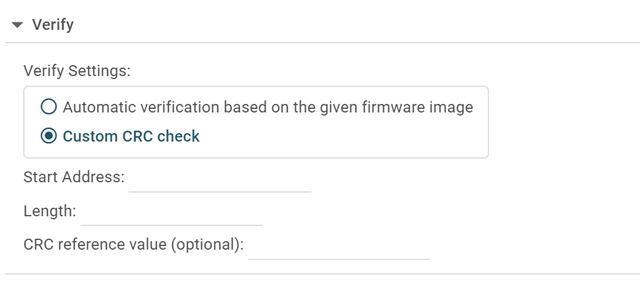
    You can customize the verification settings in Uniflash here:

    These settings should be kept when you generate the standalone package too.

    Best Regards,
    Brian

  • Hi Brian,

    thanks for this information - I will give it a try.

    Best regards,
    Timo