A related question is a question created from another question. When the related question is created, it will be automatically linked to the original question.
If you have a related question, please click the "Ask a related question" button in the top right corner. The newly created question will be automatically linked to this question.
Correct, Table 5-5 details how to set the compensation level using the EQ pins, and which level to select based on your ESR. Table 5-6 essentially takes those same compensation levels and details how the actual I2C register values correlate.
Please keep in mind if you are using GPIO settings that the eUSB2 and USB2 PHYs are configured exclusively. Only one PHY can be configured at a time in GPIO mode, not both.
Sorry, I still cofuse about the HW pinstrap mode setting.
If I use the HW pin strap mode and know the USB PHY trace length (e.g., 5 inches), but don't know the ESR conditions, can I look up Table 10-1 to find the corresponding level and then configure the matching EQ in Table 5-5? Or is it mandatory to know the ESR to determine the EQ settings? Also, regarding the ESR, do I need the FR4 stack-up information in order to calculate it?"
Table 10-1 refers to configuring the eUSB2 PHY based on the eUSB2 trace length, not the USB2 PHY.
If you can determine the dB loss on the USB2 trace however, you can use table 5-4 to determine what the loss compensation is for the different USB2 EQ levels. For example, EQ level 0 compensates for 0.06dB on the USB2 trace, EQ level 1 compensates for 1.09dB, and EQ level 2 compensates for 2.67dB. You can use table 5-4 to determine which compensation level to use if you do not know your ESR.
To summarize:
For eUSB2 HW EQ configuration, you can use either ESR value with table 5-5 to determine configuration, or table 10-1 with trace length and table 5-4 to determine configuration.
For USB2 HW EQ Configuration, you can use either ESR value with table 5-3, or if you know the dB loss of your traces, you can use table 5-4 and the U_EQ_Px bit values to determine which compensation level closest matches the loss in your trace.
Again, please keep in mind that in pin-strap mode you can only configure either the eUSB2 EQ or the USB2 EQ, you cannot configure both at the same time in pin-strap mode. If the USB2 PHY is being configured, then the eUSB2 PHY settings will default to the EQ for a 5 inch trace.
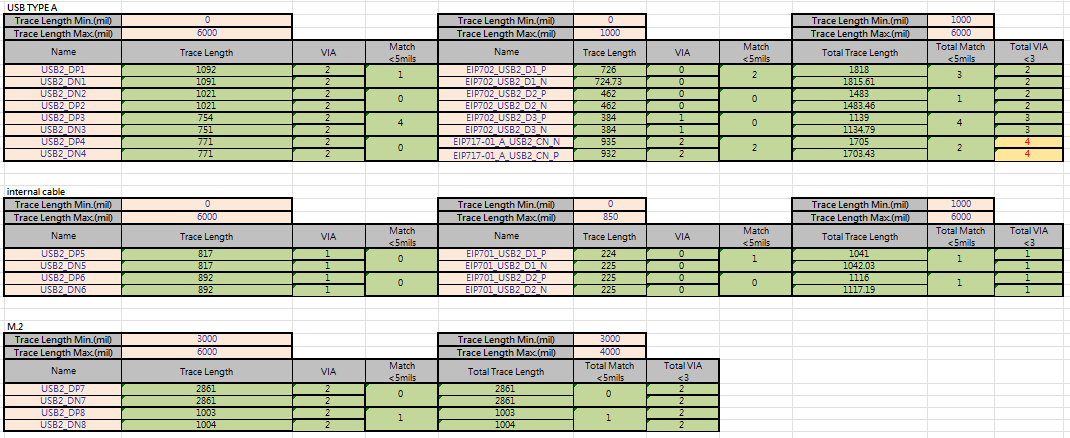
I would like to double-check a few points with you based on Table 5-4, Table 10-1, and my trace length table. If I am limited to the hardware pin-strap mode:
eUSB:
USB:
1. If prioritizing the USB2 configuration (using Table 5-4): The eUSB2 registers will be forced to "Register Default". According to your previous explanation, this default is equivalent to the EQ setting for a 5-inch trace (i.e., E_EQ_Px = 2, etc.). Since my actual maximum eUSB2 trace length is only about 3.06 inches, would using the 5-inch compensation parameters cause slight over-equalization on the signal?
2. If prioritizing the eUSB2 configuration (using Table 10-1): Could I select the 2.5-inch parameters (e.g., E_EQ_Px = 0), which are closest to my actual length, to ensure signal accuracy on the eUSB2 side? In this scenario, the USB2 side would fall back to the default configuration. Given that my USB2 trace is only 2.86 inches, would the default low compensation (such as Level 0) be sufficient to handle the insertion loss of such a short trace?
1. If prioritizing the USB2 configuration (using Table 5-4): The eUSB2 registers will be forced to "Register Default". According to your previous explanation, this default is equivalent to the EQ setting for a 5-inch trace (i.e., E_EQ_Px = 2, etc.). Since my actual maximum eUSB2 trace length is only about 3.06 inches, would using the 5-inch compensation parameters cause slight over-equalization on the signal?
No, the EQ settings on the eUSB2 lanes if configuring for USB2 should not be enough to cause over-equalization. 1dB of gain should not be enough to cause any large amount of over-equalization, so I don't believe there is concern there.
2. If prioritizing the eUSB2 configuration (using Table 10-1): Could I select the 2.5-inch parameters (e.g., E_EQ_Px = 0), which are closest to my actual length, to ensure signal accuracy on the eUSB2 side? In this scenario, the USB2 side would fall back to the default configuration. Given that my USB2 trace is only 2.86 inches, would the default low compensation (such as Level 0) be sufficient to handle the insertion loss of such a short trace?
Yes, you could use the 2.5 inch settings for the eUSB2 parameters in that case. E_EQ_Px = 0 still gives ~0.4dB of gain to the signal, so there would still be some amount of equalization being added to the signal.
For USB2, the default register settings should be enough to cover for 2.86 inches in trace. Plus, you also have to factor in the loss that may be attributed to connectors or other components you have in the trace.
It seems like you implementation is relatively low distance on both sides of the repeater, so I believe lower EQ settings would make more sense for your system. In terms of configuration, I do believe that it's better to tune for the USB2 PHY in this case, but I believe your system should be able to support either configurations.