SN65DSI86: MIPI to eDP panel with SN65DSI86 Bridge IC

Part Number: SN65DSI86

Hi

Custemer are having an issue during panel porting with the following setup:

  • Platform: Android 16
  • CPU: Qualcomm 6690
  • Bridge IC: SN65DSI86 (MIPI DSI to eDP)
  • Panel: 10.1” eDP panel (N101UAN01)

We have successfully detected the SN65DSI86 using its native driver and the I2C configuration in the BSP device tree.

We also directly wrote registers to the SN65DSI86 to enable the color bar. The eDP panel displayed the color bar correctly, confirming that the connection from the SN65DSI86 to the panel is working.

During porting, we checked the SN65DSI86 error status using Table 8-31, “CSR Bit Field Definitions,” in the datasheet. Some errors were found initially, but they have been resolved by modifying the driver and device tree.

Our HW team also checked the power sequence and adjusted the delays to meet the datasheet requirements.

However, the eDP panel still does not display anything, even after these checks.

Could you please help us identify other possible causes and suggest what we should check or modify next?

The SN65DSI86 datasheet and panel specifications are attached for your reference.

Thank you for your support.

10.1_N101UAN01_0 Final spec 20191015_11191011HZ02.pdf 

  • Hi Gareth,

    If you have the test pattern working, then this would suggest that the DP link training and video timings to downstream display are working. Please check the following items:

    1. Display timings for color bar and video input:

    • Are the timings programmed to the DSI86 the same for color bars pattern (working) and DSI input video (not working)?
    • Please check and share the register dumps for test pattern and DSI input modes to check whether the same timings are used
    • What timings is the DSI input video sending?

    2. Error flags: 

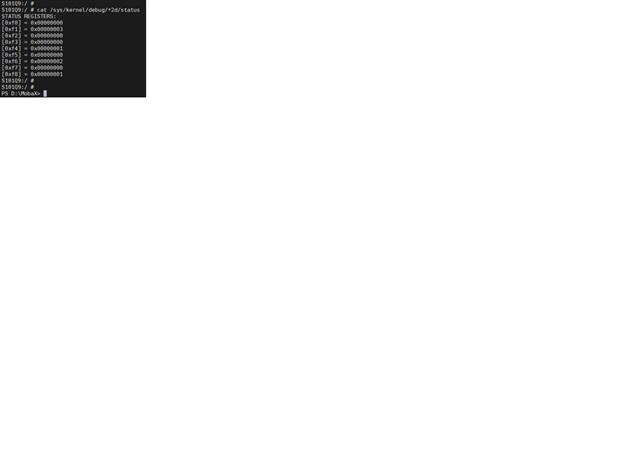
    • When the video is not transmitting, what errors are flagged on the 0xF0 - 0xF8 registers?

    3. Registers to check:

    • Link training status:
      • is link training successful?
      • Is the same DP lane count and rate used for both test pattern DSI input video?
    • REF CLK mode used, and DP PLL lock
    • DSI channel modes: does the DSI number of channels and lanes used match between DSI86 programming and SoC config

    4. Power-up sequence:

    I see that you mentioned that the power-up sequence was verified. Please check whether every step and register checking between steps is complete. There are steps in the datasheet "8.4.2 Power-Up Sequence" that mention which registers to check after certain steps. This can help to identify which step is not being completed.

    Best regards
    Ikram

  • Hi Ikram

    Display timings for color bar and video input:

    >>> Our understanding is that "timings" refers to the video format parameters in Table 8-7 (registers 0x20-0x3A). Please correct us if you meant something else.


    • Are the timings programmed to the DSI86 the same for color bars pattern (working) and DSI input video (not working)?

    >>> Registers 0x20-0x3A have identical values in color bar mode and DSI input mode. Register dumps for both modes are attached.

    • Please check and share the register dumps for test pattern and DSI input modes to check whether the same timings are used
    • What timings is the DSI input video sending?

    >>> open color bars

    >>> DSI input video

    1. Error flags: 
    • When the video is not transmitting, what errors are flagged on the 0xF0 - 0xF8 registers?

    >>> Initially, error flags were set in registers 0xF0–0xF8. After modifying the driver, the error bits have been cleared, and currently only 0xF8 reads 0x01 (LT_PASS, indicating that link training succeeded).

    1. Registers to check:
    • Link training status:
      • is link training successful?

    >>> successful, 0xF8 = 0x01 (LT_PASS).

      • Is the same DP lane count and rate used for both test pattern DSI input video?

    >>> 0x93 = 0x24 -> 2 DP lanes, 0x94 = 0x81 -> 2.70 Gbps (HBR)

    • REF CLK mode used, and DP PLL lock

    >>> REFCLK_FREQ = 27 MHz, DP PLL locked (bit 7 = 1).

    • DSI channel modes: does the DSI number of channels and lanes used match between DSI86 programming and SoC config

    >>> This matches the SoC configuration (single DSI, 4 data lanes).


    1. Power-up sequence:

    I see that you mentioned that the power-up sequence was verified. Please check whether every step and register checking between steps is complete. There are steps in the datasheet "8.4.2 Power-Up Sequence" that mention which registers to check after certain steps. This can help to identify which step is not being completed.

    >>> We modified the driver according to datasheet 8.4.2 (driver attached). Could you please review whether the sequence and the register checks between steps are correct?


    Our Environment

    - SoC: Qualcomm [TBD: platform], Linux kernel 6.1, Qualcomm DSI host driver

    - Bridge driver: ti-sn65dsi86.c, modified according to datasheet 8.4.2 (attached)

    - Panel: eDP, 1920x1200 @ 60 Hz, 24 bpp

    - DSI: single channel (A), 4 lanes, RGB888 (data type 0x3E)

    - REFCLK: 27 MHz on REFCLK pin

  • Hi Gareth,

    I am looking into this issue and I will send an update by tomorrow.

    Best regards,
    Ikram

  • Hi Ikram

    would like to follow up on this issue. Could you please share any updates on the status?

    Thank you for your support.

    Best regards,

  • Hi Ikram

    Based on our current test results, we can enable the color bar pattern via i2cset 0x3C. After modifying the registers from 0xF0 to 0xF8, all registers read 0x00 except 0xF8, which reads 0x01.

    1. Does this indicate that the SN65DSI86-to-eDP panel output path is working properly?

    Since the color bar pattern can be displayed, it suggests that the output path from the SN65DSI86 to the eDP panel is generally working. However, we would like to confirm whether the DP link training and related status registers indicate normal operation.

    2. How can we verify that the MIPI DSI signals are correctly received by the SN65DSI86?

    Qualcomm has asked us to verify the MIPI DSI input. Could you please advise how we can confirm that the DSI video stream is being correctly received by the SN65DSI86?

    In particular, we would like to know:

    • Which registers should we check to verify the DSI input status and identify any reception errors?
    • How can we confirm that the DSI clock and data lanes are operating correctly?
    • Are there any specific registers or status flags we should check when switching from color bar mode to DSI video input mode?

    Thank you for your support.

    Best regards,

  • Hi Gareth,

    Which registers should we check to verify the DSI input status and identify any reception errors?

    The main registers to check for errors are the 0xF0 - 0xF8. 

    Are there no errors shown after initialization with DSI input? Please check whether the DSI errors keep recurring after the system is initialized. This could help narrow down the DSI input issue.

    How can we confirm that the DSI clock and data lanes are operating correctly?

    Based on the panel specifications shared earlier, the PCLK rate should be between 155.43 to 158.73 MHz. What rate is the SoC using?

    The DSI clock rate = (PCLK rate * bpp) / (2 * number of DSI lanes)
    Please use this to calculate the DSI rate.

    Check if the DSI rate is within the range set on register 0x12.

    • Current register dumps show 0x12 is set to 0x5d =  93. This corresponds to 465 ≤ frequency < 470 MHz

    If the current PCLK rate and corresponding DSI clock rate is out of this range, please modify this register setting.

    Are there any specific registers or status flags we should check when switching from color bar mode to DSI video input mode?

    Between color bar test pattern and DSI input modes, the main difference will be the 0x3C.

    Please check the DSI errors from 0xF0 - 0xF8 on multiple cycles, and check the DSI clock rate.

    Best regards,
    Ikram

  • Hi Ikram

    Are there no errors shown after initialization with DSI input? Please check whether the DSI errors keep recurring after the system is initialized. This could help narrow down the DSI input issue.

    >>>After system initialization was completed, three rounds of “read → clear → read again” were performed in DSI video mode. No error bits were detected in registers 0xF0–0xF8 (only 0xF8 = 0x01, indicating LT_PASS). No persistent DSI errors were observed.

    The DSI clock rate = (PCLK rate * bpp) / (2 * number of DSI lanes)

    Please use this to calculate the DSI rate.


    Check if the DSI rate is within the range set on register 0x12.

    Current register dumps show 0x12 is set to 0x5d =  93. This corresponds to 465 ≤ frequency < 470 MHz

    If the current PCLK rate and corresponding DSI clock rate is out of this range, please modify this register setting.

    >>> 

    We used the following commands to check the device information and calculate the DSI clock rate:

    • cat /sys/kernel/debug/dri/0/state

    • cat /sys/kernel/debug/clk/clk_summary

    The results are as follows:

    • PCLK rate: 154.128 MHz

    • Bits per pixel (bpp): 24

    • Number of DSI data lanes: 4

    According to the formula provided by TI:

    DSI clock rate = (PCLK rate × bpp) / (2 × number of DSI lanes)

    = (154.128 MHz × 24) / (2 × 4) = 462.384 MHz

    Currently, register 0x12 is set to 0x5D (93), which corresponds to a frequency range of 465 MHz ≤ frequency < 470 MHz.

    Based on the calculated DSI clock rate of 462.384 MHz, the corresponding register setting should be 0x5C, which represents a frequency range of 460 MHz ≤ frequency < 465 MHz.

    However, we modified the driver to force register 0x12 to 0x5C and 0x5D, respectively, but the result remained the same. The eDP panel still displays no image in either case.

    We would appreciate your further assistance with the following questions.

    1. MIPI DSI Input Verification

    Besides registers 0xF0–0xF8, are there any other registers or methods to check the MIPI DSI input data, such as packet types, video timing, or pixel data? We would like to compare the received data with the packets sent by the SoC to verify that the transmission is correct.

    2. eDP Output Verification

    Since the color bar test pattern displays correctly, we understand that DP link training and the video timing sent to the panel are likely working properly.

    • Does the successful color bar display confirm that the entire output data path from the SN65DSI86 to the eDP panel is working correctly?

    • Is there any way to read or verify the eDP output data, such as the DP video stream status or MSA parameters, to confirm that the output stream is correct?

    3. Linux Kernel 6.1 Porting

    Do you have any experience, documentation, or references for porting the SN65DSI86 driver to Linux kernel 6.1 that you could share with us?

    Thank you for your support.

    Best regards

  • Hi Gareth,

    1. If there are no error flags on 0xF0 - 0xF8, then no DSI errors are being indicated. 

    How are you certain that the DSI video is sending actual video data? Could you try a different image output and check as well.

    2. eDP Output

    If color bars pattern is working, then it confirms that eDP connection, the display timing used with it, link training at that lane count and rate, are all working. It confirms that the output connection between DSI86 and eDP panel is working with those configurations.

    The next step would be using DSI video instead of test pattern. The video timings should be kept the same, and the eDP settings that worked for test pattern should be used.

    Please check the timings including blankings sent by the SoC to the DSI86 to check whether they match with what is programmed for DSI86. This includes the active and blanking periods (front porch, sync, back porch).

    If the eDP receiver has the capability on the panel or TCON, you could read the MSAs from the DPRX. This would be for the DPRX not the DPTX (DSI86 in this case).

    3. Linux and programming.

    This previous thread shares a link to an example driver source code. It is provided as-is.
    [FAQ] SN65DSI8x Programming Tools

    There is also a calculator tool there for programming the DSI86. It can be used to generate a list of register settings to program it.

    Best regards,
    Ikram