DP83826I: Device can not be found when using MSP430F5529 demo board for debug

Part Number: DP83826I
Other Parts Discussed in Thread: MSP430F5529, USB-2-MDIO, UNIFLASH, DP83826EVM, DP83826AEVM, MSP430F5528

Hi team,

We met an issue about DP83826 and want to use MSP430F5529+USB-2-MDIO for registers reading.

I have upgrated MSP430 demo board by using Uniflash and succeed.

Now I just use MSP430F5529+USB-2-MDIO and don't connect SMI with DP83826EVM and let GUI to read 0000 regeister but there is no signal on MDC line.

How to know MSP430F5529EVM is available? Should make any other actions on MSP430F5529EVM like moving out some jumpers?
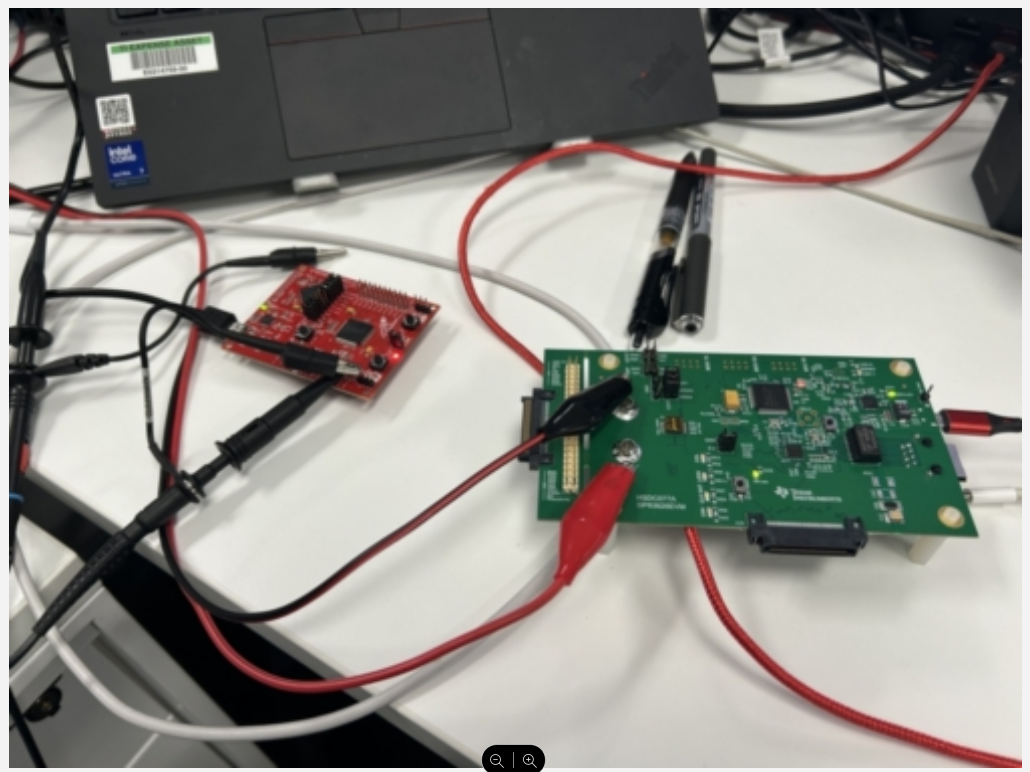
image.png


  • Is the version of USB-2-MDIO latest?

  • Hi Gary,

    Your USB2MDIO version is correct. Have you followed the USB2MDIO user's guide when making the setup?

    It sounds like you've successfully flashed the MSP430 and are trying to read a register without connecting the MSP430 board to the PHY EVM. This will not work, as the MDC and MDIO lines need to be connected to the PHY MDC/MDIO pins before powering on the MSP430. The correct jumper config is shown in the user's guide:

    The correct procedure is to connect the MDC/MDIO lines, then power up the PHY EVM, then power on the MSP430. After doing so, the COM port should show up as 'USB serial device'. 

    One further consideration: the DP83826AEVM already has an on-board MSP430, accessible via the USB micro-b connector on the PHY EVM. If you want to use an external MSP430, you may need to remove R109 and R110 to avoid bus contention from two MSP430s accessing the same bus:

    Best,

    Shane

  • Hi Shane,

    Thanks for your reply.

    There are three situations now.

    1. Use DP83826EVM and just connect it with computer by micro usb and don't use DC source to power it, which means MSP430 is powered but PHY is not. Result 1 is that address 0000 and 0001's value is 0000.

    2. Use DP83826EVM and just connect it with computer by micro usb and use 5V DC source to power it, which means MSP430 and PHY both are powered. Result 2 is that address 0001's value is 7849, which is same as datasheet default value.

    3. Use MSP430F5529 demo board, updated firmware(successful), read no matter address 0000 or 0001, all the feedback are “device not connected”. Computer has indicated relevant COM. In my opinion, MSP430F5528(work for USB to Serial port) is ok but MSP430F5529 (Serial port to MDC/MDIO) is not ok. Do you have some method to check MSP430F5529's status?

  • Hi Shane,

    I have successfully read the register through MSP430F5529EVM + DP83826EVM