This thread has been locked.

If you have a related question, please click the "Ask a related question" button in the top right corner. The newly created question will be automatically linked to this question.

TUSB2036 Over current

Other Parts Discussed in Thread: TUSB2036

Hi all,

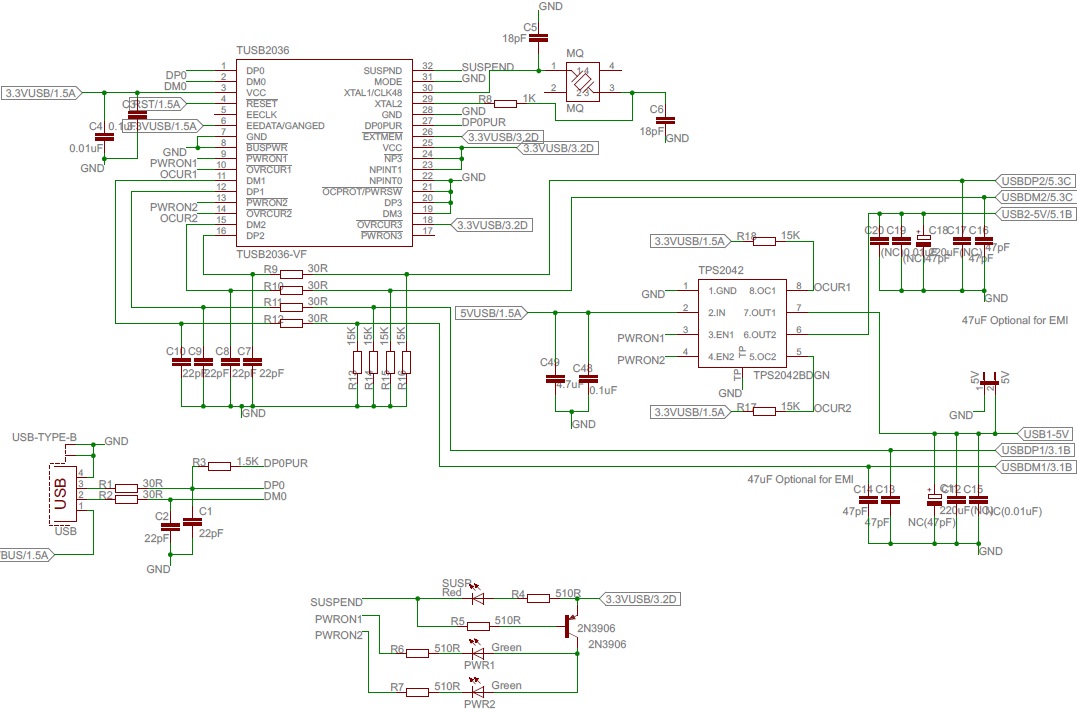
After connecting the TUSB2036 Hub with two devices attached I have that windows message "Power surge on hub port. A USB device has exceeded the power limits of its hub port." I have followed the schematics presented in the application note "sllr047"

According to the errata note http://www.ti.com/lit/er/sllz053/sllz053.pdf there is an issue with this device when trying to detect USB high speed devices, assuming them as a lower speed devices, causing this error.

My question is, does anyone has an idea know how to fix this problem, without adding more IC's or changing the one I am using?

The schematic that I am using is attached to this post.

Best Regards,
Tiago Gomes

  • Hello Tiago,

    There is probably a real over-current event, you are configuring the hub as bus-powered, so you can only connect "low-current" downstream devices if they are bus-powered.

    If you configure the hub as self-power and use an external supply the problem should go, also, if the downstream device is self-power or low-current device, the problem should also go away.

    Regards.

  • Hi Elias,

    Thanks for you fast reply.

    I don't think that I have a real over-current event because I am using "low-current" downstream devices. I have a CC2511F32 connected to the downstream port 1 and a FTDI232RL chip connected to the other one. Because these devices are "low-current" and the USB port has enough current to power these devices it might be other problem, like the one as it says in the errata note. Dont you think so?

    Best Regards,

    Tiago Gomes

  • I have answered from my collegue's computer, Filipe Salgado.

    Best Regards,

    Tiago Gomes

  • Hello,

    The errata is for a "false speed detection", the "...Power surge..." message is due to an over-current condition.

    Check that the /OVRCUR# terminals are high.

    Regards.

  • Hi again,


    I may have found the issue. On the "Generic USB Hub Properties" under the Windows "Device Manager", it says that I only have 100mA per port. Now I have attached the SmartRF05 Evaluation Board to one port and a USB Serial Converter to the other one.

    So, if I am right if the SmartRF05EB says that it requires 500mA, and because the Hub says that can only supply 100mA per port, the Power Surge Error occurs.

    Because the Hub is in "Bus Powered Mode", that 100mA per port from the Hub it's under the USB specification, right?
    So I must change it to "Self Powered Mode"? If so, I may still use the USB 5V 500mA supply for powering the Hub, even if he "thinks" that he is self powered? Is it possible this trick to fool the Hub?

    Regards,

    Tiago Gomes

  • Hello,

    Problem solved. I have changed the operation mode of the Hub to Self-powered mode, in spite of the power source used is still from the USB. This fools the Hub, making him think that is connected to an external power source and leads to the negotiation, with the PC, the required 500mA per port.

    Regards,

    Tiago Gomes