This thread has been locked.

If you have a related question, please click the "Ask a related question" button in the top right corner. The newly created question will be automatically linked to this question.

Driver for TUSB4310

Other Parts Discussed in Thread: TUSB3410, MSP430F169

Hello ....
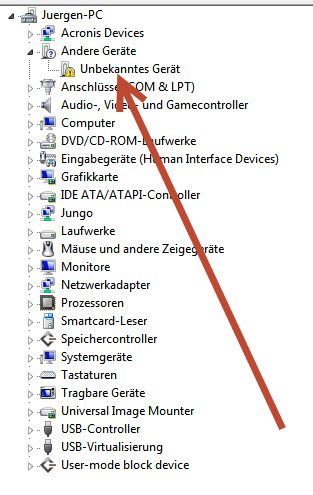
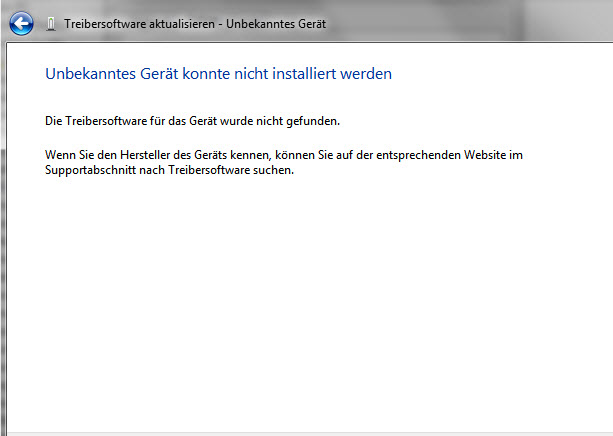
I search a Driver for the USB-Controller TUSB4310. If I connect the Device first time to my PC a Message appears no Driver were found.
If I search for a Driver at Ti.Com I can't find anyone Driver. Please help me to find the correct driver for the TUSB4310 Device. My PC system is windows 7 32Bit
friendly Juergen

  • Hello,

    I guess you meant to say TUSB3410, the driver is on www.ti.com at the "software" tab.

    Regards

    http://www.ti.com/product/TUSB3410/toolssoftware

  • Hello Elias,

    sorry, in my first post, I mean TUSB3410

    thank you very much for your answer. I have found the Driver and I have installed the Software. But I have a further problem. If I connect the TUSB3410 via USB at my PC a Message appears,

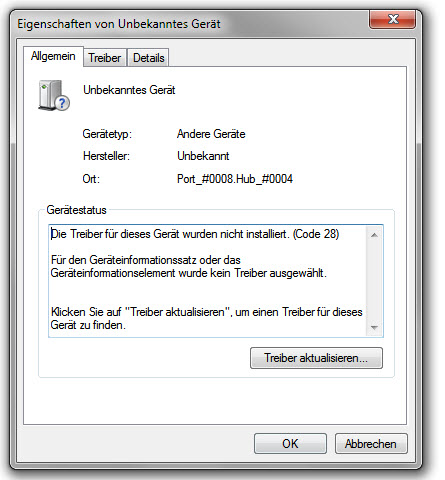
    The drivers for this device are not installed. (Code 28)

    For the device information set or the device information element no driver is selected.

    If I install the Driver at an other PC, I can connect the TUSB3410 without problems.

    Is there a collision with an other Device?

    How can I solve the collision?

    Regards Jürgen

  • Hello,

    the .exe you downloaded from ti.com is just a wrapper, then you have to run the driver installer, did you do that?

    Regards.

  • Hello Elias,

    yes I have unpacked the driver and started the install utiltiy.

    At my PC I have also installed a MSP-FET430UIF with a TUSB3410.

    It may be that there are problems with it?

    Regards Jürgen

  • Hello Jurgen, 

    If the MSP-FET430UIF with a TUSB3410 installs their own driver and separately you install the driver that you get from TI.com it can cause some conflicts since you are installing two drivers for the same device, I recommend you to remove any driver previously installed if you want to use the USBUART single driver.

    Regards,

    Roberto

  • Hello Roberto,

    thank you very much for your answer. How can I install two devices TUSB3410 at my PC?

    Regards Jürgen

  • Hello Jurgen, 

    If you are using the VCP driver that TI provide you for both devices, there should not be problem, the driver should be able to enumerate both of them when you connect the device devices to the system.


    I mean just, install the driver an connect the TUSB3410 devices.


    Regards,

    Roberto.

  • Hello Roberto,

    I have found many descriptions and reports for an VCP driver at ti.com. Which description or report is the best for me to solve my problem?

    Regards

    Jürgen

  • Hello Jurgen

    Please try using the following driver http://www.ti.com/lit/zip/sllc428  

    Regards,

    Roberto.

  • Hello Roberto,

    thank you very much for your answer and your and your patience with me.

    I have this driver already installed and with this driver I get the problem.

    is there any other way to bring the second TUSB3410 running?

    The second USB have no EEPROM, only a MSP430F169 is connected to the TUSB3410.

    Regards

    Jürgen

  • Hello Jurge, 

    Could you please send me what are you getting on your Device manager? As well the hardware info of the device that is not working (VID/PID, etc)? 

    If you only connects the device that is not working in a different system?  The driver install correctly? 

    This behavior is only present on your system or you can reproduce It in a different system? 

    Regards,

    Roberto.

  • Dear Roberto,

    I have a problem with the TUSB3410 too, but different. The funny part is that I had a problem on my former system (XP 32-Bit) too, but somehow I solved it with the help of Dr. Google - around 3 years ago. This time I can't find any solution. My system is Win 7 x64 Ultimate SP1 (all Updates as by today).

    I am using an USB-2-Serial cable (came with a Huawei Terminal Adapter for CDMA) which gets identified as TUSB3410 Device (COM7). The driver is 6.7.2.0  from 03/20/2013...no problems during installing...

    Now I want to use the cable (as I did before on XP as well) as a bridge between a MCU Device I build and Putty...

    If I hook the MCU direct to the build in RS232-Port (COM1) on my PC - it works...if I use the TUSB3410 cable with the same setting (COM7) no data gets transmitted. I even tried all different setting (XON/XOFF etc. FIFO ON/OFF, Change of COM-Port to COM2...etc,etc,etc...) There is no data transfer...even I used another similar cable (I have around 40 of them here) - no transfer....

    Unfortunately I sampled some of the TUSB3410 Chips last month and was about to integrate them in my MCU application...but if the customers later will face this kind of problems to connect/access - I have to reconsider....

    I hope you can help me to find a solution, coz I don't want to mix within my MCU App...almost all components are TI...

    Thx...

    Dr. Klaus Helmgens  

  • Request duplicated at thread

    http://e2e.ti.com/support/interface/digital_interface/f/130/p/383329/1351493.aspx#1351493

    Regards,

    Roberto.

  • Hello Klaus,

    I have also received your message.

    I think your problem is not your cable. I have also many problems with the USB-Interface TUSB3410. I think you have a driver problem. I have had problems with the installation of the driver. The first installation of the driver did not work. I then looked everywhere for the cause why the USB port is not working. After a long time I have uninstalled the driver again and removed all entries in the registry. Then I reinstalled the driver. The interface is then working properly.

    regards Jürgen

  • Dear Roberto,

    sorry for the double post, coz the first was in the wrong place....

    -

    Dear Juergen,

    thanks for your information. I also doubt that the cable is the issue, coz it worked before.

    I remember that I had to do this Reg.-Cleaning at XP x86 as well and finally it worked with the Belkin driver.

    But this time it wont work, even I tried to reinstall after Reg-cleaning and even with Driver Signature Enforcement disabled...all is not working under Win7 x64. Unfortunately I need 64 Bit, coz for some simulation programs I need my 64GB RAM.

    And before I go with this Chip for my Monitoring-Device I have to be sure that the customers don't face any problems - no matter what OS they run...

    This problem with the TUSB3410 is already old and many people are facing it - why TI is not able to find a proper solution.... 

    With the chips from Silicon Labs (like the CP210x-Series) I never have any problems - almost Plug&Play....but with the TI it's Plug&Pray...

    I am looking right now thru the net if I find some manufacturers which are using this Chip and offer Software with a modified driver explicit for Win7 x64.

    Maybe someone have an idea?!

    Best regards

    Dr. Klaus Helmgens

  • Hello Klaus.

    That is strange, our driver works fine at our end. Can you send us the driver package that you are using, we would like to reproduce the problem using our EVM. One more question, why are you using “Driver Signature Enforcement “ the driver that you are using has been modified and don’t have MSFT signature? I just want to be sure that we are trying the same environment. 

    Can you try in a clean system with a fresh windows installed? I would like to verify that this problem is not caused by any other cause that the driver itself.


    Regards,

    Roberto.

  • Hello Roberto,

    the driver is from the TI website (TI_WDF_USBUART_SINGLE_DRIVER_V6.7.2.0_WHQL.exe) downloaded before 3 days...

    The Driver Enforcement.... I only tired if it will make some different, coz I had some problems with the driver from Atmel Studio before - even it didn't show any conflict - the Jungo driver doesn't work without this...

    A clean system is a problem right now, coz this means I have to reinstall all my apps....I am living in Ethiopia...it is almost impossible to go just to the next shop an buy another hardware like this to setup a second system...which I really want to have...but not available...I had to import this - the customs clearing needed 4 month...

    My Desktop (almost Server Hardware) is a Super Micro with 4x Xeon Quad Core @ 2.6GHz and 64 GB RAM and 7x 1TB SAS HDD in Raid 50..... The server downstairs is a cluster with 64 nodes...but this doesn't matter for this driver problem...

  • Hello Klaus,

    As this behavior can’t be reproduced using our EVM and your testing environment are limited. I want to send you a debug driver in order to obtain more information about it, please send us a e-mail where I can send you the debug driver.


    Regards,

    Roberto