This thread has been locked.

If you have a related question, please click the "Ask a related question" button in the top right corner. The newly created question will be automatically linked to this question.

TUSB2036 Device Not Recognized

Other Parts Discussed in Thread: TUSB2036, TUSB3410, TPS2044

Hello all,


I am having problems with the TUSB2036 HUB device and I was hoping someone here could help me out.  My design followed the reference designs where possible and is highlighted below: 


  • TUSB2036 configured as a two port hub (NP3 pin HIGH).
  • Self-powered hub (BUSPWR pin HIGH)
  • Each port has a TUSB3410 permanently attached device (Header file in external I2C EEPROM, Binary firmware on PC, Serialized)
  • 48 MHz oscillator (MODE pin HIGH)
  • No EEPROM to force default VID/PID (EXTMEM pin HIGH) to rely upon the default VID/PID settings for the OS (WinXP, SP3) to recognize a General Purpose USB Hub (as per datasheet).  
  • No over current detection circuity (OVRCUR1, OVRCUR2, OVRCUR3 pins HIGH though 10K pull-up)
  • No Power-On/Off control (PWRON1, PWRON2, PWRON3 pins N/C)
  • Permanatly attached 2 device (NPINT1, NPINT 0 pins HIGH)


I cannot get my OS (WinXP, SP3) to recognize the device as a General Purpose USB Hub.  When I attach the device windows prompts with a bubble saying that “USB Device Not recognized”.  Under the Device Manager / Universal Serial Bus controllers I see an “Unknown Device” pop up.  When checking the properties / details of this device I read that it has a VID_0000&PID_0000.  The full device instance id is listed below:


USB\VID_0000&PID_0000\5&132757A4&0&2


Is there a specific driver I must load to communicate with the TUSB2036?  What should the default VID/PID combination be for the TUSB2036?  Is it necessary to remove downstream USB devices (i.e. the TUSB3410) to allow the OS to install the proper drivers for the TUSB2036, then power down and install these downstream ports?  Any ideas on where to troubleshoot the design?  Again, a sample schematic is available.


Thanks in advance for your support


BMurphy

  • Hi,


    Please send me a copy of the schematic for review at nirchi@ti.com


    Regards,

    Julie Nirchi

  • BMurphy,

    The TUSb2036 does not require any specific drver and should work with the standard hub driver provided by the operating system.

    The first thing we need to do is review your schematic.  If you do not want to post it on the forum, please sned it via e-mail to usb@ti.com.

  • Hello all,

    Through the advice given here I have discovered the problem to my design.  Since the TUSB2036 was not sending back correct VID/PID settings to the OS it was suggested to check the clock and power-on reset pulse.  The clock was clean but the problem was with the power-on reset pulse.  Initial debug only checked the pull-up nature of this pin, not the power-up pulse.  Investigation lead to a hardware issue where the reset line was not connected to the processor supervisory circuit (power-on reset generator).  Once fixed, the OS immediately recognized the Generic USB Hub device. 

    Thanks to Dan and Julie for helping me solve this problem.

    Brendan

  • Hello All

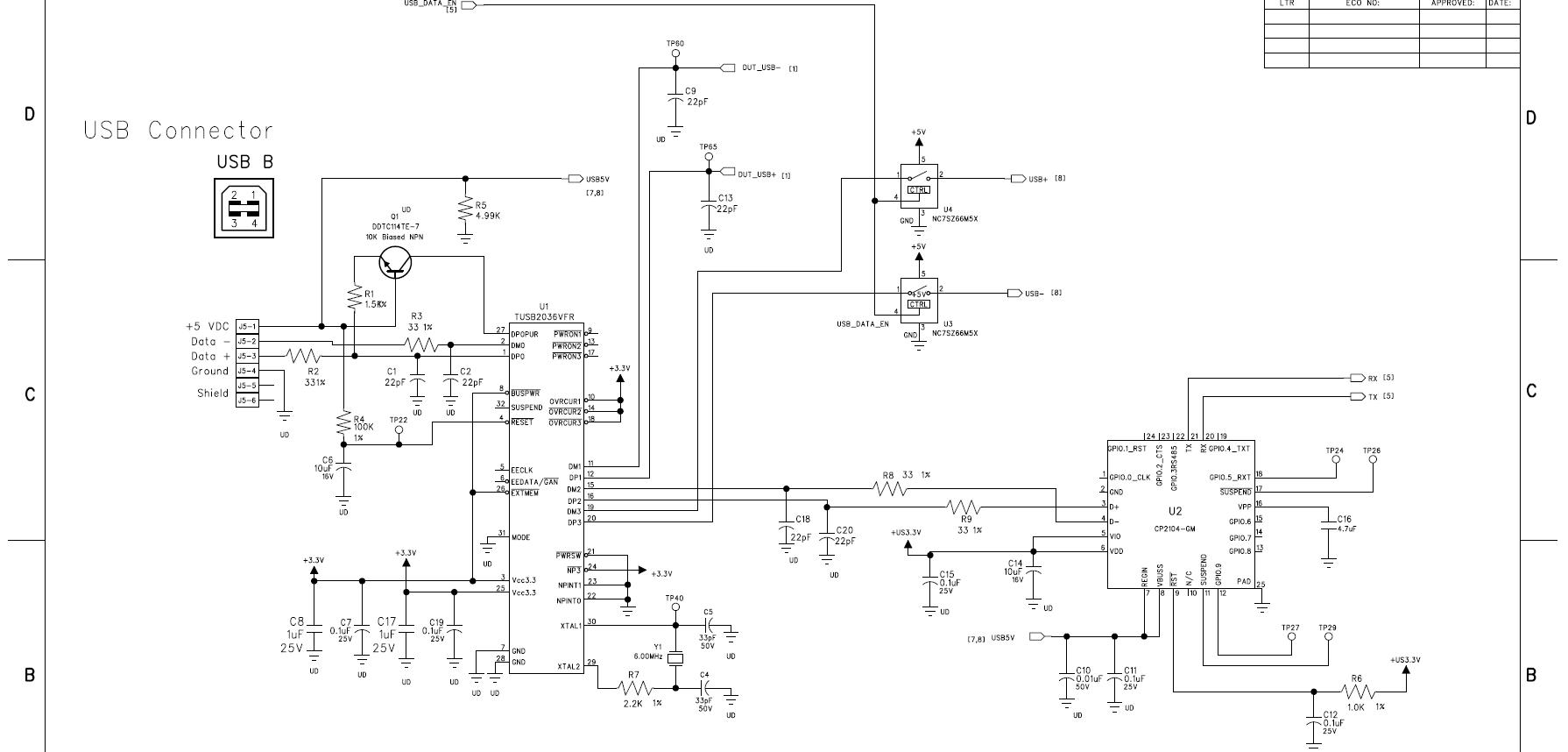
    I am having a similar problem with the TUSB2036 hub IC as well.  This is an in circuit design.  I get the "USB Device not recognized" as well.  The Device manager sees the Generic USB Hub, but I also get another "Unknown device" under the Universal Serial Bus Controllers.  I am posting a schematic page of the design.  Looking for some help.  I need to use all 3 ports of teh hub.  There will be some devices that are there all the time, but others will be plugged in and out at times.  The CP2104 UART will be there all the time, the two other ports are connected to various device that need testing.  One is a Audio Codec, the other is another HUB.  Will this work?

    Thanks in advance

    Guy


  • Hello Guy,

    Please do the following:

    1) Change the value of R4 to 15K and the value of C6 to 0.1uF ; by specification a USB device must be able to respond to the host within 100ms after power up, your RC circuit gives a reset pulse of 1s long.

    2) Terminal EEDATA/GANGED# must be tied to 3.3V (according with you application's description)

    3) If you want to use the three ports, then NP3# must be tied to ground.

    4) If one port is going to have a permanently attached device, you have to set NPINT#[1:0]=01 and the permanently attached device must be on DP1/DM1.

    Recommendation: When the downstream devices are going to be actively attached/detached it is recommended to implement Power Switching Devices like the TPS2044.

    See attached schematic for reference.

    2086.6Mhz Bus-powered 3-port hub.pdf

    Regards.


  • Hello All

    Thank you for your posts.  I have found and fixed the problem.  I changed the connections as explained and also found that I had a D+ and D- swapped on the design.  Again, thank you for the help.

    Regards

    Guy

  • Hi Dan

    We are distributor of TI in Singapore.

    We have a customer trying to design in the TUSB2036.  So far we have sent to him the datasheet, Errata, Reference design schematic and a application report found in ESP.  Bu the engineer still find the information too little and asking for more detail on the software programming side for the TUSB2036. 

    May I know do you have any?

    My email is mark.t@teldevice.co.jp

    Thank you

    Mark

  • Hello,

    there is no "software side" for the TUSB2036, it is made of state machines and does not require any firmware. Any operating system with USB stack support will support this device.

    Regards

  • Hi Elias

    Thank you very much for your reply.

    What the customer is checking is for the EEDATA and EECLK (Pin 5 and 6), how to control the TUSB2036?  How is the command to control the TUSB2036?  Are there any spec on this?

    Thank you

    Mark
    mark.t@teldevice.co.jp

  • Hello,

    The TUSB2036 cannot be controlled by an i2c master.

    The i2c interface on the TUSB2036 is only designed to read and attached EEPROM for customizing the VID/PID.

    Regards.