This thread has been locked.

If you have a related question, please click the "Ask a related question" button in the top right corner. The newly created question will be automatically linked to this question.

TUSBWINVCP does not find TUSB3410 via USB..

Other Parts Discussed in Thread: TUSB3410

Hi All,

I am trying to connect TUSBWINVCP and TUSB3410 with 2K EEPROM is burned original VID/PID.
There is not firmware in EEPROM.
I used TI USB EEPROM Burner Utility to burn VID/PID, and this utility displayed "EEPROM Programmed Successfully!".
Of course I compiled VID/PID of INF file for driver. 
But TUSBWINVCP does not find TUSB3410 via USB...
Please advise how I can solve this problem.
And I would like to know which operation does TUSB3410 use "Random-Read", "Current-Address Read" or "Sequential-Read", when TUSB3410 reads VID/PID from EEPROM, ?

Regards,

KAZU


  • Hello,

    If you are using your own VID/PID burned in the EEPROM, then you must change that info in the driver's INF. There's no need to compile the driver source code.

    Once you have modified the INF, connect your 3410 device (with EEPROM containing your descriptors info) and install the driver. Driver installation is not automatic for other VID/PID if you are using our default VCP driver installer. You may need to perform a manual installation (going to 'Device Manager' and then updating the driver for the 3410 device instance).

    Also, please make sure that the VCP driver is going to be installed in a different system other than the one where the EEPROM burner app is installed. This app uses a different driver for the 3410 device that can't coexist with the VCP driver.

    About the communication between 3410 and EEPROM, it's done via I2C doing a sequential read.

    Let us know if this helped you in something.

  • Hi Ismael-san,

    Thank you very much for your useful advice.

    I have checked a different system which is installed in PC, and found EEPROM burner. I uninstalled it.

    I changed VID/PID in driver's INF.

    When TUSB3410 is started, PC has find a new USB device.

    I tried to do manual installation of driver and indicated the folder where is driver's INF, but I can not find driver.

    Do I need any files in the folder where is driver's INF?

    TI recommends microchip 24LC02B for 2K EEPROM.

    I use ROHM BR24A02-WM. This vevice is 2Kbit I2C EEPROM.

    Are there any problem about this device selection?

    Would you advise to my questions?

    Regards,

    KAZU


  • Hello KAZU,

    In order to perform a manual installation of our VCP driver, you need to put together (in a separate folder) the following files:


    Driver --> umpusbvista.sys

    INF --> usbuart3410.inf

    Catalog File --> ump3410.cat

    FW --> umpf3410.i51

    Co-Installer --> WdfCoInstaller01009.dll


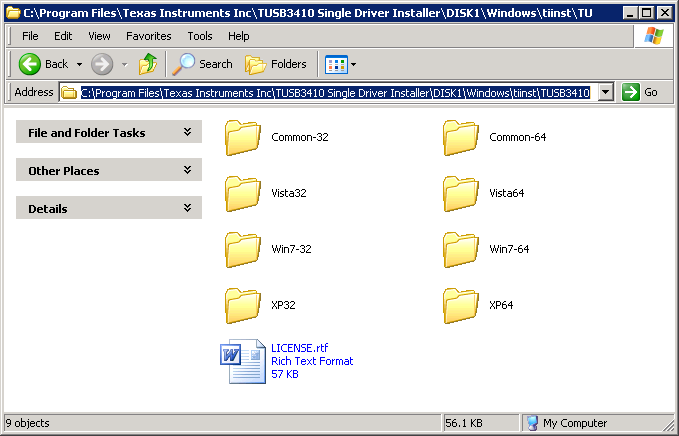
    These files can be found by default in 'C:\Program Files\Texas Instruments Inc\TUSB3410 Single Driver Installer\DISK1\Windows\tiinst\TUSB3410' (see screenshot 'VCP-Driver-Locations.png'). For example, if you are trying to do a manual installation of our VCP on XP 32-bit OS, then go to "Common-32" and copy the INF, FW and Co-installer files on a new folder. Then go to folder named "XP32" and copy Driver and its Catalog File.

    Once you have all these files together in another folder, it's quite easy to perform a "Driver Update" at Device Manager this by right-clicking on the new "USB device" detected in your system. Select the folder you created which contains all the necessary files I mentioned above.


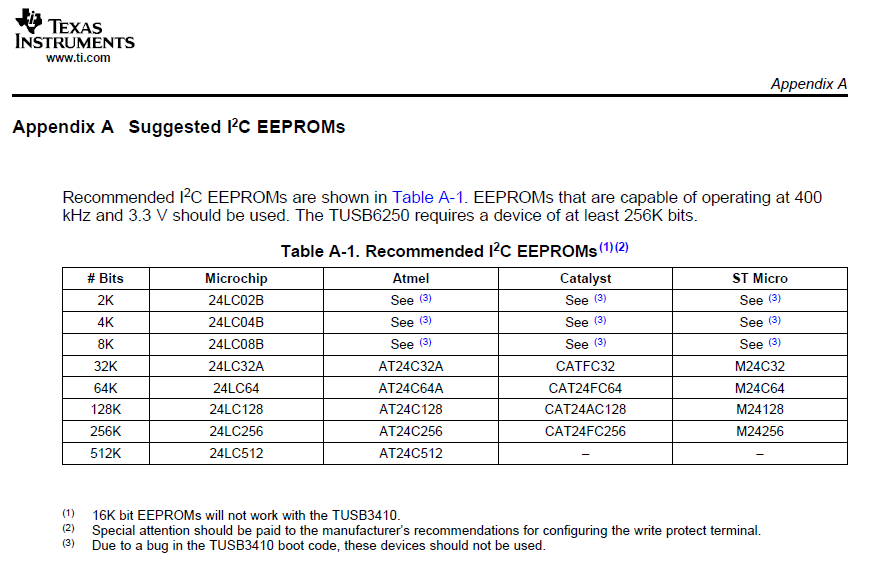
    About the EEPROM you are using, it's not recommended. Please see Apendix A of this document: http://focus.ti.com/lit/an/slla179a/slla179a.pdf

    I hope this helps! 

  • Hello Ismael-san,

    I saved five files which ware necessary for installation driver, and tried to connect TUSB3410.
    PC found a new USB device, then I indicated the folder within these files.
    But PC without burner utility could not find the driver..
    I burned VID/PID completely in EEPROM by burner utility, and I confirmed the correct data in EEPROM.
    Of course I changed INF file and saved appropriate folder.

    I doubt whether TUSB3410 reads VID/PID data from EEPROM completely.

    I checked a waveform of I2C between TUSB3410 and EEPROM.
    It seems that TUSB3410 used like current address read operation, NOT sequential read operation.
    Is this correct?
    The previous advice said "TUSB3410 uses sequential read".
    I guess this misread is the cause which TUSB3410 can not find driver on PC.

    Would you advise me to improve this problem, please.

    Regards,

    KAZU


  • Hi Kazu,

    Please attach screenshots of the issue you are seeing at your end. I'll see if I can come up with a solution...

    Did you take care of the valid EEPROM types shown on Apendix A? Which EEPROM are you using? 24LC02 still? 

    About the read operation, yes you are correct.


  • Hi Ismael-san,

    Thank you for your prompt reply.
    I have read Appendix a surely, but EEPROM remains BR24A02-WM Rohm.
    Because I can not change hardware at once...

    My guess regarding the cause are following.

    1. Problem of communication between TUSB3410 and EEPROM via I2C, including problem of EEPROM Prat#.
    2. VID/PID data is invalid in EEPROM.
       I can see "EEPROM programmed successfully" when I burned VID/PID.
       Is it possible are there invalid data in EEPROM??
    3. Problem of driver on PC.

    I have following plans to clarify these subjects.

    a. Change EEPROM from BR24A02 to 24LC02B.
    b. Check EEPROM data for VID/PID.
       I would like to get a raw sample data?
    c. Capture the communication log data on USB. Is this useful to reveal root cause?

    I will inform when I can get additional information.
    Thank you again for your advice.

    Regards,

    KAZU

  • Hi Kazu,

    It will be useful if you could share additional details like:

    - Schematic of this 3410 implementation.

    - CFG file used for generating the BIN file to be burned in the EEPROM.

    - Modified INF file that is being used to install our VCP driver.

    We will be able to provide more comments once we take a look to this information.

  • Hi Ismael-san,

    I have solved the problem in communication between TUSB3410 and EEPROM.
    There is a mistake of selection EEPROM type.
    2K bit EEPROM is Type2 EEPROM, but I set A2, A1 and A0 to 000b in my hardware.
    I have changed A2 from 0 to 1, so all operation become good.

    Thank you very much for your useful advice.

    Best Regards,

    KAZU