This thread has been locked.

If you have a related question, please click the "Ask a related question" button in the top right corner. The newly created question will be automatically linked to this question.

[TPS65982] TRM vs config tool v2.8

Other Parts Discussed in Thread: TPS65982

Hi,

Our customer would like to know following register information. Those are able to set on TPS6598x Application Customizer ver 2.8, but not described in technical reference manual.

1. System configuration register (0x28h), Internal 5 Volt Power Path Over-current Timeout

  -  Need functional description, bit location and range of value.

  -  On application customizer tool, it is fixed as 640us. Is it possible to change this timeout value from EC?


2. Internal 5V Power Path Over-Current Timeout Enable

  - Need functional description, bit location and range of value.

  - On application customizer tool, it is fixed as “Enabled”. Is it possible to change to “Disabled” from EC?

Since customer is going to fix their firmware, could you provide it soon?

Regards,

Fukui

  • Fukui-san,

    These bit fields were recently added to the FW and the Config Tool for Display-only.

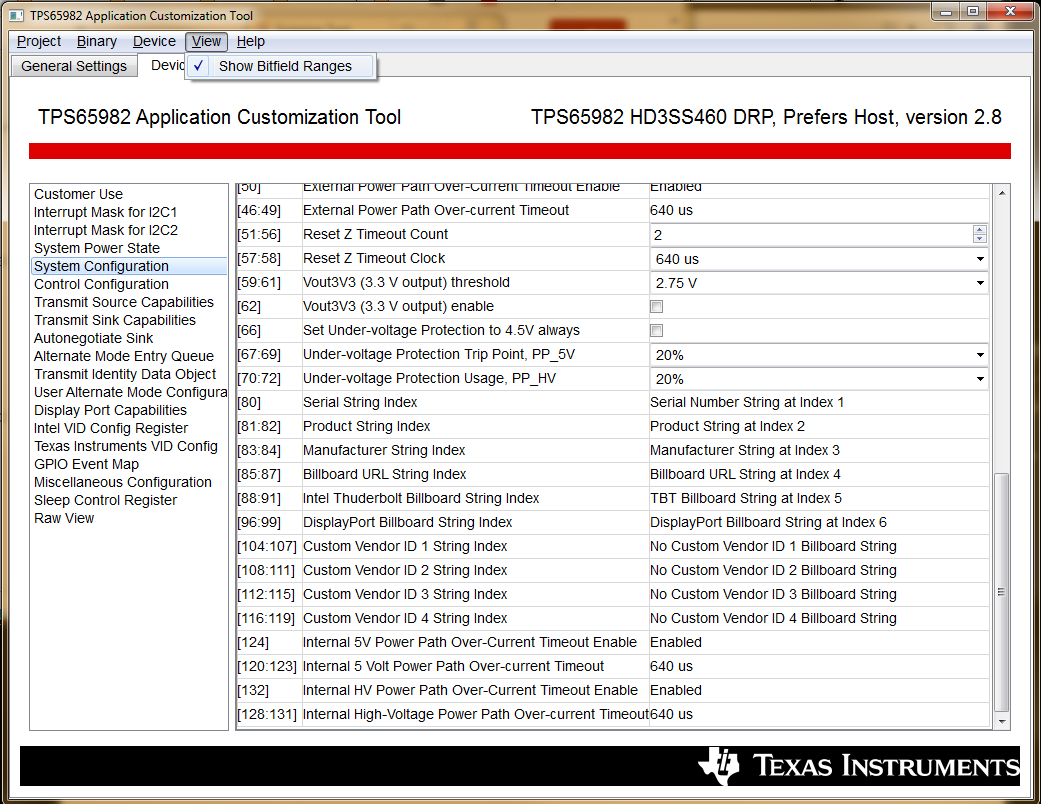
    You can always see the exact bit field length and offset by clicking "View - Show Bitfiled Ranges":

    Each Enable field is 1 bit and each of the timers is 4 bits long, the same length as the PP_EXT Over-current Timeout Length:

    Although you cannot confirm from the TRM, these fields use the same definition as the PP_EXT Enable and Timeout length.

    Changing the value of these registers is not advised, since the FETs are internal and controlled by the TPS65982 FW and analog protection circuitry.

    Disabling or extending the length of these timers could cause an increase in temperature due to the I*R loss of the FETs.

    The 640us timer was selected because it has been tested with many real system loads and it prevents OCP tripping during in-rush (surge) currents when a battery (laptop charging) or motor-driver load (hard drive) is applied instantaneously.

  • Brian-san,

    Thanks.
    I am glad to know show-bit field options. Without this bit-field information, customer could not write their EC firmware. Our customer is requesting all register information into TRM in the future, since it is official document, and I hope it will updated soon.

    Thanks,
    Fukui
  • Fukui-san,

    The FW Update has been documented in our internal tracking system, and the Tool was updated to test the display of this information.

    The TRM documentation will be updated to reflect these changes. Thank you for noticing the discrepancy and understanding that FW/SW can move faster than documents sometimes.