


Other Parts Discussed in Thread: TPS65982
We just acquired the TUSB1046 USB Type-C Enabler EVM board, and are having difficulties getting a valid DP signal. Our use case scenario is the one explained on page 2 of the EVM users guide, except our USB dongle is a DisplayPort only dongle:
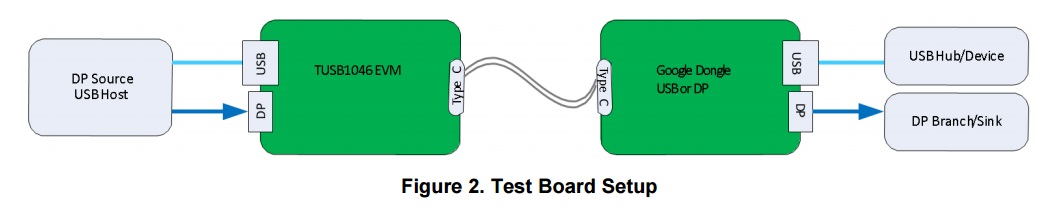
The ideal setting would be 2 DP lanes and USB3.1 lanes.
A bit more about our setup:
- For the DP source we have tried a standard DELL desktop PC and an Intel NUC.
- For power supply we've tried USB powered or with power supply.
- For DP sink we have a monitor connected to the USB Type-C dongle. We're using a monitor with a standard DP input.
My best guess would be to ensure JMP7 is set to pull down to enable GPIO Mode. The SW1 would be set to 0111 to enable 2-lane DP mode with flip enabled. SW2 is set to all 0? However this doesn't result in a valid signal to the DP monitor.
We have now tried several other permutations of setting switches and jumpers, but have been unable to get a valid DP signal out. Could someone inform me, what the correct switch and jumper settings should be to accomplish this scenario? Or am I missing something basic?
Any help would be greatly appreciated.
