This thread has been locked.

If you have a related question, please click the "Ask a related question" button in the top right corner. The newly created question will be automatically linked to this question.

TPS65982-EVM: Trouble programming the TPS65982 EVM

Part Number: TPS65982-EVM
Other Parts Discussed in Thread: TPS65982, HD3SS460

Hello TI,

I am currently using the TPS65982 EVM with the aardvard I2C/SPI programmer.

For software I am using your TPS65982 application tool to generate .pjt and .bin files

To program the evm I am using the Host interface utility tool

I am able to see the EVM over the SPI and I can read registers in the TPS, so I believe the interface is working.

To generate images I am doing the following

  1. Using the application customization tool generate a new project file. I use the TPS65982_HD3SS460_DFP_FULL_2_10.tpl as my starting project.

  2. I generate both a flash image binary and a low region image bin file.

  3. I then use the host interface tool to program the flash with the low image bin file

However I am unsuccessful in programming the associated flash on the evm and I am unsure of what I am doing incorrectly in my procedure.

Or is there something in my image that is not allowing me to program the SPI flash (indirectly through the I2C interface)

I have appended the .pjt and the .bin files. Is there any-way to get some phone support to possibly discuss this issue regarding programming the EVM for a few minutes...this is becoming a critical show stopper for us….

Regards,

Guy

TPS65982_lrb.zip

  • Hi Guy,

    to program the TPS65982 board with an aardvark programmer, you must use the totalphase flash-center software. Installation and user instructions are included in the TPS65982EVM user guide starting on page 38. 

    I hope this helps.

    Thank you,

    Eric

  • Hi Eric,
    thank you for the response. I mentioned SPI in my post, but I am using the I2C interface on the TPS EVM not the SPI directly.

    Regards,
    Guy
  • Hi Guy,

    Using I2C to program will not directly allow you to program the flash. Instead, it will program the flash through the devices firmware. Using SPI is a much faster method of programming the TPS65982. I was able to load the flash file that you attached in your original message (TPS65982_flash_lrb.bin) to a TPS65982EVM using the totalphase Flash Center software and an Aardvark using SPI communication.

    Thank you,
    Eric
  • Hi Eric,
    I envision my design using only the I2C interface to indirectly access the flash. I am not worried about speed just ease of use.

    So I cannot program the flash indirectly through the I2C interface?

    You mentioned programming the flash through the devices firmware...this is the architecture I envison. can you clarify what steps are needed to do this...

    Regards,
    Guy
  • Hi Guy,

    Did you follow all of the steps in section 3 of the TPS6598x Application-Customization Tool User Guide? (Pg. 15)

    This explains all of the drivers needed and proper connection between the Aardvark and TPS65982EVM board for I2C.

    Thank you,

    Eric

  • hello Eric,
    yes I have followed the user guide and I have loaded all of the appropriate drives for the aardvark, I have connected the aardvark to the evm as indicated for the i2c interface (sda,clk,gnd), but I am still not able to program the flash through the i2c interface. I can see the tps when I query the i2c, but I cannot program the flash.
    regards,
    Guy
  • Hi Guy,

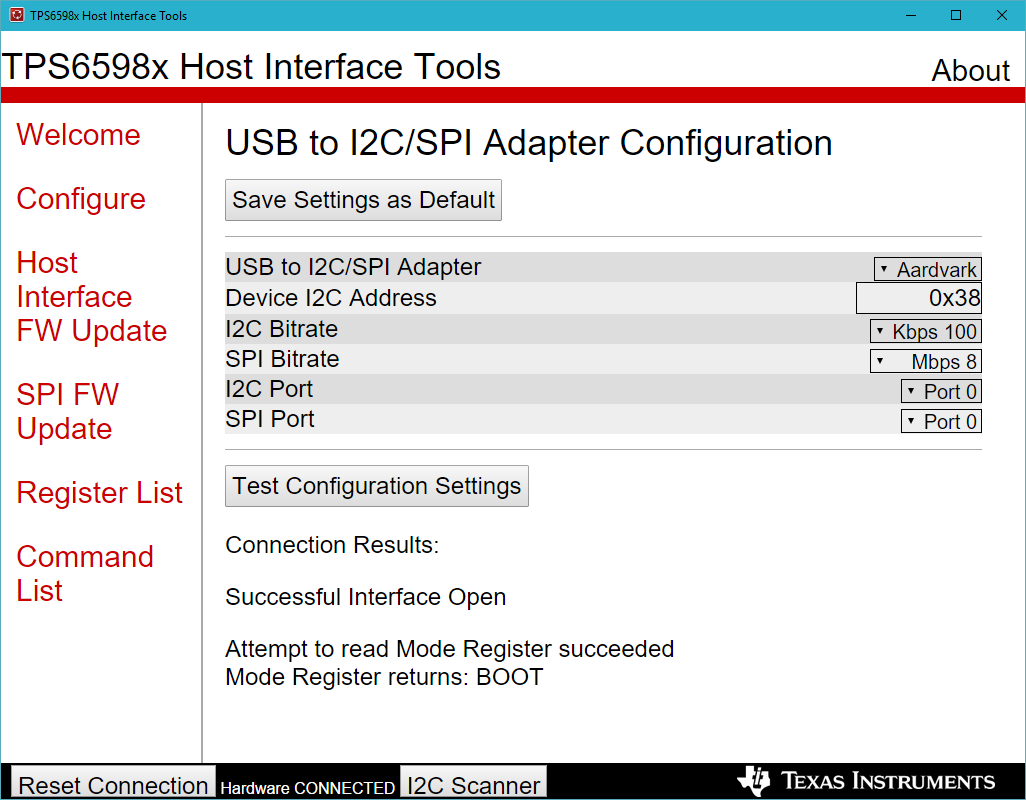
    On the Host Interface Tool software, under the configure tab, try to change the values of the I2C port and the SPI port: 

    Once these values are as shown in the image above, click on Test Configuration Settings and you should read: "Attempt to read Mode Register succeeded Mode Register returns: APP"

    after this, you should be able to program the flash through I2C by clicking on SPI FW Update, choosing your file, and the Program Flash Image. I was able to load your (TPS65982_flash_lrb) file onto a TPS65982 EVM through I2C with this configuration.

    I hope this resolves your issue.

    Thank you,

    Eric

  • Hi Eric,

    I tried this also, and no luck...I have attached a screen shot...I have attempted to program using both sp1 port1 and port 2. my I2C is connected to port 0 of the TPS.

    when I query the mode register it returns boot not app....is there a way to reconfigure the evm? perhaps something is corrupted???

    regards,

    Guy

  • Hi Guy,

    You can reconfigure the EVM through the Application Customization Tool. To do so, click on Device, Re-Flash EVM Firmware (Recovery).
    The Mode Register returns should read APP.

    Thank you,
    Eric
  • Hi Eric,

    I want to be clear...using the application customization tool I can flash the recovery file but I have to use the SPI interface? I cannot flash the recovery image over I2C?

    I tried to flash the image after hooking up the SPI interface to the EVM and I still do not see the mode register respond with APP.

    Can I flash the image over the SPI using only the application customization tool? or do I need additional firmware?

    Is there a way we could setup a webex or quick phone conference?

    Regards,
    Guy
  • Hi Guy,

    In the Host Interface Tools, can you click on "Boot Flags" under Register List? This will help debug why the device is stuck in Boot mode.

    You should be able to re-flash the image using either I2C or SPI.

    Thank you,
    Eric
  • Hello Eric,

    ok using the Host interface tool I attempted to program the flash...

    I see i2c activity from the aardvard at the headers but I do not see any activity on the SPI interface. so the i2c data is not being pushed to the SPI interface...

    here are the boot flags I read....

    I am confused..i am using your software and your evm and I cannot program the flash.....how can this be? what would stop this from occurring??? Is there something on the EVM hardware I need to confirm

    Regards,

    Guy

  • Hi Guy,

    The documentation is very misleading. If you read it carefully they subtly distinguish "programming" from "updating".
    If you search through old posts on this forum, you'll find that the '82 CAN NOT be "programmed" over I2C. It can only be "updated" over I2C. In practice, this means if the '82 is in "BOOT" mode, then it has not loaded any software from the flash and is only running with very limited factory programmed features. These features DO NOT include updating the flash. If the '82 can successfully read its program from the flash, the additional features will include updating the flash. This flash-updating can only be done after the program is loaded from the flash chip and this will be indicated by the "APP" mode.

    So the first time the flash is programmed, it must be direct over SPI. The '82's I2C interface will not help at all. Subsequent updating can done over I2C or SPI.
    Warnings about I2C updates: it takes a really long time. The first time I did it, I thought the GUI had frozen, so I rebooted it. Turns out it had been working and I had "bricked" the flash by interrupting the update process. Fortunately, I reprogrammed over SPI and everything still worked. So be careful about how you configure the I2C update. Don't do a full flash erase / re-write. This didn't seem to preserve the "2-image backup system".

    I have not used the aardvark yet. So far I've only tested the EVM with the built-in FTDI SPI/I2C comms.

    So in summary, your process sounds fine if this were actually a supported feature, but what you're doing is not supported by the '82 (or any TPS658x as far as I can tell).

    Good luck,
    Aaron
  • Hi Aaron,
    thank you for this information, this was not clear to me in the documentation or from TI support.
    When updating the flash, you mentioned don't do a full erase/rewrite. What do you believe is happening in this case? Are you worried that if you do an erase and then the re-write fails that you will brick the FLASH?

    Regards,
    Guy
  • I'm not sure. I think if you command an entire update of the flash (full binary image) it may do a full chip erase. It's probably safer to do it one section at a time. I'm not 100% sure either way. I haven't played with it very much since we got the SPI flash working. The I2C update also requires using a SPI flash that doesn't have the WP set by default and require clearing by software before starting a write. Our application requires a different flash chip (BTW, the recommended flash on the EVM and in the datasheet is currently EOL and not recommended for new designs by the manufacturer), but the interface for this different flash IC is just slightly different enough that I2C updates don't work. Reading the flash program works, but updating through the '82 over I2C does not. It's unfortunate, but we've got to provide the SPI lines off the board for programming now.
  • Hi Aaron,

    I am looking at having to program our flash via initially the SPI also. One question though, with both the TPS and your programming interface on the SPI lines, is there not contention between the TPS and the external master SPI you are using to program the FLASH? Do you need to set the TPS in a non-master SPI Mode or is there a way of disabling the TPS SPI interface while you are programming the flash.

    Regards,

    Guy

  • I don't recall where in the datasheet it's described, but I know there's a section which talks about sharing the external flash. The TPS only reads the flash during boot then puts its SPI I/O lines in high-z regardless of the reading results. I believe this is why there are pull-ups on these lines in the EVM schematic. I suppose if commanded, the TPS will drive the SPI I/O lines during a flash update.

    When using the FTDI chip that's part of the EVM, I didn't do anything special to initiate the SPI flash writing. I think the FTDI also leaves the lines high-Z until commanded to interact with the chip.

    At some point in the datasheet, it mentions that this pattern of only driving the SPI lines during boot is a feature which should allow an attached uC to also use the external flash as its own space after the TSP boot image.