This thread has been locked.

If you have a related question, please click the "Ask a related question" button in the top right corner. The newly created question will be automatically linked to this question.

SN65DSI86: DSI86 PANEL_VIDEOREGISTER_CALC

Part Number: SN65DSI86

Hello Sir,

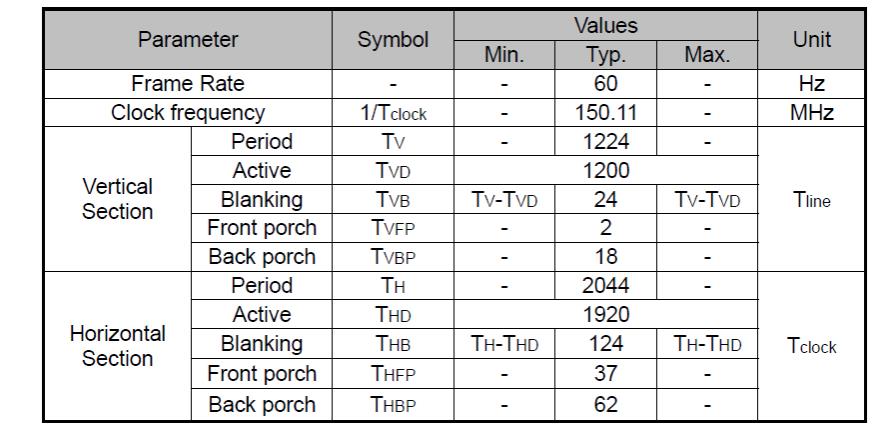
Due to we don't have panel EDID content .

May I know EDID is must for this PANEL_VIDEOREGISTER_Calculator ? 

When I select " No" for  EDID Input in Datasheet Table , I can't create script file .

Would you also help to check the attach setting correct or incorrect ? 

Single channel 4 lane DSI input from SoC , 2 lane DP output to panel

TKS !

<DSIInitSequence> 
23 0A 2 \n 
23 10 26 \n 
23 12 5A \n 
23 13 5A \n 
23 94 E0 \n 
23 0D 1 \n 
23 64 1 \n 
23 74 0 \n 
23 75 1 \n 
23 76 0A \n 
23 77 1 \n 
23 78 81 \n 
FF 0A \n 
23 5A 5 \n 
23 93 10 \n 
23 96 0A \n 
FF 14 \n 
23 20 80 \n 
23 21 07 \n 
23 22 0 \n 
23 23 0 \n 
23 24 B0 \n 
23 25 04 \n 
23 2C 19 \n 
23 2D 00 \n 
23 30 04 \n 
23 31 00 \n 
23 34 3E \n 
23 36 12 \n 
23 38 25 \n 
23 3A 02 \n 
23 5B 0 \n 
23 3C 07 \n 
23 5A 0D \n 
</DSIInitSequence> 


<aardvark> 
<configure i2c=1 spi=1 gpio=0 tpower=1 pullups=0/> 
<i2c_bitrate khz=100/> 

======REFCLK Frequency  ====== 
<i2c_write addr=0x2D count=1 radix=16> 0A 2 </i2c_write>/> 

======DSI Mode  ====== 
<i2c_write addr=0x2D count=1 radix=16> 10 26 </i2c_write>/> 

======DSIA Clock  ====== 
  • Terry

    If you don't have EDID content, please select 'yes' so the script will be generated based on the value input in the "datasheet EDID infomation".

    You can also use DSI86 to read the panel EDID content through direct or indirect method. This is covered in section 8.4.5.3. This is a good way to verify the AUX is working correctly.

    Thanks
    David
  • Hi David,

    Thanks your suggestion !

    - May I double confirm can DSI TUNER tool create correct setting to light panel without EDID ?

    - For pattern generator function, does it need REFCLK input from external CLK or DSI CLK input ? 

    TKS !

  • Terry

    1. The DSI Tuner tool generates the video timing and the configuration register values required based on inputs entered in the input fields provided in the tool. So the tuner functions the same as the spreadsheet.

    2. For Color Bar, you need REFCLK input.

    Thanks
    David