This thread has been locked.

If you have a related question, please click the "Ask a related question" button in the top right corner. The newly created question will be automatically linked to this question.

DS90UB954-Q1: How to enable Test pattern for CSI-2

Part Number: DS90UB954-Q1

Hi Team,

Please advise me on how to enable on-chip test pattern generator.

I set up on chip test pattern generate with the following script
and checked the CSI-2 output.
I sow SOT and Sync word, however, MIPI differential driver stayed same
State level as seen in attached screen shot.
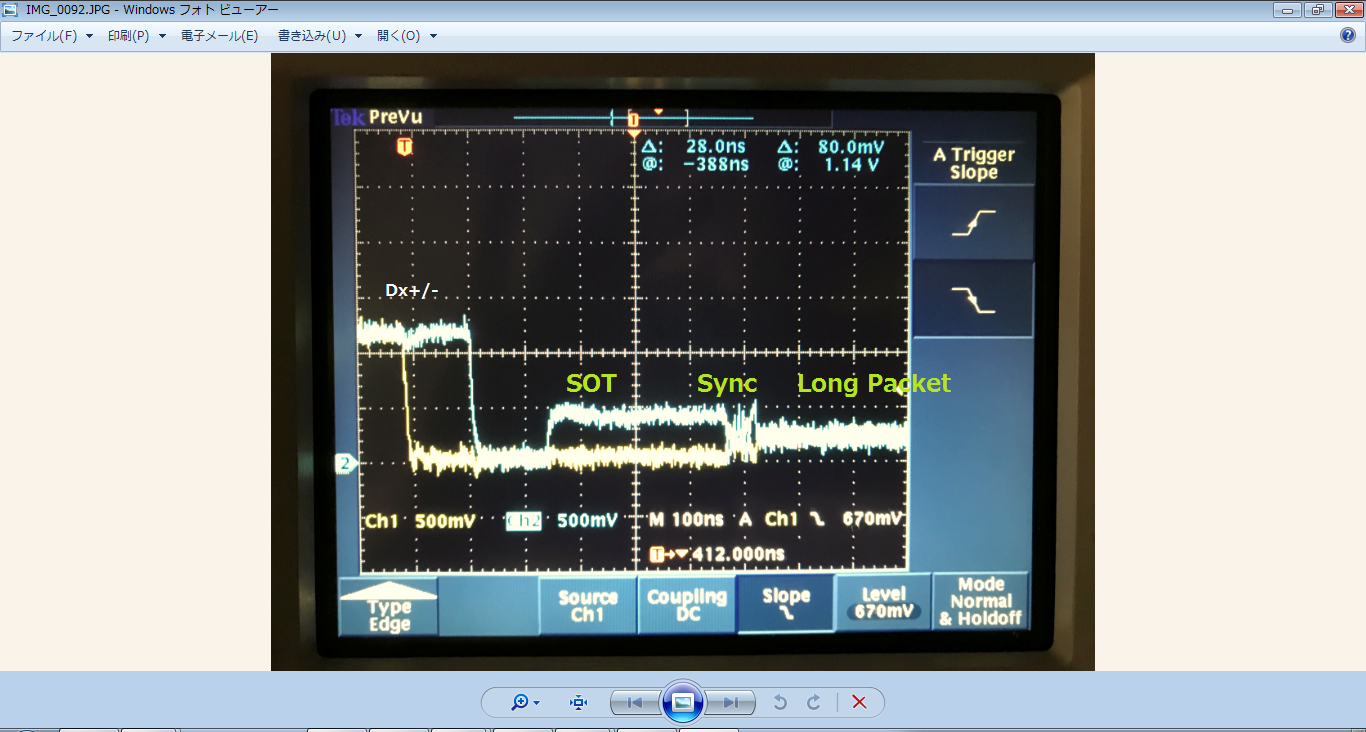
Please let me know why valid test data do not come out for the CSI-2 port.

The EVM in my hand is old and may EQ chip on it.

The marking is
PBU954Q
BIBLND
TI 73
CLGF G4

~~~~~~~~~~~~~~~~~~~~~~~~~~~~~~~~~~~~~~~~
######################
## P954_A0_RX0_CSI_Enable.py
######################

# Set VC-ID = RGB888 0x24 or TYV422 0x1E
board.WriteI2C(devAddr,0x70, 0x24)
board.WriteI2C(devAddr,0x71,0x24)

# Set CSI_EN and set to continuous clock mode 2Lane
print "CSI_EN with 2 lanes"
board.WriteI2C(devAddr,0x33,0x23)
time.sleep(0.1)

# Set forwarding of RX port 0 to CSI output
print "FWD_PORT0"
board.WriteI2C(devAddr,0x20,0x30)
time.sleep(0.1)

# CSI-2 rate = 400Mbps
board.WriteI2C(devAddr,0x1f,0x03)
time.sleep(0.1)

# Enable TPG
board.WriteI2C(devAddr,0xB0,0x00)
board.WriteI2C(devAddr,0xB1,0x01)
board.WriteI2C(devAddr,0xB2,0x01)
~~~~~~~~~~~~~~~~~~~~~~~~~~~~~~~~~~~~~~~~~~
Mita

  • Hello,

    please try the following:

    board.WriteReg(0x33, 0x03)               
    board.WriteReg(0xB0, 0x02)               
    board.WriteReg(0xB1, 0x01)               
                               
    board.WriteReg(0xB2, 0x01)              
    board.WriteReg(0xB2, 0x34)               
    board.WriteReg(0xB2, 0x2B)               
    board.WriteReg(0xB2, 0x06)              
    board.WriteReg(0xB2, 0x40)              
    board.WriteReg(0xB2, 0x00)               
    board.WriteReg(0xB2, 0xC8)               
    board.WriteReg(0xB2, 0x02)              
    board.WriteReg(0xB2, 0xD0)             
    board.WriteReg(0xB2, 0x03)              
    board.WriteReg(0xB2, 0x20)             
    board.WriteReg(0xB2, 0x10)              
    board.WriteReg(0xB2, 0x47)             
    board.WriteReg(0xB2, 0x0A)              
    board.WriteReg(0xB2, 0x0A)              
    board.WriteReg(0xB2, 0xAA)              
    board.WriteReg(0xB2, 0x33)              
    board.WriteReg(0xB2, 0xF0)             
    board.WriteReg(0xB2, 0x7F)             
    board.WriteReg(0xB2, 0x55)              
    board.WriteReg(0xB2, 0xCC)            
    board.WriteReg(0xB2, 0x0F)             
    board.WriteReg(0xB2, 0x80)             
    board.WriteReg(0xB2, 0x00)             
    board.WriteReg(0xB2, 0x00)             
    board.WriteReg(0xB2, 0x00)             
    board.WriteReg(0xB2, 0x00)              
    board.WriteReg(0xB2, 0x00)              
    board.WriteReg(0xB2, 0x00)             
    board.WriteReg(0xB2, 0x00)              
    board.WriteReg(0xB2, 0x00)    

  • Thank you for your advise.

    I tired the script you provided, however, the result was same as before.

    I wish further your advise.

    Mita

  • Hello,

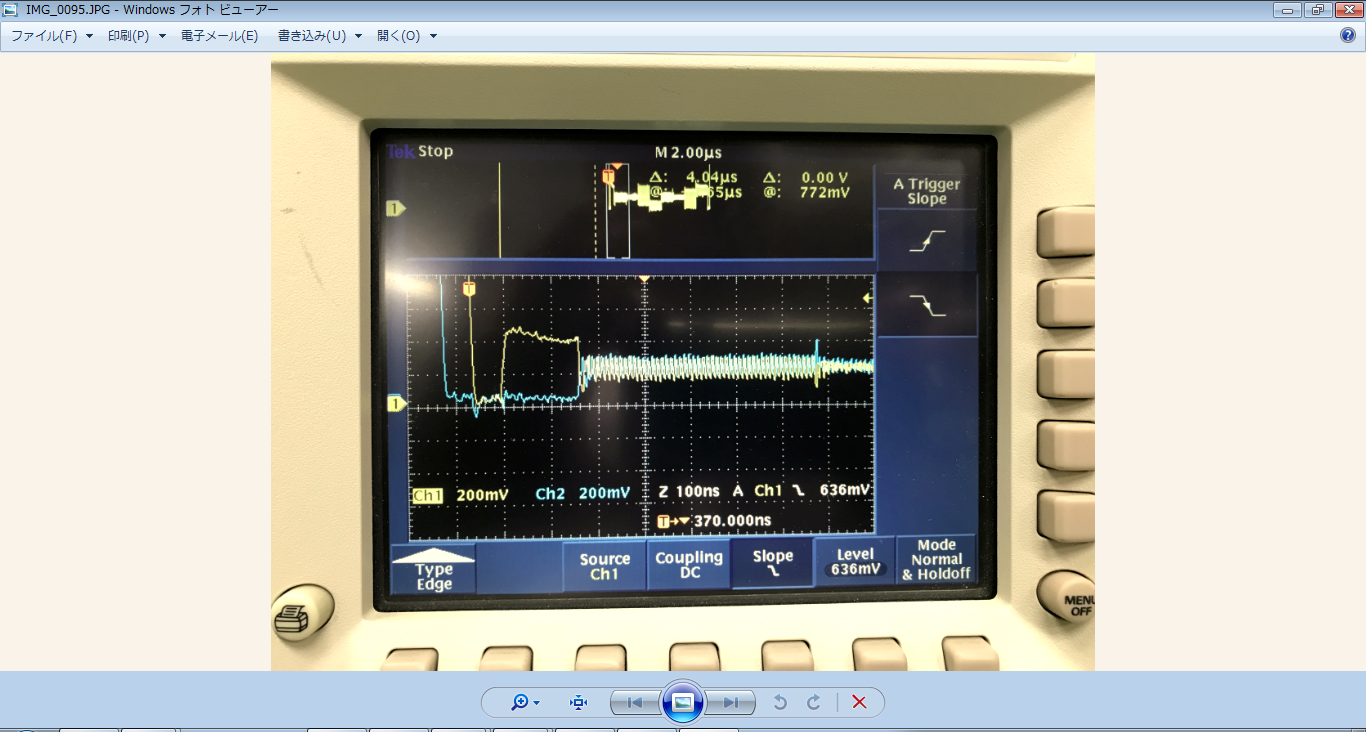
    I can see that both scope shots are completely different.

    In the second shot you see clearly the LP11, LP01, LP00 and the HS data.