This thread has been locked.

If you have a related question, please click the "Ask a related question" button in the top right corner. The newly created question will be automatically linked to this question.

TUSB8020B: New PCB design doesn't connect to upstream

Part Number: TUSB8020B


We are developing a new PCB which uses the TUSB8020B 2 port USB 3.0 hub IC to interface to an external USB 3.0 peripheral as well as onboard MCU through a USB to UART connection. The PCB was designed following the example circuits in the datasheet, reference design, and evaluation board. However, when we tested the board, it does not enumerate on the upstream PC when connected. As a result the downstream devices also don't connect. In fact, no USB error of any kind is presented, the PC acts as though nothing is connected.

We performed the following tests to see where a possible problem may lie:
- Used USBTreeView to check for any connection
- Tested multiple PCs and multiple USB ports
- Verified the voltage rails were at the correct values
- Power up reset time (GRSTz > 2V after Vcc=3.3V steady state) was measured to be around 10ms which >3ms recommended
- Crystal oscillator XO correctly outputs a ~24MHz clock signal
- Pin 9 USB_VBUS reads ~0.5V
- Since the TUSB8020 first attempts to load the configuration from EEPROM in I2C mode if pins 2 (SCL/SMBCLK), 3 (SDA/SMBDAT) are pulled high, the pullup resistors R1 and R2 were removed to disable configuration reading
- Downstream port wasn’t receiving power so the enable pin 3 of the power switch was pulled high
- Power management was disabled by removing R19
- Pin 22 was probed and the transition from the in circuit pull-up (HIGH) state to the not SuperSpeed connection flag (LOW) state was observed
- Traces to MSP430 on SCL and SDA were cut
- FTDI chip removed
- SMBUSZ I2C mode resistor R23 was removed (still internally pulled up) to match example in datasheet and reference design

Based on the tests performed, it seems as though the chip is running, and despite our modifications to attempt to alleviate any possible issues, it still refuses to connect to the upstream. In the process of debugging we also looked through responses on the help forum and could not find anything that helped us with our particular issue. We are not sure where to proceed in debugging of the TUSB8020B connectivity issues, so any assistance in getting this design to work would be greatly appreciated. I have attached the schematic of our design for reference.

  • Hi Justin,

    What do you see on the upstream DP and DM lines?  Can you share the USB tree view?

    Thanks,

    JMMN

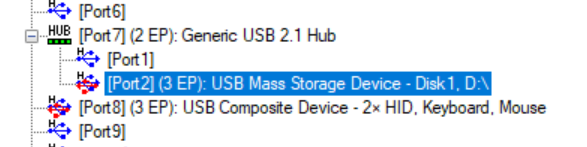
  • Both DP and DM only show as GND level voltage, I don't see any transitions. USBTreeView is below. It appears the same regardless if the USB cable is connected or not.

  • Justin,

    What kind of thermal pad connection is below the device?  The thermal pad is the main ground for the hub and if it is not connected properly, the hub will not function.  Are you seeing the crystal circuit start and then stop?  Can you send a scope plot?

    Regards,

    JMMN

  • Hi JMMN,

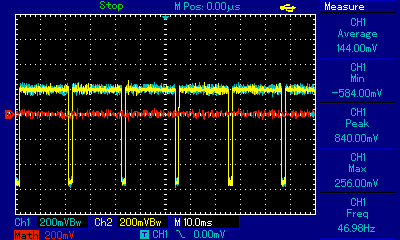
    The thermal pad is connected to a 3.62mm x 3.62mm pad which is per the datasheet land pattern. The pad is connected with 5 vias to the GND plane which runs the length of the board. I don't believe that the crystal is starting and stopping. Crystal output XO was measured using a 50MHz 1GSa/s scope with a 10x scope probe set to DC coupling. See below for the scope plot.

    Cheers,

    Justin

  • Hi Justin,

    This is very strange, I would not expect the crystal to keep running if the hub was not connected unless it was in test mode or SMBUS mode.  You have confirmed the state of these pins, correct?  What is the voltage on USB_R1 pin?

    Regards,

    JMMN

  • Hi JMMN,

    SMBUS mode is enabled when pin 22 SMBUSz/SS_DN2 is pulled low correct? We have it pulled high as shown in the schematic. When I measure this pin, it is pulled high when power is turned on for ~10ms before it is pulled low. I believe this means that the I2C mode is selected at deassertation of reset, and then pulled low to indicate that the connection status of downstream port 2 is not SuperSpeed. Is my understanding here correct?

    The voltage at the TEST pin and USB_R1 both read as 0V.

    Cheers,

    Justin

  • Hi Justin,

    USB_R1 should not be zero and DP should go high when VBUS is applied to the hub.  Can you check the thermal pad connection?  Also, please confirm that the downstream port DP/DM lines are not being pulled high.

    Regards,

    JMMN

  • Hi JMMN,

    I went back to test our board and found that the USB 2.0 hub enumerated while I was probing VBUS. After some additional testing I found a fair amount of noise on the power rails, and have at least partially solved the connectivity issue by changing our setup to have a cleaner input power supply. However, the problem is now that it only connects in 2.0 and not 3.0.

    Regards,

    Justin

  • Hi Justin,

    I'm glad you found the issue, can you send the zoomed out screen shot of USBView?  There should be another hub entry for a SuperSpeed hub.  The TUSB8020B will show up as two entries in the USBview tree.  USB 3.0 is more sensitive to power problems since it requires higher current, can you try externally powering the hub rails and see if the SuperSpeed hub appears?

    Regards,

    JMMN

  • Hi JMMN,

    I have powered the hub with a benchtop supply and only the single entry for the 2.1 hub appears. The SuperSpeed hub does not appear.

    Cheers,

    Justin

  • Hi Justin,

    Can you provide scope plots of the activity on the USB 3.0 signals?

    Regards,

    JMMN

  • Hi JMMN,

    The 3.0 Tx differential pair shows the following. There is nothing seen at all on the Rx differential pair.

    Cheers,

    Justin

  • Hi Justin,

    It appears that the host does not detect the USB 3.0 portion of the TUSB8020B.  Can you confirm if the host has the expected AC caps?  Can you try a very short cable?  What does hte via pattern under the hub look like?

    Regards,

    JMMN

  • Hi JMMN,

    Are you referring to the 0.1uF capacitors on the TXM/TXP lines? If so then I can confirm that they are present. I tried the shortest cable that we had available and the result was still the same, only USB 2.0. See below for the via pattern under the hub.

    Cheers,

    Justin

  • HI Justin,

    I can see the caps in the schematic on the hub side, can you confirm that the host has the same caps on their TX pair?  Do other devices connect at USB 3.0 on that port?

    Regards,

    JMMN

  • Hi JMMN,

    I just tested and that particular port was not connecting other devices at 3.0. When I switched to a different port that could connect a USB 3.0 flash drive, the hub enumerated both the 2.0 and SuperSpeed hubs in USBTreeView correctly. Plugging the USB 3.0 flash drive into the hub downstream port also enumerated the device correctly under the SuperSpeed hub. The root cause was therefore just the power supply noise on the board that I noted in an earlier post.

    Regards,

    Justin

  • Great!  Glad you got it working!