This thread has been locked.

If you have a related question, please click the "Ask a related question" button in the top right corner. The newly created question will be automatically linked to this question.

TUSB4020BI: Device detect fail

Part Number: TUSB4020BI
Other Parts Discussed in Thread: TUSB8044, TUSB4020BPHPEVM

Hi,

I have problem with detecting USB device correctly.

There is one way can detect USB dongle.

The USB dongle can be detected if dongle plugged-in 'before' power on TUSB4020BI.

Two ways will fail.

[1] The USB dongle cannot be detected if dongle plugged-in 'after' power on TUSB4020BI.

[2] Wait USB dongle be detected, plug-out and insert again, USB dongle still fail be detected.

Is any hardware configuration should be notice?

Here is hardware configuration:

SMBUSz=floating; PWRCRL_POL="1"; GANGED="0"; FULLPWRMGMTz'="1"

Thanks, Hedy

  • Hi Hedy,

    Could you give me more information on what function this USB dongle has? Are you able to probe on DP and DM when device is inserted? Can you measure to see if dongle presents a pull up resistor to ~3.3V when connected? Is TUSB4020BI power-up sequence correct? Also please see link below for addtion debug steps that can be followed for TI USB Hubs.

    https://e2e.ti.com/support/interface/f/138/t/719918?tisearch=e2e-sitesearch&keymatch=faq%3Atrue 

  • Hi Malik,

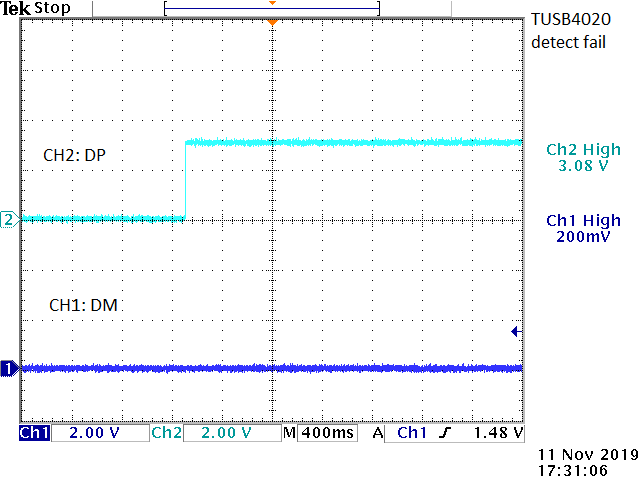
    The USB dongle is mouse or Kingston USB drive. I will attach waveform later.

    Question: Does TUSB4020BI need pre-programming?

    I followed troubleshooting guide and the answer as below:

    • When connected to the host, what is the voltage at the USB_Vbus pin? 0.495V
    • For oscillator-based applications, does my clock input at the XI pin start before TUSB8044 comes out of reset? Yes
    • Is the SMBUSz pin held low in the system? SMBUSz floating, it is "low" while booting then "high" automatically. I tried to solder SMBUSz to ground, but hub stays in programming mode and stop operating.

    I floating I2C interface, and hardware configuration as SMBUSz=floating; PWRCRL_POL="1"; GANGED="0"; FULLPWRMGMTz'="1"

    Please let me know anything I can check. Thanks.

    Hedy

  • Hi Hedy,

    TUSB8044 will only need pre-programming in SMBUS mode. To avoid this SMBUSz should be pulled high. If possible could you try to pull SMBUSz high externally? What is the voltage you see when the Hub is floating? Also please ensure that the power-up sequence is following section 7.7 Power-Up Timing Requirements in the datasheet. Is TUSB4020BI seen by the USB Host (PC)? 

  • Hi Malik,

    The power sequence and level are followed datasheet.

    I get the EVM today and connect with my DUT, but my problem is still exist. I list more detail including my debug steps for reference.

    • Design background: TUSB4020 is designed to connect between SOC and two USB type-A connector
    • Issue description:
      • Trial 1
        • power on hub but hold its reset pin
        • Plug USB flash disk (or USB mouse), SOC pull high hub's reset pin: SOC can detect USB device
        • Unplug USB device and insert USB device (reset pin is keeping high): SOC fail detect USB device
        • (Note. external pull high SMBUSz cannot fix this issue)
      • Trial 2
        • Use TUSB4020BPHPEVM connect PC
        • Plug USB mouse, PC can detect USB device
        • Unplug USB mouse and insert, PC can success detects USB device
      • Trial 3
        • Use TUSB4020BPHPEVM's U6 connect to SOC
        • Wait EVM all LEDs light
        • Plug USB mouse, SOC fail detect USB device
      • Trial 4
        • Use commercial USB hub connect to SOC
        • Plug USB mouse, SOC can success detects USB device

    It seems PC can query TUSB4020 and avoid hub enter suspend mode.

    SOC cannot communicate with TUSB4020 hub well, however, SOC can talk to other commercial hub and success detect USB devices.

    Question:

    If TUSB4020 enters suspend mode, can it detect USB device and return active mode?

    Any detect mechanism (or hardware pull-high/ pull-low on which pin) can keep SOC connect with TUSB4020?

    Thanks. Hedy

  • Hi Hedy,

    What is the SOC that you are using? Is this using a non-Windows OS with custom USB drivers? The USB Host should bring TUSB4020 out of suspend using either a Reset or Resume bus condition and TUSB4020 had been configured for remote wake and the control interrupt endpoint has been setup. There is no hardware pins that would help this scenario as TUSB4020 lets the Host know when a device has been interested and Host decides when the Hub can "wake up" all over USB 2 protocol. 

  • Hi Hedy,

    Is there any more support needed for this issue? If so please reply with any relevant details so that I can further assist you. For now I will be marking this thread as "TI Thinks Resolved". If you have resolved your issue, please post the solution to the original problem/post for others with similar issues.