This thread has been locked.

If you have a related question, please click the "Ask a related question" button in the top right corner. The newly created question will be automatically linked to this question.

SN65DP159: TUSB3410 firmware for EyeScan tool

Part Number: SN65DP159
Other Parts Discussed in Thread: TUSB3410

Hello,

I have read in other forum posts that the TUSB3410 eval board needs a different firmware build in order to interface with the EyeScan software (for use with a DP159 chip). How can I obtain this firmware?

Thanks.

  • eyescan software  for Dp159 has nothing to do with TUSB3410.

  • Several other forum answers have stated that the EyeScan software only connects to a TUSB3410 chip (the question linked to this one for example). I'm inclined to believe those statements, because the "TUSB3x10_I2C_API.dll" is the only DLL file installed with the EyeScan software.

    If you have an alternative method for extracting the EyeScan data from the DP159, then please let me know. As far as I can tell, all of the EyeScan registers in the DP159 are undocumented (or require an NDA for documentation).

  • Hi,

    TUSB3410 by default is a USB to UART bridge chip. A special firmware is needed to change the TUSB3410 from UART to I2C in order to be used with DP159 EyeScan SW. Please accept my friendship request and I will send you the firmware.

    Thanks

    David

  • Hi David,

    I have accepted your friend request. Can you confirm if there is any other method for interfacing with the EyeScan software or reading the DP159 EyeScan registers? I have a TUSB3410 module, but would like to know if it's possible to obtain the same information using our custom design (without having to sign an NDA).

    Thank you.

  • Hi,

    I sent you the TUSB3410 I2C firmware using the private message, please check.

    You can only use TUSB3410 with the EyeScan SW since the EyeScan SW look for the TUSB3410 PID and VID. EyeScan will not work without TUSB3410 VID and PID.

    If you are not using the EyeScan SW, then you can use any I2C masters to access the DP159 registers.  

    Are you seeing a particular issue with DP159? Most DP159 operation can be performed using the available information in its datasheet. Additional registers are mostly for debugging purpose.

    Thanks

    David

  • Hi David,

    Thanks for your quick response. I received the firmware but am not able to burn it to the TUSB3410 EEPROM. I can't seem to get the TUSB3410 EVM into the HID mode that the EEPROM burner program requires. The TUSB3410 shows up as a COM port, but when I uninstall that driver and try to install the Aploader driver, it fails to install (maybe it's a driver signing issue?). It seems like I'm falling down a rabbit hole on this, so I'm going to give up on this route for now.

    We're using a DP159 as a DisplayPort retimer on a custom board. We've been able to configure it and perform link training and receive video data through it. Since our device is running at 5.4 Gb/s on 4 lanes, we'd like to get a clearer picture of what our SI and timing margins look like. The EyeScan software seems like the perfect tool to accomplish this task. But I can't seem to find any significant documentation about the EyeScan registers within the DP159. I'd be happy to use our I2C master to read the EyeScan data out of the DP159, but I haven't found any documentation on how to parse the data. Can you point me to where this information is?

  • Hi,

    Windows will automatically load the UART driver for COM port if it is installed. You must open the device manager, select the TUSB3410 serial port device and right-click to "Update driver software...". Switch the driver to the TUSB3410_EEPROM Burner driver. If you cannot see this in the list of available drivers, you can browse to it manually. It should be at "C:\Program Files (x86)\Texas Instruments Inc\TUSB3x10 EEPROM Burner\Aploader"

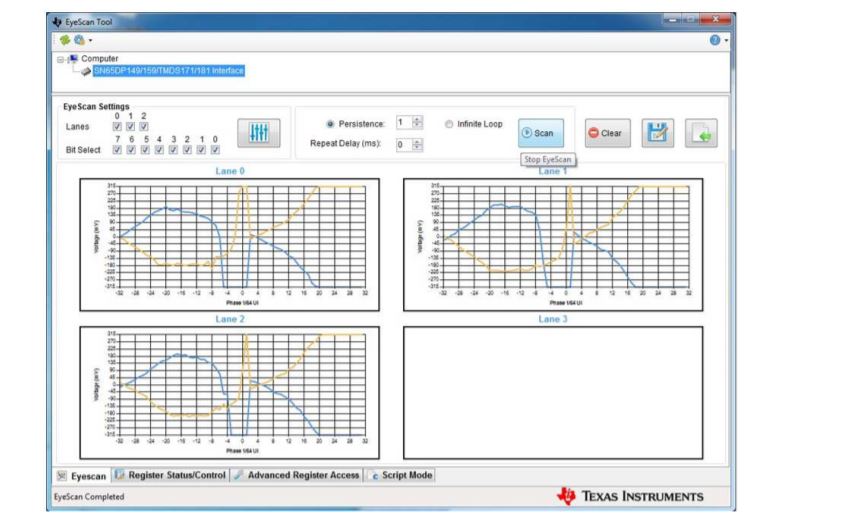
    The EyeScan SW has a bug at data rate closer to 6G that it can't correctly interpret the eye diagram. The eye diagram would look like this

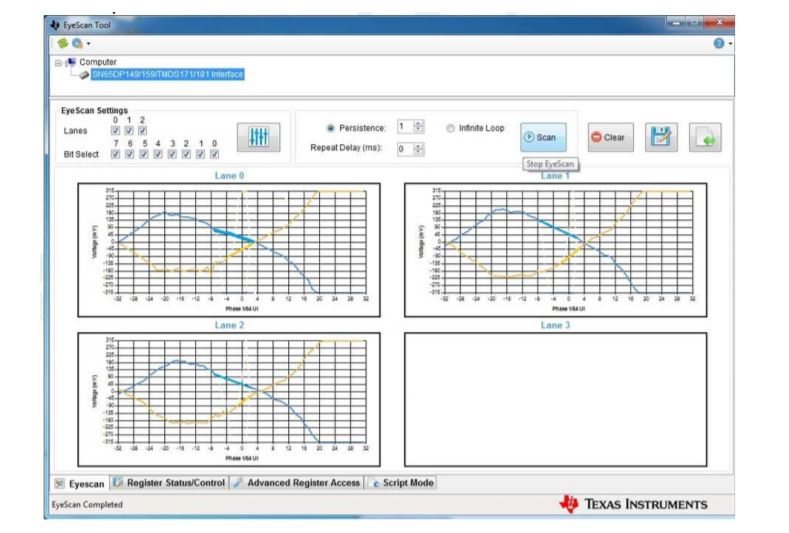
    You have to interpret the eye diagram to be this:


    Unfortunately, I don't have the EyeScan source code.

    Thanks

    David