This thread has been locked.

If you have a related question, please click the "Ask a related question" button in the top right corner. The newly created question will be automatically linked to this question.

DS90UB949-Q1: Screen Displays Vertical Lines (2)

Part Number: DS90UB949-Q1
Other Parts Discussed in Thread: ALP

Hello,


I'm back in the office now so I have access to my setup. I don't have access to the I2C bus on the deserializer side since it's part of the customer module, so in order to run the BIST I substituded the DS90UB948 EVM and Analog Launchpad software. The procedure was as follows:


1. In ALP, set Deserializer register 0x24 to 0x01 (Enable BIST)
2. The orange LED on the EVM (connected to the PASS pin) lights up
3. After BIST has run for several seconds, set Deserializer register 0x24 to 0x00 (Disable BIST)
4. The orange LED turns off, indicating that at least one error occurred during BIST
5. Read Deserializer register 0x25 (BIST Error Count). Register value is zero, which contradicts the low PASS pin.
6. In ALP Remote Registers tab, read Serializer register 0x1B. Register value is 0x04.


I'm not really sure how to interpret this data. The BIST Error Count register is zero, so does that mean the FPD-Link III signal integrity is ok? Why is the PASS pin going low after the BIST if there were no errors? Is this due to the back channel errors? I'd appreciate some guidance from TI.

Thanks,
Josh

  • Hello Joshua,

    What clock source are you using for BIST? Also is the serializer receiving PCLK from the video source during this testing?

    Best Regards,

    Casey 

  • Hi Casey,

    The BIST Clock source bits are 00, so that means the BIST clock source should be the external pixel clock, right? In the information tab (under normal operation), the deserializer pixel clock is hovering around 70 MHz while the serializer pixel clock is around 75 MHz, as shown:

    When BIST is enabled, the deserializer information remains the same while the serializer Pixel Clock is listed as "20-85 MHz" as shown:

    Thanks,

    Josh

  • Hi Josh,

    Thank you for reaching out to us. Can you please confirm if you are using 949 to 948 EVM? If yes, are you connecting both EVMs on the same bus? Or you are connecting to separate bus.

    Aaron

  • Hi Aaron,

    This post was meant to be a continuation of the previous thread, which was locked due to inactivity because I could not access my setup due to COVID. During that thread, it was determined that the problem I was experiencing seemed like a signal integrity issue. To check whether the problem was on the HDMI or the FPD-Link side, I needed to run a BIST on the serdes link. I am using a custom PCB for the 949 serializer, and a 948 EVM on the deserializer side for the purposes of running the BIST.

    Thanks,

    Josh

  • Hi Josh,

    When you run the BIST mode, did you run locally or remotely?

    Aaron

  • Hi Aaron,

    The ALP software is talking to the Deserializer EVM. I enabled the BIST by setting the BIST_EN bit in Deserializer Register 0x24 in the ALP "Registers" tab. I think that means I ran it locally, right? Since I enabled it by writing to a local register?

    Thanks,

    Josh

  • Hi Josh,

    Thank you for the confirmation. When you are reading the BIST error and monitor the pass status indicator, do you know which PORT you setting or monitoring to? Can you please read the register 0x34? Thanks.

    Aaron

  • Hi Aaron,

    Register 0x34 is reading as 0x01. However, I've tried switching between reading port 0 and port 1 using the PORT0_SEL and PORT1_SEL bits, and the BIST error count register reads zero in either case.

    Thanks,

    Josh

  • Hello Josh

    1. Anyway you can get us a timing scope shot? Is the PASS pin going low at the point BISTEN is being transitioned low? Or do you see the PASS pin low all the time after BIST is enabled? Do you also see any CRC errors 

    Thanks

    Vijay

  • Hello Vijay,

    I attached a logic analyzer to the pin and got the following capture:

    The PASS pin appears to go high as soon as BIST_EN is set and goes low only when BIST_EN is cleared. 

    There were 4 total CRC errors detected during this test, according to the Back Channel CRC Errors registers in the serializer.

    Thanks,

    Josh

  • Josh

      Looks like your fwd channel fpd link data is clean , since PASS was high as BIST_EN is high. Seems like you had some CRC errors but that is on the back-channel.so that does not affect the quality of the video. Here some questions or things to try:

    1. Looks like you are not able to transfer video properly? Is this right?

    2.Can you use the internal pattern generator inside 949 to send various color bar patterns and see if the pattern gets displayed properly on your monitor. If everything is good, then it is likely that issue is on the hdmi side

    Thanks

    Vijay

  • Hello Vijay,

    In that case it looks like we'll have to conclude the issue is on the HDMI side. As mentioned in the previous post, I've run several tests with the pattern generator and it seems the vertical lines only show up when I'm using the external pixel clock instead of the internally-generated one. We will need to re-examine our board design with attention to the HDMI signal integrity.

    I'm still curious about the PASS pin. Do I see it go low at the end of the test due to the CRC errors? I was under the impression it would only respond to forward-channel errors.

    Thanks,

    Josh

  • Josh

     Let me see if I can summarize your findings (Is this correct?):

    1. Pattern Generator with External HDMI clock -------> Only vertical lines visible

    2. Pattern generator with Internal clock --------------------> No issues seen

    See if you can lower the resolution (so lower the hdmi clock frequency) and see if the issue is related to the signal integrity

    Yes, PASS pin only responds to the FWD channel and will go low at the end of the BIST test

    Thanks

    Vijay

  • Hi Vijay,

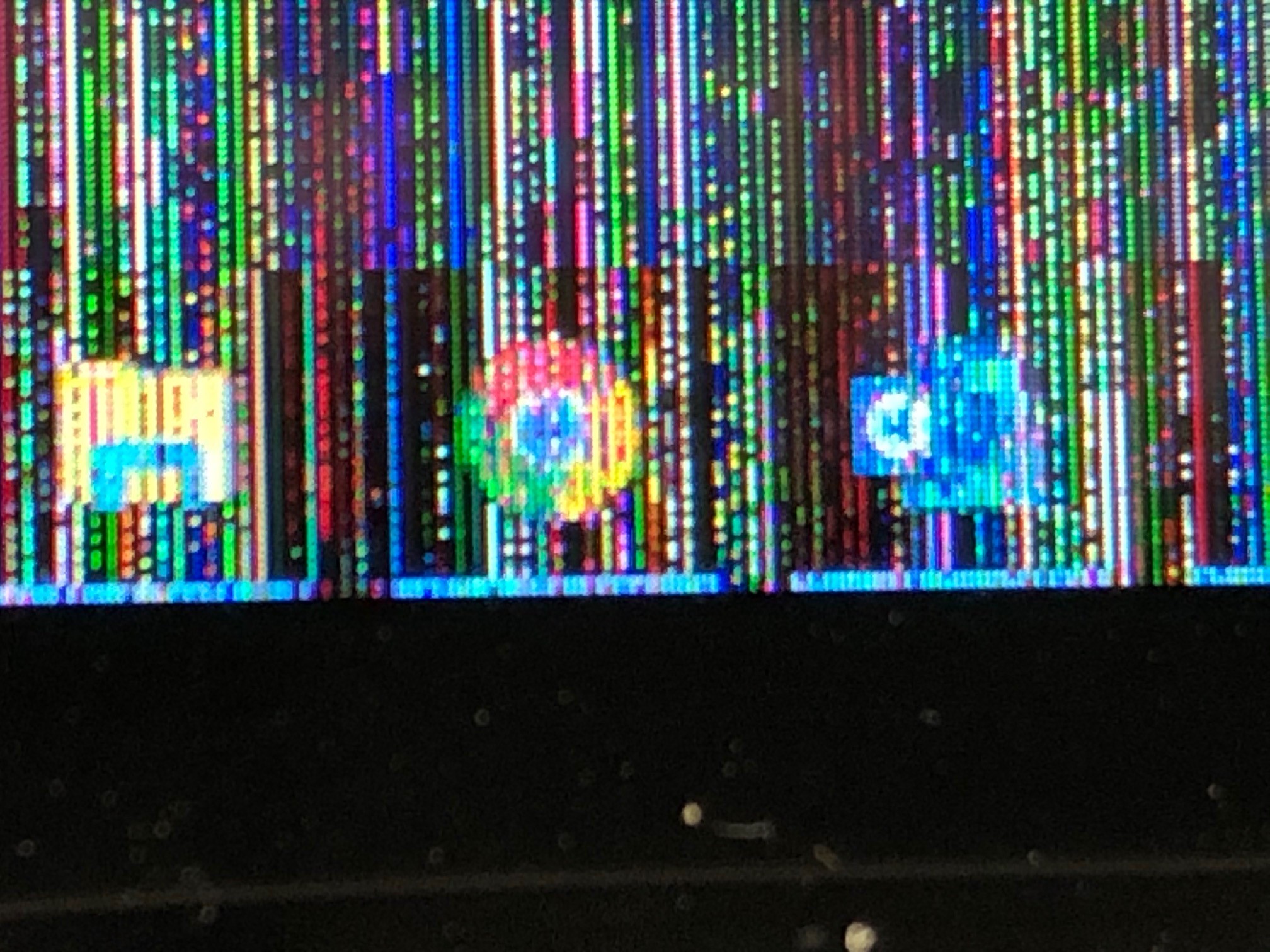
    That summary of my findings is correct, except that when the vertical lines are there the original image can still be seen underneath- a close inspection shows every other column of pixels is the wrong color. Here's a close-up image of it:

    As mentioned in the previous thread, lowering the HDMI clock frequency seemed to stop the lines from showing up. However, if the screen already displayed the lines and the clock frequency was lowered, I noticed that the lines would sometimes remain visible.

    Your description of the PASS pin doesn't seem to match the deserializer datasheet. In section 7.3.15.1 it says, "After BIST is deactivated, the result of the last test is held on the PASS output until reset (new BIST test or power down). A high on PASS indicates NO ERRORS were detected. A Low on PASS indicates one or more errors were detected." So it seems that if there were no forward channel errors, the PASS pin should remain high after the BIST test is over. Can you confirm the expected behavior?

    Thanks,

    Josh

  • Hey Josh,

    I did a quick test of the BIST in this configuration and can confirm that the PASS goes low after the test even if there were no errors. I believe there may be some other precondition needed which wasn't explicitly described in the datasheet for it to hold the result like that so we will look into it but your result does not seem abnormal

    Best Regards,
    Casey 

  • Hi Casey,

    Thank you for the sanity check- it's good to hear that the PASS pin is acting as expected.

    I realized just this morning that the resolution settings of the HDMI source during the BISTs were significantly lower than during the actual application. When I set them correctly and re-run the BIST, register 0x25 reads 0x06 for both channels. This is after keeping the BIST active for around ten seconds. I assume this is still low enough that the FPD-Link signal integrity isn't in question?

    Thanks,

    Josh

  • Hello Josh,

    The length of BIST testing can be defined by your system level BER requirement. The forward channel data rate is PCLK*35 for single channel FPD-Link mode or PCLK*(35/2) for dual link mode. Based on that data rate you can use common BER confidence level calculation to define the time which your test must run to achieve that BER. Typically for these products, the system target is BER 10e-10

    Best Regards,

    Casey 

  • Hi Casey,

    If I'm understanding you correctly:

    HDMI Clock is 150 MHz, so forward channel data rate in dual link mode is 2.625 GHz.

    BIST lasts ten seconds, so 26.25 Gbits of data were transferred during BIST

    6 bits were corrupted during BIST, so the BER is 6 / 26.25e9 = 2.286e-10, which is lower than the typical target rate of 10e-10.

    We can therefore conclude the FPD-Link signal integrity is fine, and even a BER higher than 10e-10 likely wouldn't be the culprit behind the vertical lines shown in my picture.

    The conclusion is that the signal integrity issue must be on the HDMI side. Specifically, based on the results with the pattern generator, it's an issue with the HDMI clock signal. Would a bad/noisy HDMI clock signal cause the kind of lines shown in the picture?

    Just to reiterate how the issue behaves, the screen will sometimes display these lines after the serializer is reset, after the HDMI block is reset, or after the HDMI connector is unplugged and plugged back in. Once the lines show up, the ONLY way to get them to disappear is to keep repeating one of those three actions until the lines are gone. The lines never go away on their own.

    This indicates to me that maybe a noisy HDMI clock can cause problems in the serializer's detection circuitry. Can you elaborate on what process goes on when the serializer HDMI block is reset?

    Thanks,

    Josh

  • Sorry Josh,

    There was a typo in my last message - BER is typically 1e-10 at minimum, not 10e-10. In fact, typically the actual BER for FPD-Link is much better than that, but this is a common design target. 

    You should not be getting 6 errors in 10 seconds of testing. That means that the link quality is probably an issue. You can plug the numbers into a BER confidence level calculator and see that 6 errors over 10 seconds at this data rate gives ~1% confidence. 

    https://www.jitterlabs.com/support/calculators/ber-confidence-level-calculator

    Best Regards,

    Casey 

  • Casey,

    In your opinion, could this FPD-Link signal integrity issue be the cause of the vertical line phenomenon I've shown?

    Thanks,

    Josh

  • Hi Josh,

    Have you try to swap the HMDI cable with different brand?

    Aaron

  • Hi Aaron,

    Yes, we've tried this with multiple computers, multiple HDMI cables, multiple screens. As mentioned in the original post, the vertical line problem follows the board every time.

    Thanks,

    Josh

  • Hi Josh,

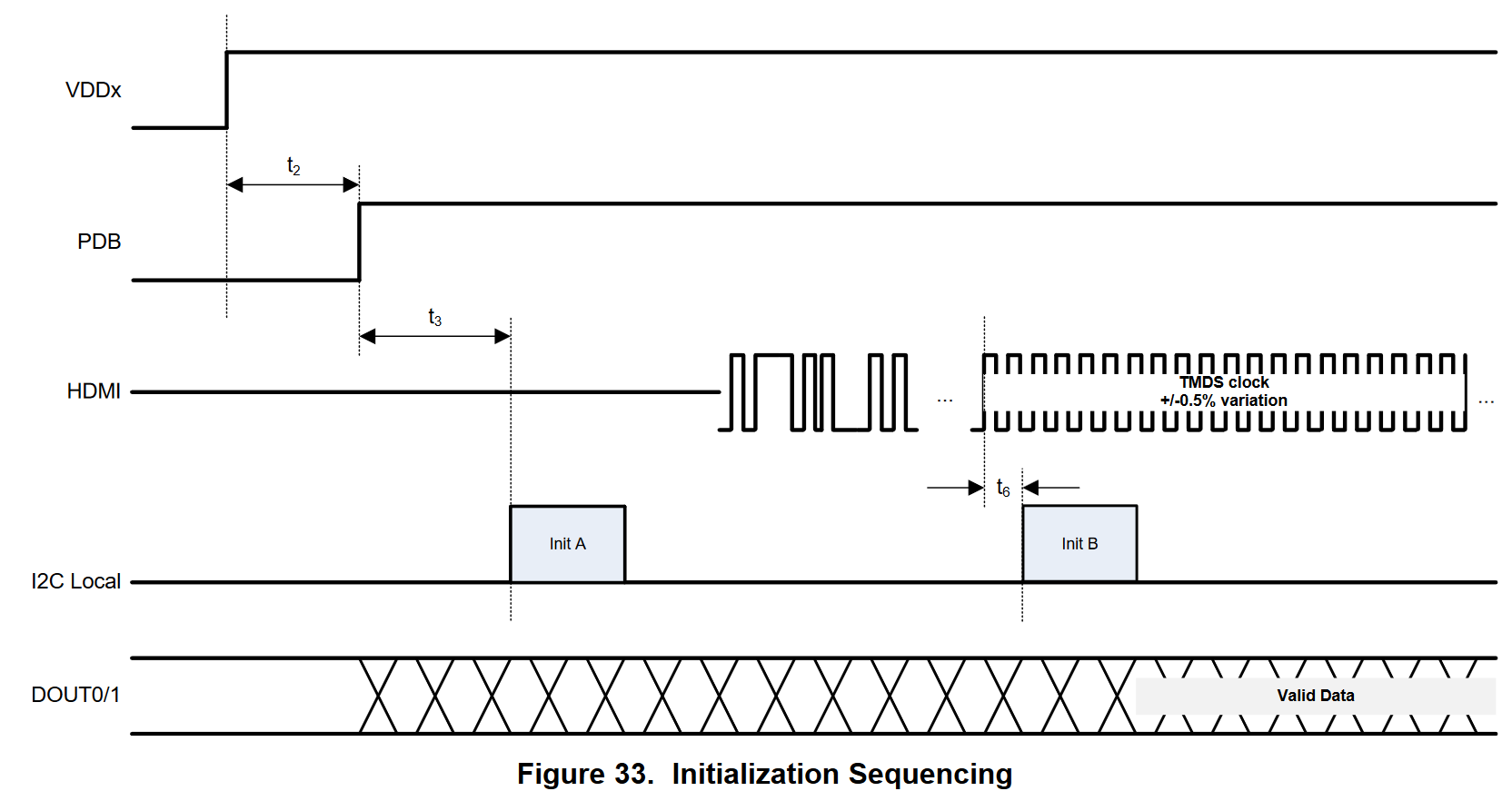
    I reviewed your posted on 6/5/2020 at 11:47AM when you reiterated the behavior of the issue. The behavior might lead to suspiciously of the device being locked in an unstabled clock. On 949 device, you must performed the initialization A and B locally, and allowing some time of t6 to be stabled before you perform initialization B ensuring you are locking a stable clock. Could you please confirm if this has been done in section 9? Below is the snapshot.

    Aaron

  • Hi Aaron,

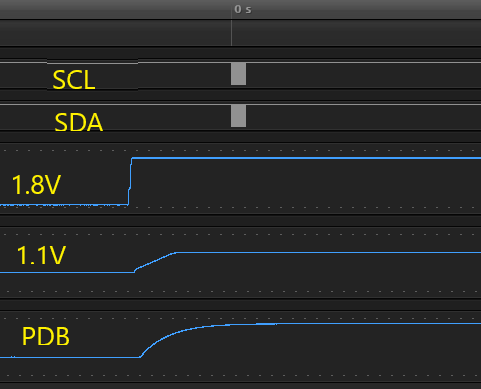
    Here are the snips of my initialization sequence:

    First, a zoomed-out view so you can see the power and PDB lines:

    Next, a zoomed-in view of the I2C Initialization:

    I can provide more captures with the rest of INIT B if you want, but it follows the datasheet. I am still seeing the lines appear on the screen despite this process.

    Thanks,

    Josh

  • Hey Josh,

    What kind of HDMI source is being used here? Also what is the voltage setting for the VTERM pin?

    Best Regards,

    Casey 

  • Hi Casey,

    I'm not sure you want me to characterize my HDMI source. It comes from the video card in my computer as miniDP and passes through a miniDP-HDMI converter and an HDMI cable before reaching the board. However, as I've mentioned, we've changed around the HDMI source including different computers, different brands of miniDP converters, different cables, etc. The problem follows the board, not the HDMI source.

    The VTERM pin is fed 3.3V.

    Thanks,

    Josh

    EDIT: I'm not sure *how* you want me to characterize my HDMI source

  • Hello Josh,

    Have you only ever tried with a DP to HDMI converter in the middle? Have you tried this with a straight HDMI connection? DP to HDMI conversion may add some extra complication here depending on the type of converter this is. If the converter uses DP++ (AC coupled HDMI), then the VTERM pin needs to be 1.8V. Also often times DP to HDMI converters can only generate specific standard monitor timings so if you are trying to drive a custom resolution then the converter may be introducing problems. Indeed I have seen such issues before testing with DP to HDMI converters 

    Best Regards,

    Casey 

  • Casey,

    I don't recall whether I've tested directly with an HDMI source. I can certainly try, although it might take a couple of days to get it set up as we don't have very many computers which directly output HDMI.

    However, I'm skeptical that this is the problem. If it were an issue with the converter, then wouldn't we be seeing it crop up on every serializer board? As it is, only certain boards display the problem. Other "good" boards never show vertical lines despite using the exact same converter setup. Plug a "good" board and a "bad" board into the exact same source and only the "bad" board displays the problem. Not to sound like a broken record here, but the problem follows the board, not the HDMI source.

    Thanks,

    Josh

  • Hi Josh,

    Just want to confirm something with you. Have you try to connect it with our 949EVM? If yes, do you see the same problem occurred?

    Aaron

  • Hi Aaron,

    Yes, as I confirmed in the original thread I have tried using the 949EVM and I don't see the problem when using it.

    Thanks,

    Josh

  • Hi Josh,

    If you confirmed that using 949EVM doesn't show up the issue, I think we need to look at the schematic and layout. Could you please share schematic and layout? If you wish not to share in public, I can invite you to private chat.

    Let me know.

    Aaron

  • Hi Aaron,

    Yes, please send the private chat invite and I'll share our design files.

    Thanks,

    Josh

  • Hi Josh,

    I just sent you a friend request. Please accept it, and we can chat via private room.

    Aaron

  • Aaron,

    I've accepted the request and sent over the design files. Please confirm that you received them.

    Thanks,

    Josh

  • Hi Josh,

    Just want to confirmed with you that I had received your design file via private chat. I will provide you the feedbacks by EOD.

    Aaron