This thread has been locked.

If you have a related question, please click the "Ask a related question" button in the top right corner. The newly created question will be automatically linked to this question.

DP83869HM: DP83869 linux driver installation

Part Number: DP83869HM
Other Parts Discussed in Thread: DP83869,

Hello

Please how can I install linux driver on RPi 3+ compute module?

For the driver you have provided source dp83869.c. Also I've found patches from https://lore.kernel.org/patchwork/patch/1148980/

I've found, that drivers are natively in linux kernel 5.5+. I could install on RPi only kernel 5.4 as newest possible.

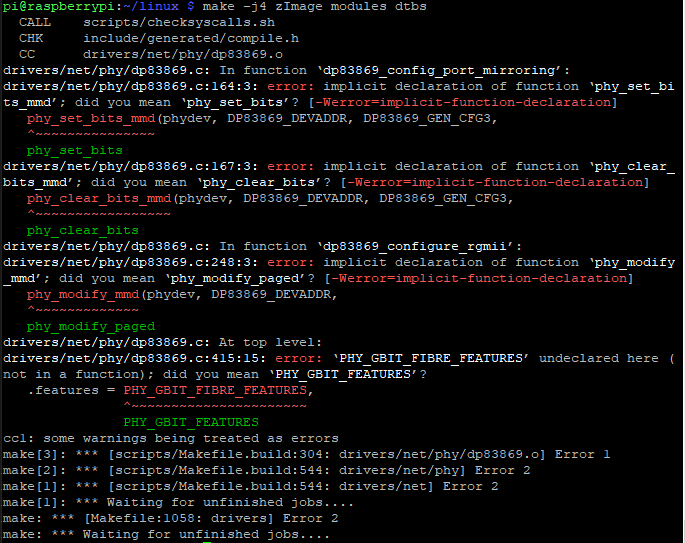
I've tried to apply patches to RPi kernel sources 4.19.127. I miss here from whitch folder apply patches. Which option add to apply patch. Finelly I could compile and run linux kernel 4.19.127 only without adding dp83869 driver support. When I add driver support in "make menuconfig", then I receive error (bellow image).

Thanks for any help

Best regards

Michael Dvoracek
  • Hi Michael,

    Can you check if it is possible to install Linux kernel 5.5+ on RPi 3+? When we release a new linux driver we release it for the current version at that time and also upload the source code. For future versions, the driver get automatically ported over. 

    I can check if we have a 5.4 kernel compatible driver.

    -Regards

    Aniruddha

  • Hi Michael,

    Our Linux driver developer was able to take a look at this question. It looks like some core linux kernel patches are missing. To clear up the set/clear_bits you can cherry pick the patch from upstream. The following  was checked locally and the backport was completed cleanly.

    git cherry-pick 1878f0dcbff0cd07f62602deb160a44d69a8f146


    And to fix the PHY_GBIT_FIBRE_FEATURES you can replace that with
    .features = PHY_GBIT_FEATURES | SUPPORTED_FIBRE,

    Please note that we can provide limited support for backporting. This is only compiled check and not fully tested on a system.

    -Regards

    Aniruddha

  • Hi Aniruddha

    Sorry for late answer. Finally I could apply patches from your forum e2e.ti.com/.../809516

    Also I could download RPi not tested branch sources with linux kernel 5.6. This I could compile and run this kernel.

    Also I've tested the NIC on ubuntu with kernel 5.7. There I don't receive IP address from router either.

    With applied patches or newer kernel I've not seen any more in "dmesg" cmd anyting about missing driver phy chip.

    So probably it's not problem of missing driver DP83869HM. We have NIC with mac chip: Microchip LAN7801 and phy chip: DP83869HM. It has SFP module and with optic fibre it's connected to router Mikrotik. On windows 10 this network card works, on linux doesn't, with same registers settings. In winbox I can see, that under windows 10 router give IP address to NIC. Under linux (RPi OS, Ubuntu) router doesn't give IP to NIC.

    I can add here information from ethtool.

    pi@raspberrypi:~ $ ethtool -i eth0
    driver: lan78xx
    version: 5.6.19-v7+
    firmware-version:
    expansion-rom-version:
    bus-info: usb-3f980000.usb-1.4
    supports-statistics: yes
    supports-test: no
    supports-eeprom-access: yes
    supports-register-dump: yes
    supports-priv-flags: no

    pi@raspberrypi:~ $ ethtool eth0
    Settings for eth0:
    Supported ports: [ TP MII ]
    Supported link modes: 1000baseT/Full
    Supported pause frame use: Symmetric Receive-only
    Supports auto-negotiation: Yes
    Supported FEC modes: Not reported
    Advertised link modes: 1000baseT/Full
    Advertised pause frame use: Symmetric
    Advertised auto-negotiation: Yes
    Advertised FEC modes: Not reported
    Speed: 1000Mb/s
    Duplex: Full
    Port: MII
    PHYAD: 0
    Transceiver: internal
    Auto-negotiation: on
    Cannot get wake-on-lan settings: Operation not permitted
    Current message level: 0x00000007 (7)
    drv probe link
    Link detected: yes

    pi@raspberrypi:~ $ sudo ethtool -e eth0
    Offset Values
    ------ ------
    0x0000: a5 00 80 0f 78 00 ad 00 00 06 00 0f c1 80 00 00
    0x0010: 01 04 06 07 a0 d3 07 80 67 31 00 80 01 00 00 0a
    0x0020: 00 1e 00 09 04 14 60 10 6a 1a 72 16 7f 06 8a 16
    0x0030: 31 12 3c 12 45 12 4e 12 57 12 4e 12 57 00 00 00
    0x0040: 00 00 00 00 00 00 00 00 00 00 00 00 00 00 ff ff
    0x0050: 00 00 00 00 00 00 00 00 08 04 00 00 00 00 31 80
    0x0060: 00 4f 05 0f 16 00 02 07 10 02 0e 01 00 00 0a 10
    0x0070: 03 02 0e 00 01 0a dc 05 12 01 10 03 ff 00 ff 09
    0x0080: 24 04 01 78 00 02 01 02 03 01 09 02 39 00 01 01
    0x0090: 00 e0 0a 09 04 00 00 03 ff 00 ff 00 12 01 10 02
    0x00a0: ff 00 ff 40 24 04 01 78 00 02 01 02 03 01 09 02
    0x00b0: 27 00 01 01 00 e0 0a 09 04 00 00 03 ff 00 ff 00
    0x00c0: 14 03 4d 00 69 00 63 00 72 00 6f 00 63 00 68 00
    0x00d0: 69 00 70 00 10 03 4c 00 41 00 4e 00 37 00 38 00
    0x00e0: 30 00 31 00 1a 03 30 00 30 00 38 00 30 00 30 00
    0x00f0: 46 00 37 00 38 00 30 00 30 00 41 00 42 00 16 03
    0x0100: 4a 00 52 00 65 00 70 00 63 00 69 00 6b 00 2d 00
    0x0110: 41 00 42 00 06 03 07 00 67 00 ff ff ff ff ff ff
    0x0120: ff ff ff ff ff ff ff ff ff ff ff ff ff ff ff ff
    0x0130: ff ff ff ff ff ff ff ff ff ff ff ff ff ff ff ff
    0x0140: ff ff ff ff ff ff ff ff ff ff ff ff ff ff ff ff
    0x0150: ff ff ff ff ff ff ff ff ff ff ff ff ff ff ff ff
    0x0160: ff ff ff ff ff ff ff ff ff ff ff ff ff ff ff ff
    0x0170: ff ff ff ff ff ff ff ff ff ff ff ff ff ff ff ff
    0x0180: ff ff ff ff ff ff ff ff ff ff ff ff ff ff ff ff
    0x0190: ff ff ff ff ff ff ff ff ff ff ff ff ff ff ff ff
    0x01a0: ff ff ff ff ff ff ff ff ff ff ff ff ff ff ff ff
    0x01b0: ff ff ff ff ff ff ff ff ff ff ff ff ff ff ff ff
    0x01c0: ff ff ff ff ff ff ff ff ff ff ff ff ff ff ff ff
    0x01d0: ff ff ff ff ff ff ff ff ff ff ff ff ff ff ff ff
    0x01e0: ff ff ff ff ff ff ff ff ff ff ff ff ff ff ff ff
    0x01f0: ff ff ff ff ff ff ff ff ff ff ff ff ff ff ff ff
    pi@raspberrypi:~ $ ifconfig eth0
    eth0: flags=4163<UP,BROADCAST,RUNNING,MULTICAST> mtu 1500
    ether 00:80:0f:78:00:ad txqueuelen 1000 (Ethernet)
    RX packets 1555 bytes 244233 (238.5 KiB)
    RX errors 0 dropped 0 overruns 0 frame 0
    TX packets 8996 bytes 1573761 (1.5 MiB)
    TX errors 0 dropped 0 overruns 0 carrier 0 collisions 0

    Thanks for any help or tips how to move forward

    Best regards

    Michael

  • Hi Michael,

    Assigning IP is a higher layer application and involves much more steps than just getting the PHY operational. For this thread, we will need to limit the scope to make sure that the PHY is working as desired. When you say that the application runs for windows but not for Linux, do you see link LED turn on when you are using Linux? 

    The register dump that you have provided above is a little confusing, the PHY registers are 16bit but the data above shows 8bit. Can you double check and provide the register values for DP83869?

    -Regards

    Aniruddha