This thread has been locked.

If you have a related question, please click the "Ask a related question" button in the top right corner. The newly created question will be automatically linked to this question.

DS90UB964-Q1: abnormal virtual channel images

Part Number: DS90UB964-Q1

Hello.

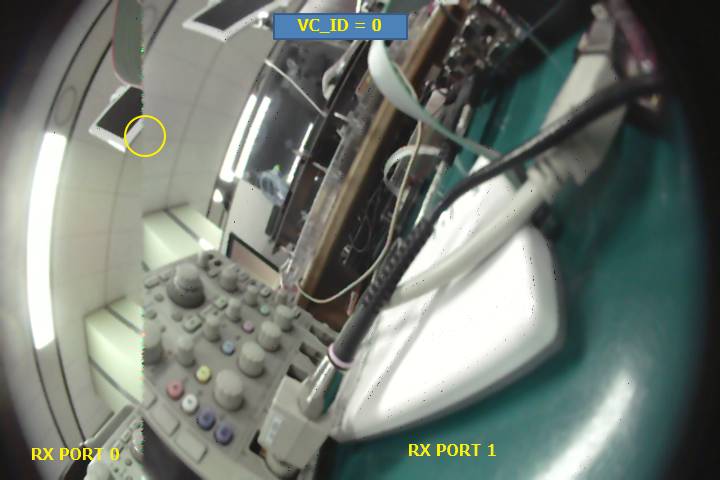
Please check the attached image, each image's H line has merged with other virtual images H line. 

- application : CMOS image sensors(4EA) -> UB953(4EA) -> UB960 -> ISP

- format : CSI2
- mode : Basic Synchronized forwarding mode
- sync : Internal frame sync mode, GPIO[2]
- symptoms : virtual channel image is invaded by other virtual channels line by line.
- Sensor output format (AR0143/1M/30P)
  . Bit per Pixel: 12
  . HTotal: 2750
  . VTotal: 900
  . HActive: 1280
  . VActive: 720
  . FrameRate: 30

CSI_TX_SPEED of attached image is 1.6Gbps . if I change to lower speed then each virtual channel's H length is getting longer.

At 400Mbps doesn't work with 4 cameras, but 3 cameras fine.

Is there something I have missed???

Here is the setting data (UB960 & UB953)

// UB960
UB960 W 0x4C, 0x01
UB960 W 0x6D, 0x78
UB960 W 0x20, 0xE0
UB960 W 0x72, 0xE4
UB960 W 0x6F, 0x0A
UB960 W 0x58, 0x5E
UB960 W 0x5B, 0x42
UB960 W 0x5C, 0x42
UB960 W 0x5D, 0x20
UB960 W 0x65, 0x20

UB960 W 0x4C, 0x12
UB960 W 0x6D, 0x78
UB960 W 0x20, 0xC0
UB960 W 0x72, 0xE5
UB960 W 0x6F, 0x0A
UB960 W 0x58, 0x5E
UB960 W 0x5B, 0x42
UB960 W 0x5C, 0x42
UB960 W 0x5D, 0x20
UB960 W 0x65, 0x20

UB960 W 0x4C, 0x24
UB960 W 0x6D, 0x78
UB960 W 0x20, 0x80
UB960 W 0x72, 0xE6
UB960 W 0x6F, 0x0A
UB960 W 0x58, 0x5E
UB960 W 0x5B, 0x42
UB960 W 0x5C, 0x42
UB960 W 0x5D, 0x20
UB960 W 0x65, 0x20

UB960 W 0x4C, 0x38
UB960 W 0x6D, 0x78
UB960 W 0x20, 0x00
UB960 W 0x72, 0xE7
UB960 W 0x6F, 0x0A
UB960 W 0x58, 0x5E
UB960 W 0x5B, 0x42
UB960 W 0x5C, 0x42
UB960 W 0x5D, 0x20
UB960 W 0x65, 0x20

UB960 W 0x1F, 0x00
UB960 W 0x32, 0x01
UB960 W 0x33, 0x03
UB960 W 0x21, 0x04
UB960 W 0x0F, 0x00
UB960 W 0x12, 0x91
UB960 W 0x19, 0x0A
UB960 W 0x1A, 0xD8
UB960 W 0x1B, 0xCE
UB960 W 0x1C, 0x2C
UB960 W 0x18, 0x01


// UB953
UB953 W 0x02, 0x73
UB953 W 0x06, 0x21
UB953 W 0x20, 0x10
UB953 W 0x0E, 0x0F
UB953 W 0x0D, 0xE0
UB953 W 0x0E, 0x0F
UB953 W 0x0D, 0xC0
UB953 W 0x0E, 0x4B
UB953 W 0x0D, 0xC0
UB953 W 0x0E, 0x4B
UB953 W 0x0D, 0x40

  • Hello,

    Your approximate input bandwidth per camera is 415Mbps. With four cameras, 400Mbps output bandwidth is too low to aggregate all the cameras. The output bandwidth should be set to 800Mbps or 1.6Gbps.

    Best,
    Jiashow 

  • Dear Jiashow.

    Thanks for your response.

    I have tried all bandwidths 400Mbps, 800Mbps, 1.2Gbps and 1.6Gbps by changing 0x1F[1:0].

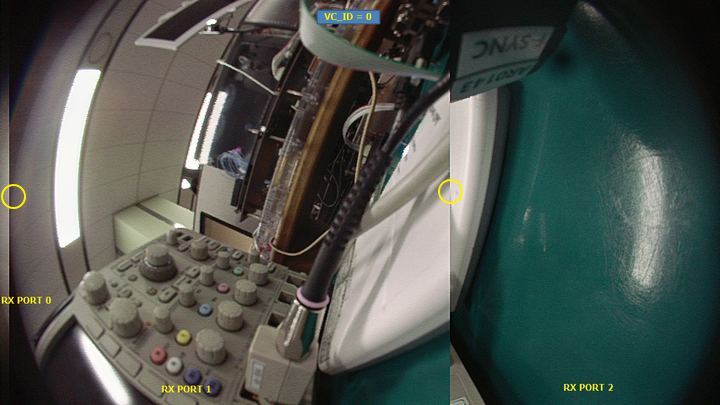
    All output bandwidth have same symptoms. Each H lines are merged with other virtual channel H lines like attached image.  

    ▲Image from Virtual channel 0, 1.6Gbps

    ▲Image from Virtual channel 0, 800Mbps

  • Hello,

    From the code, reg 0x20 should be set to 0x0F before enabling the CSI port and 0x00 after enabling the CSI port. Reg 0x20 isn't an RX register so it only needs to be set once.

    Could you check two things:

    1) if you use patgen instead of the camera, do you still see the same issues?

    2) if you do round robin forwarding (with cameras) instead of synchronized forwarding, does the issue persists?

    Jiashow

  • Dear Jiashow.

    I wrote UB960 control driver code to handling each RX port. now I have changed setting sequence of 0x20 register.

      - put writing (0x20, 0x0F) to first line, and put writing (0x20, 0x00) to End line.

    1) if you use patgen instead of the camera, do you still see the same issues?

     - at ub960 pattern, it was clearly display patterns but I could see only one virtual channel image.

     - at ub953 pattern, that issue is still perisist.

    2) if you do round robin forwarding (with cameras) instead of synchronized forwarding, does the issue persists?

     - Yes, round robin forwarding(0x21, 0x03) sill have same issue. I checked with generated pattern from ub953.

    I am adding pattern images from virtual channel 1 and 2. (btw, Is it right pattern colors?)

  • Hello,

    Are you using the default pattern for the 953? It looks like the SoC is configured wrong to process the data because the color is wrong and the second half of the images are wrong.

    VC ID remapping is set in reg 0x72. You're setting this register correctly. If patgen and round robin don't change the behavior. I suspect the SoC isn't configured correctly. You could also try a different hardware.

    Best,

    Jiashow

  • Dear Jiashow.

    Thanks for your consult. I will look into SoC.

    JW.