


Part Number: DS90UB954-Q1
Hi team,
I have a customer question I was hoping you could help with, see below:
----
We got a setup with OV2311 -> 913 -> 954 and the vertical sync (VS) signal from the 954 is not always present.
Yellow: LED enable pulse
Blue: LED current command
Pink: Camera VS
Green: LED current
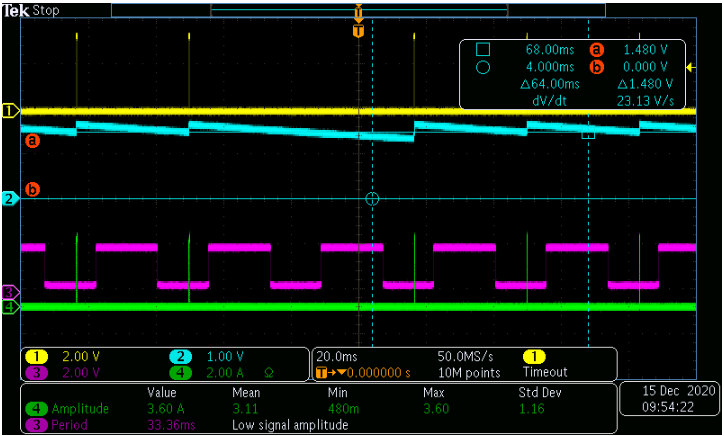
As can be seen in the scope shot, is that the camera VS is constant, but the LED stuff is missing a video frame. The LED circuit uses the 954 VS data to control the LED driver.
The 954 drives a FPGA and we have been able to capture the situation where a VS is not present.
Would it be possible to have a look at our serilaiser and deserialiser settings to see if it is all good?
Also have you had other clients with this serdes combination that reported a missing VS issue?
The video data is 10-bit raw and the frames are at 30Hz.
Couple of findings from additional testing:
- By probing the MIPI decoder output, we can clearly see that some VSYNC pulse missing intermittently
- And probing the 954 PASS/LOCK pin we can see them going low intermittently too.
Attached is the 954/913 init sequence.
FPD954 set 0x01 0x02  # // Digital reset1[1]
sleep 1s
FPD954 set 0x21 0x14 #FWD_CTL2 enabled CSI0_RR_FWD
FPD954 set 0x20 0x20 #FWD_CTL1 enabled forwarding of RX Port 0 to CSI Output
FPD954 set 0x18 0x01
FPD954 set 0x4c 0x01
FPD954 set 0x33 0x63 #CSI_EN, set to continuous clock mode, 2 lanes
FPD954 set 0x6D 0x7F #COAX MODE, FPD RAW 10bit
FPD954 set 0x0f 0x6f #GPIO INPU
FPD954 set 0xbe 0x10 #Enable Refclk
FPD954 set 0x14 0x13 #Enable Refclk
sleep 1s
FPD954 set 0xd2 0x98 #Set Adaptive EQ
sleep 2s
FPD954 set 0x08 0x1c
FPD954 set 0x0a 0x79
FPD954 set 0x0b 0x79
FPD954 set 0x4c 0x01 #FPD3 PORT Selection, Set RX-WRITE-PORT 0
FPD954 set 0x58 0x48 #Enable passthrough, Back Channel Frequency 2.5Mbps
FPD954 set 0x5C 0xB0 #913 Alias 0x58 <<1
FPD954 set 0x5D 0x20 #Sensor I2C Address 0x10 <<1
FPD954 set 0x65 0x20 #Sensor alias I2C Address 0x10 <<1


FPD913 set 0x01 0x01 #Digital reset0[0]
sleep 1s
FPD913 set 0x03 0xC7 #TRFB[0], OV_CLK2PLL[1], I2C Passthrough[2], Tx Par Gen En[6]
                     #Rx CRC Check En[7]
sleep 1s
FPD913 set 0x35 0x08 #LOCK2OSC[0]=0
FPD913 set 0x11 0x64 #SCL High Time
FPD913 set 0x12 0x64 #SCL Low Time
FPD913 set 0x0D 0x99
Thanks
Tyler

