Tool/software:
Hi team,
Two cases have occurred in which, after updating TPLD-PROGRAM for one of my clients, the device could no longer connect to the PC. Is there any recommended solution for this issue?
Best regards,
Kyohei
This thread has been locked.
If you have a related question, please click the "Ask a related question" button in the top right corner. The newly created question will be automatically linked to this question.
Tool/software:
Hi team,
Two cases have occurred in which, after updating TPLD-PROGRAM for one of my clients, the device could no longer connect to the PC. Is there any recommended solution for this issue?
Best regards,
Kyohei
Hi Kyohei,
It's possible that they do not have the correct drivers installed. Within InterConnect Studio, please go to Configure -> Firmware Update Recovery. A dialogue box will appear describing the firmware update recovery process, including a link to download and install the necessary drivers. Once the instructions in the dialogue box have been completed, click Start. This should solve the issue.
Regards,
Nikki
Hi Nikki,
Thank you for your reply.
An issue has occurred with two customers. One of them has recovered using the above-mentioned solution.
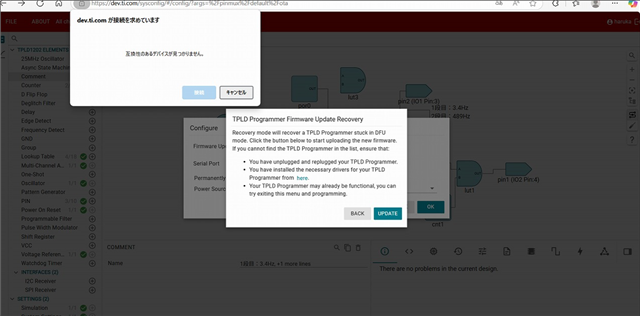
However, the other customer tried the Firmware Update Recovery, and as shown in the image below, they are now unable to connect.
Are there any other possible causes or solutions we should consider?

Best regards,
Kyohei
Hi Kyohei,
First ensure that the customer successfully downloaded, installed, and updated the drivers according to the dialogue box that is shown in your screenshot.
If the computer still cannot detect the device, the customer should to reboot their computer to ensure no conflicts occur.
If the problem persists, the customer may need to talk to their IT team. Some company computers may block external drivers, and this may also cause the problem.
Regards,
Nikki
Hi Nikki,
Thank you for your support.
Regarding the installation of the driver below, is the installation complete simply by downloading and extracting the ZIP file?
STELLARIS_ICDI_DRIVERS Driver or library | TI.com

The following files are included, but what steps should I take to complete the driver installation?
Best regards,
Kyohei
Hi Kyohei,
Please go to the Device Manager on your computer. Next, locate the 'Tiva Device Firmware Update'. In my Device Manager, it is located under 'Other devices', but it may be located somewhere else. Right click on 'Tiva Device Firmware Update', then click 'Update device'.

Next, click 'Browse my computer for drivers' and navigate to the extracted folder. Click the 'stellaris_icdi_drivers' folder that you have downloaded and extracted from TI, and follow the instructions to install the drivers.

Finally, un-plug and re-plug the TPLD programmer, and press 'Update'. You should now see a device ready to connect. Select the device, and click 'Connect'. This should solve your problem.
Regards,
Nikki