Part Number: TPUL1X1000-EVM
Other Parts Discussed in Thread: TPUL2G123
Hello team,
I just grab TPUL EVM.
R1 is pull up resistor and it connected with 1Tn, 1T, 2Tn, 2T.
Our customer will use TPUL2G123 as a WDT IC.
(I try to follow "Designing with the SN54/74LS123" document)
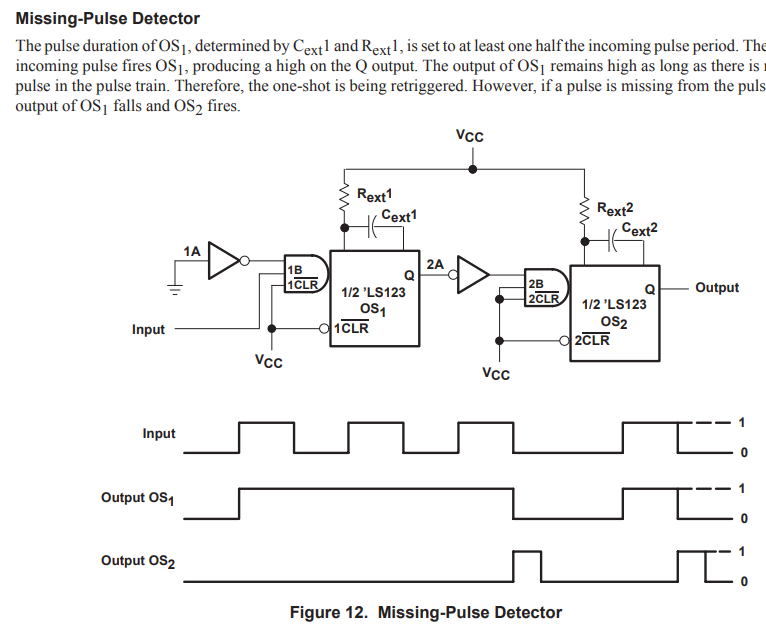
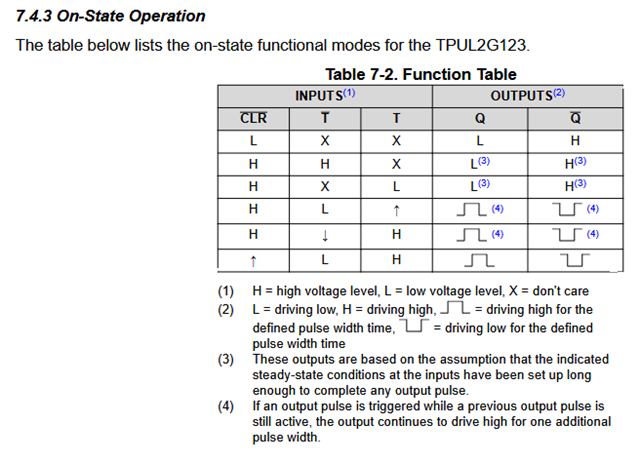
So, it should be react by rising edge.
To change trigger edge from falling to rising.
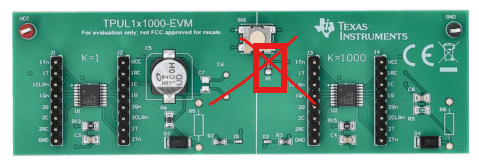
I removed R1 resistor and connect 1Tn, 2Tn (K=1) to GND.
And Connect 1CLRn, 2CLRn to VDD without resistor. Connect 1T to MCU PWM pulse with pull down resistor.
I didn't connected another pins(2Q, 2Qn, 1Q, 1Qn... etc).
After power on, Power supply runs like short circumstance.
Is there any problem on my circuit? Could you check what is wrong?