This thread has been locked.

If you have a related question, please click the "Ask a related question" button in the top right corner. The newly created question will be automatically linked to this question.

CAN bus interfacing in TM4C1294NCPDT

Other Parts Discussed in Thread: TM4C1294NCPDT, EK-TM4C1294XL

Hello people, I am new to code composer studio. I am learning about TM4C1294NCPDT launchpad for my final year project. I have been given a task to interface two launchpads using CAN bus protocol. I have used the simple Tx and Rx example codes for CAN. For hardware I have used two MCP2551 ICs with 120 ohm Resistors. But I am not able to send messages from Tx to Rx sides. Moreover, nothing is displayed in the console on either sides. I am attaching an image of my circuit diagram and also the Rx and Tx code files that I am using. Your help and guidance would be highly appreciated. Thank you.

//*****************************************************************************
//
// simple_rx.c - Example demonstrating simple CAN message reception.
//
// Copyright (c) 2010-2015 Texas Instruments Incorporated.  All rights reserved.
// Software License Agreement
//
//   Redistribution and use in source and binary forms, with or without
//   modification, are permitted provided that the following conditions
//   are met:
//
//   Redistributions of source code must retain the above copyright
//   notice, this list of conditions and the following disclaimer.
//
//   Redistributions in binary form must reproduce the above copyright
//   notice, this list of conditions and the following disclaimer in the
//   documentation and/or other materials provided with the
//   distribution.
//
//   Neither the name of Texas Instruments Incorporated nor the names of
//   its contributors may be used to endorse or promote products derived
//   from this software without specific prior written permission.
//
// THIS SOFTWARE IS PROVIDED BY THE COPYRIGHT HOLDERS AND CONTRIBUTORS
// "AS IS" AND ANY EXPRESS OR IMPLIED WARRANTIES, INCLUDING, BUT NOT
// LIMITED TO, THE IMPLIED WARRANTIES OF MERCHANTABILITY AND FITNESS FOR
// A PARTICULAR PURPOSE ARE DISCLAIMED. IN NO EVENT SHALL THE COPYRIGHT
// OWNER OR CONTRIBUTORS BE LIABLE FOR ANY DIRECT, INDIRECT, INCIDENTAL,
// SPECIAL, EXEMPLARY, OR CONSEQUENTIAL DAMAGES (INCLUDING, BUT NOT
// LIMITED TO, PROCUREMENT OF SUBSTITUTE GOODS OR SERVICES; LOSS OF USE,
// DATA, OR PROFITS; OR BUSINESS INTERRUPTION) HOWEVER CAUSED AND ON ANY
// THEORY OF LIABILITY, WHETHER IN CONTRACT, STRICT LIABILITY, OR TORT
// (INCLUDING NEGLIGENCE OR OTHERWISE) ARISING IN ANY WAY OUT OF THE USE
// OF THIS SOFTWARE, EVEN IF ADVISED OF THE POSSIBILITY OF SUCH DAMAGE.
//
// This is part of revision 2.1.2.111 of the Tiva Firmware Development Package.
//
//*****************************************************************************

#include <stdbool.h>
#include <stdint.h>
#include "inc/hw_can.h"
#include "inc/hw_ints.h"
#include "inc/hw_memmap.h"
#include "inc/hw_types.h"
#include "driverlib/can.h"
#include "driverlib/gpio.h"
#include "driverlib/interrupt.h"
#include "driverlib/pin_map.h"
#include "driverlib/sysctl.h"
#include "driverlib/uart.h"
#include "utils/uartstdio.h"	//so we gonna add this

//*****************************************************************************
//
//! \addtogroup can_examples_list
//! <h1>Simple CAN RX (simple_rx)</h1>
//!
//! This example shows the basic setup of CAN in order to receive messages
//! from the CAN bus.  The CAN peripheral is configured to receive messages
//! with any CAN ID and then print the message contents to the console.
//!
//! This example uses the following peripherals and I/O signals.  You must
//! review these and change as needed for your own board:
//! - CAN0 peripheral
//! - GPIO port B peripheral (for CAN0 pins)
//! - CAN0RX - PB4
//! - CAN0TX - PB5
//!
//! The following UART signals are configured only for displaying console
//! messages for this example.  These are not required for operation of CAN.
//! - GPIO port A peripheral (for UART0 pins)
//! - UART0RX - PA0
//! - UART0TX - PA1
//!
//! This example uses the following interrupt handlers.  To use this example
//! in your own application you must add these interrupt handlers to your
//! vector table.
//! - INT_CAN0 - CANIntHandler
//
//*****************************************************************************

//*****************************************************************************
//
// A counter that keeps track of the number of times the RX interrupt has
// occurred, which should match the number of messages that were received.
//
//*****************************************************************************
volatile uint32_t g_ui32MsgCount = 0;

//*****************************************************************************
//
// A flag for the interrupt handler to indicate that a message was received.
//
//*****************************************************************************
volatile bool g_bRXFlag = 0;

//*****************************************************************************
//
// A flag to indicate that some reception error occurred.
//
//*****************************************************************************
volatile bool g_bErrFlag = 0;

//*****************************************************************************
//
// This function sets up UART0 to be used for a console to display information
// as the example is running.
//
//*****************************************************************************
void
InitConsole(void)
{
    //
    // Enable GPIO port A which is used for UART0 pins.
    // TODO: change this to whichever GPIO port you are using.
    //
    SysCtlPeripheralEnable(SYSCTL_PERIPH_GPIOB);

    //
    // Configure the pin muxing for UART0 functions on port A0 and A1.
    // This step is not necessary if your part does not support pin muxing.
    // TODO: change this to select the port/pin you are using.
    //
    GPIOPinConfigure(GPIO_PB0_U1RX);
    GPIOPinConfigure(GPIO_PB1_U1TX);

    //
    // Enable UART0 so that we can configure the clock.
    //
    SysCtlPeripheralEnable(SYSCTL_PERIPH_UART1);

    //
    // Use the internal 16MHz oscillator as the UART clock source.
    //
    UARTClockSourceSet(UART1_BASE, UART_CLOCK_PIOSC);

    //
    // Select the alternate (UART) function for these pins.
    // TODO: change this to select the port/pin you are using.
    //
    GPIOPinTypeUART(GPIO_PORTB_BASE, GPIO_PIN_0 | GPIO_PIN_1);

    //
    // Initialize the UART for console I/O.
    //
    UARTStdioConfig(0, 115200, 16000000);
}

//*****************************************************************************
//
// This function is the interrupt handler for the CAN peripheral.  It checks
// for the cause of the interrupt, and maintains a count of all messages that
// have been received.
//
//*****************************************************************************
void
CANIntHandler(void)
{
    uint32_t ui32Status;

    //
    // Read the CAN interrupt status to find the cause of the interrupt
    //
    ui32Status = CANIntStatus(CAN0_BASE, CAN_INT_STS_CAUSE);

    //
    // If the cause is a controller status interrupt, then get the status
    //
    if(ui32Status == CAN_INT_INTID_STATUS)
    {
        //
        // Read the controller status.  This will return a field of status
        // error bits that can indicate various errors.  Error processing
        // is not done in this example for simplicity.  Refer to the
        // API documentation for details about the error status bits.
        // The act of reading this status will clear the interrupt.
        //
        ui32Status = CANStatusGet(CAN0_BASE, CAN_STS_CONTROL);

        //
        // Set a flag to indicate some errors may have occurred.
        //
        g_bErrFlag = 1;
    }

    //
    // Check if the cause is message object 1, which what we are using for
    // receiving messages.
    //
    else if(ui32Status == 1)
    {
        //
        // Getting to this point means that the RX interrupt occurred on
        // message object 1, and the message reception is complete.  Clear the
        // message object interrupt.
        //
        CANIntClear(CAN0_BASE, 1);

        //
        // Increment a counter to keep track of how many messages have been
        // received.  In a real application this could be used to set flags to
        // indicate when a message is received.
        //
        g_ui32MsgCount++;

        //
        // Set flag to indicate received message is pending.
        //
        g_bRXFlag = 1;

        //
        // Since a message was received, clear any error flags.
        //
        g_bErrFlag = 0;
    }

    //
    // Otherwise, something unexpected caused the interrupt.  This should
    // never happen.
    //
    else
    {
        //
        // Spurious interrupt handling can go here.
        //
    }
}

//*****************************************************************************
//
// Configure the CAN and enter a loop to receive CAN messages.
//
//*****************************************************************************
int
main(void)
{
#if defined(TARGET_IS_TM4C129_RA0) ||                                         \
    defined(TARGET_IS_TM4C129_RA1) ||                                         \
    defined(TARGET_IS_TM4C129_RA2)
    uint32_t ui32SysClock;
#endif

    tCANMsgObject sCANMessage;
    uint8_t pui8MsgData[8];

    //
    // Set the clocking to run directly from the external crystal/oscillator.
    // TODO: The SYSCTL_XTAL_ value must be changed to match the value of the
    // crystal used on your board.
    //
#if defined(TARGET_IS_TM4C129_RA0) ||                                         \
    defined(TARGET_IS_TM4C129_RA1) ||                                         \
    defined(TARGET_IS_TM4C129_RA2)
    ui32SysClock = SysCtlClockFreqSet((SYSCTL_XTAL_25MHZ |
                                       SYSCTL_OSC_MAIN |
                                       SYSCTL_USE_OSC)
                                       25000000);
#else
    SysCtlClockSet(SYSCTL_SYSDIV_1 | SYSCTL_USE_OSC | SYSCTL_OSC_MAIN |
                   SYSCTL_XTAL_16MHZ);
#endif

    //
    // Set up the serial console to use for displaying messages.  This is
    // just for this example program and is not needed for CAN operation.
    //
    InitConsole();

    //
    // For this example CAN0 is used with RX and TX pins on port B4 and B5.
    // The actual port and pins used may be different on your part, consult
    // the data sheet for more information.
    // GPIO port B needs to be enabled so these pins can be used.
    // TODO: change this to whichever GPIO port you are using
    //
    SysCtlPeripheralEnable(SYSCTL_PERIPH_GPIOA);

    //
    // Configure the GPIO pin muxing to select CAN0 functions for these pins.
    // This step selects which alternate function is available for these pins.
    // This is necessary if your part supports GPIO pin function muxing.
    // Consult the data sheet to see which functions are allocated per pin.
    // TODO: change this to select the port/pin you are using
    //
    GPIOPinConfigure(GPIO_PA0_CAN0RX);
    GPIOPinConfigure(GPIO_PA1_CAN0TX);

    //
    // Enable the alternate function on the GPIO pins.  The above step selects
    // which alternate function is available.  This step actually enables the
    // alternate function instead of GPIO for these pins.
    // TODO: change this to match the port/pin you are using
    //
    GPIOPinTypeCAN(GPIO_PORTA_BASE, GPIO_PIN_0 | GPIO_PIN_1);

    //
    // The GPIO port and pins have been set up for CAN.  The CAN peripheral
    // must be enabled.
    //
    SysCtlPeripheralEnable(SYSCTL_PERIPH_CAN0);

    //
    // Initialize the CAN controller
    //
    CANInit(CAN0_BASE);

    //
    // Set up the bit rate for the CAN bus.  This function sets up the CAN
    // bus timing for a nominal configuration.  You can achieve more control
    // over the CAN bus timing by using the function CANBitTimingSet() instead
    // of this one, if needed.
    // In this example, the CAN bus is set to 500 kHz.  In the function below,
    // the call to SysCtlClockGet() or ui32SysClock is used to determine the
    // clock rate that is used for clocking the CAN peripheral.  This can be
    // replaced with a  fixed value if you know the value of the system clock,
    // saving the extra function call.  For some parts, the CAN peripheral is
    // clocked by a fixed 8 MHz regardless of the system clock in which case
    // the call to SysCtlClockGet() or ui32SysClock should be replaced with
    // 8000000.  Consult the data sheet for more information about CAN
    // peripheral clocking.
    //
#if defined(TARGET_IS_TM4C129_RA0) ||                                         \
    defined(TARGET_IS_TM4C129_RA1) ||                                         \
    defined(TARGET_IS_TM4C129_RA2)
    CANBitRateSet(CAN0_BASE, ui32SysClock, 500000);
#else
    CANBitRateSet(CAN0_BASE, SysCtlClockGet(), 500000);
#endif

    //
    // Enable interrupts on the CAN peripheral.  This example uses static
    // allocation of interrupt handlers which means the name of the handler
    // is in the vector table of startup code.  If you want to use dynamic
    // allocation of the vector table, then you must also call CANIntRegister()
    // here.
    //
    // CANIntRegister(CAN0_BASE, CANIntHandler); // if using dynamic vectors
    //
    CANIntEnable(CAN0_BASE, CAN_INT_MASTER | CAN_INT_ERROR | CAN_INT_STATUS);

    //
    // Enable the CAN interrupt on the processor (NVIC).
    //
    IntEnable(INT_CAN0);

    //
    // Enable the CAN for operation.
    //
    CANEnable(CAN0_BASE);

    //
    // Initialize a message object to be used for receiving CAN messages with
    // any CAN ID.  In order to receive any CAN ID, the ID and mask must both
    // be set to 0, and the ID filter enabled.
    //
    sCANMessage.ui32MsgID = 0;
    sCANMessage.ui32MsgIDMask = 0;
    sCANMessage.ui32Flags = MSG_OBJ_RX_INT_ENABLE | MSG_OBJ_USE_ID_FILTER;
    sCANMessage.ui32MsgLen = 8;

    //
    // Now load the message object into the CAN peripheral.  Once loaded the
    // CAN will receive any message on the bus, and an interrupt will occur.
    // Use message object 1 for receiving messages (this is not the same as
    // the CAN ID which can be any value in this example).
    //
    CANMessageSet(CAN0_BASE, 1, &sCANMessage, MSG_OBJ_TYPE_RX);

    //
    // Enter loop to process received messages.  This loop just checks a flag
    // that is set by the interrupt handler, and if set it reads out the
    // message and displays the contents.  This is not a robust method for
    // processing incoming CAN data and can only handle one messages at a time.
    // If many messages are being received close together, then some messages
    // may be dropped.  In a real application, some other method should be used
    // for queuing received messages in a way to ensure they are not lost.  You
    // can also make use of CAN FIFO mode which will allow messages to be
    // buffered before they are processed.
    //
    for(;;)
    {
        unsigned int uIdx;

        //
        // If the flag is set, that means that the RX interrupt occurred and
        // there is a message ready to be read from the CAN
        //
        if(g_bRXFlag)
        {
            //
            // Reuse the same message object that was used earlier to configure
            // the CAN for receiving messages.  A buffer for storing the
            // received data must also be provided, so set the buffer pointer
            // within the message object.
            //
            sCANMessage.pui8MsgData = pui8MsgData;

            //
            // Read the message from the CAN.  Message object number 1 is used
            // (which is not the same thing as CAN ID).  The interrupt clearing
            // flag is not set because this interrupt was already cleared in
            // the interrupt handler.
            //
            CANMessageGet(CAN0_BASE, 1, &sCANMessage, 0);

            //
            // Clear the pending message flag so that the interrupt handler can
            // set it again when the next message arrives.
            //
            g_bRXFlag = 0;

            //
            // Check to see if there is an indication that some messages were
            // lost.
            //
            if(sCANMessage.ui32Flags & MSG_OBJ_DATA_LOST)
            {
                UARTprintf("CAN message loss detected\n");
            }

            //
            // Print out the contents of the message that was received.
            //
            UARTprintf("Msg ID=0x%08X len=%u data=0x",
                       sCANMessage.ui32MsgID, sCANMessage.ui32MsgLen);
            for(uIdx = 0; uIdx < sCANMessage.ui32MsgLen; uIdx++)
            {
                UARTprintf("%02X ", pui8MsgData[uIdx]);
            }
            UARTprintf("total count=%u\n", g_ui32MsgCount);
        }
    }

    //
    // Return no errors
    //
    //return(0);
}

//*****************************************************************************
//
// simple_tx.c - Example demonstrating simple CAN message transmission.
//
// Copyright (c) 2010-2015 Texas Instruments Incorporated.  All rights reserved.
// Software License Agreement
//
//   Redistribution and use in source and binary forms, with or without
//   modification, are permitted provided that the following conditions
//   are met:
//
//   Redistributions of source code must retain the above copyright
//   notice, this list of conditions and the following disclaimer.
//
//   Redistributions in binary form must reproduce the above copyright
//   notice, this list of conditions and the following disclaimer in the
//   documentation and/or other materials provided with the
//   distribution.
//
//   Neither the name of Texas Instruments Incorporated nor the names of
//   its contributors may be used to endorse or promote products derived
//   from this software without specific prior written permission.
//
// THIS SOFTWARE IS PROVIDED BY THE COPYRIGHT HOLDERS AND CONTRIBUTORS
// "AS IS" AND ANY EXPRESS OR IMPLIED WARRANTIES, INCLUDING, BUT NOT
// LIMITED TO, THE IMPLIED WARRANTIES OF MERCHANTABILITY AND FITNESS FOR
// A PARTICULAR PURPOSE ARE DISCLAIMED. IN NO EVENT SHALL THE COPYRIGHT
// OWNER OR CONTRIBUTORS BE LIABLE FOR ANY DIRECT, INDIRECT, INCIDENTAL,
// SPECIAL, EXEMPLARY, OR CONSEQUENTIAL DAMAGES (INCLUDING, BUT NOT
// LIMITED TO, PROCUREMENT OF SUBSTITUTE GOODS OR SERVICES; LOSS OF USE,
// DATA, OR PROFITS; OR BUSINESS INTERRUPTION) HOWEVER CAUSED AND ON ANY
// THEORY OF LIABILITY, WHETHER IN CONTRACT, STRICT LIABILITY, OR TORT
// (INCLUDING NEGLIGENCE OR OTHERWISE) ARISING IN ANY WAY OUT OF THE USE
// OF THIS SOFTWARE, EVEN IF ADVISED OF THE POSSIBILITY OF SUCH DAMAGE.
//
// This is part of revision 2.1.2.111 of the Tiva Firmware Development Package.
//
//*****************************************************************************

#include <stdbool.h>
#include <stdint.h>
#include "inc/hw_can.h"
#include "inc/hw_ints.h"
#include "inc/hw_memmap.h"
#include "driverlib/can.h"
#include "driverlib/gpio.h"
#include "driverlib/interrupt.h"
#include "driverlib/pin_map.h"
#include "driverlib/sysctl.h"
#include "driverlib/uart.h"
#include "utils/uartstdio.h"

//*****************************************************************************
//
//! \addtogroup can_examples_list
//! <h1>Simple CAN TX (simple_tx)</h1>
//!
//! This example shows the basic setup of CAN in order to transmit messages
//! on the CAN bus.  The CAN peripheral is configured to transmit messages
//! with a specific CAN ID.  A message is then transmitted once per second,
//! using a simple delay loop for timing.  The message that is sent is a 4
//! byte message that contains an incrementing pattern.  A CAN interrupt
//! handler is used to confirm message transmission and count the number of
//! messages that have been sent.
//!
//! This example uses the following peripherals and I/O signals.  You must
//! review these and change as needed for your own board:
//! - CAN0 peripheral
//! - GPIO Port B peripheral (for CAN0 pins)
//! - CAN0RX - PB4
//! - CAN0TX - PB5
//!
//! The following UART signals are configured only for displaying console
//! messages for this example.  These are not required for operation of CAN.
//! - GPIO port A peripheral (for UART0 pins)
//! - UART0RX - PA0
//! - UART0TX - PA1
//!
//! This example uses the following interrupt handlers.  To use this example
//! in your own application you must add these interrupt handlers to your
//! vector table.
//! - INT_CAN0 - CANIntHandler
//
//*****************************************************************************

//*****************************************************************************
//
// A counter that keeps track of the number of times the TX interrupt has
// occurred, which should match the number of TX messages that were sent.
//
//*****************************************************************************
volatile uint32_t g_ui32MsgCount = 0;

//*****************************************************************************
//
// A flag to indicate that some transmission error occurred.
//
//*****************************************************************************
volatile bool g_bErrFlag = 0;

//*****************************************************************************
//
// This function sets up UART0 to be used for a console to display information
// as the example is running.
//
//*****************************************************************************
void
InitConsole(void)

{
    //
    // Enable GPIO port A which is used for UART0 pins.
    //TODO: change this to whichever GPIO port you are using.
    //
    SysCtlPeripheralEnable(SYSCTL_PERIPH_GPIOB);

    //
    // Configure the pin muxing for UART0 functions on port A0 and A1.
    // This step is not necessary if your part does not support pin muxing.
    // TODO: change this to select the port/pin you are using.
    //
    GPIOPinConfigure(GPIO_PB0_U1RX);
    GPIOPinConfigure(GPIO_PB1_U1TX);

    //
    // Enable UART0 so that we can configure the clock.
    //
    SysCtlPeripheralEnable(SYSCTL_PERIPH_UART1);

    //
    // Use the internal 16MHz oscillator as the UART clock source.
    //
    UARTClockSourceSet(UART1_BASE, UART_CLOCK_PIOSC);

    //
    // Select the alternate (UART) function for these pins.
    // TODO: change this to select the port/pin you are using.
    //
    GPIOPinTypeUART(GPIO_PORTB_BASE, GPIO_PIN_0 | GPIO_PIN_1);

    //
    // Initialize the UART for console I/O.
    //
    UARTStdioConfig(0, 115200, 16000000);
}

//*****************************************************************************
//
// This function provides a 1 second delay using a simple polling method.
//
//*****************************************************************************
void
SimpleDelay(void)
{
    //
    // Delay cycles for 1 second
    //
    SysCtlDelay(16000000 / 3);
}

//*****************************************************************************
//
// This function is the interrupt handler for the CAN peripheral.  It checks
// for the cause of the interrupt, and maintains a count of all messages that
// have been transmitted.
//
//*****************************************************************************
void
CANIntHandler(void)
{
    uint32_t ui32Status;

    //
    // Read the CAN interrupt status to find the cause of the interrupt
    //
    ui32Status = CANIntStatus(CAN0_BASE, CAN_INT_STS_CAUSE);

    //
    // If the cause is a controller status interrupt, then get the status
    //
    if(ui32Status == CAN_INT_INTID_STATUS)
    {
        //
        // Read the controller status.  This will return a field of status
        // error bits that can indicate various errors.  Error processing
        // is not done in this example for simplicity.  Refer to the
        // API documentation for details about the error status bits.
        // The act of reading this status will clear the interrupt.  If the
        // CAN peripheral is not connected to a CAN bus with other CAN devices
        // present, then errors will occur and will be indicated in the
        // controller status.
        //
        ui32Status = CANStatusGet(CAN0_BASE, CAN_STS_CONTROL);

        //
        // Set a flag to indicate some errors may have occurred.
        //
        g_bErrFlag = 1;
    }

    //
    // Check if the cause is message object 1, which what we are using for
    // sending messages.
    //
    else if(ui32Status == 1)
    {
        //
        // Getting to this point means that the TX interrupt occurred on
        // message object 1, and the message TX is complete.  Clear the
        // message object interrupt.
        //
        CANIntClear(CAN0_BASE, 1);

        //
        // Increment a counter to keep track of how many messages have been
        // sent.  In a real application this could be used to set flags to
        // indicate when a message is sent.
        //
        g_ui32MsgCount++;

        //
        // Since the message was sent, clear any error flags.
        //
        g_bErrFlag = 0;
    }

    //
    // Otherwise, something unexpected caused the interrupt.  This should
    // never happen.
    //
    else
    {
        //
        // Spurious interrupt handling can go here.
        //
    }
}
//*****************************************************************************
//
// Configure the CAN and enter a loop to transmit periodic CAN messages.
//
//*****************************************************************************
int
main(void)
{
#if defined(TARGET_IS_TM4C129_RA0) ||                                         \
    defined(TARGET_IS_TM4C129_RA1) ||                                         \
    defined(TARGET_IS_TM4C129_RA2)
    uint32_t ui32SysClock;
#endif

    tCANMsgObject sCANMessage;
    uint32_t ui32MsgData;

    uint8_t *pui8MsgData;

    pui8MsgData = (uint8_t *)&ui32MsgData;

     // Set the clocking to run directly from the external crystal/oscillator.
    // TODO: The SYSCTL_XTAL_ value must be changed to match the value of the
    // crystal on your board.
    //
#if defined(TARGET_IS_TM4C129_RA0) ||                                         \
    defined(TARGET_IS_TM4C129_RA1) ||                                         \
    defined(TARGET_IS_TM4C129_RA2)
    ui32SysClock = SysCtlClockFreqSet((SYSCTL_XTAL_25MHZ |
                                       SYSCTL_OSC_MAIN |
                                       SYSCTL_USE_OSC)
                                       25000000);
#else
    SysCtlClockSet(SYSCTL_SYSDIV_1 | SYSCTL_USE_OSC | SYSCTL_OSC_MAIN |
                   SYSCTL_XTAL_16MHZ);
#endif

    //
    // Set up the serial console to use for displaying messages.  This is
    // just for this example program and is not needed for CAN operation.
    //
    InitConsole();
    //ConfigureUART();
    //
    // For this example CAN0 is used with RX and TX pins on port B4 and B5.
    // The actual port and pins used may be different on your part, consult
    // the data sheet for more information.
    // GPIO port B needs to be enabled so these pins can be used.
    // TODO: change this to whichever GPIO port you are using
    //
    SysCtlPeripheralEnable(SYSCTL_PERIPH_GPIOA);

    //
    // Configure the GPIO pin muxing to select CAN0 functions for these pins.
    // This step selects which alternate function is available for these pins.
    // This is necessary if your part supports GPIO pin function muxing.
    // Consult the data sheet to see which functions are allocated per pin.
    // TODO: change this to select the port/pin you are using
    //
    GPIOPinConfigure(GPIO_PA0_CAN0RX);
    GPIOPinConfigure(GPIO_PA1_CAN0TX);

    //
    // Enable the alternate function on the GPIO pins.  The above step selects
    // which alternate function is available.  This step actually enables the
    // alternate function instead of GPIO for these pins.
    // TODO: change this to match the port/pin you are using
    //
    GPIOPinTypeCAN(GPIO_PORTA_BASE, GPIO_PIN_0 | GPIO_PIN_1);

    //
    // The GPIO port and pins have been set up for CAN.  The CAN peripheral
    // must be enabled.
    //
    SysCtlPeripheralEnable(SYSCTL_PERIPH_CAN0);

    //
    // Initialize the CAN controller
    //
    CANInit(CAN0_BASE);

    //
    // Set up the bit rate for the CAN bus.  This function sets up the CAN
    // bus timing for a nominal configuration.  You can achieve more control
    // over the CAN bus timing by using the function CANBitTimingSet() instead
    // of this one, if needed.
    // In this example, the CAN bus is set to 500 kHz.  In the function below,
    // the call to SysCtlClockGet() or ui32SysClock is used to determine the
    // clock rate that is used for clocking the CAN peripheral.  This can be
    // replaced with a  fixed value if you know the value of the system clock,
    // saving the extra function call.  For some parts, the CAN peripheral is
    // clocked by a fixed 8 MHz regardless of the system clock in which case
    // the call to SysCtlClockGet() or ui32SysClock should be replaced with
    // 8000000.  Consult the data sheet for more information about CAN
    // peripheral clocking.
    //
#if defined(TARGET_IS_TM4C129_RA0) ||                                         \
    defined(TARGET_IS_TM4C129_RA1) ||                                         \
    defined(TARGET_IS_TM4C129_RA2)
    CANBitRateSet(CAN0_BASE, ui32SysClock, 500000);
#else
    CANBitRateSet(CAN0_BASE, SysCtlClockGet(), 500000);
#endif

    //
    // Enable interrupts on the CAN peripheral.  This example uses static
    // allocation of interrupt handlers which means the name of the handler
    // is in the vector table of startup code.  If you want to use dynamic
    // allocation of the vector table, then you must also call CANIntRegister()
    // here.
    //
    // CANIntRegister(CAN0_BASE, CANIntHandler); // if using dynamic vectors
    //
    CANIntEnable(CAN0_BASE, CAN_INT_MASTER | CAN_INT_ERROR | CAN_INT_STATUS);

    //
    // Enable the CAN interrupt on the processor (NVIC).
    //
    IntEnable(INT_CAN0);

    //
    // Enable the CAN for operation.
    //
    CANEnable(CAN0_BASE);

    //
    // Initialize the message object that will be used for sending CAN
    // messages.  The message will be 4 bytes that will contain an incrementing
    // value.  Initially it will be set to 0.
    //
    ui32MsgData = 0;
    sCANMessage.ui32MsgID = 1;
    sCANMessage.ui32MsgIDMask = 0;
    sCANMessage.ui32Flags = MSG_OBJ_TX_INT_ENABLE;
    sCANMessage.ui32MsgLen = sizeof(pui8MsgData);
    sCANMessage.pui8MsgData = pui8MsgData;


    // Enter loop to send messages.  A new message will be sent once per
    // second.  The 4 bytes of message content will be treated as an uint32_t
    // and incremented by one each time.
    //
    while(1)
    {

        //
        // Print a message to the console showing the message count and the
        // contents of the message being sent.
        //
        UARTprintf("Sending msg: 0x%02X %02X %02X %02X",
                 pui8MsgData[0], pui8MsgData[1], pui8MsgData[2],
               pui8MsgData[3]);

        //
        // Send the CAN message using object number 1 (not the same thing as
        // CAN ID, which is also 1 in this example).  This function will cause
        // the message to be transmitted right away.
        //
        CANMessageSet(CAN0_BASE, 1, &sCANMessage, MSG_OBJ_TYPE_TX);

        //
        // Now wait 1 second before continuing
        //
        SimpleDelay();

        //
        // Check the error flag to see if errors occurred
        //
        if(g_bErrFlag)
        {
            UARTprintf(" error - cable connected?\n");
        }
        else
        {
            //
            // If no errors then print the count of message sent
            //
            UARTprintf(" total count = %u\n", g_ui32MsgCount);
        }

        //
        // Increment the value in the message data.
        //
        ui32MsgData++;
    }

    //
    // Return no errors
    //
    //return(0);
}
  

  • Hello Kunal

    If you are using TivaWare 2.1.3.156 then there is a bug in the CANMessageSet function, that needs to be corrected. Please refer for the correction in the following thread

    e2e.ti.com/.../547356

    Did you check the state of the TX and RX lines when the program is executed using a scope or a logic analyzer?
  • Hello Amit sir, 

    Thank you for your quick reply. I am using TivaWare 2.1.2.111 version. So, the problem must be in the hardware or the software program that I have used. My another concern is that I have not used the pin no. 8 of MCP2551 ICs that is generally grounded with a resistor for slop control (I read that in the datasheet of MCP2551). Moreover, as you said so, I will check the status of Rx and Tx lines on the oscilloscope and will get back to you soon. 

  • Hello Kunal

    Thanks for the confirmation of the software version. There is a bug in the can.c in TivaWare 2.1.3.156, so please do not move to this version.
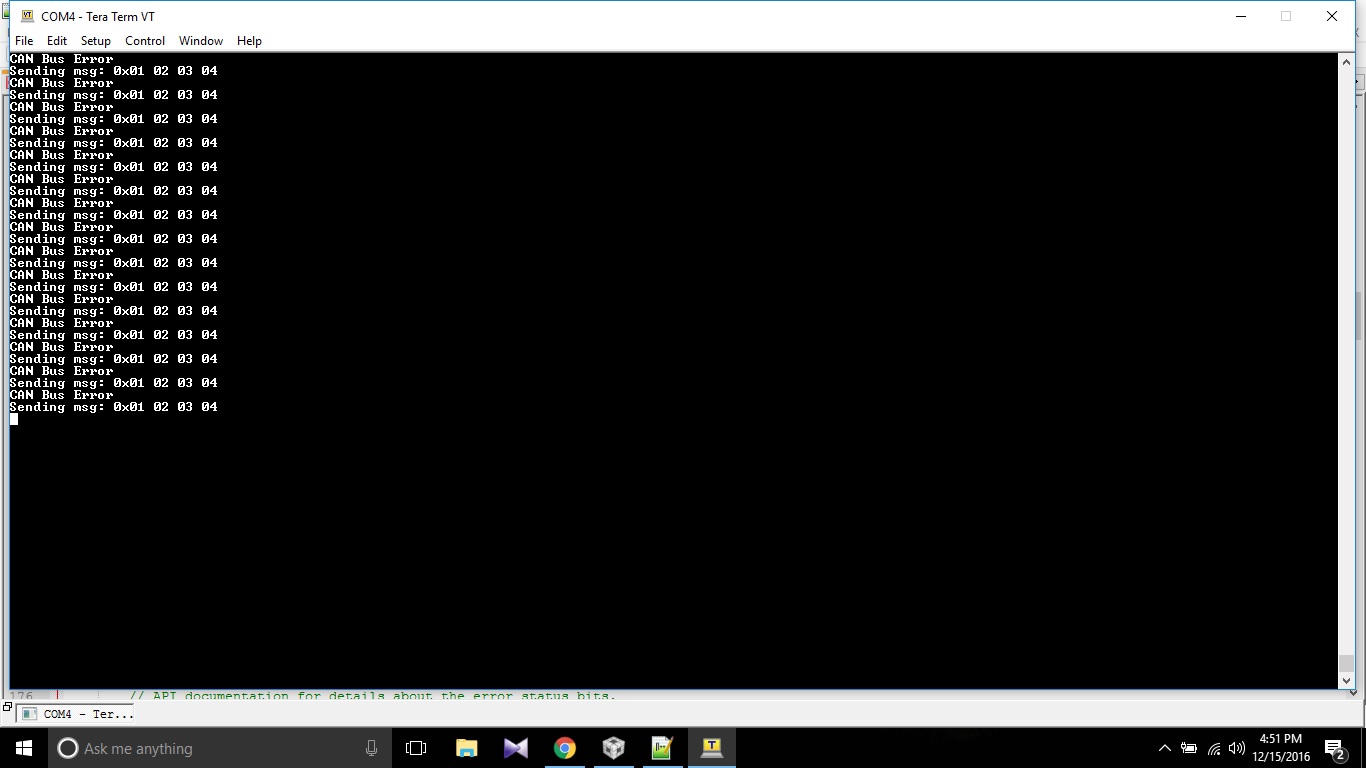
  • Hello Amit sir. We have made some progress. We are now able to print the message in the console on the transmitter side. We are now using CAN1 (PB0 and PB1) and UART0 (PA0 and PA1). But, the can error flag gets set in the while(1) loop and we also get the printed message on the console "Can bus Error" as per our code. So, we are still not able to transmit the message. We thought that the problem now must be in the ICs that we are using. So we replaced the MCP2551 ICs. But still we are getting the same error message in the console. Please look in to our codes let us know if we are making a mistake somewhere. I am also attaching a screenshot of our console that shows the error message. 

    #include <stdint.h>
    #include <stdbool.h>
    #include "inc/hw_memmap.h"
    #include "inc/hw_types.h"
    #include "inc/hw_can.h"
    #include "inc/hw_ints.h"
    #include "driverlib/can.h"
    #include "driverlib/interrupt.h"
    #include "driverlib/sysctl.h"
    #include "driverlib/gpio.h"
    #include "driverlib/uart.h"
    #include "driverlib/pin_map.h"
    #include "utils/uartstdio.h"
    
    
    volatile bool rxFlag = 0; // msg recieved flag
    volatile bool errFlag = 0; // error flag
    
    // CAN interrupt handler
    void CANIntHandler(void) {
    
    	unsigned long status = CANIntStatus(CAN1_BASE, CAN_INT_STS_CAUSE); // read interrupt status
    
    	if(status == CAN_INT_INTID_STATUS) { // controller status interrupt
    		status = CANStatusGet(CAN1_BASE, CAN_STS_CONTROL);
    		errFlag = 1;
    	} else if(status == 1) { // msg object 1
    		CANIntClear(CAN1_BASE, 1); // clear interrupt
    		rxFlag = 1; // set rx flag
    		errFlag = 0; // clear any error flags
    	} else { // should never happen
    		UARTprintf("Unexpected CAN bus interrupt\n");
    	}
    }
    
    int main(void) {
    
    	tCANMsgObject msg; // the CAN msg object
    	unsigned char msgData[8]; // 8 byte buffer for rx message data
    
    	// Run from crystal at 50Mhz
    	SysCtlClockSet(SYSCTL_SYSDIV_4 | SYSCTL_USE_PLL | SYSCTL_XTAL_16MHZ | SYSCTL_OSC_MAIN);
    
    	// Set up debugging UART
    	SysCtlPeripheralEnable(SYSCTL_PERIPH_GPIOA);
    	SysCtlPeripheralEnable(SYSCTL_PERIPH_UART0);
    	GPIOPinConfigure(GPIO_PA0_U0RX);
    	GPIOPinConfigure(GPIO_PA1_U0TX);
    	GPIOPinTypeUART(GPIO_PORTA_BASE, GPIO_PIN_0 | GPIO_PIN_1);
    	UARTStdioConfig(0, 115200, SysCtlClockGet());
    
    	// Set up CAN1
    	SysCtlPeripheralEnable(SYSCTL_PERIPH_GPIOB);
    	GPIOPinConfigure(GPIO_PB0_CAN1RX);
    	GPIOPinConfigure(GPIO_PB1_CAN1TX);
    	GPIOPinTypeCAN(GPIO_PORTB_BASE, GPIO_PIN_0 | GPIO_PIN_1);
    	SysCtlPeripheralEnable(SYSCTL_PERIPH_CAN1);
    	CANInit(CAN1_BASE);
    	CANBitRateSet(CAN1_BASE, SysCtlClockGet(), 500000);
    	CANIntRegister(CAN1_BASE, CANIntHandler); // use dynamic vector table allocation
    	CANIntEnable(CAN1_BASE, CAN_INT_MASTER | CAN_INT_ERROR | CAN_INT_STATUS);
    	IntEnable(INT_CAN1);
    	CANEnable(CAN1_BASE);


    	// Use ID and mask 0 to recieved messages with any CAN ID
    	msg.ui32MsgID = 0;
    	msg.ui32MsgIDMask = 0;
    	msg.ui32Flags = MSG_OBJ_RX_INT_ENABLE | MSG_OBJ_USE_ID_FILTER;
    	msg.ui32MsgLen = 8; // allow up to 8 bytes
    
    	// Load msg into CAN peripheral message object 1 so it can trigger interrupts on any matched rx messages
    	CANMessageSet(CAN1_BASE, 1, &msg, MSG_OBJ_TYPE_RX);
    
    	unsigned int rcvmsg[4];
    	
    
    	while(1) {
    
    		if(rxFlag) { // rx interrupt has occured
    
    			msg.pui8MsgData = msgData; // set pointer to rx buffer
    			CANMessageGet(CAN1_BASE, 1, &msg, 0); // read CAN message object 1 from CAN peripheral
    
    			rxFlag = 0; // clear rx flag
    
    			if(msg.ui32Flags & MSG_OBJ_DATA_LOST) { // check msg flags for any lost messages
    				UARTprintf("CAN message loss detected\n");
    			}
    
    			rcvmsg[0] = msgData[0] ;
    			rcvmsg[1] = msgData[1] ;
    			rcvmsg[2] = msgData[2] ;
    			rcvmsg[3] = msgData[3] ; 
    
    			// write to UART for debugging
    			UARTprintf("Received message 0x%02X %02X %02X %02X\n", msgData[0], msgData[1], msgData[2], msgData[3]);
    		}
    	}
    
    	return 0;
    }
    
    #include <stdbool.h>
    #include <stdint.h>
    #include "inc/hw_memmap.h"
    #include "inc/hw_types.h"
    #include "inc/hw_can.h"
    #include "inc/hw_ints.h"
    #include "driverlib/can.h"
    #include "driverlib/interrupt.h"
    #include "driverlib/sysctl.h"
    #include "driverlib/gpio.h"
    #include "driverlib/uart.h"
    #include "driverlib/pin_map.h"
    #include "utils/uartstdio.h"


    volatile bool errFlag = 0; // transmission error flag
    unsigned int sysClock; // clockspeed in hz
    
    void delay(unsigned int milliseconds) {
    	SysCtlDelay((sysClock / 3) * (milliseconds / 1000.0f));
    }
    
    // CAN interrupt handler
    void CANIntHandler(void) {
    
    	unsigned long status = CANIntStatus(CAN1_BASE, CAN_INT_STS_CAUSE); // read interrupt status
    
    	if(status == CAN_INT_INTID_STATUS) { // controller status interrupt
    		status = CANStatusGet(CAN1_BASE, CAN_STS_CONTROL); // read back error bits, do something with them?
    		errFlag = 1;
    	} else if(status == 1) { // message object 1
    		CANIntClear(CAN1_BASE, 1); // clear interrupt
    		errFlag = 0; // clear any error flags
    	} else { // should never happen
    		UARTprintf("Unexpected CAN bus interrupt\n");
    	}
    }
    
    int main(void) {
    
    	tCANMsgObject msg; // the CAN message object
    	unsigned int msgData; // the message data is four bytes long which we can allocate as an int32
    	unsigned char *msgDataPtr = (unsigned char *)&msgData; // make a pointer to msgData so we can access individual bytes
    
    	// Run from the PLL at 120 MHz.
    	sysClock = SysCtlClockFreqSet((SYSCTL_XTAL_25MHZ | SYSCTL_OSC_MAIN | SYSCTL_USE_PLL | SYSCTL_CFG_VCO_480), 120000000);
    
    	// Set up debugging UART
    	SysCtlPeripheralEnable(SYSCTL_PERIPH_GPIOA); // enable UART0 GPIO peripheral
    	SysCtlPeripheralEnable(SYSCTL_PERIPH_UART0);
    	GPIOPinConfigure(GPIO_PA0_U0RX);
    	GPIOPinConfigure(GPIO_PA1_U0TX);
    	GPIOPinTypeUART(GPIO_PORTA_BASE, GPIO_PIN_0 | GPIO_PIN_1);
    	UARTStdioConfig(0, 115200, sysClock); // 115200 baud
    
    	// Set up CAN1
    	SysCtlPeripheralEnable(SYSCTL_PERIPH_GPIOB); // enable CAN1 GPIO peripheral
    	GPIOPinConfigure(GPIO_PB0_CAN1RX);
    	GPIOPinConfigure(GPIO_PB1_CAN1TX);
    	GPIOPinTypeCAN(GPIO_PORTB_BASE, GPIO_PIN_0 | GPIO_PIN_1);
    	SysCtlPeripheralEnable(SYSCTL_PERIPH_CAN1);
    	CANInit(CAN1_BASE);
    	CANBitRateSet(CAN1_BASE, sysClock, 500000);
    	CANIntRegister(CAN1_BASE, CANIntHandler); // use dynamic vector table allocation
    	CANIntEnable(CAN1_BASE, CAN_INT_MASTER | CAN_INT_ERROR | CAN_INT_STATUS);
    	IntEnable(INT_CAN1);
    	CANEnable(CAN1_BASE);
    
    	// Set up msg object
    	msgData = 0;
    	msg.ui32MsgID = 1;
    	msg.ui32MsgIDMask = 0;
    	msg.ui32Flags = MSG_OBJ_TX_INT_ENABLE;
    	msg.ui32MsgLen = sizeof(msgDataPtr);
    	msg.pui8MsgData = msgDataPtr;


    	while(1) {
    
    
    		msgDataPtr[0] = 0x01;
    		msgDataPtr[1] = 0x02;
    		msgDataPtr[2] = 0x03;
    		msgDataPtr[3] = 0x04;
    
    		UARTprintf("Sending msg: 0x%02X %02X %02X %02X\n", msgDataPtr[0], msgDataPtr[1], msgDataPtr[2], msgDataPtr[3]); // write colour to UART for debugging
    		CANMessageSet(CAN1_BASE, 1, &msg, MSG_OBJ_TYPE_TX); // send as msg object 1
    
    		delay(1000); // wait 1000ms
    
    		if(errFlag) { // check for errors
    			UARTprintf("CAN Bus Error\n");
    		}
    
    	}
    
    	return 0;
    }


  • Hello Kunal,

    Can you check the variable "status" to see what is the Error?
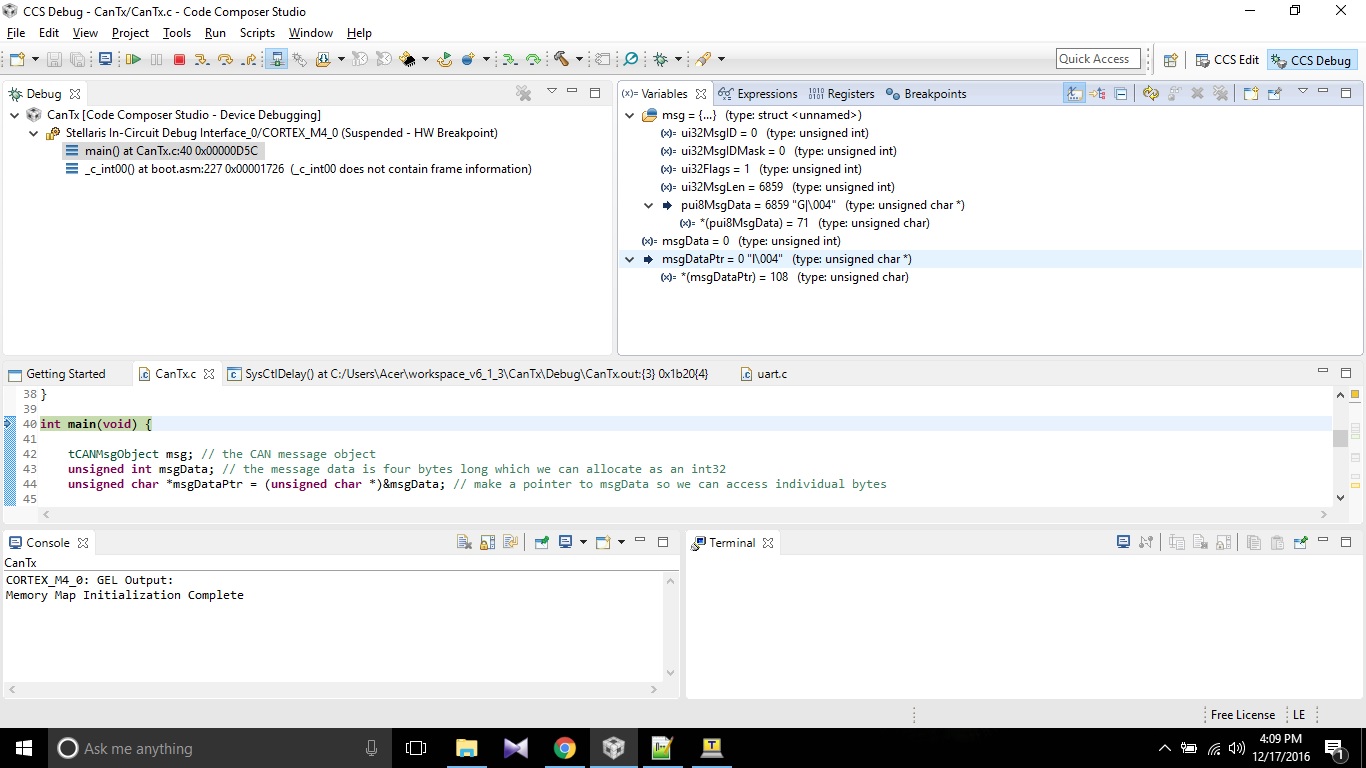
  • Hello Amit sir. I tried to check the status variable in debug mode of code composer studio. But it doesn't display the status variable in the list. I am attaching a screenshot of the CCS environment that shows the list of all variables. Moving further, I tried to look up for CAN_INT_INTID_STATUS because when the status variable is equal to this value(Line no. 29 in our code), the error flag is set. CAN_INT_INTID_STATUS is located in hw_can.h file and its value is equal to 0x00008000. So I think that the value of the status variable is 0x00008000. It is supposed to be 1 in order to transmit the message.  I am also attaching the screeshot of hw_can.h file.  CAN_INT_INTID_STATUS is at the line no. 153.

    Also would you please explain us by uploading a video of how to interface two boards using CAN bus protocol? That way, we might get to know what is the problem. 

  • Hello Kunal,

    Can you please provide the CCS projects for the CAN Rx and Tx so that I can reproduce the issue on my test board. Not just the files but the CCS projects. Please do note that I don't use the CAN transceiver that you have.
  • Hello Kunal

    Ignore my last message for a while. I think the issue is in the CAN Receiver side.

    You are using the wrong functions for the System Clock.

    SysCtlClockSet(SYSCTL_SYSDIV_4 | SYSCTL_USE_PLL | SYSCTL_XTAL_16MHZ | SYSCTL_OSC_MAIN);
    CANBitRateSet(CAN1_BASE, SysCtlClockGet(), 500000);

    SysCtlClockSet and SysCtlClockGet is for TM4C123x devices and not for TM4C129x devices....
  • Hello Amit Sir,
    I found these lines of code from the sample program of CAN given in TivaWare_C_series examples.
    So can we use this function for system clock?


    #if defined(TARGET_IS_TM4C129_RA0) || \
    defined(TARGET_IS_TM4C129_RA1) || \
    defined(TARGET_IS_TM4C129_RA2)
    uint32_t ui32SysClock;
    #endif

    tCANMsgObject sCANMessage;
    uint8_t pui8MsgData[8];


    #if defined(TARGET_IS_TM4C129_RA0) || \
    defined(TARGET_IS_TM4C129_RA1) || \
    defined(TARGET_IS_TM4C129_RA2)
    ui32SysClock = SysCtlClockFreqSet((SYSCTL_XTAL_25MHZ |
    SYSCTL_OSC_MAIN |
    SYSCTL_USE_OSC)
    25000000);
    #else
    SysCtlClockSet(SYSCTL_SYSDIV_1 | SYSCTL_USE_OSC | SYSCTL_OSC_MAIN |
    SYSCTL_XTAL_16MHZ);
    #endif

    Thank you,

    Dhruvil
  • Hello Amit sir. We used the code lines from simple_rx.c file for the clock. Since it contains if else statements according to the target board, we thought that it can solve our problem. But still, we are getting the same message at the console printing "CAN bus Error" on the Tx side and nothing at the console on the Rx side.  

    /*
     * CAN bus LED controller slave firmware
     *
     */
    
    #include <stdint.h>
    #include <stdbool.h>
    #include "inc/hw_memmap.h"
    #include "inc/hw_types.h"
    #include "inc/hw_can.h"
    #include "inc/hw_ints.h"
    #include "driverlib/can.h"
    #include "driverlib/interrupt.h"
    #include "driverlib/sysctl.h"
    #include "driverlib/gpio.h"
    #include "driverlib/uart.h"
    #include "driverlib/pin_map.h"
    #include "utils/uartstdio.h"
    
    
    volatile bool rxFlag = 0; // msg recieved flag
    volatile bool errFlag = 0; // error flag
    
    // CAN interrupt handler
    void CANIntHandler(void) {
    
    	unsigned long status = CANIntStatus(CAN1_BASE, CAN_INT_STS_CAUSE); // read interrupt status
    
    	if(status == CAN_INT_INTID_STATUS) { // controller status interrupt
    		status = CANStatusGet(CAN1_BASE, CAN_STS_CONTROL);
    		errFlag = 1;
    	} else if(status == 1) { // msg object 1
    		CANIntClear(CAN1_BASE, 1); // clear interrupt
    		rxFlag = 1; // set rx flag
    		errFlag = 0; // clear any error flags
    	} else { // should never happen
    		UARTprintf("Unexpected CAN bus interrupt\n");
    	}
    }
    
    int main(void) {
    
    	tCANMsgObject msg; // the CAN msg object
    	unsigned char msgData[8]; // 8 byte buffer for rx message data
    
    	// Run from crystal at 50Mhz
    	//SysCtlClockSet(SYSCTL_SYSDIV_4 | SYSCTL_USE_PLL | SYSCTL_XTAL_16MHZ | SYSCTL_OSC_MAIN);
    	#if defined(TARGET_IS_TM4C129_RA0) ||                                         \
    		defined(TARGET_IS_TM4C129_RA1) ||                                         \
    		defined(TARGET_IS_TM4C129_RA2)
    		uint32_t ui32SysClock;
    	#endif


    		//
    		// Set the clocking to run directly from the external crystal/oscillator.
    		// TODO: The SYSCTL_XTAL_ value must be changed to match the value of the
    		// crystal used on your board.
    		//
    	#if defined(TARGET_IS_TM4C129_RA0) ||                                         \
    		defined(TARGET_IS_TM4C129_RA1) ||                                         \
    		defined(TARGET_IS_TM4C129_RA2)
    		ui32SysClock = SysCtlClockFreqSet((SYSCTL_XTAL_25MHZ |
    										   SYSCTL_OSC_MAIN |
    										   SYSCTL_USE_OSC)
    										   25000000);
    	#else
    		SysCtlClockSet(SYSCTL_SYSDIV_1 | SYSCTL_USE_OSC | SYSCTL_OSC_MAIN |
    					   SYSCTL_XTAL_16MHZ);
    	#endif
    
    
    	// Set up debugging UART
    	SysCtlPeripheralEnable(SYSCTL_PERIPH_GPIOA);
    	SysCtlPeripheralEnable(SYSCTL_PERIPH_UART0);
    	GPIOPinConfigure(GPIO_PA0_U0RX);
    	GPIOPinConfigure(GPIO_PA1_U0TX);
    	GPIOPinTypeUART(GPIO_PORTA_BASE, GPIO_PIN_0 | GPIO_PIN_1);
    	UARTStdioConfig(0, 115200, SysCtlClockGet());
    
    	// Set up CAN1
    	SysCtlPeripheralEnable(SYSCTL_PERIPH_GPIOB);
    	GPIOPinConfigure(GPIO_PB0_CAN1RX);
    	GPIOPinConfigure(GPIO_PB1_CAN1TX);
    	GPIOPinTypeCAN(GPIO_PORTB_BASE, GPIO_PIN_0 | GPIO_PIN_1);
    	SysCtlPeripheralEnable(SYSCTL_PERIPH_CAN1);
    	CANInit(CAN1_BASE);
    	//CANBitRateSet(CAN1_BASE, SysCtlClockGet(), 500000);
    
    	#if defined(TARGET_IS_TM4C129_RA0) ||                                         \
    		defined(TARGET_IS_TM4C129_RA1) ||                                         \
    		defined(TARGET_IS_TM4C129_RA2)
    		CANBitRateSet(CAN1_BASE, ui32SysClock, 500000);
    	#else
    		CANBitRateSet(CAN1_BASE, SysCtlClockGet(), 500000);
    	#endif
    
    	CANIntRegister(CAN1_BASE, CANIntHandler); // use dynamic vector table allocation
    	CANIntEnable(CAN1_BASE, CAN_INT_MASTER | CAN_INT_ERROR | CAN_INT_STATUS);
    	IntEnable(INT_CAN1);
    	CANEnable(CAN1_BASE);


    	// Use ID and mask 0 to recieved messages with any CAN ID
    	msg.ui32MsgID = 0;
    	msg.ui32MsgIDMask = 0;
    	msg.ui32Flags = MSG_OBJ_RX_INT_ENABLE | MSG_OBJ_USE_ID_FILTER;
    	msg.ui32MsgLen = 8; // allow up to 8 bytes
    
    	// Load msg into CAN peripheral message object 1 so it can trigger interrupts on any matched rx messages
    	CANMessageSet(CAN1_BASE, 1, &msg, MSG_OBJ_TYPE_RX);
    
    	//unsigned int rcvmsg[4];
    	
    
    	while(1) {
    
    		if(rxFlag) { // rx interrupt has occured
    
    			msg.pui8MsgData = msgData; // set pointer to rx buffer
    			CANMessageGet(CAN1_BASE, 1, &msg, 0); // read CAN message object 1 from CAN peripheral
    
    			rxFlag = 0; // clear rx flag
    
    			if(msg.ui32Flags & MSG_OBJ_DATA_LOST) { // check msg flags for any lost messages
    				UARTprintf("CAN message loss detected\n");
    			}
    
    			// read in rcvmsg data from rx buffer (scale from 0-255 to 0-0xFFFF for LED driver)
    		/*	rcvmsg[0] = msgData[0] ;
    			rcvmsg[1] = msgData[1] ;
    			rcvmsg[2] = msgData[2] ;
    			rcvmsg[3] = msgData[3] ;	*/
    
    			// write to UART for debugging
    			UARTprintf("Received message\t %d\t %d\t %d\t %d\n", msgData[0], msgData[1], msgData[2], msgData[3]);
    		}
    	}
    
    	return 0;
    }
    

  • Hello Kunal

    And what is the define set to as during compilation option?
  • Sir, we don't understand what you are asking for. Can you be more specific about what you were asking?
  • Hello Amit sir,

    We have used On board LED to check whether the transmitted data is received properly or not.

    As shown in attached file , our program does not execute the 'if loop'.

    That means ' g_bRXFlag ' has to be set , but in this case it does not set. Therefore at receiver side the On-Board LED doesn't TURN ON and hence the transmitted message is not received.

    //*****************************************************************************
    //
    // simple_rx.c - Example demonstrating simple CAN message reception.
    //
    // Copyright (c) 2010-2015 Texas Instruments Incorporated.  All rights reserved.
    // Software License Agreement
    //
    //   Redistribution and use in source and binary forms, with or without
    //   modification, are permitted provided that the following conditions
    //   are met:
    //
    //   Redistributions of source code must retain the above copyright
    //   notice, this list of conditions and the following disclaimer.
    //
    //   Redistributions in binary form must reproduce the above copyright
    //   notice, this list of conditions and the following disclaimer in the
    //   documentation and/or other materials provided with the
    //   distribution.
    //
    //   Neither the name of Texas Instruments Incorporated nor the names of
    //   its contributors may be used to endorse or promote products derived
    //   from this software without specific prior written permission.
    //
    // THIS SOFTWARE IS PROVIDED BY THE COPYRIGHT HOLDERS AND CONTRIBUTORS
    // "AS IS" AND ANY EXPRESS OR IMPLIED WARRANTIES, INCLUDING, BUT NOT
    // LIMITED TO, THE IMPLIED WARRANTIES OF MERCHANTABILITY AND FITNESS FOR
    // A PARTICULAR PURPOSE ARE DISCLAIMED. IN NO EVENT SHALL THE COPYRIGHT
    // OWNER OR CONTRIBUTORS BE LIABLE FOR ANY DIRECT, INDIRECT, INCIDENTAL,
    // SPECIAL, EXEMPLARY, OR CONSEQUENTIAL DAMAGES (INCLUDING, BUT NOT
    // LIMITED TO, PROCUREMENT OF SUBSTITUTE GOODS OR SERVICES; LOSS OF USE,
    // DATA, OR PROFITS; OR BUSINESS INTERRUPTION) HOWEVER CAUSED AND ON ANY
    // THEORY OF LIABILITY, WHETHER IN CONTRACT, STRICT LIABILITY, OR TORT
    // (INCLUDING NEGLIGENCE OR OTHERWISE) ARISING IN ANY WAY OUT OF THE USE
    // OF THIS SOFTWARE, EVEN IF ADVISED OF THE POSSIBILITY OF SUCH DAMAGE.
    //
    // This is part of revision 2.1.2.111 of the Tiva Firmware Development Package.
    //
    //*****************************************************************************
    
    #include <stdbool.h>
    #include <stdint.h>
    #include "inc/hw_can.h"
    #include "inc/hw_ints.h"
    #include "inc/hw_memmap.h"
    #include "inc/hw_types.h"
    #include "driverlib/can.h"
    #include "driverlib/gpio.h"
    #include "driverlib/interrupt.h"
    #include "driverlib/pin_map.h"
    #include "driverlib/sysctl.h"
    #include "driverlib/uart.h"
    #include "utils/uartstdio.h"
    
    //*****************************************************************************
    //
    //! \addtogroup can_examples_list
    //! <h1>Simple CAN RX (simple_rx)</h1>
    //!
    //! This example shows the basic setup of CAN in order to receive messages
    //! from the CAN bus.  The CAN peripheral is configured to receive messages
    //! with any CAN ID and then print the message contents to the console.
    //!
    //! This example uses the following peripherals and I/O signals.  You must
    //! review these and change as needed for your own board:
    //! - CAN0 peripheral
    //! - GPIO port B peripheral (for CAN0 pins)
    //! - CAN0RX - PB4
    //! - CAN0TX - PB5
    //!
    //! The following UART signals are configured only for displaying console
    //! messages for this example.  These are not required for operation of CAN.
    //! - GPIO port A peripheral (for UART0 pins)
    //! - UART0RX - PA0
    //! - UART0TX - PA1
    //!
    //! This example uses the following interrupt handlers.  To use this example
    //! in your own application you must add these interrupt handlers to your
    //! vector table.
    //! - INT_CAN0 - CANIntHandler
    //
    //*****************************************************************************
    
    //*****************************************************************************
    //
    // A counter that keeps track of the number of times the RX interrupt has
    // occurred, which should match the number of messages that were received.
    //
    //*****************************************************************************
    volatile uint32_t g_ui32MsgCount = 0;
    
    //*****************************************************************************
    //
    // A flag for the interrupt handler to indicate that a message was received.
    //
    //*****************************************************************************
    volatile bool g_bRXFlag = 0;
    
    //*****************************************************************************
    //
    // A flag to indicate that some reception error occurred.
    //
    //*****************************************************************************
    volatile bool g_bErrFlag = 0;
    
    //*****************************************************************************
    //
    // This function sets up UART0 to be used for a console to display information
    // as the example is running.
    //
    //*****************************************************************************
    void
    InitConsole(void)
    {
        //
        // Enable GPIO port A which is used for UART0 pins.
        // TODO: change this to whichever GPIO port you are using.
        //
        SysCtlPeripheralEnable(SYSCTL_PERIPH_GPIOA);
    
        //
        // Configure the pin muxing for UART0 functions on port A0 and A1.
        // This step is not necessary if your part does not support pin muxing.
        // TODO: change this to select the port/pin you are using.
        //
        GPIOPinConfigure(GPIO_PA0_U0RX);
        GPIOPinConfigure(GPIO_PA1_U0TX);
    
        //
        // Enable UART0 so that we can configure the clock.
        //
        SysCtlPeripheralEnable(SYSCTL_PERIPH_UART0);
    
        //
        // Use the internal 16MHz oscillator as the UART clock source.
        //
        UARTClockSourceSet(UART0_BASE, UART_CLOCK_PIOSC);
    
        //
        // Select the alternate (UART) function for these pins.
        // TODO: change this to select the port/pin you are using.
        //
        GPIOPinTypeUART(GPIO_PORTA_BASE, GPIO_PIN_0 | GPIO_PIN_1);
    
        //
        // Initialize the UART for console I/O.
        //
        UARTStdioConfig(0, 115200, 16000000);
    }
    
    //*****************************************************************************
    //
    // This function is the interrupt handler for the CAN peripheral.  It checks
    // for the cause of the interrupt, and maintains a count of all messages that
    // have been received.
    //
    //*****************************************************************************
    void
    CANIntHandler(void)
    {
        uint32_t ui32Status;
    
        //
        // Read the CAN interrupt status to find the cause of the interrupt
        //
        ui32Status = CANIntStatus(CAN0_BASE, CAN_INT_STS_CAUSE);
    
        //
        // If the cause is a controller status interrupt, then get the status
        //
        if(ui32Status == CAN_INT_INTID_STATUS)
        {
            //
            // Read the controller status.  This will return a field of status
            // error bits that can indicate various errors.  Error processing
            // is not done in this example for simplicity.  Refer to the
            // API documentation for details about the error status bits.
            // The act of reading this status will clear the interrupt.
            //
            ui32Status = CANStatusGet(CAN0_BASE, CAN_STS_CONTROL);
    
            //
            // Set a flag to indicate some errors may have occurred.
            //
            g_bErrFlag = 1;
        }
    
        //
        // Check if the cause is message object 1, which what we are using for
        // receiving messages.
        //
        else if(ui32Status == 1)
        {
            //
            // Getting to this point means that the RX interrupt occurred on
            // message object 1, and the message reception is complete.  Clear the
            // message object interrupt.
            //
            CANIntClear(CAN0_BASE, 1);
    
            //
            // Increment a counter to keep track of how many messages have been
            // received.  In a real application this could be used to set flags to
            // indicate when a message is received.
            //
            g_ui32MsgCount++;
    
            //
            // Set flag to indicate received message is pending.
            //
            g_bRXFlag = 1;
            //GPIOPinWrite(GPIO_PORTN_BASE, GPIO_PIN_0, GPIO_PIN_0);
            //
            // Since a message was received, clear any error flags.
            //
            g_bErrFlag = 0;
        }
    
        //
        // Otherwise, something unexpected caused the interrupt.  This should
        // never happen.
        //
        else
        {
            //
            // Spurious interrupt handling can go here.
            //
        }
    }
    
    //*****************************************************************************
    //
    // Configure the CAN and enter a loop to receive CAN messages.
    //
    //*****************************************************************************
    int
    main(void)
    {
    #if defined(TARGET_IS_TM4C129_RA0) ||                                         \
        defined(TARGET_IS_TM4C129_RA1) ||                                         \
        defined(TARGET_IS_TM4C129_RA2)
        uint32_t ui32SysClock;
    #endif
    
        tCANMsgObject sCANMessage;
        uint8_t pui8MsgData[8];
    
        //
        // Set the clocking to run directly from the external crystal/oscillator.
        // TODO: The SYSCTL_XTAL_ value must be changed to match the value of the
        // crystal used on your board.
        //
    	#if defined(TARGET_IS_TM4C129_RA0) ||                                         \
    		defined(TARGET_IS_TM4C129_RA1) ||                                         \
    		defined(TARGET_IS_TM4C129_RA2)
    		ui32SysClock = SysCtlClockFreqSet((SYSCTL_XTAL_25MHZ |
    										   SYSCTL_OSC_MAIN |
    										   SYSCTL_USE_OSC)
    										   25000000);
    	#else
    		SysCtlClockSet(SYSCTL_SYSDIV_1 | SYSCTL_USE_OSC | SYSCTL_OSC_MAIN |
    					   SYSCTL_XTAL_16MHZ);
    	#endif
    
        SysCtlPeripheralEnable(SYSCTL_PERIPH_GPION);
    
           //
           // Check if the peripheral access is enabled.
           //
           while(!SysCtlPeripheralReady(SYSCTL_PERIPH_GPION))
           {
           }
    
           //
           // Enable the GPIO pin for the LED (PN0).  Set the direction as output, and
           // enable the GPIO pin for digital function.
           //
           GPIOPinTypeGPIOOutput(GPIO_PORTN_BASE, GPIO_PIN_0);
           //GPIOPinWrite(GPIO_PORTN_BASE, GPIO_PIN_0, GPIO_PIN_0);
        //
        // Set up the serial console to use for displaying messages.  This is
        // just for this example program and is not needed for CAN operation.
        //
        InitConsole();
    
        //
        // For this example CAN0 is used with RX and TX pins on port B4 and B5.
        // The actual port and pins used may be different on your part, consult
        // the data sheet for more information.
        // GPIO port B needs to be enabled so these pins can be used.
        // TODO: change this to whichever GPIO port you are using
        //
        SysCtlPeripheralEnable(SYSCTL_PERIPH_GPIOB);
    
        //
        // Configure the GPIO pin muxing to select CAN0 functions for these pins.
        // This step selects which alternate function is available for these pins.
        // This is necessary if your part supports GPIO pin function muxing.
        // Consult the data sheet to see which functions are allocated per pin.
        // TODO: change this to select the port/pin you are using
        //
        GPIOPinConfigure(GPIO_PB0_CAN1RX);
        GPIOPinConfigure(GPIO_PB1_CAN1TX);
    
        //
        // Enable the alternate function on the GPIO pins.  The above step selects
        // which alternate function is available.  This step actually enables the
        // alternate function instead of GPIO for these pins.
        // TODO: change this to match the port/pin you are using
        //
        GPIOPinTypeCAN(GPIO_PORTB_BASE, GPIO_PIN_0 | GPIO_PIN_1);
    
        //
        // The GPIO port and pins have been set up for CAN.  The CAN peripheral
        // must be enabled.
        //
        SysCtlPeripheralEnable(SYSCTL_PERIPH_CAN1);
    
        //
        // Initialize the CAN controller
        //
        CANInit(CAN1_BASE);
    
        //
        // Set up the bit rate for the CAN bus.  This function sets up the CAN
        // bus timing for a nominal configuration.  You can achieve more control
        // over the CAN bus timing by using the function CANBitTimingSet() instead
        // of this one, if needed.
        // In this example, the CAN bus is set to 500 kHz.  In the function below,
        // the call to SysCtlClockGet() or ui32SysClock is used to determine the
        // clock rate that is used for clocking the CAN peripheral.  This can be
        // replaced with a  fixed value if you know the value of the system clock,
        // saving the extra function call.  For some parts, the CAN peripheral is
        // clocked by a fixed 8 MHz regardless of the system clock in which case
        // the call to SysCtlClockGet() or ui32SysClock should be replaced with
        // 8000000.  Consult the data sheet for more information about CAN
        // peripheral clocking.
        //
    #if defined(TARGET_IS_TM4C129_RA0) ||                                         \
        defined(TARGET_IS_TM4C129_RA1) ||                                         \
        defined(TARGET_IS_TM4C129_RA2)
        CANBitRateSet(CAN1_BASE, ui32SysClock, 500000);
    #else
        CANBitRateSet(CAN1_BASE, SysCtlClockGet(), 500000);
    #endif
    
        //
        // Enable interrupts on the CAN peripheral.  This example uses static
        // allocation of interrupt handlers which means the name of the handler
        // is in the vector table of startup code.  If you want to use dynamic
        // allocation of the vector table, then you must also call CANIntRegister()
        // here.
        //
        CANIntRegister(CAN1_BASE, CANIntHandler); // if using dynamic vectors
        //
        CANIntEnable(CAN1_BASE, CAN_INT_MASTER | CAN_INT_ERROR | CAN_INT_STATUS);
    
        //
        // Enable the CAN interrupt on the processor (NVIC).
        //
        IntEnable(INT_CAN1);
    
        //
        // Enable the CAN for operation.
        //
        CANEnable(CAN1_BASE);
    
        //
        // Initialize a message object to be used for receiving CAN messages with
        // any CAN ID.  In order to receive any CAN ID, the ID and mask must both
        // be set to 0, and the ID filter enabled.
        //
        sCANMessage.ui32MsgID = 0;
        sCANMessage.ui32MsgIDMask = 0;
        sCANMessage.ui32Flags = MSG_OBJ_RX_INT_ENABLE | MSG_OBJ_USE_ID_FILTER;
        sCANMessage.ui32MsgLen = 8;
    
        //
        // Now load the message object into the CAN peripheral.  Once loaded the
        // CAN will receive any message on the bus, and an interrupt will occur.
        // Use message object 1 for receiving messages (this is not the same as
        // the CAN ID which can be any value in this example).
        //
        CANMessageSet(CAN1_BASE, 1, &sCANMessage, MSG_OBJ_TYPE_RX);
    
        //
        // Enter loop to process received messages.  This loop just checks a flag
        // that is set by the interrupt handler, and if set it reads out the
        // message and displays the contents.  This is not a robust method for
        // processing incoming CAN data and can only handle one messages at a time.
        // If many messages are being received close together, then some messages
        // may be dropped.  In a real application, some other method should be used
        // for queuing received messages in a way to ensure they are not lost.  You
        // can also make use of CAN FIFO mode which will allow messages to be
        // buffered before they are processed.
        //
        for(;;)
        {
            unsigned int uIdx;
            //GPIOPinWrite(GPIO_PORTN_BASE, GPIO_PIN_0, GPIO_PIN_0);
            //
            // If the flag is set, that means that the RX interrupt occurred and
            // there is a message ready to be read from the CAN
            //
            if(g_bRXFlag)
            {
                //
                // Reuse the same message object that was used earlier to configure
                // the CAN for receiving messages.  A buffer for storing the
                // received data must also be provided, so set the buffer pointer
                // within the message object.
            	GPIOPinWrite(GPIO_PORTN_BASE, GPIO_PIN_0, GPIO_PIN_0);
                sCANMessage.pui8MsgData = pui8MsgData;
    
                //
                // Read the message from the CAN.  Message object number 1 is used
                // (which is not the same thing as CAN ID).  The interrupt clearing
                // flag is not set because this interrupt was already cleared in
                // the interrupt handler.
                //
                CANMessageGet(CAN1_BASE, 1, &sCANMessage, 0);
    
                //
                // Clear the pending message flag so that the interrupt handler can
                // set it again when the next message arrives.
                //
                g_bRXFlag = 0;
    
                //
                // Check to see if there is an indication that some messages were
                // lost.
                //
                if(sCANMessage.ui32Flags & MSG_OBJ_DATA_LOST)
                {
                    UARTprintf("CAN message loss detected\n");
                }
    
                //
                // Print out the contents of the message that was received.
    
                GPIOPinWrite(GPIO_PORTN_BASE, GPIO_PIN_0, GPIO_PIN_0);
                UARTprintf("Msg ID=0x%08X len=%u data=0x",
                           sCANMessage.ui32MsgID, sCANMessage.ui32MsgLen);
                for(uIdx = 0; uIdx < sCANMessage.ui32MsgLen; uIdx++)
                {
                    UARTprintf("%02X ", pui8MsgData[uIdx]);
                }
                UARTprintf("total count=%u\n", g_ui32MsgCount);
            }
        }
    
        //
        // Return no errors
        //
        //return(0);
    }
    

  • Hello Dhruvil,

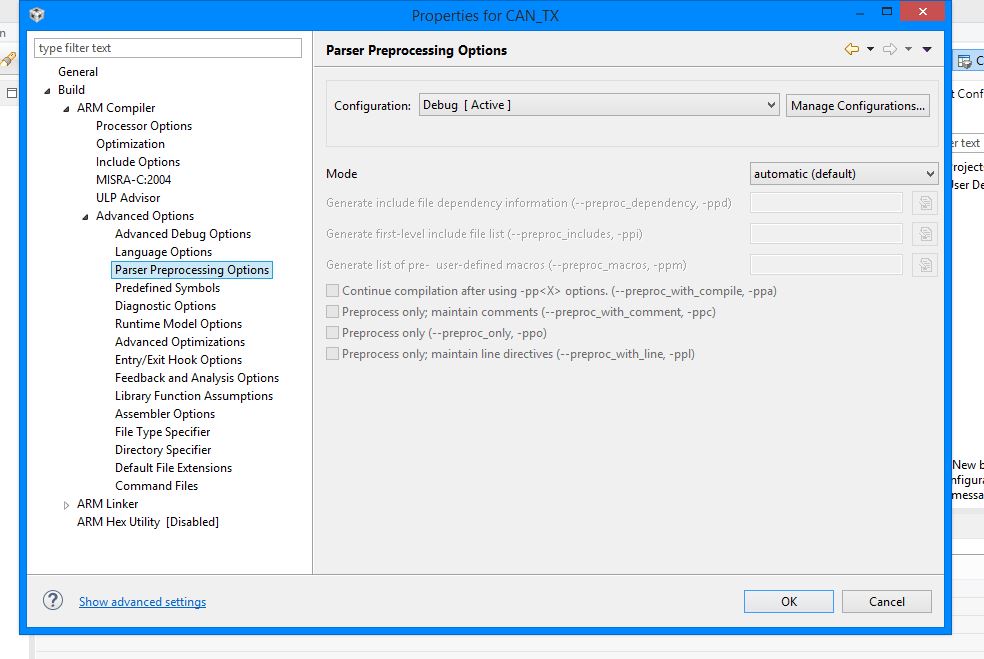
    I mean what is the define TARGET_IS_TM4C129_RAx (X being 0, 1 or 2) being set in the project properties?
  • Hello Amit sir,

    This is for TX code :

     #if defined(TARGET_IS_TM4C129_RA0) ||                                         \

       defined(TARGET_IS_TM4C129_RA1) ||                                         \

       defined(TARGET_IS_TM4C129_RA2)

       uint32_t ui32SysClock;

    #endif

    //*****************************************************************************
    //
    // simple_tx.c - Example demonstrating simple CAN message transmission.
    //
    // Copyright (c) 2010-2015 Texas Instruments Incorporated.  All rights reserved.
    // Software License Agreement
    //
    //   Redistribution and use in source and binary forms, with or without
    //   modification, are permitted provided that the following conditions
    //   are met:
    //
    //   Redistributions of source code must retain the above copyright
    //   notice, this list of conditions and the following disclaimer.
    //
    //   Redistributions in binary form must reproduce the above copyright
    //   notice, this list of conditions and the following disclaimer in the
    //   documentation and/or other materials provided with the
    //   distribution.
    //
    //   Neither the name of Texas Instruments Incorporated nor the names of
    //   its contributors may be used to endorse or promote products derived
    //   from this software without specific prior written permission.
    //
    // THIS SOFTWARE IS PROVIDED BY THE COPYRIGHT HOLDERS AND CONTRIBUTORS
    // "AS IS" AND ANY EXPRESS OR IMPLIED WARRANTIES, INCLUDING, BUT NOT
    // LIMITED TO, THE IMPLIED WARRANTIES OF MERCHANTABILITY AND FITNESS FOR
    // A PARTICULAR PURPOSE ARE DISCLAIMED. IN NO EVENT SHALL THE COPYRIGHT
    // OWNER OR CONTRIBUTORS BE LIABLE FOR ANY DIRECT, INDIRECT, INCIDENTAL,
    // SPECIAL, EXEMPLARY, OR CONSEQUENTIAL DAMAGES (INCLUDING, BUT NOT
    // LIMITED TO, PROCUREMENT OF SUBSTITUTE GOODS OR SERVICES; LOSS OF USE,
    // DATA, OR PROFITS; OR BUSINESS INTERRUPTION) HOWEVER CAUSED AND ON ANY
    // THEORY OF LIABILITY, WHETHER IN CONTRACT, STRICT LIABILITY, OR TORT
    // (INCLUDING NEGLIGENCE OR OTHERWISE) ARISING IN ANY WAY OUT OF THE USE
    // OF THIS SOFTWARE, EVEN IF ADVISED OF THE POSSIBILITY OF SUCH DAMAGE.
    //
    // This is part of revision 2.1.2.111 of the Tiva Firmware Development Package.
    //
    //*****************************************************************************
    
    #include <stdbool.h>
    #include <stdint.h>
    #include "inc/hw_can.h"
    #include "inc/hw_ints.h"
    #include "inc/hw_memmap.h"
    #include "driverlib/can.h"
    #include "driverlib/gpio.h"
    #include "driverlib/interrupt.h"
    #include "driverlib/pin_map.h"
    #include "driverlib/sysctl.h"
    #include "driverlib/uart.h"
    #include "utils/uartstdio.h"
    
    //*****************************************************************************
    //
    //! \addtogroup can_examples_list
    //! <h1>Simple CAN TX (simple_tx)</h1>
    //!
    //! This example shows the basic setup of CAN in order to transmit messages
    //! on the CAN bus.  The CAN peripheral is configured to transmit messages
    //! with a specific CAN ID.  A message is then transmitted once per second,
    //! using a simple delay loop for timing.  The message that is sent is a 4
    //! byte message that contains an incrementing pattern.  A CAN interrupt
    //! handler is used to confirm message transmission and count the number of
    //! messages that have been sent.
    //!
    //! This example uses the following peripherals and I/O signals.  You must
    //! review these and change as needed for your own board:
    //! - CAN1 peripheral
    //! - GPIO Port B peripheral (for CAN1 pins)
    //! - CAN1RX - PB4
    //! - CAN1TX - PB5
    //!
    //! The following UART signals are configured only for displaying console
    //! messages for this example.  These are not required for operation of CAN.
    //! - GPIO port A peripheral (for UART0 pins)
    //! - UART0RX - PA0
    //! - UART0TX - PA1
    //!
    //! This example uses the following interrupt handlers.  To use this example
    //! in your own application you must add these interrupt handlers to your
    //! vector table.
    //! - INT_CAN1 - CANIntHandler
    //
    //*****************************************************************************
    
    //*****************************************************************************
    //
    // A counter that keeps track of the number of times the TX interrupt has
    // occurred, which should match the number of TX messages that were sent.
    //
    //*****************************************************************************
    volatile uint32_t g_ui32MsgCount = 0;
    
    //*****************************************************************************
    //
    // A flag to indicate that some transmission error occurred.
    //
    //*****************************************************************************
    volatile bool g_bErrFlag = 0;
    
    //*****************************************************************************
    //
    // This function sets up UART0 to be used for a console to display information
    // as the example is running.
    //
    //*****************************************************************************
    void
    InitConsole(void)
    
    {
        //
        // Enable GPIO port A which is used for UART0 pins.
        //TODO: change this to whichever GPIO port you are using.
        //
        SysCtlPeripheralEnable(SYSCTL_PERIPH_GPIOA);
    
        //
        // Configure the pin muxing for UART0 functions on port A0 and A1.
        // This step is not necessary if your part does not support pin muxing.
        // TODO: change this to select the port/pin you are using.
        //
        GPIOPinConfigure(GPIO_PA0_U0RX);
        GPIOPinConfigure(GPIO_PA1_U0TX);
    
        //
        // Enable UART0 so that we can configure the clock.
        //
        SysCtlPeripheralEnable(SYSCTL_PERIPH_UART0);
    
        //
        // Use the internal 16MHz oscillator as the UART clock source.
        //
        UARTClockSourceSet(UART0_BASE, UART_CLOCK_PIOSC);
    
        //
        // Select the alternate (UART) function for these pins.
        // TODO: change this to select the port/pin you are using.
        //
        GPIOPinTypeUART(GPIO_PORTA_BASE, GPIO_PIN_0 | GPIO_PIN_1);
    
        //
        // Initialize the UART for console I/O.
        //
        UARTStdioConfig(0, 115200, 16000000);
    }
    
    //*****************************************************************************
    //
    // This function provides a 1 second delay using a simple polling method.
    //
    //*****************************************************************************
    void
    SimpleDelay(void)
    {
        //
        // Delay cycles for 1 second
        //
        SysCtlDelay(16000000 / 3);
    }
    
    //*****************************************************************************
    //
    // This function is the interrupt handler for the CAN peripheral.  It checks
    // for the cause of the interrupt, and maintains a count of all messages that
    // have been transmitted.
    //
    //*****************************************************************************
    void
    CANIntHandler(void)
    {
        uint32_t ui32Status;
    
        //
        // Read the CAN interrupt status to find the cause of the interrupt
        //
        ui32Status = CANIntStatus(CAN1_BASE, CAN_INT_STS_CAUSE);
    
        //
        // If the cause is a controller status interrupt, then get the status
        //
        if(ui32Status == CAN_INT_INTID_STATUS)
        {
            //
            // Read the controller status.  This will return a field of status
            // error bits that can indicate various errors.  Error processing
            // is not done in this example for simplicity.  Refer to the
            // API documentation for details about the error status bits.
            // The act of reading this status will clear the interrupt.  If the
            // CAN peripheral is not connected to a CAN bus with other CAN devices
            // present, then errors will occur and will be indicated in the
            // controller status.
            //
            ui32Status = CANStatusGet(CAN1_BASE, CAN_STS_CONTROL);
    
            //
            // Set a flag to indicate some errors may have occurred.
            //
            g_bErrFlag = 1;
        }
    
        //
        // Check if the cause is message object 1, which what we are using for
        // sending messages.
        //
        else if(ui32Status == 1)
        {
            //
            // Getting to this point means that the TX interrupt occurred on
            // message object 1, and the message TX is complete.  Clear the
            // message object interrupt.
            //
            CANIntClear(CAN1_BASE, 1);
    
            //
            // Increment a counter to keep track of how many messages have been
            // sent.  In a real application this could be used to set flags to
            // indicate when a message is sent.
            //
            g_ui32MsgCount++;
    
            //
            // Since the message was sent, clear any error flags.
            //
            g_bErrFlag = 0;
        }
    
        //
        // Otherwise, something unexpected caused the interrupt.  This should
        // never happen.
        //
        else
        {
            //
            // Spurious interrupt handling can go here.
            //
        }
    }
    //*****************************************************************************
    //
    // Configure the CAN and enter a loop to transmit periodic CAN messages.
    //
    //*****************************************************************************
    int
    main(void)
    {
    #if defined(TARGET_IS_TM4C129_RA0) ||                                         \
        defined(TARGET_IS_TM4C129_RA1) ||                                         \
        defined(TARGET_IS_TM4C129_RA2)
        uint32_t ui32SysClock;
    #endif
    
        tCANMsgObject sCANMessage;
        uint32_t ui32MsgData;
    
        uint8_t *pui8MsgData;
    
        pui8MsgData = (uint8_t *)&ui32MsgData;
    
         // Set the clocking to run directly from the external crystal/oscillator.
        // TODO: The SYSCTL_XTAL_ value must be changed to match the value of the
        // crystal on your board.
        //
    #if defined(TARGET_IS_TM4C129_RA0) ||                                         \
        defined(TARGET_IS_TM4C129_RA1) ||                                         \
        defined(TARGET_IS_TM4C129_RA2)
        ui32SysClock = SysCtlClockFreqSet((SYSCTL_XTAL_25MHZ |
                                           SYSCTL_OSC_MAIN |
                                           SYSCTL_USE_OSC)
                                           25000000);
    #else
        SysCtlClockSet(SYSCTL_SYSDIV_1 | SYSCTL_USE_OSC | SYSCTL_OSC_MAIN |
                       SYSCTL_XTAL_16MHZ);
    #endif
    
        //
        // Set up the serial console to use for displaying messages.  This is
        // just for this example program and is not needed for CAN operation.
        //
        InitConsole();
        //ConfigureUART();
        //
        // For this example CAN1 is used with RX and TX pins on port B4 and B5.
        // The actual port and pins used may be different on your part, consult
        // the data sheet for more information.
        // GPIO port B needs to be enabled so these pins can be used.
        // TODO: change this to whichever GPIO port you are using
        //
        SysCtlPeripheralEnable(SYSCTL_PERIPH_GPIOB);
    
        //
        // Configure the GPIO pin muxing to select CAN1 functions for these pins.
        // This step selects which alternate function is available for these pins.
        // This is necessary if your part supports GPIO pin function muxing.
        // Consult the data sheet to see which functions are allocated per pin.
        // TODO: change this to select the port/pin you are using
        //
        GPIOPinConfigure(GPIO_PB0_CAN1RX);
        GPIOPinConfigure(GPIO_PB1_CAN1TX);
    
        //
        // Enable the alternate function on the GPIO pins.  The above step selects
        // which alternate function is available.  This step actually enables the
        // alternate function instead of GPIO for these pins.
        // TODO: change this to match the port/pin you are using
        //
        GPIOPinTypeCAN(GPIO_PORTB_BASE, GPIO_PIN_0 | GPIO_PIN_1);
    
        //
        // The GPIO port and pins have been set up for CAN.  The CAN peripheral
        // must be enabled.
        //
        SysCtlPeripheralEnable(SYSCTL_PERIPH_CAN1);
    
        //
        // Initialize the CAN controller
        //
        CANInit(CAN1_BASE);
    
        //
        // Set up the bit rate for the CAN bus.  This function sets up the CAN
        // bus timing for a nominal configuration.  You can achieve more control
        // over the CAN bus timing by using the function CANBitTimingSet() instead
        // of this one, if needed.
        // In this example, the CAN bus is set to 500 kHz.  In the function below,
        // the call to SysCtlClockGet() or ui32SysClock is used to determine the
        // clock rate that is used for clocking the CAN peripheral.  This can be
        // replaced with a  fixed value if you know the value of the system clock,
        // saving the extra function call.  For some parts, the CAN peripheral is
        // clocked by a fixed 8 MHz regardless of the system clock in which case
        // the call to SysCtlClockGet() or ui32SysClock should be replaced with
        // 8000000.  Consult the data sheet for more information about CAN
        // peripheral clocking.
        //
    	#if defined(TARGET_IS_TM4C129_RA0) ||                                         \
    		defined(TARGET_IS_TM4C129_RA1) ||                                         \
    		defined(TARGET_IS_TM4C129_RA2)
    		CANBitRateSet(CAN1_BASE, ui32SysClock, 500000);
    	#else
    		CANBitRateSet(CAN1_BASE, SysCtlClockGet(), 500000);
    	#endif
    
        //
        // Enable interrupts on the CAN peripheral.  This example uses static
        // allocation of interrupt handlers which means the name of the handler
        // is in the vector table of startup code.  If you want to use dynamic
        // allocation of the vector table, then you must also call CANIntRegister()
        // here.
        //
        CANIntRegister(CAN1_BASE, CANIntHandler); // if using dynamic vectors
    
        CANIntEnable(CAN1_BASE, CAN_INT_MASTER | CAN_INT_ERROR | CAN_INT_STATUS);
    
        //
        // Enable the CAN interrupt on the processor (NVIC).
        //
        IntEnable(INT_CAN1);
    
        //
        // Enable the CAN for operation.
        //
        CANEnable(CAN1_BASE);
    
        //
        // Initialize the message object that will be used for sending CAN
        // messages.  The message will be 4 bytes that will contain an incrementing
        // value.  Initially it will be set to 0.
        //
        ui32MsgData = 0;
        sCANMessage.ui32MsgID = 1;
        sCANMessage.ui32MsgIDMask = 0;
        sCANMessage.ui32Flags = MSG_OBJ_TX_INT_ENABLE;
        sCANMessage.ui32MsgLen = sizeof(pui8MsgData);
        sCANMessage.pui8MsgData = pui8MsgData;
    
    
        // Enter loop to send messages.  A new message will be sent once per
        // second.  The 4 bytes of message content will be treated as an uint32_t
        // and incremented by one each time.
        //
        while(1)
        {
    
            //
            // Print a message to the console showing the message count and the
            // contents of the message being sent.
            //
            UARTprintf("Sending msg: 0x%02X %02X %02X %02X",
                     pui8MsgData[0], pui8MsgData[1], pui8MsgData[2],
                   pui8MsgData[3]);
    
            //
            // Send the CAN message using object number 1 (not the same thing as
            // CAN ID, which is also 1 in this example).  This function will cause
            // the message to be transmitted right away.
            //
            CANMessageSet(CAN1_BASE, 1, &sCANMessage, MSG_OBJ_TYPE_TX);
    
            //
            // Now wait 1 second before continuing
            //
            SimpleDelay();
    
            //
            // Check the error flag to see if errors occurred
            //
            if(g_bErrFlag)
            {
                UARTprintf(" error - cable connected?\n");
            }
            else
            {
                //
                // If no errors then print the count of message sent
                //
                UARTprintf(" total count = %u\n", g_ui32MsgCount);
            }
    
            //
            // Increment the value in the message data.
            //
            ui32MsgData++;
        }
    
        //
        // Return no errors
        //
        //return(0);
    }
    

    And this is for RX code :

    #if defined(TARGET_IS_TM4C129_RA0) ||                                         \

    defined(TARGET_IS_TM4C129_RA1) ||                                         \

    defined(TARGET_IS_TM4C129_RA2)

    uint32_t ui32SysClock;

    #endif

    /*
     * CAN bus LED controller slave firmware
     *
     */
    
    #include <stdint.h>
    #include <stdbool.h>
    #include "inc/hw_memmap.h"
    #include "inc/hw_types.h"
    #include "inc/hw_can.h"
    #include "inc/hw_ints.h"
    #include "driverlib/can.h"
    #include "driverlib/interrupt.h"
    #include "driverlib/sysctl.h"
    #include "driverlib/gpio.h"
    #include "driverlib/uart.h"
    #include "driverlib/pin_map.h"
    #include "utils/uartstdio.h"
    
    
    volatile bool rxFlag = 0; // msg recieved flag
    volatile bool errFlag = 0; // error flag
    
    // CAN interrupt handler
    void CANIntHandler(void) {
    
    	unsigned long status = CANIntStatus(CAN1_BASE, CAN_INT_STS_CAUSE); // read interrupt status
    
    	if(status == CAN_INT_INTID_STATUS) { // controller status interrupt
    		status = CANStatusGet(CAN1_BASE, CAN_STS_CONTROL);
    		errFlag = 1;
    	} else if(status == 1) { // msg object 1
    		CANIntClear(CAN1_BASE, 1); // clear interrupt
    		rxFlag = 1; // set rx flag
    		errFlag = 0; // clear any error flags
    	} else { // should never happen
    		UARTprintf("Unexpected CAN bus interrupt\n");
    	}
    }
    
    int main(void) {
    
    	tCANMsgObject msg; // the CAN msg object
    	unsigned char msgData[8]; // 8 byte buffer for rx message data
    
    	// Run from crystal at 50Mhz
    	//SysCtlClockSet(SYSCTL_SYSDIV_4 | SYSCTL_USE_PLL | SYSCTL_XTAL_16MHZ | SYSCTL_OSC_MAIN);
    	#if defined(TARGET_IS_TM4C129_RA0) ||                                         \
    		defined(TARGET_IS_TM4C129_RA1) ||                                         \
    		defined(TARGET_IS_TM4C129_RA2)
    		uint32_t ui32SysClock;
    	#endif


    		//
    		// Set the clocking to run directly from the external crystal/oscillator.
    		// TODO: The SYSCTL_XTAL_ value must be changed to match the value of the
    		// crystal used on your board.
    		//
    	#if defined(TARGET_IS_TM4C129_RA0) ||                                         \
    		defined(TARGET_IS_TM4C129_RA1) ||                                         \
    		defined(TARGET_IS_TM4C129_RA2)
    		ui32SysClock = SysCtlClockFreqSet((SYSCTL_XTAL_25MHZ |
    										   SYSCTL_OSC_MAIN |
    										   SYSCTL_USE_OSC)
    										   25000000);
    	#else
    		SysCtlClockSet(SYSCTL_SYSDIV_1 | SYSCTL_USE_OSC | SYSCTL_OSC_MAIN |
    					   SYSCTL_XTAL_16MHZ);
    	#endif
    
    
    	// Set up debugging UART
    	SysCtlPeripheralEnable(SYSCTL_PERIPH_GPIOA);
    	SysCtlPeripheralEnable(SYSCTL_PERIPH_UART0);
    	GPIOPinConfigure(GPIO_PA0_U0RX);
    	GPIOPinConfigure(GPIO_PA1_U0TX);
    	GPIOPinTypeUART(GPIO_PORTA_BASE, GPIO_PIN_0 | GPIO_PIN_1);
    	UARTStdioConfig(0, 115200, SysCtlClockGet());
    
    	// Set up CAN1
    	SysCtlPeripheralEnable(SYSCTL_PERIPH_GPIOB);
    	GPIOPinConfigure(GPIO_PB0_CAN1RX);
    	GPIOPinConfigure(GPIO_PB1_CAN1TX);
    	GPIOPinTypeCAN(GPIO_PORTB_BASE, GPIO_PIN_0 | GPIO_PIN_1);
    	SysCtlPeripheralEnable(SYSCTL_PERIPH_CAN1);
    	CANInit(CAN1_BASE);
    	//CANBitRateSet(CAN1_BASE, SysCtlClockGet(), 500000);
    
    	#if defined(TARGET_IS_TM4C129_RA0) ||                                         \
    		defined(TARGET_IS_TM4C129_RA1) ||                                         \
    		defined(TARGET_IS_TM4C129_RA2)
    		CANBitRateSet(CAN1_BASE, ui32SysClock, 500000);
    	#else
    		CANBitRateSet(CAN1_BASE, SysCtlClockGet(), 500000);
    	#endif
    
    	CANIntRegister(CAN1_BASE, CANIntHandler); // use dynamic vector table allocation
    	CANIntEnable(CAN1_BASE, CAN_INT_MASTER | CAN_INT_ERROR | CAN_INT_STATUS);
    	IntEnable(INT_CAN1);
    	CANEnable(CAN1_BASE);


    	// Use ID and mask 0 to recieved messages with any CAN ID
    	msg.ui32MsgID = 0;
    	msg.ui32MsgIDMask = 0;
    	msg.ui32Flags = MSG_OBJ_RX_INT_ENABLE | MSG_OBJ_USE_ID_FILTER;
    	msg.ui32MsgLen = 8; // allow up to 8 bytes
    
    	// Load msg into CAN peripheral message object 1 so it can trigger interrupts on any matched rx messages
    	CANMessageSet(CAN1_BASE, 1, &msg, MSG_OBJ_TYPE_RX);
    
    	//unsigned int rcvmsg[4];
    	
    
    	while(1) {
    
    		if(rxFlag) { // rx interrupt has occured
    
    			msg.pui8MsgData = msgData; // set pointer to rx buffer
    			CANMessageGet(CAN1_BASE, 1, &msg, 0); // read CAN message object 1 from CAN peripheral
    
    			rxFlag = 0; // clear rx flag
    
    			if(msg.ui32Flags & MSG_OBJ_DATA_LOST) { // check msg flags for any lost messages
    				UARTprintf("CAN message loss detected\n");
    			}
    
    			// read in rcvmsg data from rx buffer (scale from 0-255 to 0-0xFFFF for LED driver)
    		/*	rcvmsg[0] = msgData[0] ;
    			rcvmsg[1] = msgData[1] ;
    			rcvmsg[2] = msgData[2] ;
    			rcvmsg[3] = msgData[3] ;	*/
    
    			// write to UART for debugging
    			UARTprintf("Received message\t %d\t %d\t %d\t %d\n", msgData[0], msgData[1], msgData[2], msgData[3]);
    		}
    	}
    
    	return 0;
    }
    

  • Hello Dhruvil

    And what is the define set to as in the Build Settings for project under PreProcessor Defines
  • Hello Amit Sir,

    How to check define set in the Build Settings

    Regards,

    Khush Kansara
  • Hello Khush,

    Right click your CCS project, Go to build Settings, then in the pop-up, Compiler->Advanced Setting-> Pre Processor.

    I guess based on your response I gather that you have not set any properties for the project?
  • Hello Sir,

    No, We have set some properties like :

    1) Include option in ARM Compiler

    2) File search Path i ARM linker.

    But yes , we not set any properties for pre-processor...

    i can't fine any option like pre-processor in Advanced option.

  • Hello Dhruvil,

    Look under Predefined Symbols. There would already be the PART_ define in the options. Add the above mentioned define.
  • Hello Sir,

    As per your suggestion, we have added the other three defines in pre-defined symbols: TARGET_IS_TM4C129_RA0, TARGET_IS_TM4C129_RA1, TARGET_IS_TM4C129_RA2

    .

    But, when we compile it, it shows some errors.

    How can we eliminate these error which is located at line 258

  • Hello Khush

    Why did you add all 3 defines? There can only be one revision of the device!!!! Check the marking on the TM4C129x micro-controller. If it shows XM4C1294NCPDTI2 then the define should be TARGET_IS_TM4C129_RA1 and if TM4C1294NCPDTI3 then the define should be TARGET_IS_TM4C129_RA2.

    Secondly, in the function API call, there is a missing "," in the construct call.
  • Hello Sir,

    Thank you for your suggestion. We have checked on our board, It is TM4C1294NCPDTI3 written. So, we have added TARGET_IS_TM4C129_RA2 in pre-defined symbols and put ","  at the error location so that we are able to remove the errors.

    But, as shown below in the photo, the data is continuously transmitted, but at receiver side, there is no data received. 


    Transmitter Side


    Receiver Side


  • Hello Khush

    The message indicates that one of the Transceivers may not be working. causing the Controller to detect a broken cable. Can you check on the Transmitter side, that TX and RX pins are showing the same pattern. if not then the transceiver is not working.
  • Hello Sir,

    Because of unavailability of oscilloscope today, we could not check the patterns at Tx and Rx pins. But, we have checked the voltages at Tx and Rx pins with multi meter , it shows same voltage values.

    Means at transmitter side, Tx pin shows 3.3 V and Rx pin shows 5 V... And at receiver side, Tx pin shows 3.3 V and Rx pin shows 5 V ...

    Thanks and Regards,

    Khush Kansara

  • Hello Khush,

    The TM4C129x devices are not 5V tolerant. Chances are that device may be damaged on the RX pin.
  • Hello Sir,

    We have checked the voltage ratings at CANH and CANL pins on the IC MCP2551, it shows same voltages (2.5 V). That means there is no differential voltage between them. But, for data tranferring there must be some differential voltage. In this condition, what should we do ?
  • Hello Khush

    Change the transceiver and see if the brings back the CANH-L lines back to recessive state?
  • Hello Amit sir,

                             We are sorry for not being active in this post since a long time. We were quite busy since few days. We tried to use a new pair of MCP2551, but it shows the same error message in the console. Can you suggest the other CAN transceivers that would be compatible with TM4C1294NCPDT launchpad?

    Regards, 

    Kunal

  • Hello Amit Sir,

    We need your help to understand this line of Simple RX code .

    line 249  : TODO: The SYSCTL_XTAL_ value must be changed to match the value of the crystal used on your board.

    What is the frequency of Crystal oscillator used in TM4C1294NCPDT board?

    //*****************************************************************************
    //
    // simple_rx.c - Example demonstrating simple CAN message reception.
    //
    // Copyright (c) 2010-2015 Texas Instruments Incorporated.  All rights reserved.
    // Software License Agreement
    //
    //   Redistribution and use in source and binary forms, with or without
    //   modification, are permitted provided that the following conditions
    //   are met:
    //
    //   Redistributions of source code must retain the above copyright
    //   notice, this list of conditions and the following disclaimer.
    //
    //   Redistributions in binary form must reproduce the above copyright
    //   notice, this list of conditions and the following disclaimer in the
    //   documentation and/or other materials provided with the
    //   distribution.
    //
    //   Neither the name of Texas Instruments Incorporated nor the names of
    //   its contributors may be used to endorse or promote products derived
    //   from this software without specific prior written permission.
    //
    // THIS SOFTWARE IS PROVIDED BY THE COPYRIGHT HOLDERS AND CONTRIBUTORS
    // "AS IS" AND ANY EXPRESS OR IMPLIED WARRANTIES, INCLUDING, BUT NOT
    // LIMITED TO, THE IMPLIED WARRANTIES OF MERCHANTABILITY AND FITNESS FOR
    // A PARTICULAR PURPOSE ARE DISCLAIMED. IN NO EVENT SHALL THE COPYRIGHT
    // OWNER OR CONTRIBUTORS BE LIABLE FOR ANY DIRECT, INDIRECT, INCIDENTAL,
    // SPECIAL, EXEMPLARY, OR CONSEQUENTIAL DAMAGES (INCLUDING, BUT NOT
    // LIMITED TO, PROCUREMENT OF SUBSTITUTE GOODS OR SERVICES; LOSS OF USE,
    // DATA, OR PROFITS; OR BUSINESS INTERRUPTION) HOWEVER CAUSED AND ON ANY
    // THEORY OF LIABILITY, WHETHER IN CONTRACT, STRICT LIABILITY, OR TORT
    // (INCLUDING NEGLIGENCE OR OTHERWISE) ARISING IN ANY WAY OUT OF THE USE
    // OF THIS SOFTWARE, EVEN IF ADVISED OF THE POSSIBILITY OF SUCH DAMAGE.
    //
    // This is part of revision 2.1.2.111 of the Tiva Firmware Development Package.
    //
    //*****************************************************************************
    
    #include <stdbool.h>
    #include <stdint.h>
    #include "inc/hw_can.h"
    #include "inc/hw_ints.h"
    #include "inc/hw_memmap.h"
    #include "inc/hw_types.h"
    #include "driverlib/can.h"
    #include "driverlib/gpio.h"
    #include "driverlib/interrupt.h"
    #include "driverlib/pin_map.h"
    #include "driverlib/sysctl.h"
    #include "driverlib/uart.h"
    #include "utils/uartstdio.h"
    
    //*****************************************************************************
    //
    //! \addtogroup can_examples_list
    //! <h1>Simple CAN RX (simple_rx)</h1>
    //!
    //! This example shows the basic setup of CAN in order to receive messages
    //! from the CAN bus.  The CAN peripheral is configured to receive messages
    //! with any CAN ID and then print the message contents to the console.
    //!
    //! This example uses the following peripherals and I/O signals.  You must
    //! review these and change as needed for your own board:
    //! - CAN1 peripheral
    //! - GPIO port B peripheral (for CAN1 pins)
    //! - CAN1RX - PB0
    //! - CAN1TX - PB1
    //!
    //! The following UART signals are configured only for displaying console
    //! messages for this example.  These are not required for operation of CAN.
    //! - GPIO port A peripheral (for UART0 pins)
    //! - UART0RX - PA0
    //! - UART0TX - PA1
    //!
    //! This example uses the following interrupt handlers.  To use this example
    //! in your own application you must add these interrupt handlers to your
    //! vector table.
    //! - INT_CAN1 - CANIntHandler
    //
    //*****************************************************************************
    
    //*****************************************************************************
    //
    // A counter that keeps track of the number of times the RX interrupt has
    // occurred, which should match the number of messages that were received.
    //
    //*****************************************************************************
    volatile uint32_t g_ui32MsgCount = 0;
    
    //*****************************************************************************
    //
    // A flag for the interrupt handler to indicate that a message was received.
    //
    //*****************************************************************************
    volatile bool g_bRXFlag = 0;
    
    //*****************************************************************************
    //
    // A flag to indicate that some reception error occurred.
    //
    //*****************************************************************************
    volatile bool g_bErrFlag = 0;
    
    //*****************************************************************************
    //
    // This function sets up UART0 to be used for a console to display information
    // as the example is running.
    //
    //*****************************************************************************
    void
    InitConsole(void)
    {
        //
        // Enable GPIO port A which is used for UART0 pins.
        // TODO: change this to whichever GPIO port you are using.
        //
        SysCtlPeripheralEnable(SYSCTL_PERIPH_GPIOA);
    
        //
        // Configure the pin muxing for UART0 functions on port A0 and A1.
        // This step is not necessary if your part does not support pin muxing.
        // TODO: change this to select the port/pin you are using.
        //
        GPIOPinConfigure(GPIO_PA0_U0RX);
        GPIOPinConfigure(GPIO_PA1_U0TX);
    
        //
        // Enable UART0 so that we can configure the clock.
        //
        SysCtlPeripheralEnable(SYSCTL_PERIPH_UART0);
    
        //
        // Use the internal 16MHz oscillator as the UART clock source.
        //
        UARTClockSourceSet(UART0_BASE, UART_CLOCK_PIOSC);
    
        //
        // Select the alternate (UART) function for these pins.
        // TODO: change this to select the port/pin you are using.
        //
        GPIOPinTypeUART(GPIO_PORTA_BASE, GPIO_PIN_0 | GPIO_PIN_1);
    
        //
        // Initialize the UART for console I/O.
        //
        UARTStdioConfig(0, 115200, 16000000);
    }
    
    //*****************************************************************************
    //
    // This function is the interrupt handler for the CAN peripheral.  It checks
    // for the cause of the interrupt, and maintains a count of all messages that
    // have been received.
    //
    //*****************************************************************************
    void
    CANIntHandler(void)
    {
        uint32_t ui32Status;
    
        //
        // Read the CAN interrupt status to find the cause of the interrupt
        //
        ui32Status = CANIntStatus(CAN1_BASE, CAN_INT_STS_CAUSE);
    
        //
        // If the cause is a controller status interrupt, then get the status
        //
        if(ui32Status == CAN_INT_INTID_STATUS)
        {
            //
            // Read the controller status.  This will return a field of status
            // error bits that can indicate various errors.  Error processing
            // is not done in this example for simplicity.  Refer to the
            // API documentation for details about the error status bits.
            // The act of reading this status will clear the interrupt.
            //
            ui32Status = CANStatusGet(CAN1_BASE, CAN_STS_CONTROL);
    
            //
            // Set a flag to indicate some errors may have occurred.
            //
            g_bErrFlag = 1;
        }
    
        //
        // Check if the cause is message object 1, which what we are using for
        // receiving messages.
        //
        else if(ui32Status == 1)
        {
            //
            // Getting to this point means that the RX interrupt occurred on
            // message object 1, and the message reception is complete.  Clear the
            // message object interrupt.
            //
            CANIntClear(CAN1_BASE, 1);
    
            //
            // Increment a counter to keep track of how many messages have been
            // received.  In a real application this could be used to set flags to
            // indicate when a message is received.
            //
            g_ui32MsgCount++;
    
            //
            // Set flag to indicate received message is pending.
            //
            g_bRXFlag = 1;
    
            //
            // Since a message was received, clear any error flags.
            //
            g_bErrFlag = 0;
        }
    
        //
        // Otherwise, something unexpected caused the interrupt.  This should
        // never happen.
        //
        else
        {
            //
            // Spurious interrupt handling can go here.
            //
        }
    }
    
    //*****************************************************************************
    //
    // Configure the CAN and enter a loop to receive CAN messages.
    //
    //*****************************************************************************
    int
    main(void)
    {
    #if defined(TARGET_IS_TM4C129_RA0) ||                                         \
        defined(TARGET_IS_TM4C129_RA1) ||                                         \
        defined(TARGET_IS_TM4C129_RA2)
        uint32_t ui32SysClock;
    #endif
    
        tCANMsgObject sCANMessage;
        uint8_t pui8MsgData[8];
    
        //
        // Set the clocking to run directly from the external crystal/oscillator.
        // TODO: The SYSCTL_XTAL_ value must be changed to match the value of the
        // crystal used on your board.
        //
    #if defined(TARGET_IS_TM4C129_RA0) ||                                         \
        defined(TARGET_IS_TM4C129_RA1) ||                                         \
        defined(TARGET_IS_TM4C129_RA2)
        ui32SysClock = SysCtlClockFreqSet((SYSCTL_XTAL_25MHZ |SYSCTL_OSC_MAIN |
        									SYSCTL_USE_OSC |SYSCTL_USE_PLL |
    										SYSCTL_CFG_VCO_480)
        									,120000000);
    
    #else
        SysCtlClockSet(SYSCTL_SYSDIV_1 | SYSCTL_USE_OSC | SYSCTL_OSC_MAIN |
                       SYSCTL_XTAL_16MHZ);
    #endif
    
        //
        // Set up the serial console to use for displaying messages.  This is
        // just for this example program and is not needed for CAN operation.
        //
        InitConsole();
    
        //
        // For this example CAN1 is used with RX and TX pins on port B4 and B5.
        // The actual port and pins used may be different on your part, consult
        // the data sheet for more information.
        // GPIO port B needs to be enabled so these pins can be used.
        // TODO: change this to whichever GPIO port you are using
        //
        SysCtlPeripheralEnable(SYSCTL_PERIPH_GPIOB);
    
        //
        // Configure the GPIO pin muxing to select CAN1 functions for these pins.
        // This step selects which alternate function is available for these pins.
        // This is necessary if your part supports GPIO pin function muxing.
        // Consult the data sheet to see which functions are allocated per pin.
        // TODO: change this to select the port/pin you are using
        //
        GPIOPinConfigure(GPIO_PB0_CAN1RX);
        GPIOPinConfigure(GPIO_PB1_CAN1TX);
    
        //
        // Enable the alternate function on the GPIO pins.  The above step selects
        // which alternate function is available.  This step actually enables the
        // alternate function instead of GPIO for these pins.
        // TODO: change this to match the port/pin you are using
        //
        GPIOPinTypeCAN(GPIO_PORTB_BASE, GPIO_PIN_0 | GPIO_PIN_1);
    
        //
        // The GPIO port and pins have been set up for CAN.  The CAN peripheral
        // must be enabled.
        //
        SysCtlPeripheralEnable(SYSCTL_PERIPH_CAN1);
    
        //
        // Initialize the CAN controller
        //
        CANInit(CAN1_BASE);
    
        //
        // Set up the bit rate for the CAN bus.  This function sets up the CAN
        // bus timing for a nominal configuration.  You can achieve more control
        // over the CAN bus timing by using the function CANBitTimingSet() instead
        // of this one, if needed.
        // In this example, the CAN bus is set to 500 kHz.  In the function below,
        // the call to SysCtlClockGet() or ui32SysClock is used to determine the
        // clock rate that is used for clocking the CAN peripheral.  This can be
        // replaced with a  fixed value if you know the value of the system clock,
        // saving the extra function call.  For some parts, the CAN peripheral is
        // clocked by a fixed 8 MHz regardless of the system clock in which case
        // the call to SysCtlClockGet() or ui32SysClock should be replaced with
        // 8000000.  Consult the data sheet for more information about CAN
        // peripheral clocking.
        //
    #if defined(TARGET_IS_TM4C129_RA0) ||                                         \
        defined(TARGET_IS_TM4C129_RA1) ||                                         \
        defined(TARGET_IS_TM4C129_RA2)
        CANBitRateSet(CAN1_BASE, ui32SysClock, 500000);
    #else
        CANBitRateSet(CAN1_BASE, SysCtlClockGet(), 500000);
    #endif
    
        //
        // Enable interrupts on the CAN peripheral.  This example uses static
        // allocation of interrupt handlers which means the name of the handler
        // is in the vector table of startup code.  If you want to use dynamic
        // allocation of the vector table, then you must also call CANIntRegister()
        // here.
        //
        CANIntRegister(CAN1_BASE, CANIntHandler); // if using dynamic vectors
        //
        CANIntEnable(CAN1_BASE, CAN_INT_MASTER | CAN_INT_ERROR | CAN_INT_STATUS);
    
        //
        // Enable the CAN interrupt on the processor (NVIC).
        //
        IntEnable(INT_CAN1);
    
        //
        // Enable the CAN for operation.
        //
        CANEnable(CAN1_BASE);
    
        //
        // Initialize a message object to be used for receiving CAN messages with
        // any CAN ID.  In order to receive any CAN ID, the ID and mask must both
        // be set to 0, and the ID filter enabled.
        //
        sCANMessage.ui32MsgID = 0;
        sCANMessage.ui32MsgIDMask = 0;
        sCANMessage.ui32Flags = MSG_OBJ_RX_INT_ENABLE | MSG_OBJ_USE_ID_FILTER;
        sCANMessage.ui32MsgLen = 8;
    
        //
        // Now load the message object into the CAN peripheral.  Once loaded the
        // CAN will receive any message on the bus, and an interrupt will occur.
        // Use message object 1 for receiving messages (this is not the same as
        // the CAN ID which can be any value in this example).
        //
        CANMessageSet(CAN1_BASE, 1, &sCANMessage, MSG_OBJ_TYPE_RX);
    
        //
        // Enter loop to process received messages.  This loop just checks a flag
        // that is set by the interrupt handler, and if set it reads out the
        // message and displays the contents.  This is not a robust method for
        // processing incoming CAN data and can only handle one messages at a time.
        // If many messages are being received close together, then some messages
        // may be dropped.  In a real application, some other method should be used
        // for queuing received messages in a way to ensure they are not lost.  You
        // can also make use of CAN FIFO mode which will allow messages to be
        // buffered before they are processed.
        //
        for(;;)
        {
            unsigned int uIdx;
            //
            // If the flag is set, that means that the RX interrupt occurred and
            // there is a message ready to be read from the CAN
            //
            if(g_bRXFlag)
            {
                //
                // Reuse the same message object that was used earlier to configure
                // the CAN for receiving messages.  A buffer for storing the
                // received data must also be provided, so set the buffer pointer
                // within the message object.
                //
                sCANMessage.pui8MsgData = pui8MsgData;
    
                //
                // Read the message from the CAN.  Message object number 1 is used
                // (which is not the same thing as CAN ID).  The interrupt clearing
                // flag is not set because this interrupt was already cleared in
                // the interrupt handler.
                //
                CANMessageGet(CAN1_BASE, 1, &sCANMessage, 0);
    
                //
                // Clear the pending message flag so that the interrupt handler can
                // set it again when the next message arrives.
                //
                g_bRXFlag = 0;
    
                //
                // Check to see if there is an indication that some messages were
                // lost.
                //
                if(sCANMessage.ui32Flags & MSG_OBJ_DATA_LOST)
                {
                    UARTprintf("CAN message loss detected\n");
                }
    
                //
                // Print out the contents of the message that was received.
                //
                UARTprintf("Msg ID=0x%08X len=%u data=0x",
                           sCANMessage.ui32MsgID, sCANMessage.ui32MsgLen);
                for(uIdx = 0; uIdx < sCANMessage.ui32MsgLen; uIdx++)
                {
                    UARTprintf("%02X ", pui8MsgData[uIdx]);
                }
                UARTprintf("total count=%u\n", g_ui32MsgCount);
            }
        }
    
        //
        // Return no errors
        //
        return(0);
    }
    

  • Hello Dhruvil,

    It is 25MHz crystal on the EK-TM4C1294XL.
  • what is the output expected for this circuit
  • Hello Ashwini,

    If you have a specific question in mind then (a) your post does not help and (b) Open a new post asking the question.
  • lo amit sir
    hello Amit sir
    i am designing can bus interface with tm4c1294xl using only one CAN transceiver below is my code for transmitter. i am new to code composer studio v7 when i try to build this program i keep getting new errors every time please help me fix this
    i don understand the problem is with the code or including library files
    // Main.c
    // Runs on LM4F120/TM4C123
    // Main program for the CAN example. Initialize hardware and software for
    // CAN transfers. Repeatedly send the status of the built-in buttons over
    // the CAN and light up the built-in LEDs according to the response.
    // Daniel Valvano
    // May 3, 2015

    /* This example accompanies the book
    "Embedded Systems: Real Time Interfacing to Arm Cortex M Microcontrollers",
    ISBN: 978-1463590154, Jonathan Valvano, copyright (c) 2015
    Program 7.5, example 7.6

    Copyright 2015 by Jonathan W. Valvano, valvano@mail.utexas.edu
    You may use, edit, run or distribute this file
    as long as the above copyright notice remains
    THIS SOFTWARE IS PROVIDED "AS IS". NO WARRANTIES, WHETHER EXPRESS, IMPLIED
    OR STATUTORY, INCLUDING, BUT NOT LIMITED TO, IMPLIED WARRANTIES OF
    MERCHANTABILITY AND FITNESS FOR A PARTICULAR PURPOSE APPLY TO THIS SOFTWARE.
    VALVANO SHALL NOT, IN ANY CIRCUMSTANCES, BE LIABLE FOR SPECIAL, INCIDENTAL,
    OR CONSEQUENTIAL DAMAGES, FOR ANY REASON WHATSOEVER.
    For more information about my classes, my research, and my books, see
    users.ece.utexas.edu/.../
    */

    // MCP2551 Pin1 TXD ---- CAN0Tx PE5 (8) O TTL CAN module 0 transmit
    // MCP2551 Pin2 Vss ---- ground
    // MCP2551 Pin3 VDD ---- +5V with 0.1uF cap to ground
    // MCP2551 Pin4 RXD ---- CAN0Rx PE4 (8) I TTL CAN module 0 receive
    // MCP2551 Pin5 VREF ---- open (it will be 2.5V)
    // MCP2551 Pin6 CANL ---- to other CANL on network
    // MCP2551 Pin7 CANH ---- to other CANH on network
    // MCP2551 Pin8 RS ---- ground, Slope-Control Input (maximum slew rate)
    // 120 ohm across CANH, CANL on both ends of network
    #include <stdint.h>
    #include <stdbool.h>
    #include "inc/hw_can.h"
    #include "inc/hw_ints.h"
    #include "inc/hw_memmap.h"
    #include "driverlib/fpu.h"
    #include "driverlib/can.h"
    #include "driverlib/gpio.h"
    #include "driverlib/pin_map.h"
    #include "driverlib/rom.h"
    #include "driverlib/sysctl.h"
    //#include "grlib/grlib.h"
    #include "driverlib/interrupt.h"

    volatile uint32_t g_ui32RXMsgCount = 0;
    volatile uint32_t g_ui32TXMsgCount = 0;

    int senderror;
    volatile bool g_bRXFlag1 = 0;
    volatile bool g_bRXFlag2 = 0;
    volatile bool g_bRXFlag3 = 0;
    volatile bool g_bRXFlag4 = 0;
    volatile bool g_bErrFlag = 0;
    volatile uint32_t g_ui32ErrFlag = 0;
    tCANMsgObject g_sCAN0RxMessage;
    tCANMsgObject g_sCAN0TxMessage;
    #define CAN0RXID 0
    #define RXOBJECT 1
    #define CAN0TXID 0x355 //commented 2 lines as no sending required.
    #define TXOBJECT 20
    uint32_t canh;
    uint32_t canl;
    uint8_t g_ui8TXMsgData;// no tx
    uint8_t g_ui8RXMsgData;


    #define PF0 (*((volatile uint32_t *)0x40025004))
    #define PF1 (*((volatile uint32_t *)0x40025008))
    #define PF2 (*((volatile uint32_t *)0x40025010))
    #define PF3 (*((volatile uint32_t *)0x40025020))
    #define PF4 (*((volatile uint32_t *)0x40025040))

    /*
    void DisableInterrupts(void); // Disable interrupts
    void EnableInterrupts(void); // Enable interrupts
    void WaitForInterrupt(void); // low power mode
    uint8_t XmtData[4];
    uint8_t RcvData[4];
    uint32_t RcvCount=0;
    uint8_t sequenceNum=0;
    */

    void
    getcantestdata(void)
    {

    canl=GPIOPinRead(GPIO_PORTF_BASE, GPIO_PIN_2);
    }

    void
    initgetcantestdata(void)
    {
    SysCtlPeripheralEnable(SYSCTL_PERIPH_GPIOF);
    //ROM_GPIOPinConfigure(GPIO_PF1_GPIO);
    //ROM_GPIOPinConfigure(GPIO_PF2_GPIO);
    GPIOPinTypeGPIOInput(GPIO_PORTF_BASE, GPIO_PIN_1);
    GPIOPinTypeGPIOInput(GPIO_PORTF_BASE, GPIO_PIN_2);
    // canstatuscause =CANIntStatus(CAN0_BASE, CAN_INT_STS_CAUSE);
    }

    void
    CAN0IntHandler(void)
    {
    uint32_t ui32Status;
    ui32Status = CANIntStatus(CAN0_BASE, CAN_INT_STS_CAUSE);
    if(ui32Status == CAN_INT_INTID_STATUS)
    {
    ui32Status = CANStatusGet(CAN0_BASE, CAN_STS_CONTROL);
    g_bErrFlag = 1;
    }
    else if(ui32Status == 1)
    {
    CANIntClear(CAN0_BASE, 1);
    g_ui32TXMsgCount++;
    g_bErrFlag = 0;
    }

    else
    {
    //
    // Spurious interrupt handling can go here.
    //
    }
    }
    void
    CAN1IntHandler(void)
    {
    uint32_t ui32Status;

    ui32Status = CANIntStatus(CAN1_BASE, CAN_INT_STS_CAUSE);
    if(ui32Status == CAN_INT_INTID_STATUS)
    {
    ui32Status = CANStatusGet(CAN1_BASE, CAN_STS_CONTROL);
    g_ui32ErrFlag |= ui32Status;
    }
    else if(ui32Status == RXOBJECT)
    {
    CANIntClear(CAN1_BASE, RXOBJECT);
    g_ui32RXMsgCount++;
    g_bRXFlag1 = true;
    g_ui32ErrFlag = 0;

    }
    else if(ui32Status == 2)
    {
    CANIntClear(CAN1_BASE, 2);
    g_ui32RXMsgCount++;
    g_bRXFlag2 = true;
    g_ui32ErrFlag = 0;
    }
    else if(ui32Status == 3)
    {
    CANIntClear(CAN1_BASE, 3);
    g_ui32RXMsgCount++;
    g_bRXFlag3 = true;
    g_ui32ErrFlag = 0;

    }
    else if(ui32Status==4)
    {
    CANIntClear(CAN1_BASE, 4);
    g_ui32RXMsgCount++;
    g_bRXFlag4 = true;
    g_ui32ErrFlag = 0;

    }
    else
    {
    //
    // Spurious interrupt handling can go here.
    //
    }
    }


    void
    InitCAN1(void)
    {
    //
    // For this example CAN0 is used with RX and TX pins on port E4 and E5.
    // GPIO port E needs to be enabled so these pins can be used.
    //
    // SysCtlPeripheralEnable(SYSCTL_PERIPH_GPIOB);
    SysCtlPeripheralEnable(SYSCTL_PERIPH_GPIOA);

    //
    // Configure the GPIO pin muxing to select CAN0 functions for these pins.
    // This step selects which alternate function is available for these pins.
    //
    //GPIOPinConfigure(GPIO_PB0_CAN1RX);
    // GPIOPinConfigure(GPIO_PB1_CAN1TX);

    GPIOPinConfigure(GPIO_PA0_CAN0RX);
    GPIOPinConfigure(GPIO_PA1_CAN0TX);


    //
    // Enable the alternate function on the GPIO pins. The above step selects
    // which alternate function is available. This step actually enables the
    // alternate function instead of GPIO for these pins.
    //
    // GPIOPinTypeCAN(GPIO_PORTB_BASE, GPIO_PIN_0 | GPIO_PIN_1);
    GPIOPinTypeCAN(GPIO_PORTA_BASE, GPIO_PIN_0 | GPIO_PIN_1);

    //
    // The GPIO port and pins have been set up for CAN. The CAN peripheral
    // must be enabled.
    //
    //SysCtlPeripheralEnable(SYSCTL_PERIPH_CAN1);
    SysCtlPeripheralEnable(SYSCTL_PERIPH_CAN0);
    //
    // Initialize the CAN controller
    //
    //CANInit(CAN1_BASE);
    CANInit(CAN0_BASE);

    //
    // Set up the bit rate for the CAN bus. This function sets up the CAN
    // bus timing for a nominal configuration. You can achieve more control
    // over the CAN bus timing by using the function CANBitTimingSet() instead
    // of this one, if needed.
    // In this example, the CAN bus is set to 500 kHz.
    //

    //CANBitRateSet(CAN1_BASE, SysCtlClockGet(), 500000);
    CANBitRateSet(CAN0_BASE, SysCtlClockGet(), 500000);
    //
    // Enable interrupts on the CAN peripheral. This example uses static
    // allocation of interrupt handlers which means the name of the handler
    // is in the vector table of startup code.
    //
    // CANIntEnable(CAN1_BASE, CAN_INT_MASTER | CAN_INT_ERROR | CAN_INT_STATUS);
    CANIntEnable(CAN0_BASE, CAN_INT_MASTER | CAN_INT_ERROR | CAN_INT_STATUS);
    //
    // Enable the CAN interrupt on the processor (NVIC).
    //
    // IntEnable(INT_CAN1);
    IntEnable(INT_CAN0);
    //
    // Enable the CAN for operation.
    //
    // CANEnable(CAN1_BASE);
    CANEnable(CAN0_BASE);
    //
    // Initialize a message object to be used for receiving CAN messages with
    // any CAN ID. In order to receive any CAN ID, the ID and mask must both
    // be set to 0, and the ID filter enabled.
    //------------------------------------------------------ Message 1
    g_sCAN0RxMessage.ui32MsgID = 0x0351;
    g_sCAN0RxMessage.ui32MsgIDMask = 0xfffff;
    g_sCAN0RxMessage.ui32Flags = (MSG_OBJ_RX_INT_ENABLE | MSG_OBJ_USE_ID_FILTER |
    MSG_OBJ_EXTENDED_ID);
    g_sCAN0RxMessage.ui32MsgLen = 8;//sizeof(g_ui8RXMsgData);

    //
    // Now load the message object into the CAN peripheral. Once loaded the
    // CAN will receive any message on the bus, and an interrupt will occur.
    // Use message object RXOBJECT for receiving messages (this is not the
    //same as the CAN ID which can be any value in this example).
    //
    CANMessageSet(CAN0_BASE, 1, &g_sCAN0RxMessage, MSG_OBJ_TYPE_RX);


    // ----------------------------------------------------- Message 2
    g_sCAN0RxMessage.ui32MsgID = 0x0355;
    g_sCAN0RxMessage.ui32MsgLen = 4;
    CANMessageSet(CAN0_BASE, 2, &g_sCAN0RxMessage, MSG_OBJ_TYPE_RX);

    // ----------------------------------------------------- Message 3

    g_sCAN0RxMessage.ui32MsgID = 0x0356;
    g_sCAN0RxMessage.ui32MsgLen = 6;
    CANMessageSet(CAN0_BASE, 3, &g_sCAN0RxMessage, MSG_OBJ_TYPE_RX);

    // ----------------------------------------------------- Message 4

    g_sCAN0RxMessage.ui32MsgID = 0x035A;
    g_sCAN0RxMessage.ui32MsgLen = 8;
    CANMessageSet(CAN0_BASE, 4, &g_sCAN0RxMessage, MSG_OBJ_TYPE_RX);


    //
    // Initialize the message object that will be used for sending CAN
    // messages. The message will be 1 bytes that will contain the character
    // received from the other controller. Initially it will be set to 0.
    //
    g_ui8TXMsgData = 40;
    g_sCAN0TxMessage.ui32MsgID = CAN0TXID;
    g_sCAN0TxMessage.ui32MsgIDMask = 0;
    g_sCAN0TxMessage.ui32Flags = MSG_OBJ_TX_INT_ENABLE;
    g_sCAN0TxMessage.ui32MsgLen = 8;//sizeof(g_ui8TXMsgData);
    g_sCAN0TxMessage.pui8MsgData = (uint8_t *)&g_ui8TXMsgData;
    }


    //*****************************************************************************
    //
    // Can ERROR handling. When a message is received if there is an erro it is
    // saved to g_ui32ErrFlag, the Error Flag Set. Below the flags are checked
    // and cleared. It is left up to the user to add handling fuctionality if so
    // desiered.
    //
    // For more information on the error flags please see the CAN section of the
    // microcontroller datasheet.
    //
    // NOTE: you may experience errors during setup when only one board is powered
    // on. This is caused by one board sending signals and there not being another
    // board there to acknoledge it. Dont worry about these errors, they can be
    // disregarded.
    //
    //*****************************************************************************
    void
    CANErrorHandler(void)
    {
    //
    // CAN controller has entered a Bus Off state.
    //
    if(g_ui32ErrFlag & CAN_STATUS_BUS_OFF)
    {
    //
    // Handle Error Condition here
    //
    //UARTprintf(" ERROR: CAN_STATUS_BUS_OFF \n");

    //
    // Clear CAN_STATUS_BUS_OFF Flag
    //
    g_ui32ErrFlag &= ~(CAN_STATUS_BUS_OFF);

    }

    //
    // CAN controller error level has reached warning level.
    //
    if(g_ui32ErrFlag & CAN_STATUS_EWARN)
    {
    //
    // Handle Error Condition here
    //
    //UARTprintf(" ERROR: CAN_STATUS_EWARN \n");

    //
    // Clear CAN_STATUS_EWARN Flag
    //
    g_ui32ErrFlag &= ~(CAN_STATUS_EWARN);
    }

    //
    // CAN controller error level has reached error passive level.
    //
    if(g_ui32ErrFlag & CAN_STATUS_EPASS)
    {
    //
    // Handle Error Condition here
    //

    //
    // Clear CAN_STATUS_EPASS Flag
    //
    g_ui32ErrFlag &= ~(CAN_STATUS_EPASS);
    }

    //
    // A message was received successfully since the last read of this status.
    //
    if(g_ui32ErrFlag & CAN_STATUS_RXOK)
    {
    //
    // Handle Error Condition here
    //

    //
    // Clear CAN_STATUS_RXOK Flag
    //
    g_ui32ErrFlag &= ~(CAN_STATUS_RXOK);
    }

    //
    // A message was transmitted successfully since the last read of this
    // status.
    //
    if(g_ui32ErrFlag & CAN_STATUS_TXOK)
    {
    //
    // Handle Error Condition here
    //

    //
    // Clear CAN_STATUS_TXOK Flag
    //
    g_ui32ErrFlag &= ~(CAN_STATUS_TXOK);
    }

    //
    // This is the mask for the last error code field.
    //
    if(g_ui32ErrFlag & CAN_STATUS_LEC_MSK)
    {
    //
    // Handle Error Condition here
    //

    //
    // Clear CAN_STATUS_LEC_MSK Flag
    //
    g_ui32ErrFlag &= ~(CAN_STATUS_LEC_MSK);
    }

    //
    // A bit stuffing error has occurred.
    //
    if(g_ui32ErrFlag & CAN_STATUS_LEC_STUFF)
    {
    //
    // Handle Error Condition here
    //

    //
    // Clear CAN_STATUS_LEC_STUFF Flag
    //
    g_ui32ErrFlag &= ~(CAN_STATUS_LEC_STUFF);
    }

    //
    // A formatting error has occurred.
    //
    if(g_ui32ErrFlag & CAN_STATUS_LEC_FORM)
    {
    //
    // Handle Error Condition here
    //

    //
    // Clear CAN_STATUS_LEC_FORM Flag
    //
    g_ui32ErrFlag &= ~(CAN_STATUS_LEC_FORM);
    }

    //
    // An acknowledge error has occurred.
    //
    if(g_ui32ErrFlag & CAN_STATUS_LEC_ACK)
    {
    //
    // Handle Error Condition here
    //

    //
    // Clear CAN_STATUS_LEC_ACK Flag
    //
    g_ui32ErrFlag &= ~(CAN_STATUS_LEC_ACK);
    }

    //
    // The bus remained a bit level of 1 for longer than is allowed.
    //
    if(g_ui32ErrFlag & CAN_STATUS_LEC_BIT1)
    {
    //
    // Handle Error Condition here
    //

    //
    // Clear CAN_STATUS_LEC_BIT1 Flag
    //
    g_ui32ErrFlag &= ~(CAN_STATUS_LEC_BIT1);
    }

    //
    // The bus remained a bit level of 0 for longer than is allowed.
    //
    if(g_ui32ErrFlag & CAN_STATUS_LEC_BIT0)
    {
    //
    // Handle Error Condition here
    //

    //
    // Clear CAN_STATUS_LEC_BIT0 Flag
    //
    g_ui32ErrFlag &= ~(CAN_STATUS_LEC_BIT0);
    }

    //
    // A CRC error has occurred.
    //
    if(g_ui32ErrFlag & CAN_STATUS_LEC_CRC)
    {
    //
    // Handle Error Condition here
    //

    //
    // Clear CAN_STATUS_LEC_CRC Flag
    //
    g_ui32ErrFlag &= ~(CAN_STATUS_LEC_CRC);
    }

    //
    // This is the mask for the CAN Last Error Code (LEC).
    //
    if(g_ui32ErrFlag & CAN_STATUS_LEC_MASK)
    {
    //
    // Handle Error Condition here
    //

    //
    // Clear CAN_STATUS_LEC_MASK Flag
    //
    g_ui32ErrFlag &= ~(CAN_STATUS_LEC_MASK);
    }

    //
    // If there are any bits still set in g_ui32ErrFlag then something unhandled
    // has happened. Print the value of g_ui32ErrFlag.
    //
    if(g_ui32ErrFlag !=0)
    {
    //UARTprintf(" Unhandled ERROR: %x \n",g_ui32ErrFlag);
    }
    }

    //*****************************************************************************
    //
    // Set up the system, initialize the UART, Graphics, and CAN. Then poll the
    // UART for data. If there is any data send it, if there is any thing received
    // print it out to the UART. If there are errors call the error handling
    // function.
    //
    //*****************************************************************************
  • and the errors i am getting are
    unresolved symbols
    Description Resource Path Location Type
    make: *** target pattern contains no '%'. Stop. subdir_rules.mk /can/Debug/utils line 6 C/C++ Problem
    error encountered linking file
  • Hello Ashwini,

    Can you please open a new post along with the project so that I can check on my CCS setup?

    NOTE: A new post....