This thread has been locked.

If you have a related question, please click the "Ask a related question" button in the top right corner. The newly created question will be automatically linked to this question.

MSP432P401R: Error when Flashing the BSL into Memory

Part Number: MSP432P401R

Hello,

I'm using BDE-BDM209A which has a built in MSP432.  For some reason, not sure if cause by me or the part came this way, it does not have the BSL loaded into memory (BSL should start at 0x00202000).  

I'm trying to flash the BSL onto my BDE following the instructions in MSP342P4xx Simplelink Microcontrollers Bootloader (BSL) User’s Guide (Rev. J), however when I get to step 8 and attempt to load the .out file I get the following error:  CORTEX_M4_0: Flash Programmer: Verify error. Writing to Flash failed!  And I still see all FFs in memory at 0x202000.
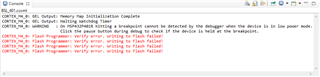
I’m using the BSL432_MSP432P401x project (release build) with Code Composer Studio 9.1.0, compiler version 18.12.2.LTS and a XDS110 Debug Probe.

Any help solving this issue would be greatly appreciated.  

  • Additional comments from off-line communication regarding testing both BSL_Release and BSL_Debug (Debug loads as expected apparently):

    ----

    I just tried putting the debug program and I think it works?  After the program is loaded on I lose my connect to the target.  I terminated the target configuration, relaunched the target configuration, reconnected to the target and successfully verified the program.  This is a little odd but seemed to work, however, I do need the release version to work instead of the debug as the debug version doesn’t load the BSL into information memory and the release version does load the BSL into information memory.  Is this possibly the issue?  That the release program is writing information memory.  Is there anything additional that I need to do to write information memory? 

     I just retried with the development kit.  Debug: had the same result as debug for the BDM.  Release:  It gave me an additional error this time - CORTEX_M4_0: Can't Run Target CPU: (Error -1268 @ 0x3090001) Device is locked up in Hard Fault or in NMI. Reset the device, and retry the operation. If error persists, confirm configuration, power-cycle the board, and/or try more reliable JTAG settings (e.g. lower TCLK). (Emulation package 8.2.0.00004)

    I power cycled the dev kit and tried the release version again and this time it only gave me the “CORTEX_M4_0: Flash Programmer: Verify error. Writing to Flash failed” error

     I both the dev kit and the BDE are functional.  I can program them with other projects with no problem.

     ----

    Comments from the TI camp would be much appreciated.  Are there any configuration differences that are required to be changed between Debug and Release BSL builds?  It does not appear so in the documentation at least.  In other words, this should work for both as-is out of box.

    TY,

    CY

  • All,

    The (slau622x) manual is not 100% clear that the first set of instructions starting on p39 is for the Debug build only.

    To load the Release build you have to perform the additional steps starting on p44 which allows the erasure of the Information memory for the Release build.

    Once that is complete, it Flashes it properly to memory space 0x00202000 and verified correctly.

    ***extra step needed for the Release version.  Documentation should in fact be updated to add a note on page 38 or 39 that there are additional steps for Release mode on pages 44 & 45.***

    Hopefully this clarifies and helps others in the future.  Thank you for your efforts Ed.

    TY,

    CY