This thread has been locked.

If you have a related question, please click the "Ask a related question" button in the top right corner. The newly created question will be automatically linked to this question.

TM4C123GH6PZ: What should be the reason for not detecting USB as a Virtual Com Port?

Part Number: TM4C123GH6PZ

Hi

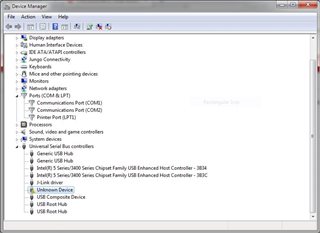
Basically, I wanted to test the "usb_dev_serial" example code. I have a custom board that will be having a TM4C123GH6PZ controller. After flashing the "usb_dev_serial" code I checked the device manager.
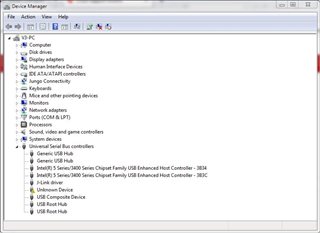
Then I tried to install the .inf file but I got the following error,
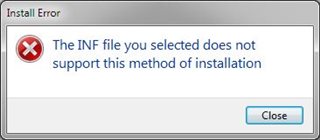
I'm attaching the .inf file as follows.

l;
;   TivaWare USB CDC (serial) driver installation file.
;
[Version]
Signature="$Windows NT$"
Class=Ports
ClassGuid={4D36E978-E325-11CE-BFC1-08002BE10318}
Provider=%MFGNAME%
LayoutFile=layout.inf
DriverVer=08/17/2001,5.1.2600.0

[Manufacturer]
%MFGNAME%=DeviceList

[DestinationDirs]
DefaultDestDir=12

[SourceDisksFiles]

[SourceDisksNames]

[DeviceList]
%DESCRIPTION_0%=DriverInstall, USB\VID_1CBE&PID_0007&MI00
%DESCRIPTION_1%=DriverInstall, USB\VID_1CBE&PID_0007&MI02

;------------------------------------------------------------------------------
;  Windows 2000/XP Sections
;------------------------------------------------------------------------------

[DriverInstall.nt]
CopyFiles=DriverCopyFiles
AddReg=DriverInstall.nt.AddReg

[DriverCopyFiles]
usbser.sys,,,0x20

[DriverInstall.nt.AddReg]
HKR,,DevLoader,,*ntkern
HKR,,NTMPDriver,,usbser.sys
HKR,,EnumPropPages32,,"MsPorts.dll,SerialPortPropPageProvider"

[DriverInstall.nt.Services]
AddService=usbser, 0x00000002, DriverService

[DriverService]
DisplayName=%SERVICE%
ServiceType=1
StartType=3
ErrorControl=1
ServiceBinary=%12%\usbser.sys

;------------------------------------------------------------------------------
;  String Definitions
;------------------------------------------------------------------------------

[Strings]
MFGNAME       = "Texas Instruments Incorporated"
DESCRIPTION_0 = "TivaWare USB Serial port"
DESCRIPTION_1 = "TivaWare USB Serial Command Port"
SERVICE       = "TivaWare USB CDC serial port"

Is anything I'm missing? Any help will be really appreciated!.

Regards

Omkar

  • Hi,

      - Did you try the usb_dev_serial "as-is" on the LaunchPad first? If not, please do so first. This will make sure there is no driver issue on the PC side. 

      - What TivaWare version do you use? There used to be a driver issue for Windows 10 machine on the earlier TivaWare release. This has been fixed in the newest TivaWare version 2.2.0.295. Please use the latest Windows driver provided in the newest TivaWare release. 

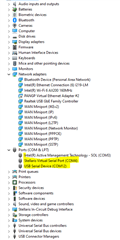
      - If you run the TivaWare example (don't modify anything) you should see the two COM ports. You didn't expand the "Ports" i n your screenshot. See below when I expand the Ports, I will see both the Stellaris Virtual Serial Port and the USB Serial Device. 

      - When I run the example, I can communicate between the two COM ports. 

     -- I will recommend you first run the TivaWare usb_dev_serial on the LaunchPad and resolve any driver issue first. If you also run into driver issue when running the LaunchPad then you can try to reset your PC and perhaps try a different Windows 10 PC for experiment. 

      - If the LaunchPad works, then rerun the same example on your custom board. 

      - If the example finally works on your custom board then expand the example to suit your application. The point is to start something that is proven to work to eliminate as many unknowns as possible when it is not working on your custom board.   

  • Thank you so much for the quick reply.

    Did you try the usb_dev_serial "as-is" on the LaunchPad first?

    Yes, I dump the code as it is but I'm getting the same USB problem. So it is confirmed that it is a driver issue.

    What TivaWare version do you use?

    I'm using "TivaWare version 2.2.0.295"

    Please use the latest Windows driver provided in the newest TivaWare release.

    Can you please help me to install the driver which is provided in the TivaWare release?

    You didn't expand the "Ports" i n your screenshot

    The above screenshot is taken when I connected the custom board.

  • Hi,

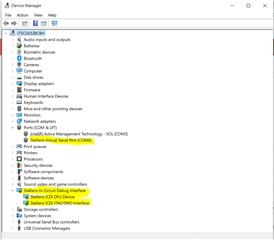
      In your device manager, I don't even see the "Stellaris I-Circuit Debug Interface". See below. You are supposed to see the ICDI JTAG Interface the moment you connect the USB cable between the PC and the LaunchPad debug port. 

      On the launchPad, there are two USB ports, which one did you connect to? In order to enumerate the ICDI debug interface, you must connect the USB cable to the top left of the board, the one to the right of the power switch. You must have that power switch moved to the rightmost position to select power from the debug port. You should first resolve this problem or you cannot even run any examples. Perhaps, please first confirm if you can run and debug any examples on the LaunchPad? 

      To download ICDI driver, please go to https://www.ti.com/tool/STELLARIS_ICDI_DRIVERS. Please get the ICDI resolved before moving to the USB CDC application. I will also suggest you try to reboot your machine as I suggested in my first reply? Did you do that? Can you try with another Windows machine? Do you have the same problem on different Windows machines? Please confirm. 

      The usb_dev_serial.inf file is in C:\ti\TivaWare_C_Series-2.2.0.295\windows_drivers. You should be able to "right-click" on the unknown device in the device manager and just click "Update Driver". But you should first resolve the ICDI issue for the LaunchPad first.

      Also looking at the .inf file you uploaded, it is quite different compare to the usb_dev_serial.inf in C:\ti\TivaWare_C_Series-2.2.0.295\windows_drivers. Where did you get yours? In any case, you should update driver with the one in the TivaWare release. 

  • Hi, Charles Tsai

    Thank You so much for the detailed reply. Finally, the problem is solved. Following three steps I have done.

    Step 1)Changed the OSC from 8Mhz to 12Mhz on the custom board.

    Step 2)Changed CPU Clock frequency from 20Mhz to 50Mhz

    Step 3)Connected USB to the controller and then installed C:\ti\TivaWare_C_Series-2.2.0.295\windows_drivers

    (using the device manager).

    I'm not sure exactly which step works out.

    But I would like to thanks Charles Tsai for their continuous support. Thanks a lot!