This thread has been locked.

If you have a related question, please click the "Ask a related question" button in the top right corner. The newly created question will be automatically linked to this question.

TMS570LC4357: Code does not execute when run standalone on the launchpad

Part Number: TMS570LC4357


Hi,

I am facing a weird issue with launchpad of TMS570LC4357. 

When JTAG is connected, the code works fine. I can do free run, pause, reset, free run again or step-over/step-in etc. As soon as I do a power cycle (disconnect USB and reconnect), the code gets stuck in data abort and does not execute further. (I found this by reconnecting the target and just loading symbols).

The main function of my code looks like this:

void main(void)
{

    /* Initialise the drivers */
    initDrivers();

    /* Initialise the application */
    initApp();

    /* Initialise the scheduler */
    initScheduler();

    while (1)
    {
    }
}

The initDrivers() function is something like this:

void initDrivers()
{
    /* Initialise discrete */
    initDiscretes();

    /* Configure CAN */
    initCan(&ConfigAddr);

    /* Configure SPI */
    initSpi();

    /* Enable the watchdog timer */
    enableWatchdog();
}

When I reconnect the JTAG with just loading symbols, WITHOUT programming the flash again, I see that, the formal parameter of initCan() function is not initialised with the address of "ConfigAddr" passed as actual parameter. And I see that particular memory location and few other locations are not writable even in memory window directly or using expressions window. As soon as I reprogram the same code, it starts working perfectly with JTAG connected, and behaves weirdly again when power cycled.

BUT there is a twist:

If I move the statement "enableWatchdog();" from initDrivers() function to the main() function, just after the call to initDrivers() function like this:

void main(void)
{

    /* Initialise the drivers */
    initDrivers();

    enableWatchdog();

    /* rest of the code */

}

(which is essentially the same execution order, no difference), everything works seamlessly, with as many power cycles as we want.

The content of enableWatchdog() function is:

void enableWatchdog()
{
RTI->RTIDWDCTRL = DWD_ENA_KEY;
}

I have faced this problem few times, and it has seemed to disappear with some illogical changes in code like the above one. I have run out of ideas to find root cause of the problem. Could you please help?

Thank you.

  • Hi,

    What is the value of the data fault status register (DFSR)? 

    If the abort is synch data abort, you can use the value in the Link Register (r14_abt) to determine which instruction generated the abort, and the value in the Saved Program Status Register (SPSR_abt) to determine the state of the processor when the abort occurred.

  • Hi QJ Wang,

    Thanks for the reply.

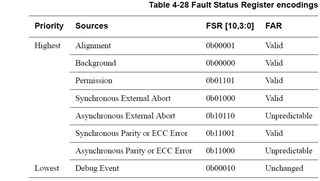
    The value of CP15_DATA_FAULT_STATUS is 0x00001008. This means it is a Synchronous External Abort.

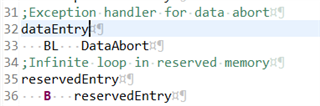
    R14_abt register has the value of 0x00000014, this points to the B reservedEntry instruction, but I think it is the BL DataAbort at address 0x00000010 where the breakpoint hits.

    The C instruction that causes the abort is (I checked it by step execution):

    switch(canConfig->canDev)
    {

    This is because canConfig is the actual parameter which is stored in stack RAM location, but this memory location is not-writable (not even in memory or expression windows) when I power cycle and connect reload symbols. This starts working alright when I reprogram it, and stops when I power cycle again.

    The value of SPSR_abt register is: 0x800003D3,

    Mode: SVC, N=1, E=1, A=1, I=1, F=1, rest all zeroes.

  • Hi,

    SPSR_abt = 0x3d3 means system is in supervisor mode. Is the device reset? or your code switches the system to SVC mode?

    Would you check which instruction causes the abort in disassembly window?

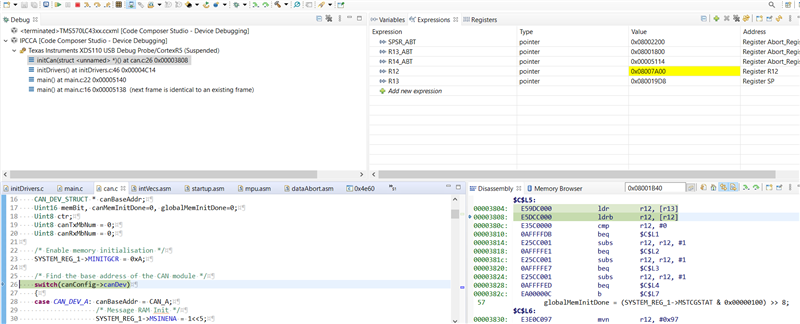
  • The device is not reset. The system enters the SVC mode as soon as the abort occurs. 

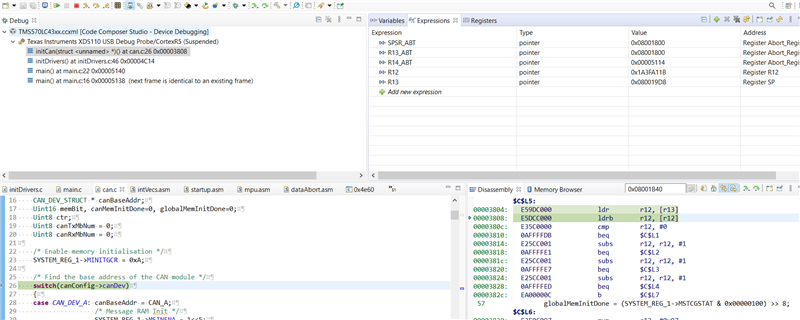
    Below screenshot shows the state just before entering the abort:

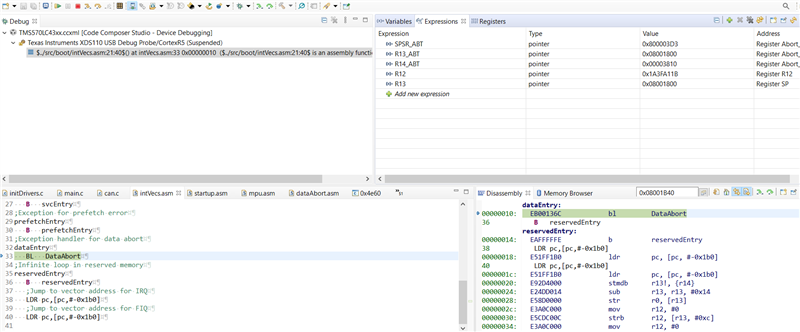
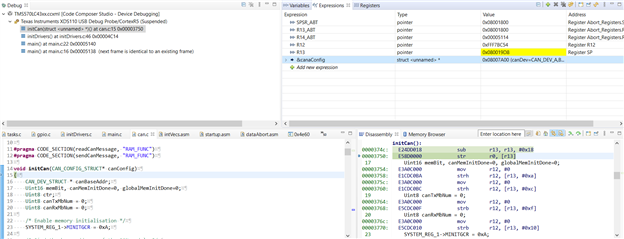
    And if I do an assembly step-in or step-over:

    The problem is, R12 is supposed to have the address of the parameter, but that location becomes non-writable when power cycled and retains garbage data.

    Below screenshot shows how it is when it works fine after reprogramming:

  • Hi Gobind,

    Have you figured out what makes the location in RAM not writable? 

  • Below screenshot shows the state just before entering the abort:

    Based upon the screenshot canConfig is a pointer to a structure, where the canConfig pointer is stored on the stack in the initCan function.

    For some reason, in the failure case the canConfig pointer gets the invalid value of 0x1A3FA11B which causes a data abort when attempted to be re-referenced; since the address 0x1A3FA11B is in reserved space in the device memory map.

    Based upon the code shown not sure if either:

    a. canConfig doesn't get initialised correctly.

    b. canConfig get overwritten on the stack.

    Can you debug monitoring the canConfig in the CCS Variables view to see when it gets the invalid value?

  • Hi QJ,

    I am not sure what makes it not writable, its just the power cycle. When I power cycle and reconnect (without reprogramming), it becomes not writable.

  • Hi Chester,

    Below is true:

    a. canConfig doesn't get initialised correctly, it retains the garbage value it gets at powerup.

  • a. canConfig doesn't get initialised correctly, it retains the garbage value it gets at powerup.

    Can you show the code for how the canConfig pointer gets initialised?

  • It is the function argument. Function call is like this:

    initCan(&canaConfig);

    and address of canaConfig is 0x08007A00.

    Below is the assembly equivalent:

    In the below screenshot, R13 contains the stack location where the address of canaConfig should have been stored, but that location contains 0x1A3FA11B, this is the value it gets at reset. There is a code to clear the memory before I go to initialise functions, but this memory location (and few others) does not get cleared.

  • It is the function argument.

    The source code and generated assembler looks OK.

    There is a code to clear the memory before I go to initialise functions, but this memory location (and few others) does not get cleared.

    It is suspicious that the problem occurs after 0xA is written to SYSTEM_REG1->MINITGCR which is the enable for the Auto-Initialization of On-Chip SRAM Modules.

    What is the value of SYSTEM_REG1->MSINENA and which memories do you want to auto-initialise?

  • It is suspicious that the problem occurs after 0xA is written to SYSTEM_REG1->MINITGCR which is the enable for the Auto-Initialization of On-Chip SRAM Modules.

    I think this statement should be ok, because everything works fine when I move "enableWatchdog();" statement to a location outside initDrivers() function. (See problem statement). But I can do some experiment if you suggest. 

    What is the value of SYSTEM_REG1->MSINENA and which memories do you want to auto-initialise?

    I am trying to initialise the CAN message RAM with these statements. And these initialisations have worked fine.

    Another observation: Initially I did not realise that I can read DFSR in registers window, so I wrote some assembly code to read it. The problem vanished as soon as I programmed the uController with new code. 

    The problem seems to go away with some illogical modifications like moving "enableWatchdog();" or adding some code. I am unable to relate the modifications and the problem. 

  • The problem seems to go away with some illogical modifications like moving "enableWatchdog();" or adding some code. I am unable to relate the modifications and the problem. 

    Are you able to attach the complete project in the state in which it fails?

    Based upon the fact that the problem can come-and-go after other changes are made to the program not sure what the cause is.

  • Hi Chester,

    I can try removing the project specific code from the project and attach it, but I am afraid I might not be able to recreate the same problem.

    If possible, can we have a call where I can share my screen to show the problem.

    Thank you.

  • I can try removing the project specific code from the project and attach it

    I meant removing our company specific code from the CCS project.