Part Number: TMS570LS3137
Other Parts Discussed in Thread: HALCOGEN
Hello,
I am new using HDK, TMS570LS3137. I have been trying to communicate two SPIs with each other but I haven't accomplished yet.
I have chosen SPI3 for transmitting the data and SPI1 as a receiver and done some setting on HalCoGen.
For this purpose, the pins I have selected from the PINMUX are: (src: tms570ls3137 (datasheet), pp.11 ZWT BGA Package Ball-Map (337-Ball Grid Array)
SPI3 SIMO W8 SPI1 SOMI G18
SPI3 SOMI V8 SPI1 SIMO F19
SPI3 CLCK V9 SPI1 CLCK F18
SPI3 CS1 V5 SPI1 CS1 F3
(but I couldn't find many of them in PINMUX to activate)
Then, from the MIBSPI1 PORT, I chose the SPI through way for SCS[1] Pin Mode and set the rest of them as GIO through way. I have done the same thing for SPI3 as well, under MIBSPI3 Port.
For Global Config, I chose SPI3 as Master Mode (kept it as default) and unticked the Master Mode for SPI1.
I kept the other settings as default and generated the code.
I don't use another device so that I just connected SPI3's SOMI pin with SPI1's SIMO pin, SPI1's SOMI pin with SPI3's SIMO pin, CS1s together and CLKs together.
While searching this topic, I've found some codes and just copied and pasted them.
uint16 TX_Data[16] = { 0x01, 0x02, 0x03, 0x04, 0x05, 0x06, 0x07, 0x08, 0x09, 0x0A, 0x0B, 0x0C, 0x0D, 0x0E, 0x0F, 0x10 };
uint16 RX_Data[16] = { 0 };
int main(void)
{
/* USER CODE BEGIN (3) */
spiInit();
_enable_IRQ();
spiDAT1_t dataconfig1_t;
dataconfig1_t.CS_HOLD = FALSE;
dataconfig1_t.WDEL = TRUE;
dataconfig1_t.DFSEL = SPI_FMT_0;
dataconfig1_t.CSNR = 0xFD;
spiSendAndGetData(spiREG1, &dataconfig1_t, 16, TX_Data, RX_Data);
spiTransmitAndReceiveData(spiREG3, &dataconfig1_t, 16, TX_Data, RX_Data);
while(1);
}
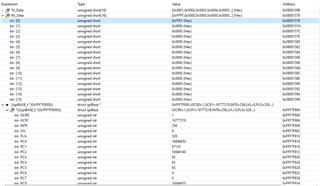
After debugging, I have seen Tx_Data as I gave, but there is nothing to see for Rx_Data. Full of zeros. I have also tried other configurations
for example,
spiSendData and spiGetData or spiTransmitData and spiReceiveData... but I couldn't communicate them with each other anyhow.
Could you help me see the problems please? (I'm sure there are a lot of problems). I can't go forward.
Thanks in advance,
Caner