Part Number: EK-TM4C123GXL
Hi all,
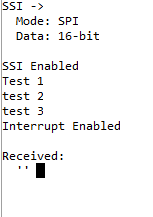
I'm an engineering student who has some experience programming arduinos. I've had a project involving an EK-TM4C123GXL thrown on me. My goal is to set up the EK-TM4C123GXL as an SPI slave and an Arduino Mega 2560 as an SPI master. I've read through the user manual and a lot of other E2E posts, but I'm having no luck sending anything from the Arduino to the EK-TM4C123GXL. I've attached my code I have for both the Arduino and the EK-TM4C123GXL below. If someone could point out what I'm doing wrong, I would appreciate it. Just from using print statements, it looks like the EK-TM4C123GXL code doesn't execute past initiating SSI2.
//*****************************************************************************
//
// project0.c - Example to demonstrate minimal TivaWare setup
//
// Copyright (c) 2012-2020 Texas Instruments Incorporated.  All rights reserved.
// Software License Agreement
//
// Texas Instruments (TI) is supplying this software for use solely and
// exclusively on TI's microcontroller products. The software is owned by
// TI and/or its suppliers, and is protected under applicable copyright
// laws. You may not combine this software with "viral" open-source
// software in order to form a larger program.
//
// THIS SOFTWARE IS PROVIDED "AS IS" AND WITH ALL FAULTS.
// NO WARRANTIES, WHETHER EXPRESS, IMPLIED OR STATUTORY, INCLUDING, BUT
// NOT LIMITED TO, IMPLIED WARRANTIES OF MERCHANTABILITY AND FITNESS FOR
// A PARTICULAR PURPOSE APPLY TO THIS SOFTWARE. TI SHALL NOT, UNDER ANY
// CIRCUMSTANCES, BE LIABLE FOR SPECIAL, INCIDENTAL, OR CONSEQUENTIAL
// DAMAGES, FOR ANY REASON WHATSOEVER.
//
// This is part of revision 2.2.0.295 of the EK-TM4C123GXL Firmware Package.
//
//*****************************************************************************

#include <stdbool.h>
#include <stdint.h>
#include "inc/hw_ints.h"
#include "inc/hw_memmap.h"
#include "driverlib/debug.h"
#include "driverlib/gpio.h"
#include "driverlib/interrupt.h"
#include "driverlib/pin_map.h"
#include "driverlib/pwm.h"
#include "driverlib/rom.h"
#include "driverlib/rom_map.h"
#include "driverlib/hw_memmap.h"
#include "driverlib/qei.h"
#include "driverlib/sysctl.h"
#include "driverlib/uart.h"
#include "utils/uartstdio.h"
#include "driverlib/fpu.h"
#include "inc/hw_types.h"
#include "inc/hw_memmap.h"
// The error routine that is called if the driver library encounters an error.
#include "inc/hw_types.h"                   // Defines common types and macros
#include "inc/hw_gpio.h"                    // Defines Macros for GPIO hardware
#include "inc/hw_qei.h"
#include "driverlib/ssi.h"

#include "driverlib/uartstdio.h"


//*****************************************************************************
//
//! \addtogroup ssi_examples_list
//! <h1>SPI Slave (spi_slave)</h1>
//!
//! This example configures the SSI0 as SPI Master, SSI2 as SPI Slave on an
//! EK-LM4F232 evaluation board.  RX timeout interrupt is configured for SSI2.
//! Three characters are sent on the master TX, then SSI2 RX timeout interrupt
//! is enabled. The code then waits for the interrupt to fire.  Once the
//! interrupt is fired the data from slave RX FIFO is read and compared to the
//! transmitted packet and the appropriate status is displayed.  If everything
//! goes well you should see a "Test Passed." message on the terminal window.
//! The status messages are transmitted over UART0 at 115200 baud and 8-n-1
//! mode.
//!
//! This example uses the following peripherals and I/O signals on EK-LM4F232.
//! You must review these and change as needed for your own board:
//! - SSI0 peripheral
//! - GPIO Port A peripheral (for SSI0 pins) (available near the SD card slot)
//! - SSI0CLK - PA2
//! - SSI0Fss - PA3
//! - SSI0Rx  - PA4
//! - SSI0Tx  - PA5
//!
//! - SSI2 peripheral
//! - GPIO Port M peripheral (for SSI2 pins) (available right below the OLED)
//! - SSI2CLK - PH4
//! - SSI2Fss - PH5
//! - SSI2Rx  - PH6
//! - SSI2Tx  - PH7
//!
//! For this example to work, the following connections are needed on the
//! EK-LM4F232 evaluation board.
//! - SSI0CLK(PA2) - SSI2CLK(PH4)
//! - SSI0Fss(PA3) - SSI0Fss(PH5)
//! - SSI0Rx(PA4)  - SSI2Tx(PH7)
//! - SSI0Tx(PA5)  - SSI2Rx(PH6)
//!
//! The following UART signals are configured only for displaying console
//! messages for this example.  These are not required for operation of SSI0.
//! - UART0 peripheral
//! - GPIO Port A peripheral (for UART0 pins)
//! - UART0RX - PA0
//! - UART0TX - PA1
//!
//! This example uses the following interrupt handlers.  To use this example
//! in your own application you must add these interrupt handlers to your
//! vector table.
//! - SSI2IntHandler.
//!
//
//*****************************************************************************

//*****************************************************************************
//
// Number of bytes to send and receive.
//
//*****************************************************************************
#define NUM_SSI_DATA 1

//*****************************************************************************
//
// Global variables used in interrupt handler and the main loop.
//
//*****************************************************************************
volatile unsigned long g_ulSSI2RXTO = 0;
unsigned long g_ulDataRx2[NUM_SSI_DATA];

//*****************************************************************************
//
// Interrupt handler for SSI2 peripheral in slave mode.  It reads the interrupt
// status and if the interrupt is fired by a RX time out interrupt it reads the
// SSI2 RX FIFO and increments a counter to tell the main loop that RX timeout
// interrupt was fired.
//
//*****************************************************************************
void
SSI2IntHandler(void)
{
    unsigned long ulStatus, ulIndex;

    //
    // Read interrupt status.
    //
    ulStatus = SSIIntStatus(SSI2_BASE, 1);

    //
    // Check the reason for the interrupt.
    //
    if(ulStatus)
    {
        //
        // Interrupt is because of RX time out.  So increment counter to tell
        // main loop that RX timeout interrupt occurred.
        //
        g_ulSSI2RXTO++;

        //
        // Read NUM_SSI_DATA bytes of data from SSI2 RX FIFO.
        //
        for(ulIndex = 0; ulIndex < NUM_SSI_DATA; ulIndex++)
        {
            SSIDataGet(SSI2_BASE, &g_ulDataRx2[ulIndex]);
        }
    }

    //
    // Clear interrupts.
    //
    SSIIntClear(SSI2_BASE, ulStatus);
}

//*****************************************************************************
//
// This function sets up UART0 to be used for a console to display information
// as the example is running.
//
//*****************************************************************************
void
InitConsole(void)
{
    //
    // Enable GPIO port A which is used for UART0 pins.
    //
    SysCtlPeripheralEnable(SYSCTL_PERIPH_GPIOA);

    //
    // Configure the pin muxing for UART0 functions on port A0 and A1.
    // This step is not necessary if your part does not support pin muxing.
    //
    GPIOPinConfigure(GPIO_PA0_U0RX);
    GPIOPinConfigure(GPIO_PA1_U0TX);

    //
    // Select the alternate (UART) function for these pins.
    //
    GPIOPinTypeUART(GPIO_PORTA_BASE, GPIO_PIN_0 | GPIO_PIN_1);

    //
    // Initialize the UART for console I/O.
    //
    UARTStdioConfig(0, 115200, 16000000);
}


//*****************************************************************************
//
// This function sets up SPI2 to be used as slave in freescale mode.
//
//*****************************************************************************
void
InitSPI2(void)
{
    //
    // The SSI0 peripheral must be enabled for use.
    //
    SysCtlPeripheralEnable(SYSCTL_PERIPH_SSI2);

    //
    // For this example SSI2 is used with PortH[7:4].  GPIO port H needs to be
    // enabled so these pins can be used.
    //
    SysCtlPeripheralEnable(SYSCTL_PERIPH_GPIOH);

    //
    // Configure the pin muxing for SSI2 functions on port H4, H5, H6 and H7.
    // This step is not necessary if your part does not support pin muxing.
    //
    GPIOPinConfigure(GPIO_PB4_SSI2CLK);
    GPIOPinConfigure(GPIO_PB5_SSI2FSS);
    GPIOPinConfigure(GPIO_PB6_SSI2RX);
    GPIOPinConfigure(GPIO_PB7_SSI2TX);

    //
    // Configure the GPIO settings for the SSI pins.  This function also gives
    // control of these pins to the SSI hardware.  Consult the data sheet to
    // see which functions are allocated per pin.
    // The pins are assigned as follows:
    //      PH7 - SSI2Tx
    //      PH6 - SSI2Rx
    //      PH5 - SSI2Fss
    //      PH4 - SSI2CLK
    //
    GPIOPinTypeSSI(GPIO_PORTH_BASE, GPIO_PIN_7 | GPIO_PIN_6 | GPIO_PIN_5 |
                   GPIO_PIN_4);

    //
    // Configure and enable the SSI2 port for SPI slave mode.
    //
    SSIConfigSetExpClk(SSI2_BASE, SysCtlClockGet(), SSI_FRF_MOTO_MODE_2,
                       SSI_MODE_SLAVE, 660000, 8);

    //
    // Enable the SSI2 module.
    //
    SSIEnable(SSI2_BASE);
}

//*****************************************************************************
//
// This example will send out 3 bytes of data from master, then waits for slave
// RX timeout interrupt to fire (where these 3 bytes are read).  Then the sent
// and returned data are compared to give out appropriate status messages on
// UART0.
//
//*****************************************************************************
int
main(void)
{
    unsigned long ulDataTx0[NUM_SSI_DATA];
    unsigned long ulDataRx0[NUM_SSI_DATA];
    unsigned long ulindex;

    //
    // Set the clocking to run directly from the external crystal/oscillator.
    //
    SysCtlClockSet(SYSCTL_SYSDIV_1 | SYSCTL_USE_OSC | SYSCTL_OSC_MAIN |
                   SYSCTL_XTAL_16MHZ);

    //
    // Set up the serial console to use for displaying messages.  This is
    // just for this example program and is not needed for SSI operation.
    //
    InitConsole();

    //
    // Display the setup on the console.
    //
    UARTprintf("SSI ->\n");
    UARTprintf("  Mode: SPI\n");
    UARTprintf("  Data: 16-bit\n\n");


    //
    // Init SPI2 as slave.
    //
    UARTprintf("290\n\n");
    InitSPI2();
    UARTprintf("292\n\n");
    //
    // Enable RX timeout interrupt.
    //
    SSIIntEnable(SSI2_BASE, SSI_RXTO);

    //
    // Read any residual data from the SSI port.  This makes sure the receive
    // FIFOs are empty, so we don't read any unwanted junk.  This is done here
    // because the SPI SSI mode is full-duplex, which allows you to send and
    // receive at the same time.  The SSIDataGetNonBlocking function returns
    // "true" when data was returned, and "false" when no data was returned.
    // The "non-blocking" function checks if there is any data in the receive
    // FIFO and does not "hang" if there isn't.
    //
    while(SSIDataGetNonBlocking(SSI2_BASE, &g_ulDataRx2[0]))
    {
    }

    //
    // Clear any pending interrupt
    //
    SSIIntClear(SSI2_BASE, SSI_RXTO);

    //

    //
    IntEnable(INT_SSI2);

    //
    // Wait for the SSI2 RXTO interrupt to fire and data read from RXFIFO.
    //
    while(g_ulSSI2RXTO == 0)
    {
        UARTprintf("\waiting...\n  ");
    }

    //
    // Display indication that salve has receiving data.
    //
    UARTprintf("\nReceived:\n  ");

    //
    // Display the 3 bytes of data that were read from RX FIFO.
    //
    for(ulindex = 0; ulindex < NUM_SSI_DATA; ulindex++)
    {
        UARTprintf("'%c' ", g_ulDataRx2[ulindex]);
    }


    if(g_ulSSI2RXTO > 1)
    {
        //
        // Tell the user that the test failed and the reason.
        //
        UARTprintf("\n\nError: %d interrupt(s) fired when expecting only one."
                   "\n", g_ulSSI2RXTO);
    }
    else
    {
        //
        // Tell the user that the test passed.
        //
        UARTprintf("\n\nTest Passed.\n\n");
    }

    while(1)
    {
    }
}
For whatever reason, TI's website will not let me place another code object, so for the arduino:
#include<SPI.h>
void setup() {
// put your setup code here, to run once:
Serial.begin(115200);
SPI.begin();
//SPI.setClockDivider(SPI_CLOCK_DIV8);
digitalWrite(SS,HIGH);
}
void loop() {
// put your main code here, to run repeatedly:
Serial.println("Sending over SPI");
byte master_send, master_receive;
digitalWrite(SS, LOW);
master_send = 1;
master_receive = SPI.transfer(master_send);
if(master_receive == 1) //Logic for setting the LED output depending upon value received from slave
{
Serial.println("SPI working");
}
delay(1000);
}