This thread has been locked.

If you have a related question, please click the "Ask a related question" button in the top right corner. The newly created question will be automatically linked to this question.

TMS570LC4357: Cannot connect to Debug Probe XDS110

Part Number: TMS570LC4357

Hello Team,

Context:- I am working on a custom PCB with TMS570LC4357 and a PMIC. I am working to get the PMIC running. I have added code to run the PMIC, the SW was running fine and was able to connect to XDS110.

Issue:- I updated the code and added just a while loop to check for a condition. After flashing this update. I am getting an error when I try to connect to the target.

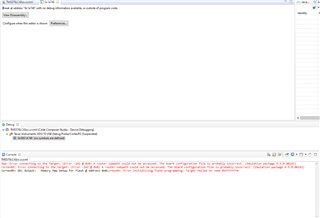
I verify the connection, The JATG DR and IR Integrity scan-test has succeeded. But I am not able to debug the session anymore. I am getting the below mentioned error code.

When I press retry, a different Error code is generated.

I have then launched the targetconfig using the .ccxml file. I am able to connect Target with IcePick. When I try to connect Target with Dap. I am getting the same above error codes 1170.

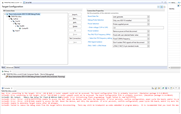
I have then tried to change the Connection Properties as shown in below pic and then launched the targetconfig. I still was facing the same issue where I am able to connect Target with IcePick and not with Dap.


I think that this issue happens after PMIC(TPS65381A1-Q1) WDG Failure caused a nRES Pin trigger on PMIC side which is connected to the nPORRST Pin on the MCU Side.

Can the team help me in resolving this Issue.

Kind Regards

  • Hi,

    Can you please try this way:below?

    1. The JTAG connection is lost after the program is loaded to flash.

      The problem might be caused by the code you have programmed. The code in the flash makes the CPU enter an exception state repeatedly, and the CPU is not able to enter a debug state.

      Please try this procedure to let CPU enter a debug state:

      1. Open the target configuration window, and launch the selected the configuration
      2. Switch to debug window.
      3. Press the reset (nRST) button and hold it.
      4. Click “Connect Target” immediately after you release the nRST button.
      5. The board should be connected after couple tries.
  • Hello,

    Thank You for your reply.

    I have tried the above mentioned procedure. I am able to connect to the CPU for a brief moment but It gets disconnected immediately.

    I have also tried to erase the Flash in the brief moment when the CPU is connected. I am getting this Error message in that case.

    Kind Regards,

  • It looks like the issue is caused by the watchdog timeout which puts MCU in reset. Can you lift the NRES leg of TPS65381A device and try JTAG connection?

    It's better to add a series resistor (zero ohms) to NRES-nPORRST trace.