This thread has been locked.

If you have a related question, please click the "Ask a related question" button in the top right corner. The newly created question will be automatically linked to this question.

LP-AM243: Creating a custom Ethernet/IP project from source or based on Example

Part Number: LP-AM243
Other Parts Discussed in Thread: SYSCONFIG

To start I have CSS v11, MCU+ SDK 8.01.00, stand alone sysconfig 1.11.0, and ti-cgt-armllvm_1.3.0.LTS installed on my Ubuntu 18.04 system. CSS can recognize sysconfig and the TI arm compiler. I have also successfully built and ran the hello_world application from the SDK inside of CSS with all tests passed.

I am attempting to create an Ehthernet/IP project to get data from a Lidar sensor. I would like to setup a project that makes use of the ethernet functionalities of the launch pad. When attempting to make a new project, I have tried creating a syscfg file to add, but when creating the file based on the device, my options are AM243x_ALV_beta and AM243x_ALX_beta. I have tried both and do not see any difference so far. Once the configuration is open, I do not see any options for the Ethernet/IP. I'm assuming it is because I'm missing the TI drivers and need to link them somehow, but do not see any options for this. Can anyone explain how to do this?

My other attempt was to import the example from the SDK, but all the source files stay in the local SDK location. Therefore, my git enabled repo in my workstation is unable to upload any changes made to the file "App.c" for example, which is where most of the code is implemented according to the documentation. This is not ideal, and I'm uncertain if this was a correct route for getting the project started. On top of this, I'm uncertain which function calls are completely mandatory to keep and what I can write over. My assumption was that I could start implementing the custom project in the function "void EI_APP_mainTask" inside the for(;;) loop. Is there a better way to set up a custom ethernet/ip project or am I going down the right path and maybe I just need to move some of the source files to my own local workspace repo?

Any guidance on what steps need to be taken to accomplish this is appreciated, and I can supply any information I may be missing.

  • Hi

    I am attempting to create an Ehthernet/IP project to get data from a Lidar sensor. I would like to setup a project that makes use of the ethernet functionalities of the launch pad. When attempting to make a new project, I have tried creating a syscfg file to add, but when creating the file based on the device, my options are AM243x_ALV_beta and AM243x_ALX_beta. I have tried both and do not see any difference so far. Once the configuration is open, I do not see any options for the Ethernet/IP. I'm assuming it is because I'm missing the TI drivers and need to link them somehow, but do not see any options for this. Can anyone explain how to do this?

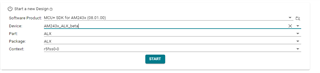
    Firstly, AM243x_ALV_beta  corresponds to TMDS243GPEVM and AM243x_ALX_beta corresponds to LP-AM243.

    Once you open SysConfig tool, if you select following options and select "Start", you should see a module for "EtherNet/IP" under "TI Industrial Comms Toolkit".

    But the recommended way is to start from the SDK example.

    My other attempt was to import the example from the SDK, but all the source files stay in the local SDK location. Therefore, my git enabled repo in my workstation is unable to upload any changes made to the file "App.c" for example, which is where most of the code is implemented according to the documentation. This is not ideal, and I'm uncertain if this was a correct route for getting the project started. On top of this, I'm uncertain which function calls are completely mandatory to keep and what I can write over. My assumption was that I could start implementing the custom project in the function "void EI_APP_mainTask" inside the for(;;) loop. Is there a better way to set up a custom ethernet/ip project or am I going down the right path and maybe I just need to move some of the source files to my own local workspace repo?

    Examples inside "mcu_plus_sdk\examples\industrial_comms" are using "link" option for files used in the example project. Other SDK examples use "copy", so you should not face this issue for other examples. I am attaching a patch which you can apply to .projectspec file for EtherNet/IP project to "copy" the files to workspace instead of linking from SDK.
    Patch : Patch-for-copy-option-for-files-in-EtherNet-IP-example.zip

    SDK example provides a base for you to start developing your example. You can check the example documentation to understand the required APIs and the sequence which needs to be followed. 

    You mentioned that you want to test ethernet functionality. So if you want to use standard ethernet, please check Networking examples in SDK. Please note that EtherNet/IP Adapter Demos provide PRU-ICSS based solution to integrate EtherNet/IP Adapter functionality. EtherNet/IP is a member of a family of network protocols that implements the Common Industrial Protocol (CIP) at its upper layers.

    Regards

    Dhaval Khandla

  • Thank you Dhaval, for the response and clearing up the sysconfig confusion. I'll start from the sdk example as recommended and use your patch to make a local copy. I am tasked with porting c++ code that uses Ethernet/IP to communicate with a sensor. Object oriented programming is very abstracted, so the set up is not as difficult (at least looking on the surface). The example code appears more complex, but I'll go through it a few more times and I'm sure I'll be able to see the commonality to the code I'm porting. Currently I have been looking at the mcu+ documentation, specifically dissecting the Ethernet example section. I'll mark this as solved once I go thought the example again and see if I can get started. I don't need my port finished for this to be considered solved, just to the point where I understand the example.

  • Also for clarification on the patch, the example was imported to my workspace for code composer (~/worksapce_vXX/ethernetip_adapter_mii_demo_am243x-lp_r5fss0-0_freertos_ti-arm-clang). Inside this folder is where I had run git init, git add ., git commit -m "message", and then pushed to a repo. I assume the patch is meant to be run from a specific location. Can I just change the file paths in the git patch to be relative to my project folder and that will perform the patch as you intended it to work?

  • Jacob
    The patch I provided is supposed to be run from root folder of SDK. The patch only modifies the projectspec file which is used for creating a CCS project.

    So I did not understand the need to update the patch. Can you please clarify this need?

    Regards
    Dhaval Khandla

  • Ok I understand as far as where to run it. In the patch, the diff shows the folder am64x-evm as a location of files for the change, I assume, I just need to change it to am243x-lp for my case since that is the board I'm working with?

  • Hi
    Okay, I understand your question now. 

    Yes, please update it to "am243x-lp". I created the patch for example on am64x-evm.

    Regards
    Dhaval Khandla

  • I get this error:

    error: patch failed: examples/industrial_comms/ethernetip_adapter_demo/mii/am243x-lp/r5fss0-0_freertos/ti-arm-clang/example.projectspec:108
    error: examples/industrial_comms/ethernetip_adapter_demo/mii/am243x-lp/r5fss0-0_freertos/ti-arm-clang/example.projectspec: patch does not apply

    Inside of

    ~/ti/mcu_plus_sdk_am243x_08_01_00_36/examples/industrial_comms/ethernetip_adapter_demo/mii/am243x-lp/r5fss0-0_freertos/ti-arm-clang

    I went ahead and edited the example.projectspec file manually based on the diff in the patch file since the patch was not working. The file changed is inside the root sdk folder into the idustrial comms example.

    When I open Resource Explorer and import the project from "Software->MCU+ SDK for AM243x-08.01.00.36->Examples->Development Tools->AM243x LaunchPad->industrial_comms->ethernetip_adapter_demo->mii->r5fss0-0_freetos", the files are not moved locally. Am I importing the wrong way?

    Here is what the example.projectspec looks like now

    ></configuration>
            <pathVariable name="MCU_PLUS_SDK_PATH" path="${COM_TI_MCU_PLUS_SDK_AM243X_INSTALL_DIR}" scope="project" />
            <file path="../../../../board/am243x-lp/AppPerm.c" openOnCreation="false" excludeFromBuild="false" action="copy">
            </file>
            <file path="../../../../board/am243x-lp/AppPerm.h" openOnCreation="false" excludeFromBuild="false" action="copy">
            </file>
            <file path="../../../../board/am243x-lp/Board.c" openOnCreation="false" excludeFromBuild="false" action="copy">
            </file>
            <file path="../../../../board/am243x-lp/Board.h" openOnCreation="false" excludeFromBuild="false" action="copy">
     				</file>
            <file path="../../../../App.c" openOnCreation="false" excludeFromBuild="false" action="copy">
            </file>
            <file path="../../../../App.h" openOnCreation="false" excludeFromBuild="false" action="copy">
            </file>
            <file path="../../../../AppClass71.c" openOnCreation="false" excludeFromBuild="false" action="copy">
            </file>
            <file path="../../../../AppClass71.h" openOnCreation="false" excludeFromBuild="false" action="copy">
            </file>
            <file path="../../../../appPhyReset.c" openOnCreation="false" excludeFromBuild="false" action="copy">
            </file>
            <file path="../../../../appPhyReset.h" openOnCreation="false" excludeFromBuild="false" action="copy">
            </file>
            <file path="linker.cmd" openOnCreation="false" excludeFromBuild="false" action="copy">
            </file>
            <file path="../example.syscfg" openOnCreation="false" excludeFromBuild="false" action="copy">
            </file>

  • Sorry, I did a direct import for a ccs project instead of using resource explorer. I now have the local copy I was looking for. Thank you for your help.

  • Hi
    Can you try importing the project with steps mentioned in "Using SDK with CCS Projects" ?

    Regards
    Dhaval Khandla

  • Dhaval, I wanted to ask a couple question about the ethernetip demo.

    1. The AppPerm.c is specific to writing to the on board QSPI flash, correct? This example is setup to write configuration data to the permanent flash and update the LED array that is also on board. 

    2. What exactly is included in the configuration? Is it the vendor ID, device type, revision...? What does vendor ID, device type, revision, refer to in this example? Is it a chip that is being interfaced with, or maybe just arbitrary?

    3. Is the configuration data necessary to run ETHPHY? Or is it only used to show how to interface with the QSPI flash.

    4. Are the class IDs arbitrary, as in free to select any ID number?

    It looks like for my own application, I need to modify the set up of the callbacks, and the cipSetup. Then I can modify the run methods as well I don't think I necessarily need the QSPI flash. It looked like it was in the example for demonstration purposes, and I can remove the I2C since I don't need to implement the LED array. I really only need to communicate to a sensor over Ethernet with the Ethernet/IP protocol.

  • Hi

    1. The AppPerm.c is specific to writing to the on board QSPI flash, correct? This example is setup to write configuration data to the permanent flash and update the LED array that is also on board. 

    Yes, this file focuses on handling of permanent data storage. There are certain configurations which will be picked up from permanent storage on start-up. Please check "EI_APP_init()->EI_APP_adpInit()->EI_APP_PERM_read()" functions in the example code.

    As mentioned in documentation, "The EtherNet/IP Adapter example for AM24x implements a vendor specific object with class ID 0x0070 and attributes in the vendor specific index ranges following 0x0300. Attributes at index 0x0300 to 0x0304 are added to a producing assembly, at index 0x0308 to 0x030C to a consuming assembly. Of those, the attribute at index 0x0308 is linked to an LED array on the AM24x evaluation kit."

    2. What exactly is included in the configuration? Is it the vendor ID, device type, revision...? What does vendor ID, device type, revision, refer to in this example? Is it a chip that is being interfaced with, or maybe just arbitrary?

    For details on what is stored in permanent storage, see "EI_APP_PERM_SCfgData_t" structure in AppPerm.h file.

    For details on vendor id, device type, etc., see Identity Object (Class Code: 0x01) API documentation.

    3. Is the configuration data necessary to run ETHPHY? Or is it only used to show how to interface with the QSPI flash.

    If you see "EI_APP_PERM_read()" in AppPerm.c, lot of stack APIs are called with values stored in permanent storage. If you do not want to set these from permanent storage, you can remove flash usage but make the required stack API calls based on your required configuration. 

    This permanent data is also affected by Type 1/2 reset service of class 0x01. See "EI_APP_PERM_reset()" for more details.

    4. Are the class IDs arbitrary, as in free to select any ID number?

    It looks like for my own application, I need to modify the set up of the callbacks, and the cipSetup. Then I can modify the run methods as well I don't think I necessarily need the QSPI flash. It looked like it was in the example for demonstration purposes, and I can remove the I2C since I don't need to implement the LED array. I really only need to communicate to a sensor over Ethernet with the Ethernet/IP protocol.

    Yes, you can modify the example according to your needs. AppClass71.c demonstrates the creation of classes, instances, and attributes and modifying their parameter values. 

    I2C LED is linked to an attribute in SDK example just for demonstration. You can remove it.

    Regards
    Dhaval Khandla

  • Thank you, I believe you have helped me get an overall ideaof what is going on in the example and where to look. I appreciate the responses and help in understanding.