This thread has been locked.

If you have a related question, please click the "Ask a related question" button in the top right corner. The newly created question will be automatically linked to this question.

TM4C1231E6PM: Config tool

Part Number: TM4C1231E6PM
Other Parts Discussed in Thread: EK-TM4C123GXL

Greeting,

I am about to start a project using a TMC4 MCU and I am new to it, TivaWare, and all the good tools, libs, etc that will be available. I think my biggest problem is not knowing how things are organized here. But for starters could you tell me if there is a tool similar to STM32 Cube that one can use to setup the board? 

Any other suggestions for older-than-dirt neophytes would be appreciated too.

Many thanks.

  • Hi John,

      The very first thing will be to download CCS from https://software-dl.ti.com/ccs/esd/documents/ccs_downloads.html.  Code Composer Studio (CCS)  is an integrated develoepment environment (IDE) to develop application for TI embedded processors including TM4C123 MCU. 

      Once you download CCS you can import all the TM4C123 examples that is in the TivaWare library into CCS. The TM4C123 CCS example projects can be found at C:\ti\TivaWare_C_Series-2.2.0.295\examples\boards\ek-tm4c123gxl directory. 

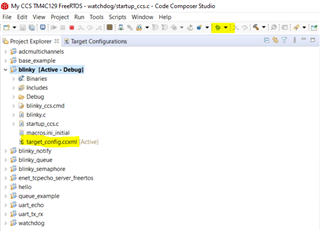
      Let's suppose you import the blinky example. You will see the blinky project in the Project Explorer. See below. In the blinky project, you will see the target_config.ccxml file. This is the file that sets up the board so CCS knows what is the target device. The example project has all of this set up for you and you don't have to do anything. You just need to click the "Debug" icon (see the yellow highlighted icon at top) to start the example. When you click the debug button, CCS will compile the project, connect to the target and load the code to the flash memory for you.

    Please also use the below training materials although it is a bit old. 

    https://software-dl.ti.com/trainingTTO/trainingTTO_public_sw/GSW-TM4C123G-LaunchPad/TM4C123G_LaunchPad_Workshop_Workbook.pdf

    https://training.ti.com/tiva-c-series-workshop

  • HI Charles,

    Thanks for the detailed leg-up. I will definitely feel more comfortable starting with CCS. I used it many, many years ago and I sure it will feel familiar. I just had a web meeting with the east coast team (thankfully I am in Dallas) at the company I joined about 10 days ago and they like to develop with VS Code. That is another tool I must learn. Seems you must add a compiler. I prefer Visual Studio 2022 C++ but beggars can't be choosers. Bottom line they said get the board up and running and the tool chain can be modified later so CCS will get blinky running which is what they want to see.

    So thanks again,

    JH

  • I got CCS installed but during the install it kept telling me I had restarts pending, I pushed ahead after 2 restarts. 

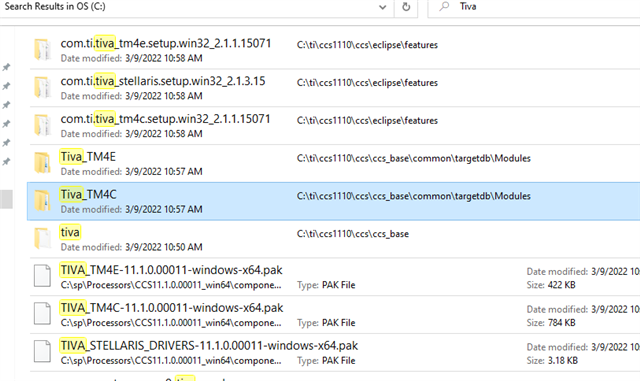
    I think the layout has changed a little bit. This is what I found on my C: drive. Maybe I should have installed in a different location but I don't really see an examples folder. However, I am not the sharpest knife in the drawer and I might be missing something.

    However, it looks like a lot of good stuff is downloadable here: www.ti.com/.../SW-TM4C

  • Hi John,

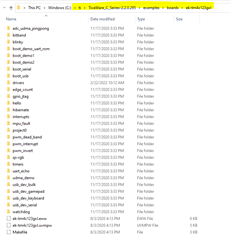
      The example folder is not part of the CCS installation. The TivaWare example I referred to is part of the TivaWare installation. Download TivaWare from www.ti.com/.../SW-TM4C.  Once you install TivaWare you can find all the examples pertaining to TM4C123 MCU in C:\ti\TivaWare_C_Series-2.2.0.295\examples\boards\ek-tm4c123gxl. See below. 

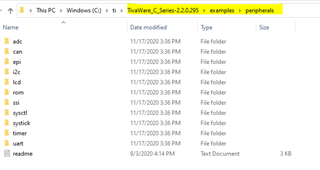
    There are additional examples in C:\ti\TivaWare_C_Series-2.2.0.295\examples\peripherals. See below. 

  • Hi Charles,

    More good stuff, thanks.

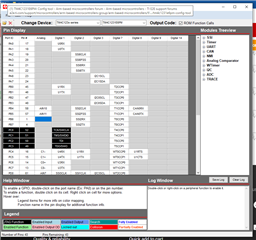
    I think this is the pin config tool I need:

    https://www.ti.com/tool/TM4C_PINMUX