This thread has been locked.

If you have a related question, please click the "Ask a related question" button in the top right corner. The newly created question will be automatically linked to this question.

TMS570LC4357: Unable to read EMAC TXnCP & RXnCP Registers

Part Number: TMS570LC4357

Hello TI,

As part of our project, we are using the EMAC module of the TMS570LC4357 controller and configuring the Transmit Channel Completion Pointer Registers (TXnCP) and Receive Channel Completion Pointer Registers (RXnCP) as per our requirements. So, for verification, we are reading these registers and what data we have written but we are not able to read any of these registers from Code Composer Studio (ver 8.0.0). In the registers it is showing "Unable to read" and also not able to read through the memory browser as shown below:
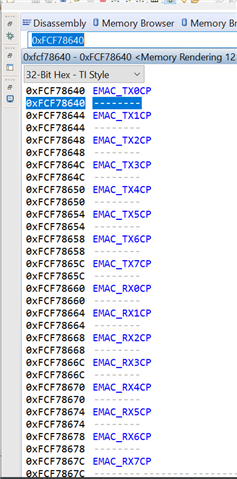
                             

Also, I checked the reference manual and there it was mentioned that these TXnCP and RXnCP registers are Read/Write registers as shown below:

Please let me know if am I missing something.

Thanks and Regards,

Parth Rastogi

  • Hi, our expert is out of office until 4/7. Please expect a delayed response.
    Also, please see this FAQ: software-dl.ti.com/.../index.html

  • Hii Team,

    Can you please respond to the above query that I raised reg the EMAC registers.

    Thanks,

    Parth Rastogi

  • Hi Parth,

     The debugger memory map setup is incorrect. The gel file used to set up the debugger memory map has the following lines:

    /* EMIF/Ethernet Registers */
    GEL_MapAdd(0xFCFFE800, 0, 0x00000100, 1, 1); /* EMIF */
    GEL_MapAdd(0xFCF78000, 0, 0x00000400, 1, 1); /* CPGMAC Slave */
    GEL_MapAdd(0xFCF78800, 0, 0x00000100, 1, 1); /* CPGMACSS Wrapper */
    GEL_MapAdd(0xFCF78900, 0, 0x00000100, 1, 1); /* Ethernet MDIO */

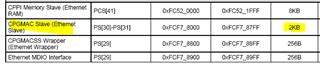
    As you see, the CPGMAC slave register frame is only defined to be of size 0x400. This needs to be increased to a size of 0x800. You can change this setting manually for now, I will try and get this corrected in the next update to CCS as well.

      (from table 6-25 of Datasheet)

    The relevant gel file is usually: C:\ti\ccsv8\ccs_base\emulation\gel\tms570lc43xx.gel if CCS is installed with the default folder-location settings.