This thread has been locked.

If you have a related question, please click the "Ask a related question" button in the top right corner. The newly created question will be automatically linked to this question.

MCU-PLUS-SDK-AM243X: Sysconfig 1.11 tool stays blank on Linux Mint 20.2

Part Number: MCU-PLUS-SDK-AM243X
Other Parts Discussed in Thread: SYSCONFIG, CCSTUDIO

Hey,

the Sysconfig tool 1.11 does stay blank when I start it under Linux Mint 20.2. On my older System with 19.3 it works.

I think my collegues, which also have 20.x version can start it.

After start it just leaves blank and CPU load goes high. I have to kill the process.

Cannot use newest Sysconfig Tool because we're currently running on 1.11 on builds!!

Are there any dependencies my system is missing?

Kind regards

Andreas

  • Hello Andreas,

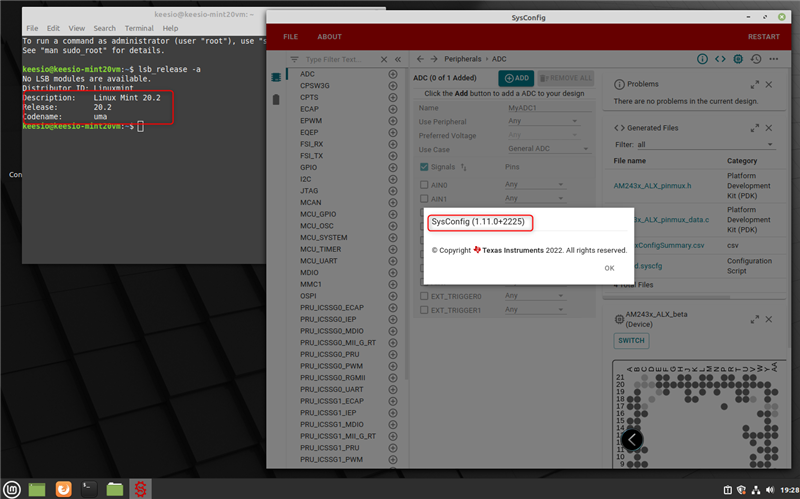
    I just installed a fresh Mint 20.2 VM and then immediately installed standalone sysconfig 1.11. It seems to work fine for me. Hence it appears to be an issue with your local environment.

    If you have CCS installed on your machine, can you open a syscfg file in CCS? Can you provide a screenshot of the blank sysconfig tool?

    Thanks

    ki

  • Hi KI,

    this is no Issue of my environment! My collegue has the same issue. On my 19.3 setup it works fine and I'm able to open it.

    I did open the syscfg file in CCS, but it does not work. CCS 10.4 recognizes SysCfg Tool 1.11 in Product Setup.

    When I start SysCfg standalone (which is my prefered way) the windows just stays blank and my CPU usage goes high. I have to kill the process manually.

    Images attached!

    Kind regards

    Andreas

    open file in syscfg from ccs

    open file directly from ccs projects directory

    start syscfg standalone

  • Note on the 1st image. I thought it would be ok to install the SDK. But after I installed it and made a setup in CCS it still did not work.

  • Hi KI,

    I installed sysconfig 1.11 on a Linux Mint 20.3 and I have the same problem as Andreas. Sysconfig tool stays blank - I launched it after installation and got the following error:

    :~/Downloads $ ./sysconfig-1.11.0_2225-setup.run 
    :~/Downloads $ [16267:16267:0426/101123.905440:ERROR:sandbox_linux.cc(376)] InitializeSandbox() called with multiple threads in process gpu-process.
    [16270:16281:0426/101123.933314:ERROR:cert_verify_proc_builtin.cc(559)] No net_fetcher for performing AIA chasing.
    [16267:16267:0426/101124.062047:ERROR:shared_context_state.cc(74)] Skia shader compilation error
    ------------------------
    
    Errors:
    
    ^C
    :~/Downloads $ Killed
    

    My system analyzer shows the nw process with maximum CPU usage.

    Kind regards,

    Benjamin

  • my installed java version:

    $ java --version
    openjdk 11.0.14.1 2022-02-08
    OpenJDK Runtime Environment (build 11.0.14.1+1-Ubuntu-0ubuntu1.20.04)
    OpenJDK 64-Bit Server VM (build 11.0.14.1+1-Ubuntu-0ubuntu1.20.04, mixed mode)

  • same version on both of my computers

  • Thank you for the additional data. Perhaps there is some conflict with other additional packages installed that is common with both you and your colleagues machines. As mentioned in my earlier post, a fresh mint 20.2 install followed by a sysconfig 1.11 install seems to be ok:

    I will try updating my mint installation and also follow up with the sysconfig engineers to see what could be the issue on your end.

    Thanks

    ki

  • I tried several things, including updating my mint environment and also installing CCS and opening a syscfg file there. So far there are still no issues.

    I escalated to engineering and they suggested enable some aditional diagnostics by turning on API logging:

    You can turn on tracing of API calls between CCS and SysConfig as follows:

    1. Create a text file named .options inside the <ccs>/ccs/eclipse/ directory, with the content com.ti.ccstudio.project.ui.webcontent/sysconfigApiCalls = true
    2. Launch CCS from a terminal using the command <ccs>/ccs/eclipse/ccstudio -debug
    3. You will see the trace in the terminal as you perform operations in the SysConfig editor

    Then reproduce the error by opening a syscfg file. Then select all the text in the terminal and copy&paste to a file. Zip the file and attach the zip to this thread.

    Thanks

    ki

  • we are on Linux Mint 20.3

  • Hi KI,

    I've attached the logs from the terminal and also a screenshot of syscfg (started from CCS) with a java trace. also I've attached the installation log of syscfg. I cannot see anything pointing to an error there.

    I don't know if this helps debugging SysCfg Problems if always starting from CCS. As already mentioned, we mainly use CCS to connect and debug on target. Usually we do not run any projects in CSS, as it is very bug prone and I do not want to get in contact with TI every time something does not work in CCS. Then I would have to spend many hours writing and debug your software!

    We usually start SysConfig as standalone application, make the changes we need and run our terminal commands to generate new sources. That mainly our workflow without big overhead.

    Are there any debug commands for SysCfg? If starting with the syscfg_gui.sh starter it has the same behaviour.

    Best regards

    Andreas

    ccs-syscfg-logs.zip

  • we are on Linux Mint 20.3

    Andreas has stated that he is on Mint 20.2. Are you both now on 20.3?

  • I'm on LM 20.2 , right, we don't have same distro versions

  • Thank you for the logs. I have sent them to engineering for analysis.

    Which dekstop environment are you using with Mint?

  • standard cinnamon

  • Yes, same for me.

    Engineering found some unusual information in your logs but still do not have enough information to determine the root case. They are suggesting a webex meeting so they can observe the issue on your environment. If this is fine, please let me know of your availability next week so that I can coordinate with engineering. Please start a private E2E conversation to discuss further.

    Thanks

    ki

  • This issue was resolved via private message. For those following this thread, the root cause was a conflict between a library used by Citrix and node webkit (used by SysConfig). Updating to the latest version of Citrix resolved the issue.

    Thanks

    ki

  • addidional information:

    From TI: Your version is loading /usr/local/lib/AppProtection/libAppProtection.so which has been flagged online as creating similar problems in vscode and firefox which are both browsers. Can you try temporarily moving this file and see if that helps? If may require updating LD_PRELOAD or LD_LIBRARY_PATH to remove anything that depends on it

    Citrix uses this library and some other apps also had trouble with it. Uninstalling icaclient (Citrix) helps. A newer version of citrix workspace app was released on 11.5.2022 for linux. This version seems fine. Sysconfig was able to start and show something.

    Also, there may be an configuration possibility in citrix workspace app which gives possibility to install without AppProtection. Did not see this.