This thread has been locked.

If you have a related question, please click the "Ask a related question" button in the top right corner. The newly created question will be automatically linked to this question.

TMS570LS3137-EP: CPU StartUp issue - OK with debugger - KO in standalone

Part Number: TMS570LS3137-EP
Other Parts Discussed in Thread: HALCOGEN, TMS570LS1224

Hi

We are currently stumbling on a road block on our project where the SW cannot start by itself. This is only the application SW side without bootloader. For testing the application start address is set at 0x0.

SW will run OK with the debugger. It will continue to run OK when debugger is disconnected.

If we power cycle the board, it does not execute.

I was trying to use the debugger (XSD200) in loading the symbols only which would be the equivalent of “attach” to running target from my understanding.

When the ECU is in this limbo state the code always halts in a data abort exception. The problem is we cannot capture the start of the execution at power up so we cannot pin point the place in the code causing the issue.

And we cannot reproduce the problem if we reset the CPU to restart the code.

Just restarting without resetting will give inconsistent places where the exception is triggered. Please note the boot code is not generated by halcogen and we are using ETAS RTA OS.


All other projects “bare metal” where boot sequence is generated with HALCOGEN work fine.

So far we have been unable to successfully mix an halcogen boot sequence with OS functions especially with OS vector initialization functions. It is always triggering an exception of some sort.

Could you please advise your side ?

Thanks in advance.

Seb

  • Hi,

      When you connect to the processor and find out that it is trapped in the data fault handler, what is the value of the data fault status register and others? See below? Please refer to the Arm Cortex-R4F TRM for the decoding of these bits for the root cause of the faults. 


  • Hi Charles

    Thanks for your reply.

    This is what I get:

    It is consistent accross power cycles. The data fault address 0xD0FE9EF8 seems to be in reserved space.

    If I interpret well the content of Arm Cortex-R4F TRM, 0x808 would mean :

    bit12 ==1 : AXI Slave error (SLVERR, or OKAY in response to exclusive read transaction) caused the abort.

    bits 3-0 == 0x8 : Synchronous External Abort with a valid value for Data Fault address ... Which is surprinsing as it seems to be in a reserved space.

    Will keep digging over the forums about what could cause this.

    Your help will be really appreciated in solving this.

    Regards

    Seb

  • Hi Seb,

      The error status indicates the fault  is due to a write. The error address is indeed an illegal address that will cause the internal address decode logic to generate an abort signal to the processor. Although I don't know for sure what caused the abort, I tend to think it may be related to the OS. 

  • Hi

    I'm not sure it is related to the OS. I have made some test it is looking it is going in abort very early.

    This is the Main function:


    Test 1 : Activate a LED after OS vector init


    Result : Runs OK on debugger. After power cycle, does not reach the LED port Init Function / LEDs are ON - Lowbrightness mode


    Test 2 : Activate a LED after OS vector init  & Comment out fnIosCustomTargetStartup()


    Result : Runs OK on debugger. After power cycle, does not reach the Init Function / LEDs are ON - Lowbrightness mode


    Test 3 : Activate a LED after OS vector init  & Comment out fnIosCustomTargetStartup() & Comment out Os_InitializeVectorTable()


    Result :

    With debugger, reaches the LED init functions and Light up the LED

    Goes into OS Shutdown with the following stack


    CPU is not in system mode hence the shutdown


    After power cycle, does not reach the Init Function / LEDs are ON - Lowbrightness mode


    Test 4 : Os_InitializeVectorTable() is back but comes after system init and LED activation


    Runs with debugger but stuck in a while loop for SPI transmission later in the code...

    After power cycle, does not reach the Init Function / LEDs are ON - Lowbrightness mode

    All this makes me think the debugger is putting the CPU is a good state for execution that the boot code before main does not.

    The boot code is not generated by halcogen and it is very minimal compared to what Halcogen does. It has been kept like this as it seemed to upset the OS execution and I was always ending up in an exception.

    I can share the project privately if that helps.

    Regards

    Seb

  • Hi,

      Based on your test 4 result, I agree maybe something that is not proper with your startup code before main() is started.  I will suggest a way of debugging. I suppose you have the sys_intvecs.asm file, correct? Modify the resetEntry to below shown in red. This will force the processor to spin on the resetEntry after you power up. You will then use the "Move to line" provided by the debugger to force the program counter to the first line of _c_int00. From there you can single step the code until you see the abort. 

    ;-------------------------------------------------------------------------------
    ; sys_intvecs.asm
    ;
    ; (c) Texas Instruments 2009-2013, All rights reserved.
    ;

    .sect ".intvecs"
    .arm

    ;-------------------------------------------------------------------------------
    ; import reference for interrupt routines

    .ref _c_int00
    .ref _dabort

    .def resetEntry

    ;-------------------------------------------------------------------------------
    ; interrupt vectors

    resetEntry
    b #-8
    undefEntry
    b undefEntry
    svcEntry
    b svcEntry
    prefetchEntry
    b prefetchEntry
    b _dabort
    reservedEntry
    b reservedEntry
    ldr pc,[pc,#-0x1b0]
    ldr pc,[pc,#-0x1b0]

  • Hi Charles

    Thanks for your reply. I'll try to give this a go but with the OS setup we have, the boot sequence is a bit different than standard.

    It is has been taken from the "helloWorld" example provided by ETAS.

    The main project has the following linker script for the vector setup:

    SECTIONS
    {
    /* Exception vector table / exception handler code
    * IRQ/SWI and Data/prefetch exceptions are separated into their own sections
    * to better support user generated vector tables
    * A common output section is used to prevent the linker injecting long jump trampolines */
    //Section below if we are using the OS library
    //.Os_ExceptionVectors: load = 0x004
    //{
    //--library=RTAOS.lib(.Os_ExceptionVectors) /* The OS-generated vector table (including the FIQ handler). */
    //--library=RTAOS.lib(.Os_IRQ)
    //--library=RTAOS.lib(.Os_SWI)
    //--library=RTAOS.lib(.Os_ExceptionHandlers)
    //} //crc_table(_App_crc_table, algorithm=TMS570_CRC64_ISO)

    //Section below if we are using the OS source files
    .Os_ExceptionVectors: {}, load = 0x004
    .Os_IRQ : {}, palign=4 > VECTBL
    .Os_SWI : {}, palign=4 > VECTBL
    .Os_ExceptionHandlers : {}, palign=4 > VECTBL

    My reset handler looks like :

    ;; This file provides a reset handler that uses the standard TI initialization
    ;; routine, but skips the initial switch to user-mode (see below).

    .sect ".text"
    .align 4
    .clink
    .armfunc Os_InitAdjustingEntry
    .state32
    .global Os_InitAdjustingEntry
    .global _c_int00

    Os_InitAdjustingEntry:

    ; Enable access to floating-point coprocessors.
    mrc p15, #0x0, r0, c1, c0, #0x2 ; Read coprocessor access control register.
    mov r3, #0x00F00000 ; Full access mask for coprocessors 10 & 11
    orr r0, r0, r3 ; (VFP coprocessors).
    mcr p15, #0x0, r0, c1, c0, #0x2 ; Write coprocessor access control register.

    ; Enable advanced VFP extensions (bit 30 in fpexc).
    mov r0,#0x40000000
    vmsr fpexc, r0
    ; Jump to 40 bytes past the TI-supplied C startup code. The first 40 bytes
    ; (i.e. 10 instructions) of this code perform the VFP initialization above
    ; and and then switch to user mode - since we want to skip the switch to user
    ; mode, we need to reproduce the VFP initialization code and jump past the
    ; mode change.
    ; See lib\rtssrc.zip\boot.asm in your TI directory.
    bl _c_int00 + 40

    With c_int00 looking like :

    .armfunc _c_int00

    ;****************************************************************************
    ;* 32 BIT STATE BOOT ROUTINE *
    ;****************************************************************************

    .global __stack
    ;***************************************************************
    ;* DEFINE THE USER MODE STACK (DEFAULT SIZE IS 512)
    ;***************************************************************
    __stack:.usect ".stack", 0, 4

    .global _c_int00
    ;***************************************************************
    ;* FUNCTION DEF: _c_int00
    ;***************************************************************
    _c_int00: .asmfunc stack_usage(0)

    .if __TI_NEON_SUPPORT__ | __TI_VFP_SUPPORT__
    ;*------------------------------------------------------
    ;* SETUP PRIVILEGED AND USER MODE ACCESS TO COPROCESSORS
    ;* 10 AND 11, REQUIRED TO ENABLE NEON/VFP
    ;* COPROCESSOR ACCESS CONTROL REG
    ;* BITS [23:22] - CP11, [21:20] - CP10
    ;* SET TO 0b11 TO ENABLE USER AND PRIV MODE ACCESS
    ;*------------------------------------------------------
    MRC p15,#0x0,r0,c1,c0,#2
    MOV r3,#0xf00000
    ORR r0,r0,r3
    MCR p15,#0x0,r0,c1,c0,#2

    ;*------------------------------------------------------
    ; SET THE EN BIT, FPEXC[30] TO ENABLE NEON AND VFP
    ;*------------------------------------------------------
    MOV r0,#0x40000000
    FMXR FPEXC,r0
    .endif

    ;*------------------------------------------------------
    ;* SET TO USER MODE
    ;*------------------------------------------------------
    MRS r0, cpsr
    BIC r0, r0, #0x1F ; CLEAR MODES
    ORR r0, r0, #0x10 ; SET USER MODE
    MSR cpsr_cf, r0

    ;*------------------------------------------------------
    ;* INITIALIZE THE USER MODE STACK
    ;*------------------------------------------------------
    .if __TI_AVOID_EMBEDDED_CONSTANTS
    MOVW sp, __STACK_END
    MOVT sp, __STACK_END
    .else
    LDR sp, c_STACK_END
    .endif

    ;*------------------------------------------------------
    ;* Call the __mpu_init hook function.
    ;*------------------------------------------------------
    BL __mpu_init

    ;*------------------------------------------------------
    ;* Perform all the required initializations when
    ;* _system_pre_init() returns non-zero:
    ;* - Process BINIT Table
    ;* - Perform C auto initialization
    ;* - Call global constructors
    ;*------------------------------------------------------
    BL _system_pre_init
    CMP R0, #0
    BEQ bypass_auto_init
    BL __TI_auto_init
    bypass_auto_init:

    ;*------------------------------------------------------
    ;* CALL APPLICATION
    ;*------------------------------------------------------
    BL _args_main

    ;*------------------------------------------------------
    ;* IF APPLICATION DIDN'T CALL EXIT, CALL EXIT(1)
    ;*------------------------------------------------------
    MOV R0, #1
    BL exit

    ;*------------------------------------------------------
    ;* DONE, LOOP FOREVER
    ;*------------------------------------------------------
    L1: B L1
    .endasmfunc

    ;***************************************************************
    ;* CONSTANTS USED BY THIS MODULE
    ;***************************************************************
    .if !__TI_AVOID_EMBEDDED_CONSTANTS
    c_STACK_END .long __STACK_END
    .endif

    ;******************************************************
    ;* UNDEFINED REFERENCES *
    ;******************************************************
    .global __STACK_END
    .global _system_pre_init
    .global __TI_auto_init
    .global _args_main
    .global exit
    .global __mpu_init

    .end

    __mpu_init is empty.

    I'm working on a reduced project which is faster to build than the main one and allows faster iteration.

    A boot sequence generated by HALCOGEN for a bare metal project has much more into it. So the idea is to keep as much as possible the Halcogen generated content for boot but adapt it for what the OS need.

    In this reduced project I have the following linker script :

    SECTIONS
    {
    /* Exception vector table / exception handler code
    * IRQ/SWI and Data/prefetch exceptions are separated into their own sections
    * to better support user generated vector tables
    * A common output section is used to prevent the linker injecting long jump trampolines */
    //Section below if we are using the OS library
    //.Os_ExceptionVectors: load = 0x004
    //{
    //--library=RTAOS.lib(.Os_ExceptionVectors) /* The OS-generated vector table (including the FIQ handler). */
    //--library=RTAOS.lib(.Os_IRQ)
    //--library=RTAOS.lib(.Os_SWI)
    //--library=RTAOS.lib(.Os_ExceptionHandlers)
    //} //crc_table(_App_crc_table, algorithm=TMS570_CRC64_ISO)

    //Section below if we are using the OS source files
    .Os_ExceptionVectors: {}, load = 0x004
    .Os_IRQ : {}, palign=4 > VECTBL
    .Os_SWI : {}, palign=4 > VECTBL
    .Os_ExceptionHandlers : {}, palign=4 > VECTBL

    .cinit: {} > FLASH /* Initialization tables */
    .text {* (.text)} > FLASH
    .const: {} > FLASH /* Constant data */
    .pinit: {} > FLASH /* Template initialization tables */

    .bss: fill=0x00 {} > MEM /* Global and static variables,
    * must be filled with 0x00 to
    * initialize at runtime */
    .data: {} > MEM /* Initialized data */
    .sysmem: {} > MEM /* Dynamic memory allocation area */

    /* CPU stack */
    .stack: {} (NOLOAD) > MEM (HIGH)
    }

    And the following reset handler:

    ;; This file provides a reset handler that uses the standard TI initialization
    ;; routine, but skips the initial switch to user-mode (see below).

    .sect ".text"
    .align 4
    .clink
    .armfunc Os_InitAdjustingEntry
    .state32
    .global Os_InitAdjustingEntry
    .global _c_int00
    .global _coreInitRegisters_

    Os_InitAdjustingEntry:

    bl _coreInitRegisters_
    ; Enable access to floating-point coprocessors.
    mrc p15, #0x0, r0, c1, c0, #0x2 ; Read coprocessor access control register.
    mov r3, #0x00F00000 ; Full access mask for coprocessors 10 & 11
    orr r0, r0, r3 ; (VFP coprocessors).
    mcr p15, #0x0, r0, c1, c0, #0x2 ; Write coprocessor access control register.

    ; Enable advanced VFP extensions (bit 30 in fpexc).
    mov r0,#0x40000000
    vmsr fpexc, r0
    ; Jump to 40 bytes past the TI-supplied C startup code. The first 40 bytes
    ; (i.e. 10 instructions) of this code perform the VFP initialization above
    ; and and then switch to user mode - since we want to skip the switch to user
    ; mode, we need to reproduce the VFP initialization code and jump past the
    ; mode change.
    ; See lib\rtssrc.zip\boot.asm in your TI directory.
    bl _c_int00 ;+ 40

    With the following _cint00 taken from Halcogen desabling all safety inits as they will normally be covered (at least in part) by the Autosar MCAL and to make it as simple as possible but with a slight mod to comment out _coreInitRegisters_ as it is done in reset handler before calling _c_Int00 and it puts the CPU in system mode as desired.

    Also commenting out _coreInitStackPointer_ as it is done by the OS vector table.

    void _c_int00(void)
    {
    ///* USER CODE BEGIN (5) */
    // uint32_t c_STACK_END;
    ///* USER CODE END */
    //
    // /* Initialize Core Registers to avoid CCM Error */
    // _coreInitRegisters_();
    //
    ///* USER CODE BEGIN (6) */
    ///* USER CODE END */
    //
    // /* Initialize Stack Pointers */
    // _coreInitStackPointer_();
    //

    /* USER CODE BEGIN (7) */
    /* USER CODE END */

    /* Work Around for Errata DEVICE#140: ( Only on Rev A silicon)
    *
    * Errata Description:
    * The Core Compare Module(CCM-R4) may cause nERROR to be asserted after a cold power-on
    * Workaround:
    * Clear ESM Group2 Channel 2 error in ESMSR2 and Compare error in CCMSR register */
    if (DEVICE_ID_REV == 0x802AAD05U)
    {
    _esmCcmErrorsClear_();
    }

    /* USER CODE BEGIN (8) */
    /* USER CODE END */

    /* Enable CPU Event Export */
    /* This allows the CPU to signal any single-bit or double-bit errors detected
    * by its ECC logic for accesses to program flash or data RAM.
    */
    _coreEnableEventBusExport_();

    /* USER CODE BEGIN (11) */
    /* USER CODE END */

    /* Workaround for Errata CORTEXR4 66 */
    _errata_CORTEXR4_66_();

    /* Workaround for Errata CORTEXR4 57 */
    _errata_CORTEXR4_57_();

    /* Reset handler: the following instructions read from the system exception status register
    * to identify the cause of the CPU reset.
    */

    /* check for power-on reset condition */
    /*SAFETYMCUSW 139 S MR:13.7 <APPROVED> "Hardware status bit read check" */
    if ((SYS_EXCEPTION & POWERON_RESET) != 0U)
    {
    /* USER CODE BEGIN (12) */
    /* USER CODE END */
    /* Add condition to check whether PLL can be started successfully */
    if (_errata_SSWF021_45_both_plls(PLL_RETRIES) != 0U)
    {
    /* Put system in a safe state */
    handlePLLLockFail();
    }
    /* clear all reset status flags */
    SYS_EXCEPTION = 0xFFFFU;

    /* USER CODE BEGIN (13) */
    /* USER CODE END */
    /* USER CODE BEGIN (14) */
    /* USER CODE END */
    /* USER CODE BEGIN (15) */
    /* USER CODE END */
    /* continue with normal start-up sequence */
    }
    /*SAFETYMCUSW 139 S MR:13.7 <APPROVED> "Hardware status bit read check" */
    else if ((SYS_EXCEPTION & OSC_FAILURE_RESET) != 0U)
    {
    /* Reset caused due to oscillator failure.
    Add user code here to handle oscillator failure */

    /* USER CODE BEGIN (16) */
    /* USER CODE END */
    }
    /*SAFETYMCUSW 139 S MR:13.7 <APPROVED> "Hardware status bit read check" */
    else if ((SYS_EXCEPTION & WATCHDOG_RESET) !=0U)
    {
    /* Reset caused due
    * 1) windowed watchdog violation - Add user code here to handle watchdog violation.
    * 2) ICEPICK Reset - After loading code via CCS / System Reset through CCS
    */
    /* Check the WatchDog Status register */
    if(WATCHDOG_STATUS != 0U)
    {
    /* Add user code here to handle watchdog violation. */
    /* USER CODE BEGIN (17) */
    /* USER CODE END */

    /* Clear the Watchdog reset flag in Exception Status register */
    SYS_EXCEPTION = WATCHDOG_RESET;

    /* USER CODE BEGIN (18) */
    /* USER CODE END */
    }
    else
    {
    /* Clear the ICEPICK reset flag in Exception Status register */
    SYS_EXCEPTION = ICEPICK_RESET;
    /* USER CODE BEGIN (19) */
    /* USER CODE END */
    }
    }
    /*SAFETYMCUSW 139 S MR:13.7 <APPROVED> "Hardware status bit read check" */
    else if ((SYS_EXCEPTION & CPU_RESET) !=0U)
    {
    /* Reset caused due to CPU reset.
    CPU reset can be caused by CPU self-test completion, or
    by toggling the "CPU RESET" bit of the CPU Reset Control Register. */

    /* USER CODE BEGIN (20) */
    /* USER CODE END */

    /* clear all reset status flags */
    SYS_EXCEPTION = CPU_RESET;

    /* USER CODE BEGIN (21) */
    /* USER CODE END */

    }
    /*SAFETYMCUSW 139 S MR:13.7 <APPROVED> "Hardware status bit read check" */
    else if ((SYS_EXCEPTION & SW_RESET) != 0U)
    {
    /* Reset caused due to software reset.
    Add user code to handle software reset. */

    /* USER CODE BEGIN (22) */
    /* USER CODE END */
    }
    else
    {
    /* Reset caused by nRST being driven low externally.
    Add user code to handle external reset. */

    /* USER CODE BEGIN (23) */
    /* USER CODE END */
    }

    /* Check if there were ESM group3 errors during power-up.
    * These could occur during eFuse auto-load or during reads from flash OTP
    * during power-up. Device operation is not reliable and not recommended
    * in this case.
    * An ESM group3 error only drives the nERROR pin low. An external circuit
    * that monitors the nERROR pin must take the appropriate action to ensure that
    * the system is placed in a safe state, as determined by the application.
    */
    if ((esmREG->SR1[2]) != 0U)
    {
    /* USER CODE BEGIN (24) */
    /* USER CODE END */
    /*SAFETYMCUSW 5 C MR:NA <APPROVED> "for(;;) can be removed by adding "# if 0" and "# endif" in the user codes above and below" */
    /*SAFETYMCUSW 26 S MR:NA <APPROVED> "for(;;) can be removed by adding "# if 0" and "# endif" in the user codes above and below" */
    /*SAFETYMCUSW 28 D MR:NA <APPROVED> "for(;;) can be removed by adding "# if 0" and "# endif" in the user codes above and below" */
    for(;;)
    {
    }/* Wait */
    /* USER CODE BEGIN (25) */
    /* USER CODE END */
    }

    /* USER CODE BEGIN (26) */
    /* USER CODE END */

    /* Initialize System - Clock, Flash settings with Efuse self check */
    systemInit();

    /* Workaround for Errata PBIST#4 */
    errata_PBIST_4();

    /* Run PBIST on STC ROM */
    pbistRun((uint32)STC_ROM_PBIST_RAM_GROUP,
    ((uint32)PBIST_TripleReadSlow | (uint32)PBIST_TripleReadFast));

    /* Wait for PBIST for STC ROM to be completed */
    /*SAFETYMCUSW 28 D MR:NA <APPROVED> "Hardware status bit read check" */
    while(pbistIsTestCompleted() != TRUE)
    {
    }/* Wait */

    /* Check if PBIST on STC ROM passed the self-test */
    if( pbistIsTestPassed() != TRUE)
    {
    /* PBIST and STC ROM failed the self-test.
    * Need custom handler to check the memory failure
    * and to take the appropriate next step.
    */

    pbistFail();

    }

    /* Disable PBIST clocks and disable memory self-test mode */
    pbistStop();

    /* Run PBIST on PBIST ROM */
    pbistRun((uint32)PBIST_ROM_PBIST_RAM_GROUP,
    ((uint32)PBIST_TripleReadSlow | (uint32)PBIST_TripleReadFast));

    /* Wait for PBIST for PBIST ROM to be completed */
    /*SAFETYMCUSW 28 D MR:NA <APPROVED> "Hardware status bit read check" */
    while(pbistIsTestCompleted() != TRUE)
    {
    }/* Wait */

    /* Check if PBIST ROM passed the self-test */
    if( pbistIsTestPassed() != TRUE)
    {
    /* PBIST and STC ROM failed the self-test.
    * Need custom handler to check the memory failure
    * and to take the appropriate next step.
    */

    pbistFail();

    }

    /* Disable PBIST clocks and disable memory self-test mode */
    pbistStop();
    /* USER CODE BEGIN (29) */
    /* USER CODE END */

    /* USER CODE BEGIN (31) */
    /* USER CODE END */


    /* USER CODE BEGIN (37) */
    /* USER CODE END */


    /* Initialize CPU RAM.
    * This function uses the system module's hardware for auto-initialization of memories and their
    * associated protection schemes. The CPU RAM is initialized by setting bit 0 of the MSIENA register.
    * Hence the value 0x1 passed to the function.
    * This function will initialize the entire CPU RAM and the corresponding ECC locations.
    */
    memoryInit(0x1U);

    /* USER CODE BEGIN (38) */
    /* USER CODE END */

    /* Enable ECC checking for TCRAM accesses.
    * This function enables the CPU's ECC logic for accesses to B0TCM and B1TCM.
    */
    _coreEnableRamEcc_();

    /* USER CODE BEGIN (39) */
    /* USER CODE END */

    /* USER CODE BEGIN (55) */
    /* USER CODE END */


    /* USER CODE BEGIN (68) */
    /* USER CODE END */

    /* USER CODE BEGIN (72) */
    /* USER CODE END */

    /* Enable IRQ offset via Vic controller */
    //_coreEnableIrqVicOffset_();


    /* USER CODE BEGIN (73) */
    /* USER CODE END */

    /* Initialize VIM table */
    //vimInit();

    /* USER CODE BEGIN (74) */
    /* USER CODE END */

    /* Configure system response to error conditions signaled to the ESM group1 */
    /* This function can be configured from the ESM tab of HALCoGen */
    esmInit();
    /* initialize copy table */
    __TI_auto_init();
    /* USER CODE BEGIN (75) */
    /* USER CODE END */

    /* call the application */
    /*SAFETYMCUSW 296 S MR:8.6 <APPROVED> "Startup code(library functions at block scope)" */
    /*SAFETYMCUSW 326 S MR:8.2 <APPROVED> "Startup code(Declaration for main in library)" */
    /*SAFETYMCUSW 60 D MR:8.8 <APPROVED> "Startup code(Declaration for main in library;Only doing an extern for the same)" */
    main();

    /* USER CODE BEGIN (76) */
    /* USER CODE END */
    /*SAFETYMCUSW 122 S MR:20.11 <APPROVED> "Startup code(exit and abort need to be present)" */
    // exit(0);

    /* USER CODE BEGIN (77) */
    /* USER CODE END */
    }

    Again this project will run fine with debugger stepping to main after reflashing or running it straight after a reflash.

    After power cycle, loading symbols only, it is in data abort with :

    Data Fault address seems consistent.

    Still in the loading symbol mode only, after system reset / CPU reset and restart, I can step to that line in _c_int00: 

    Then it goes into data abort with :

    And that seems consistent at last ...

    Any idea on what might cause the difference in behaviour when we reflash vs restart after a power cycle ?

    Would it be linked to the stack pointer getting strange values (ie exceeding RAM range) ?...

    Thanks

    Seb

  • Hi 

    I tried the debugging technique you mentionned in your last post. I can move to the first line of the reset handler but then executing it then cause a prefect abort with the following:

    I tried quite a lot of things but so far failed to nail down a consistent behaviour that would explain the poblem.

    Running out of idea with the pressure ramping up.

    Any pointers based on the above ?

    Regards

    Seb

  • Hi Seb,

       How many boards do you have? Are you consistently getting the same issue with all boards?

       Looking at your error status, it shows 0xD for CP15_INSTRUCTION_FALUT_STATUS register. This is a permission fault. Normally, this is due to MPU settings that block access to certain region of the addresses. 

      Can you single step after you move-line to the ResetEntry?  

       I also see you commenting out the below two lines. These are the very first thing by HalcoGen to initialize the processor. Commenting them out may be a problem although you mention the OS will handle them at a later time. But I think that may be too late. 

    // _coreInitRegisters_();
    //
    ///* USER CODE BEGIN (6) */
    ///* USER CODE END */
    //
    // /* Initialize Stack Pointers */
    // _coreInitStackPointer_();


  • Hi Charles

    I do not have another board at hand to check if I check the strictly same issue with another one.

    But for sure , from the start of my post, on every board we have, we can start the SW with the debugger but it will fail lto kick off after a power cycle.

    In the last post with your debugging technique, I can't single step. It goes straight to exception.

    Before trying the debugging technique, I was effectively commenting out the _coreInitRegisters_() and _coreInitStackPointer_() function in _c_int00 but my reset handler was like this - So the 2 functions were actually executed:

    Os_InitAdjustingEntry:

    bl _coreInitRegisters_
    bl _coreInitStackPointer_
    ; Enable access to floating-point coprocessors.
    mrc p15, #0x0, r0, c1, c0, #0x2 ; Read coprocessor access control register.
    mov r3, #0x00F00000 ; Full access mask for coprocessors 10 & 11
    orr r0, r0, r3 ; (VFP coprocessors).
    mcr p15, #0x0, r0, c1, c0, #0x2 ; Write coprocessor access control register.

    ; Enable advanced VFP extensions (bit 30 in fpexc).
    mov r0,#0x40000000
    vmsr fpexc, r0

    ; Init stack pointer

    ;ldr sp, c_STACK_END

    ; Jump to 40 bytes past the TI-supplied C startup code. The first 40 bytes
    ; (i.e. 10 instructions) of this code perform the VFP initialization above
    ; and and then switch to user mode - since we want to skip the switch to user
    ; mode, we need to reproduce the VFP initialization code and jump past the
    ; mode change.
    ; See lib\rtssrc.zip\boot.asm in your TI directory.
    bl _c_int00 ;+ 40

    And _coreInitStackPointer_ was modifed like the following as the OS is using a single stack for everything and has no CAT2 ISR.

    _coreInitStackPointer_

    cps #17
    ldr sp, fiqSp
    cps #18
    ldr sp, irqSp
    cps #19
    ldr sp, svcSp
    cps #23
    ldr sp, abortSp
    cps #27
    ldr sp, undefSp
    cps #31
    ldr sp, userSp
    bx lr

    userSp .word 0x08000000+0x00001000
    svcSp .word 0x08000000+0x00001000+0x00000000
    fiqSp .word 0x08000000+0x00001000+0x00000000+0x00000000
    irqSp .word 0x08000000+0x00001000+0x00000000+0x00000000+0x00000000
    abortSp .word 0x08000000+0x00001000+0x00000000+0x00000000+0x00000000+0x00000000
    undefSp .word 0x08000000+0x00001000+0x00000000+0x00000000+0x00000000+0x00000000+0x00000000

    .endasmfunc

    But even with that I'm getting into an  undefined exception either directly on the first step.

    Any pointer appreciated. I can also share the project if that helps.

    Regards

    Seb

  • Hi,

      I hope I can be more helpful. But I don't really know what went wrong. 

    But for sure , from the start of my post, on every board we have, we can start the SW with the debugger but it will fail lto kick off after a power cycle.

    Can you show your GEL script? Sometimes people get tripped up by this when trying to determine why things work in a CCS debug session vs standalone. 

    In the last post with your debugging technique, I can't single step. It goes straight to exception.

    How did you single step? Did you single step by disassembly line by line? Which assembly line caused the prefetch abort or data abort after you move line to ResetEntry?

    You need to single step using the below icon for disassembly while you are in the disassembly window. 

  • Hi Charles

    How did you single step? Did you single step by disassembly line by line? Which assembly line caused the prefetch abort or data abort after you move line to ResetEntry?

    Yes single step in disassembly.

    Regarding the GEL script, reading through forums I got to read several thereds avbout gel script but I did not manage to find one explaining where to open it.

    Can you guide me through this ?

    Thanks

    Seb

  • Hi Charles

    One thing though is what the debugger would do as an extra to put the CPU in a happy place with the same code ?

    It is very hard to understand why the debugger would not show the problem.

    Thanks

    Regards

    Seb

  • Hi,

     Are you saying after you move line to the first line in _c_int00 and if you single step one line only then you will get abort immediately? If not, which line caused the abort?

    Regarding the GEL script, reading through forums I got to read several thereds avbout gel script but I did not manage to find one explaining where to open it

    See below to open the GEL script. 

    1. In CCS in debug view, go to Tools -> ARM Advance Features and you should first see below window.

    2. Select GEL Files

    3. Double click on the GEL file. I'm using tms570ls1224.gel as an example. Yours will be different. 

    You can also find the same file in C:\ti\<your CCS version>\ccs\ccs_base\emulation\gel directory.

    With that said, if you are not familiar with GEL then I doubt you modified them and most likely you are using the default GEL provided by CCS which should not cause problem. Why don't you compare your GEL to the one provided by CCS in the directory I mention above if you have a custom GEL. 

    One thing though is what the debugger would do as an extra to put the CPU in a happy place with the same code ?

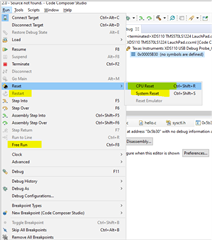
    In CCS, if you use "CPU reset", it merely set the PC (program counter) to 0x0. It does not really reset the device at all. 

    If you use "Restart", it moves the PC to the entry point address of the code (_c_int00). Depending on the debugger settings, the debugger may then auto-run to main().

    If you use "System Reset" then it is a warm reset that will reset the device except the debug logic. 

    If you use "Free Run" then it will run the code with the debugger disconnected. 

  • Hi

    Thanks for your explainations.

    That is useful to understand the diffrent possibilities. I finally cracked the problem .. Long story short the CPU does not like to have an entry point different from 0x00 when restarting from a power cyle. The debugger is deceptive in this instance as it will be ok with that. 

    I worked around what the OS was needind to actually start at 0x00 with _c_int00 function, call the OS function enabling access to coprocessor + floating point then come back to _c_Int00 but with a gap of 10nop instruction the OSEntry function is requiring this. Then execute the rest of the _c_int00 function generated from halcogen which continues with _coreInitRegisters_.

    And that was it. Starts now 100% of the time.

    Thanks a lot for your support

    Regards

    Seb