Part Number: HALCOGEN
For some reason my Halcogen has misaligned blocks which creates somewhat confusion where to click.
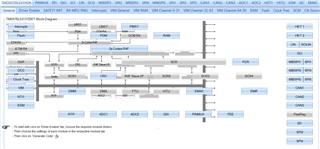

Is there a way to fix this?
This thread has been locked.
If you have a related question, please click the "Ask a related question" button in the top right corner. The newly created question will be automatically linked to this question.
Part Number: HALCOGEN
For some reason my Halcogen has misaligned blocks which creates somewhat confusion where to click.


Is there a way to fix this?
Hi,
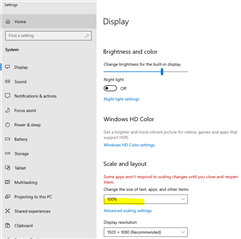
Please set to 100% in your Display settings. This is a known issue.

This post should also help.
I'd like to add that the scale value of 100% doesn't need to be maintained after HalCoGen has successfully launched. Once it's running, Windows will scale HalCoGen's bitmaps correctly.
(I'm using Windows 11 with a Dell 27" 4k monitor. Your milage may vary.)