This thread has been locked.

If you have a related question, please click the "Ask a related question" button in the top right corner. The newly created question will be automatically linked to this question.

TMS570LC4357: Getting Ethernet MAC running, starting with loopback test

Part Number: TMS570LC4357
Other Parts Discussed in Thread: HALCOGEN, , LAUNCHXL2-570LC43, CCSTUDIO, DP83630, TMDX570LC43HDK, TMDSRM48HDK

Hi,

I'm trying to get EMAC working, and hit the same problem others have encountered, as in the threads here....

https://e2e.ti.com/support/microcontrollers/arm-based-microcontrollers-group/arm-based-microcontrollers/f/arm-based-microcontrollers-forum/872569/ccs-launchxl2-570lc43-ethernet-all-received-frames-are-filtered/3244804?tisearch=e2e-sitesearch&keymatch=xl2-570lc43%20ethernet#3244804

I followed the steps in the Halcogen help documentation to do EMAC loopback.

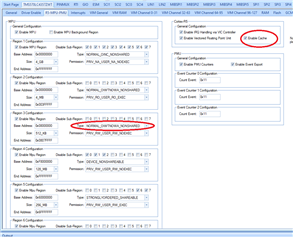
I tried setting MPU regions to NORMAL_OIWTNOWA_NONSHARED (write-through), as what supposedly worked for the above poster, but it didn't work for me.

https://e2e.ti.com/support/microcontrollers/arm-based-microcontrollers-group/arm-based-microcontrollers/f/arm-based-microcontrollers-forum/612990/tms570lc4357-mdiophyregread?tisearch=e2e-sitesearch&keymatch=TMS570LC4357%25252525252520Ethernet%25252525252520loopback%25252525252520MDIO

I tried picking up the package indicated in this post:

TMS570LC4357_LaunchPad_EMAC_Loopback.zip

but didn't have permission to retrieve it.

Thanks for any and all help to get the EMAC going.

  • I also tried to get the LWIP project example, but could not get it using this...

    git clone git://git.ti.com/cgit/hercules_examples/hercules_examples/tree/Application/LwIP/v00.04.00
    Cloning into 'v00.04.00'...
    fatal: remote error: access denied or repository not exported: /cgit/hercules_examples/hercules_examples/tree/Application/LwIP/v00.04.00

    Thanks for help.

  • Hi,

    Please use below loopback code 

    570LC43_EMAC_LOOPBACK.zip

    This project created by following "Halcogen help documentation to do EMAC loopback", but in addition to this i did two more modifications 

    1. In pin muxing table i manually configured "MDIO" and "MDCLK", because these pins are not configured automatically in HALCoGen when we enable "MII".

    2. I also changed the RAM MPU Settings as "NORMAL_OIWTNOWA_NONSHARED" because of cache is enabled by default.

    --

    Thanks,

    Jagadish.

  • Hi,

    Thank you very much for the .zip, and I was able to use it to demonstrate EMAC loopback, with emacRxNotification(hdkif) being called (by EMACRxIntISR()).  I'm not clear how the HL infrastructure has the user retrieve the received data.

    This thread...

    e2e.ti.com/.../2748630

    says EMACRxIntISR() calls EMACReceive(hdkif), and I see the code does that, after calling emacRxNotification(hdkif).

    I'm not clear what the pack() array and hdkif->rxchptr are, and how software is supposed to pick up whatever data they point to.  Is the user-provided emacRxNotification(hdkif) supposed to call EMACReceive(hdkif) [ before the call that happens in EMACRxIntISR() ] to retrieve the data?

    Is there any code example for the EMAC receive path?

    Thanks again.

  • Hi Peter,

    If you verify the function "EMACDMAInit" in the code there we will initialize the transmit and receive channels descriptors.
    In our example for for receive channel descriptors we are giving "pbuf_array"

    So our received packets will be moved into this buffers.

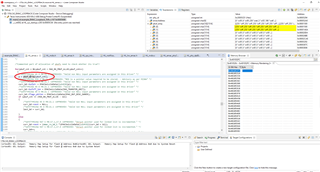
    For easy verification make this buffer as global instead of static

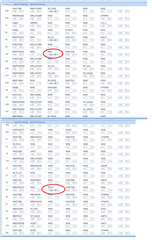
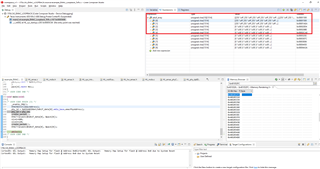
    Once you did that you can see your received packets in this buffer after as shown below 

    In our example we sent two packets so the two packets are received in pbuf_array[0] and pbuf_array[1].

    --

    Thanks,

    Jagadish.

  • Hi,

    I used the info you provided and saw the first packet received, but not the second.  I modified the example code a little, so that I could identify the received packet a little better (whether second packet was dropped or overwrote first packet), and provided more debug info (for myself) in the way of printing contents and adding delays.  One of the missing information is the received packet length, which I'm guessing is available somewhere in the hdkif passed to emacRxNotification(hdkif); I (obviously) need this crucial piece of info, even if I just do "blind" ordinal indexing of which pbuf_array[] is being referenced in the notification call.  Also, there are currently 10 (MAX_RX_PBUF_ALLOC) pbuf_array[] buffers used by EMACDMAInit(), and I need to know if the receiver will re-cycle the buffers after the 10th is used (11th packet uses pbuf_array[0], etc.).

    Thank you very much for the help.  I have attached my modified example code, and the output I see it produce when it is run.

    Code added to HL_emac.c, so that emac_buf_array references pbuf_array:

    static uint8_t pbuf_array[MAX_RX_PBUF_ALLOC][MAX_TRANSFER_UNIT];
    uint8_t (*emac_pbuf_array)[MAX_RX_PBUF_ALLOC][MAX_TRANSFER_UNIT] = &pbuf_array;

    	/** @example example_EMAC_Loopback_TxRx.c
    *  This is an example which describes the steps to create an example application which 
    *  uses the HALCoGen driver to send and receive broadcast Ethernet packets in loopback mode.
    *  The EMACTransmit API is used for transmitting a single packet. Here, it is called twice, thereby transferring two packets.
    *  To see the transmitted information, the transmitted and receive buffer descriptors must be observed, which are located in the EMAC RAM.
    *  In the default configuration, the transmitted descriptors can be found at 0xFC520000 (Base address of EMAC RAM) and the receive descriptors start at 0xFC521010.
    *  One can also observe the number of packets transmitted and other such information in the EMAC network statistics registers.
    *
    *  @b Step @b 1:
    *
    *  Create a new project.
    *
    *  Navigate: -> File -> New -> Project
    *
    *  @image html example_createProject.jpg "Figure: Create a new Project"
    *
    *  @b Step @b 2:
    *
    *  Configure driver code generation: 
    *  - Enable EMAC driver
    *  - Disable others
    *
    *  Navigate: -> TMS570LSxx /RM4 -> Driver Enable
    *
    *
    *  @b Step @b 3:
    *
    *  Configure Interrupt handling: 
    *  - Under ‘VIM Channels 64-95’, enable EMAC Tx and Rx interrupts (Channels 77 and 79 respectively).
    *
    *  Navigate: -> TMS570LSxx /RM4 -> VIM Channels 64-95
    *
    *  @image html emac_interruptenable.jpg "Figure: Interrupt Configuration"
    *
    *  @b Step @b 4:
    *
    *  Configure PLL: 
    *  - Under the ‘PLL’ tab, change the multiplier for both PLLs to a value of 150, such that the output frequency in both cases is 300.00 MHz.
    *
    *  Navigate: -> TMS570LSxx /RM4 -> PLL
    *
    *  @image html emac_PLL.jpg "Figure: PLL Configuration"
    *
    *  @b Step @b 5:
    *
    *  Configure GCM: 
    *  - Under the ‘GCM’ tab, change the value of the VCLK1, VCLK2 and VCLK3 Dividers to 1 and 
    *    VCLKA4 Divider to 2,  such that the output of VCLKA4_DIV is 37.50 MHz.
    *
    *  Navigate: -> TMS570LSxx /RM4 -> GCM
    *
    *  @image html emac_gcm.jpg "Figure: GCM Configuration"
    *
    *  @b Step @b 6:
    *
    *  Configure PINMUX
    *  - Under the ‘PINMUX’ tab, enable RMII/MII under pin muxing. Under 'Input Muxing', enable MDIO(G3), MII_COL(F3), MII_CRS(B4), MII_RX_DV(B11), 
    *	 MII_RX_ER(N19), MII_RXCLK(K19), MII_RXD[0], MII_RXD[1], MII_RXD[2], MII_RXD[3], MII_TX_CLK.
    *
    *  Navigate: -> OS -> PINMUX.
    *
    *  @image html emac_pinmux.jpg "Figure: PINMUX Configuration"
    *
    *  @b Step @b 7:
    *
    *  Configure EMAC: 
    *  -change the EMAC address to any MAC Address of your choice. The physical address is 1 by default.
    *  -Enable Loopback. Leave the other options with their default values.
    *  Navigate: -> File -> EMAC
    *
    *  @image html emac_config.jpg "Figure: EMAC Configuration"
    *
    *  @b Step @b 8:
    *
    *  Generate code
    *
    *  Navigate: -> File -> Generate Code
    *
    *  @image html example_freeRTOS_generateCode.jpg "Figure: Generate Code"
    *
    *  @b Step @b 9:
    *
    *  Copy source code below into your application.
    *
    *  The example file example_EMAC_Loopback_TxRx.c can also be found in the examples folder: ../HALCoGen/examples
    *
    *  @note HALCoGen generates an empty main function in sys_main.c, 
    *        please make sure that you link in the right main function or copy the source into the user code sections of this file.
    *
    */
    
    #include "HL_sys_common.h"
    #include "HL_system.h"
    
    /* USER CODE BEGIN (1) */
    #include "HL_emac.h"
    #include "HL_hw_reg_access.h"
    
    #include "stdio.h"
    #include "scidma.h"
    #include "timer.h"
    /* USER CODE END */
    
    /** @fn void main(void)
    *   @brief Application main function
    *   @note This function is empty by default.
    *
    *   This function is called after startup.
    *   The user can use this function to implement the application.
    */
    
    uint8	emacAddress[6U] = 	{0x00U, 0x08U, 0xEEU, 0x03U, 0xA6U, 0x6CU};
    uint32 	emacPhyAddress	=	1U;
    
    /* USER CODE BEGIN (2) */
    extern hdkif_t hdkif_data[1];
    
    #define NFRAG 5
    #define DATASZ 200
    pbuf_t pack[NFRAG];
    static uint8 data[NFRAG][DATASZ];
    
    uint32 pktlen, fraglen;
    
    void create_packet(uint32 idx)
    {
        int i, j;
    
        for (i = 0; i < NFRAG; i++) {
            pack[i].tot_len = pktlen;
            pack[i].len = fraglen;
            j = 0;
            if (i == 0) {
                for ( ; j < 6; j++) {
                    data[i][j] = 0xffu;
                }
                for ( ; j < 12; j++) {
                    data[i][j]= emacAddress[j - 6];
                }
                data[i][j++] = (pktlen >> 8 & 0xff);
                data[i][j++] = pktlen & 0xff;
            }
            data[i][j++] = (idx >> 8 & 0xff);
            data[i][j++] = idx & 0xff;
            data[i][j++] = (fraglen >> 8 & 0xff);
            data[i][j++] = fraglen & 0xff;
            data[i][j++] = (NFRAG >> 8 & 0xff);
            data[i][j++] = NFRAG & 0xff;
            for ( ; j < DATASZ; j++) {
                data[i][j] = i + idx;
            }
            pack[i].payload = &data[i][0];
            if (i != NFRAG - 1)
                pack[i].next = &pack[i + 1];
        }
        pack[NFRAG - 1].next = NULL;
    
        printf("create_packet...\n");
        for (i = 0; i < NFRAG; i++) {
            printf("== ");
            for (j = 0; j < 12 + 2 + 10; j++) {
                printf("%02x ", data[i][j]);
            }
            printf("\n");
        }
    }
    
    extern uint8_t (*emac_pbuf_array)[MAX_RX_PBUF_ALLOC][MAX_TRANSFER_UNIT];
    uint32 emac_pbuf_idx = 0;
    uint64 emac_pbuf_mask = 0x0;
    
    void get_packet(uint32 idx)
    {
        uint8_t *p = emac_pbuf_array[idx][0];
        int i;
        printf("get_packet...\n");
        printf("-- ");
        for (i = 0; i < 12 + 2 + 10; i++)
            printf("%02x ", p[i]);
        printf("\n");
    }
    
    void emacRxNotification(hdkif_t *hdkif)
    {
        emac_pbuf_mask |= (1 << emac_pbuf_idx);
        emac_pbuf_idx++;
    }
    
    /* USER CODE END */
    
    void main(void)
    {
    /* USER CODE BEGIN (3) */
        uint32 pkt_idx = 0;
    
        timer_init();
    
        sciInit();
        scidmaInitAll();
    
        printf("Starting EMAC loopback\n");
    
        _enable_IRQ();
        _enable_FIQ();
    
        EMACHWInit(emacAddress);
        fraglen = 94;
        pktlen = fraglen * NFRAG;
        create_packet(pkt_idx++);
        EMACTransmit(&hdkif_data[0], &pack[0]);
    
        fraglen = 120;
        pktlen = fraglen * NFRAG;
        create_packet(pkt_idx++);
        EMACTransmit(&hdkif_data[0], &pack[0]);
    
        timer_delay(3);
    
        printf("Display received packets...\n");
        int i;
        for (i = 0; i < 64; i++) {
            if (emac_pbuf_mask & (1ULL << i)) {
                get_packet(i);
            }
        }
        
        while(1);
    /* USER CODE END */
    }
    

    The output of the code, showing only the first packet being received, is:

    Starting EMAC loopback
    create_packet...
    == ff ff ff ff ff ff 00 08 ee 03 a6 6c 01 d6 00 00 00 5e 00 05 00 00 00 00
    == 00 00 00 5e 00 05 01 01 01 01 01 01 01 01 01 01 01 01 01 01 01 01 01 01
    == 00 00 00 5e 00 05 02 02 02 02 02 02 02 02 02 02 02 02 02 02 02 02 02 02
    == 00 00 00 5e 00 05 03 03 03 03 03 03 03 03 03 03 03 03 03 03 03 03 03 03
    == 00 00 00 5e 00 05 04 04 04 04 04 04 04 04 04 04 04 04 04 04 04 04 04 04
    create_packet...
    == ff ff ff ff ff ff 00 08 ee 03 a6 6c 02 58 00 01 00 78 00 05 01 01 01 01
    == 00 01 00 78 00 05 02 02 02 02 02 02 02 02 02 02 02 02 02 02 02 02 02 02
    == 00 01 00 78 00 05 03 03 03 03 03 03 03 03 03 03 03 03 03 03 03 03 03 03
    == 00 01 00 78 00 05 04 04 04 04 04 04 04 04 04 04 04 04 04 04 04 04 04 04
    == 00 01 00 78 00 05 05 05 05 05 05 05 05 05 05 05 05 05 05 05 05 05 05 05
    Display received packets...
    get_packet...
    -- ff ff ff ff ff ff 00 08 ee 03 a6 6c 01 d6 00 00 00 5e 00 05 00 00 00 00
    get_packet...
    -- 00 00 00 00 00 00 00 00 00 00 00 00 00 00 00 00 00 00 00 00 00 00 00 00
    

    As can be seen, pbuf_array[1] is all 0's.

    Thank you very much.

  • Just for completeness, I added code in get_packet(idx) to display the entire packet, to make sure it's complete...

    void get_packet(uint32 idx)
    {
        uint8_t *p = emac_pbuf_array[idx][0];
        int i;
        printf("get_packet...\n");
        printf("-- ");
        for (i = 0; i < 12 + 2 + 10; i++)
            printf("%02x ", p[i]);
        printf("\n");
    #define DISP_ALL
    #ifdef DISP_ALL
        uint32 pktlen = ((uint32) p[12] << 8) + (uint32) p[13];
        if (pktlen != 0) {
            pktlen -= 12 + 2; // compensate for DA (6), SA (6), LEN (2)
            pktlen += 2; // display 2 bytes beyond packet
        }
        for (i = 10; i < pktlen; i++) { // 10 bytes already displayed
            printf("%02x ", p[12 + 2 + i]);
    	if ((i - 10) % 24 == 23)
                printf("\n");
        }
        printf("\n");
    #endif
    }
    

    and the output is now...

    Starting EMAC loopback
    create_packet...
    == ff ff ff ff ff ff 00 08 ee 03 a6 6c 01 d6 00 00 00 5e 00 05 00 00 00 00
    == 00 00 00 5e 00 05 01 01 01 01 01 01 01 01 01 01 01 01 01 01 01 01 01 01
    == 00 00 00 5e 00 05 02 02 02 02 02 02 02 02 02 02 02 02 02 02 02 02 02 02
    == 00 00 00 5e 00 05 03 03 03 03 03 03 03 03 03 03 03 03 03 03 03 03 03 03
    == 00 00 00 5e 00 05 04 04 04 04 04 04 04 04 04 04 04 04 04 04 04 04 04 04
    create_packet...
    == ff ff ff ff ff ff 00 08 ee 03 a6 6c 02 58 00 01 00 78 00 05 01 01 01 01
    == 00 01 00 78 00 05 02 02 02 02 02 02 02 02 02 02 02 02 02 02 02 02 02 02
    == 00 01 00 78 00 05 03 03 03 03 03 03 03 03 03 03 03 03 03 03 03 03 03 03
    == 00 01 00 78 00 05 04 04 04 04 04 04 04 04 04 04 04 04 04 04 04 04 04 04
    == 00 01 00 78 00 05 05 05 05 05 05 05 05 05 05 05 05 05 05 05 05 05 05 05
    Display received packets...
    get_packet...
    -- ff ff ff ff ff ff 00 08 ee 03 a6 6c 01 d6 00 00 00 5e 00 05 00 00 00 00
    00 00 00 00 00 00 00 00 00 00 00 00 00 00 00 00 00 00 00 00 00 00 00 00
    00 00 00 00 00 00 00 00 00 00 00 00 00 00 00 00 00 00 00 00 00 00 00 00
    00 00 00 00 00 00 00 00 00 00 00 00 00 00 00 00 00 00 00 00 00 00 00 00
    00 5e 00 05 01 01 01 01 01 01 01 01 01 01 01 01 01 01 01 01 01 01 01 01
    01 01 01 01 01 01 01 01 01 01 01 01 01 01 01 01 01 01 01 01 01 01 01 01
    01 01 01 01 01 01 01 01 01 01 01 01 01 01 01 01 01 01 01 01 01 01 01 01
    01 01 01 01 01 01 01 01 01 01 01 01 01 01 01 01 01 01 01 01 00 00 00 5e
    00 05 02 02 02 02 02 02 02 02 02 02 02 02 02 02 02 02 02 02 02 02 02 02
    02 02 02 02 02 02 02 02 02 02 02 02 02 02 02 02 02 02 02 02 02 02 02 02
    02 02 02 02 02 02 02 02 02 02 02 02 02 02 02 02 02 02 02 02 02 02 02 02
    02 02 02 02 02 02 02 02 02 02 02 02 02 02 02 02 02 02 00 00 00 5e 00 05
    03 03 03 03 03 03 03 03 03 03 03 03 03 03 03 03 03 03 03 03 03 03 03 03
    03 03 03 03 03 03 03 03 03 03 03 03 03 03 03 03 03 03 03 03 03 03 03 03
    03 03 03 03 03 03 03 03 03 03 03 03 03 03 03 03 03 03 03 03 03 03 03 03
    03 03 03 03 03 03 03 03 03 03 03 03 03 03 03 03 00 00 00 5e 00 05 04 04
    04 04 04 04 04 04 04 04 04 04 04 04 04 04 04 04 04 04 04 04 04 04 04 04
    04 04 04 04 04 04 04 04 04 04 04 04 04 04 04 04 04 04 04 04 04 04 04 04
    04 04 04 04 04 04 04 04 04 04 04 04 04 04 04 04 04 04 04 04 04 04 04 04
    04 04 04 04 04 04 04 04 04 04 04 04 04 04 00 00
    get_packet...
    -- 00 00 00 00 00 00 00 00 00 00 00 00 00 00 00 00 00 00 00 00 00 00 00 00


    so, the entire first packet is complete/correct.

    But, no second packet.

  • Hi,

    I also managed to download the LWIP project using wget, in pieces because the top location is somehow "protected" or a link (unlike other projects in Application).

    I spent many hours trying to put the LWIP project together, and kept hitting compilation problems.  I was hoping there'd be a already-built CCS project (all components already in right places) that I could just run, but that doesn't seem to be the case.  It's a little strange, considering there's a lot of chatter in these forums about how LWIP is the "proper" demo for EMAC functionality.

    Is there some "ready-built" LWIP CCS project for the XL2-570LC43 that I could just pick up and run?  At this point, I'm thinking trying to build LWIP from sources is a futile effort for me, especially since I don't know where the pieces of the project should reside (outside and inside of the TI environment).

    Thank you for any input on this subject.


  • Hi,

    Never mind.  The second packet is received properly, and I can see the data properly in the debugger.  My pointer calculations are not correct (definition of emac_pbuf_array).  I will post what fix I'll need.

    I still need to find out what the (hardware) packet length is, which should be derive-able via something in hdkif.  I'm currently using a software packet length (bytes 12 and 13 of the packet, according to 802.3).

    Thank you for help on the hardware length.

  • This declares emac_pbuf_n_array properly...

    static uint8_t pbuf_array[MAX_RX_PBUF_ALLOC][MAX_TRANSFER_UNIT];
    uint8_t (*emac_pbuf_n_array)[MAX_TRANSFER_UNIT] = &pbuf_array[0];

    so

    printf("&pbuf_array[0]=%p\n", emac_pbuf_n_array[0]);
    printf("&pbuf_array[1]=%p\n", emac_pbuf_n_array[1]);

    shows packet [1] in the right place.

    Thanks.

  • Hi,

    I have verified that the EMAC device will wrap-around in the usage of buffers (at least at the low speed loop-back I'm doing).

    So, the outstanding question is how do I find the hardware packet length using the hdkif structure available to emacRxNotification?  It's generally a good idea to match the hardware packet length to the software (in-packet) packet length, for sanity checking.

    My next step is to use this project to develop a peer-to-peer transmit-receive platform using two XL2-570LC43 boards.

    Thank you very much.

  • Hi,


    According to above information in TRM, we don't configure any packet lengths for descriptors of EMAC. 

    The EMAC module automatically takes the length in Ethernet frame and waits for receive entire packet based on length. Once the complete packet has been received then EMAC peripheral triggers CPU and CPU starts executes the "EMACRxIntISR" and process the received packet.

    --

    Thanks,
    Jagadish.

  • Hi,

    Sorry, but there seems to be some disconnect.

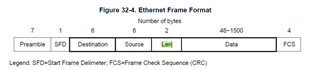
    Ethernet frames have bytes 12 and 13 as _either_ Ethernet type II, or 802.3 length...

    https://en.wikipedia.org/wiki/Ethernet_frame

    In your description, you seem to indicate that bytes 12 and 13 _must_ be a length, and that is not the case.  A common use of bytes 12 and 13 is the fixed value 0x800 (2048) to indicate that the packet is IPv4.  In the loopback sample code you provided, that field is hard-coded to 0x800.  The transmit code can (should be able to) use bytes 12 and 13 as it wishes (since it's a software entity).

    There is (and should be) a hardware counter of the length which specifies the frame length from the MAC destination (first data byte after start frame delimiter) to the end of payload (or end of frame check sequence) based on the inter-packet gap.  This counter is the _hardware_ frame length, which is _independent_ of any software frame length (since bytes 12 and 13 are by no means limited to be a length counter [could be used as a type flag]).

    Please help me figure out how the 570-LC43 EMAC provides the _hardware_ frame counter.  Note that software does _not_ have to provide any buffer max value, since Ethernet frames by definition must be less than 1536 bytes/octets or so.

    Thank you very much.

  • Testing email notification, please ignore (just) this test reply.

  • Please help me figure out how the 570-LC43 EMAC provides the _hardware_ frame counter

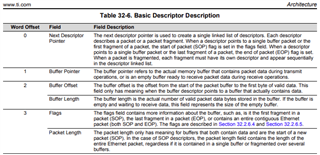
    Is the Packet Length field in the Table 32-6. Basic Descriptor Description in the TMS570LC43x 16/32 RISC Flash Microcontroller Technical Reference Manual (Rev. A) what you are looking for?

    Section 32.2.6.5.5 Packet Length in the TRM provides more information on how the software can determine the length of a received Ethernet packet.

  • Based on the table/description you sent, I want the Buffer Length, which indicates how much real data was received for a frame.  How does one get to Buffer Length from the hdkif handle available go the emacRxNotification() handler?  Or, is it via some "externally visible" array in the same way I'm currently indexing pbuf_array[] to get to the received data?  Or, is it in some register which is up-to-date while emacRxNotification() is being called (and maybe updated to the value for the next frame when/after emacReceive() is called).  Did Halcogen provide a function for getting the BL, or does the user have to do it via some pointer access?  Enquiring minds want to know.

    Sorry, don't have much sample code to use for reference.

    Thank you very much.

  • Sorry, I mis-read your answer.  Seems what you're saying is that the Packet Length is the total length of the frame, and Buffer Length is the length of the chunk, if scatter-on-receive is in use.  The question is, how does emacRxNotification(hdkif) get to the packet descriptor?  I'm currently just using a "blind" index into the pbuf_array[] (which contains 1514-byte linear buffers) to get to the data (based on previous TI suggestion, and what the TI loopback sample code does), so don't have a mechanism to get to the descriptor (which presumably is fielded primarily by Halcogen code).

    Thanks.

  • Hi,

    I see that hdkif will lead to rxchptr->active_head->flags_pktlen, so will check this out.

    Thanks.

  • The question is, how does emacRxNotification(hdkif) get to the packet descriptor? 

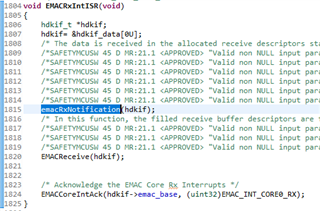
    Looking in the EMACRxIntISR() function generated by HALCoGen in HL_emac.c there is:

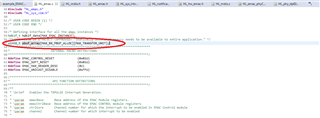
        /* The data is received in the allocated receive descriptors starting from (&(hdkif->rxchptr))->active_head */
        /*SAFETYMCUSW 45 D MR:21.1 <APPROVED> "Valid non NULL input parameters are assigned in this driver" */      
        /*SAFETYMCUSW 45 D MR:21.1 <APPROVED> "Valid non NULL input parameters are assigned in this driver" */      
        /*SAFETYMCUSW 45 D MR:21.1 <APPROVED> "Valid non NULL input parameters are assigned in this driver" */      
        /*SAFETYMCUSW 45 D MR:21.1 <APPROVED> "Valid non NULL input parameters are assigned in this driver" */      
        /*SAFETYMCUSW 45 D MR:21.1 <APPROVED> "Valid non NULL input parameters are assigned in this driver" */      
        /*SAFETYMCUSW 45 D MR:21.1 <APPROVED> "Valid non NULL input parameters are assigned in this driver" */      
        emacRxNotification(hdkif);

    hdkif->rxchptr is the type rxch_t. rxch_t is defined in HL_emac.h as:

    /**
     * Helper struct to hold the data used to operate on a particular
     * receive channel
     */
    typedef struct rxch_struct {
      volatile emac_rx_bd_t *free_head; /*Used to point to the free buffer descriptor which can receive new data.*/
      volatile emac_rx_bd_t *active_head; /*Used to point to the active descriptor in the chain which is receiving.*/
      volatile emac_rx_bd_t *active_tail; /*Used to point to the last descriptor in the chain.*/
    }rxch_t;

    The type emac_rx_bd_t is defined in HL_emac.h as:

    /* EMAC RX Buffer descriptor data structure - Refer TRM for details about the buffer descriptor structure. */
    typedef struct emac_rx_bd {
      volatile struct emac_rx_bd *next; /*Used as a pointer for next element in the linked list of descriptors.*/
      volatile uint32 bufptr; /*Pointer to the actual Buffer which will store the received data.*/
      volatile uint32 bufoff_len; /*Buffer Offset and Buffer Length (16 bits each)*/
      volatile uint32 flags_pktlen; /*Status flags and Packet Length. (16 bits each)*/
    }emac_rx_bd_t;

    So, the 16-bits of the packet length in the packet descriptor should be in the flags_pktlen field.

    While it is for a LWIP example, the lwip-1.4.1/ports/hdk/netif/hdkif.c file has the following which shows how to extract the packet length from the flags_ptklen field in the packet descriptor:

          /* Get the total length of the packet. curr_bd points to the start
           * of the packet.
           */ 
          tot_len = hdkif_swizzle_data(curr_bd->flags_pktlen) & 0xFFFF;

  • Hi,

    It seems hdkif.h/.c is what I "need" to get a software-layer going around the EMAC to be able to do the "simple" task of being able to transmit and receiver Ethernet packets, but it looks like hdkif.h/.c has way more stuff included in it than what I really need, or want to deal with.

    In comparing the hdkif code verses the loopback demo code (that uses the Halcogen-generated code/facilities), it seems a lot of code pieces are replacements rather than complements.

    So, I'm now faced with the dilemma of whether I need to use the hdkif code to get a "real" Ethernet MAC-layer going, or whether enhancing the loopback demo code to run with loopback disabled would be sufficient.  I already tried "just" disabling loopback in the (copy of) loopback demo code to access the network but have so far not gotten anywhere (no link status LEDs on the Ethernet switch indicating link-up).

    I've also tried building the LWIP project for the XL2-570LC43, but got caught in so many build issues that I gave up (for now, at least).  If there were a "turnkey" LWIP project I could just pick up and run on my Launchpads, then perhaps I could get a better feel about what is really needed.

    Could you offer me an opinion on which approach (hdkif porting, or loopback demo modding) would offer the chance of better/quicker success?  I'd like to minimize the chance of going down the wrong path, only to have to back-track or start from scratch.  Right now, I'm leaning towards modifying the loopback demo, mostly because I have it working on the hardware, and it is lean and self-contained.

    Thank you very much for the help.

  • I incorporated the code from hdkif.c that retrieves the buffer pointer and pktlen from the active_head, referenced from the hdkif pointer passed to emacRxNotification(hdkif), and loopback works fine as before (when "blindly" using pbuf_array[] to get to the received data).

    So, I modified the loopback code a little to disable loopback, and was hoping the transmit side would "just work," sending data onto the wire.  I encountered a hangup situation processing the first transmit packet, where the HL code (HL_emac.c) is looking for the EMAC_BUF_DESC_EOQ bit to be set in the flags field.  I thought the hardware was supposed to "guarantee" that the infinite while() loops would never hang up.  I don't know what's preventing the EMAC transmit packet from going out, possibly because the PHY hasn't been configured properly (or at all).  The Halcogen configuration and code generator seem to work fine.

    If I had a working/running LWIP build, perhaps I could have used that to figure out what's missing in my trying to change the loopback sample to run externally transmitting on the wire.  As it is, I'll try to figure out what hdkif.c does to actually access the network by just looking at the code.

    Thanks for any insights.

    == Hanging code...

    else {
    /*SAFETYMCUSW 45 D MR:21.1 <APPROVED> "Valid non NULL input parameters are assigned in this driver" */
    curr_bd = txch->active_tail;
    /* Wait for the EOQ bit is set */
    /*SAFETYMCUSW 28 D MR:NA <APPROVED> "Hardware status bit read check" */
    /*SAFETYMCUSW 134 S MR:12.2 <APPROVED> "LDRA Tool issue" */
    /*SAFETYMCUSW 45 D MR:21.1 <APPROVED> "Valid non NULL input parameters are assigned in this driver" */
    while (EMAC_BUF_DESC_EOQ != (EMACSwizzleData(curr_bd->flags_pktlen) & EMAC_BUF_DESC_EOQ))
    {
    }
    /* Don't write to TXHDP0 until it turns to zero */
    /*SAFETYMCUSW 28 D MR:NA <APPROVED> "Hardware status bit read check" */
    /*SAFETYMCUSW 134 S MR:12.2 <APPROVED> "LDRA Tool issue" */
    while (((uint32)0U != *((uint32 *)0xFCF78600U)))
    {

  • I incorporated the code from hdkif.c that retrieves the buffer pointer and pktlen from the active_head, referenced from the hdkif pointer passed to emacRxNotification(hdkif), and loopback works fine as before (when "blindly" using pbuf_array[] to get to the received data).

    So, I modified the loopback code a little to disable loopback, and was hoping the transmit side would "just work," sending data onto the wire.  I encountered a hangup situation processing the first transmit packet, where the HL code (HL_emac.c) is looking for the EMAC_BUF_DESC_EOQ bit to be set in the flags field.  I thought the hardware was supposed to "guarantee" that the infinite while() loops would never hang up.  I don't know what's preventing the EMAC transmit packet from going out, possibly because the PHY hasn't been configured properly (or at all).  The Halcogen configuration and code generator seem to work fine.

    If I had a working/running LWIP build, perhaps I could have used that to figure out what's missing in my trying to change the loopback sample to run externally transmitting on the wire.  As it is, I'll try to figure out what hdkif.c does to actually access the network by just looking at the code.

    Thanks for any insights.

    == Hanging code...

    else {
    /*SAFETYMCUSW 45 D MR:21.1 <APPROVED> "Valid non NULL input parameters are assigned in this driver" */
    curr_bd = txch->active_tail;
    /* Wait for the EOQ bit is set */
    /*SAFETYMCUSW 28 D MR:NA <APPROVED> "Hardware status bit read check" */
    /*SAFETYMCUSW 134 S MR:12.2 <APPROVED> "LDRA Tool issue" */
    /*SAFETYMCUSW 45 D MR:21.1 <APPROVED> "Valid non NULL input parameters are assigned in this driver" */
    while (EMAC_BUF_DESC_EOQ != (EMACSwizzleData(curr_bd->flags_pktlen) & EMAC_BUF_DESC_EOQ))
    {
    }
    /* Don't write to TXHDP0 until it turns to zero */
    /*SAFETYMCUSW 28 D MR:NA <APPROVED> "Hardware status bit read check" */
    /*SAFETYMCUSW 134 S MR:12.2 <APPROVED> "LDRA Tool issue" */
    while (((uint32)0U != *((uint32 *)0xFCF78600U)))
    {

    In looking at the hdkif.c code, I see "scary" stuff like (I also see the same in the HL_emac.c code in the loopback project, so I guess it's needed) some work-around using a direct poll of location 0xfcf78600...

     
     /*
       * Chain the bd's. If the DMA engine, already reached the end of the chain, 
       * the EOQ will be set. In that case, the HDP shall be written again.
       */
      else {
        curr_bd = txch->active_tail;
        /* TODO: (This is a workaround) Wait for the EOQ bit is set */
        while (EMAC_BUF_DESC_EOQ != (hdkif_swizzle_data(curr_bd->flags_pktlen) & EMAC_BUF_DESC_EOQ));
        /* TODO: (This is a workaround) Don't write to TXHDP0 until it turns to zero */
      	while (0 != *((uint32 *)0xFCF78600));
        curr_bd->next = hdkif_swizzle_txp(active_head);
        if (EMAC_BUF_DESC_EOQ == (hdkif_swizzle_data(curr_bd->flags_pktlen) & EMAC_BUF_DESC_EOQ)) {
          /* Write the Header Descriptor Pointer and start DMA */
          EMACTxHdrDescPtrWrite(hdkif->emac_base, (unsigned int)(active_head), 0);
        }
      }


    Thank you very much.
  • I'm having minor issues with how the edit mode works, so please ignore seeming re-posts.

    The poll of 0xfcf78600 also occurs in the loopback project, in HL_emac.c, so it is needed somehow.

  • I've also tried building the LWIP project for the XL2-570LC43, but got caught in so many build issues that I gave up (for now, at least).  If there were a "turnkey" LWIP project I could just pick up and run on my Launchpads, then perhaps I could get a better feel about what is really needed.

    To investigate that:

    1. Used SmartGit under Windows 10 to clone the https://git.ti.com/git/hercules_examples/hercules_examples.git URL

    2. In CCS 12.0 imported the project in the Application\LwIP\v00.04.00\LAUNCHXL2-TMS570LC43x\Build-LAUNCHXL2-TMS570LC43x directory from the cloned repository.

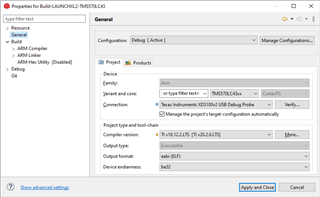
    3. In the CCS Project Properties can see that the project was created using compiler TI v18.12.2.LTS. CCS 12 didn't have that compiler version installed, and so had selected TI v20.2.6.LTS instead:

    4. The project compiled successfully using the TI v20.2.6.LTS compiler.

    5. Connected a LAUNCHXL2-570LC43, using a USB cable to the on-board XDS110 and an Ethernet cable to a switch.

    6. The target configuration file targetConfigs\TMS570LC43xx.ccxml supplied with the project had the Connection set to "Texas Instruments XDS100v2 USB Debug Probe". To match the debug probe on the LAUNCHXL2-570LC43 changed the connection to "Texas Instruments XDS110 USB Debug Probe".

    7. Downloaded the program, and connected a serial terminal to user UART on the on-board XDS110, set to 9600 baud.

    8. On initially running the program got the following reported on the serial output:

    HERCULES MICROCONTROLLERS
    Texas Instruments
    Little Endian device
    Initializing ethernet (DHCP)
            DEBUG - Getting PHY ID....SUCCESS
            DEBUG - Getting PHY Alive Status...SUCCESS
            DEBUG - Getting PHY Link Status...SUCCESS
            DEBUG - Setting up Link...SUCCESS
    ..DONE
    
    
    -------- ERROR INITIALIZING HARDWARE --------

    9. Debugging the cause of the error found the program was timing out waiting to obtain an IP address from a DHCP server (on my network part of the broadband router).

    10. In the lwIPInit function made the following changes to increase the timeout waiting to obtain an IP address using DHCP:

    mr_halfword@DESKTOP-5DD8B6L MINGW64 ~/hercules_examples (master)
    $ git diff Application/LwIP/v00.04.00/lwip-1.4.1/ports/hdk/lwiplib.c
    diff --git a/Application/LwIP/v00.04.00/lwip-1.4.1/ports/hdk/lwiplib.c b/Application/LwIP/v00.04.00/lwip-1.4.1/ports/hdk/lwiplib.c
    index e5ecb92..5403330 100644
    --- a/Application/LwIP/v00.04.00/lwip-1.4.1/ports/hdk/lwiplib.c
    +++ b/Application/LwIP/v00.04.00/lwip-1.4.1/ports/hdk/lwiplib.c
    @@ -195,13 +195,13 @@ static struct netif hdkNetIF[MAX_EMAC_INSTANCE];
            unsigned int dhcp_flag = 0;
            unsigned int dhcp_tries = 5;
            unsigned int count;
    -       unsigned int delay;
    +       volatile unsigned int delay;
            while(dhcp_tries--)
            {
    
    
            dhcp_start(&hdkNetIF[instNum]);
    -       count = 10;
    +       count = 100;
            /* Check for DHCP completion for 'count' number of times, each for the given delay. */
                    while(count--)
                    {


    11. With the above change the program successfully obtained an IP address, reporting the following on the serial output:

    HERCULES MICROCONTROLLERS
    Texas Instruments
    Little Endian device
    Initializing ethernet (DHCP)
            DEBUG - Getting PHY ID....SUCCESS
            DEBUG - Getting PHY Alive Status...SUCCESS
            DEBUG - Getting PHY Link Status...SUCCESS
            DEBUG - Setting up Link...SUCCESS
    ..DONE
    Starting Web Server..DONE
    
    HERCULES MICROCONTROLLERS
    Texas Instruments
    Little Endian device
    Device IP Address: 192.168.0.20
    Webserver accessible @ http:\\192.168.0.20
    

    12. On the Windows 10 PC can successfully access the webpage at the IP address of the LAUNCHXL2-570LC43 and the webpage served by the program in the  LAUNCHXL2-570LC43 is successfully displayed. The  LAUNCHXL2-570LC43 is also responding to pings.

    13. The webpage in the example program contains a /img/Hercules_block_diagram.gif file which is 222,066 bytes. On issue is that when try and view the webpage on a different PC running Linux that the /img/Hercules_block_diagram.gif is only partially displayed. Running Wireshark on the Linux PC shows the webserver in the LAUNCHXL2-570LC43 seems to stall part way though the transfer. A wget from the command line also stalls trying to download the /img/Hercules_block_diagram.gif file. Haven't yet determined the reason, but does look like a bug in the lwip program.

  • Haven't yet determined the reason, but does look like a bug in the lwip program.

    One other issue I noticed with the Application\LwIP\v00.04.00\LAUNCHXL2-TMS570LC43x\Build-LAUNCHXL2-TMS570LC43x example is that when the launch pad is powered on by attaching the USB cable the network doesn't start (the Ethernet cable was left connected at power on).

    After pressing the PORRST button the networking starts successfully.

    By attaching the debugger after had powered on the launch pad found the hdkif_hw_init() in hdkif.c stuck in the following loop waiting to read the Phy ID:

      while ((phyID == 0) && (phyIdReadCount > 0)) {
    	  phyID = Dp83640IDGet(hdkif->mdio_base, hdkif->phy_addr);
    	  phyIdReadCount--;
    	  sciDisplayText(sciREGx, txtProgress, sizeof(txtProgress));
      }

  • Thank you so much for providing the comprehensive instructions on how to build/run a working LwIP project.  I was able to finally build a project successfully, after spending hours fixing some clerical issues, including configuring include and library paths and changing a few .c files to add the "HL_" prefix for Halcogen include files.  Unfortunately, the CCS GUI configuration mechanism (especially for paths) is very cumbersome to manipulate (as the case with many other IDEs like Visual Studio).  At least I didn't encounter any real C code conflicts that can't be resolved by a neophyte.

    I'd like to insert the screen capture of the include paths needed, but this forum is not allowing me to insert the .jpg file.  And CCS is so limited in its configuration/properties facilities that extracting/manipulating include paths in text form is impossible. 

    Without your help, there was no way I would have completed a LwIP build for the 570LC43.

    I will attempt to run the project shortly.

  • Fast question:

    In my tweaking, I had to add

    #define _TMS570LC43x_

    to the top of lwip_main.c and ldkif.c to get the build to succeed.

    Shouldn't these be already defined somewhere with the Build-LAUNCHXL2-TMS570LC43x project?  If so, which file is the "config" file that should define _TMS570LC43x_ (that is included by lwip_main.c and ldkif.c, directly or indirectly)?

    Thanks.

  • Shouldn't these be already defined somewhere with the Build-LAUNCHXL2-TMS570LC43x project?

    Looking at the CCS Project Properties for the project imported from the Application\LwIP\v00.04.00\LAUNCHXL2-TMS570LC43x\Build-LAUNCHXL2-TMS570LC43x example, the _TMS570LC43x_ pre-defined symbol was set in in the project properties:

  • Hi,

    Since I had to set up the CCS environment for the project myself, this symbol was not in the GUI, just like all the necessary include paths.  Is there some prescribed way where the CCS settings are configured from some settings file?  Or, is this just a hole in the project-setup mechanism?

    At least I don't need C code mods to build the project now.

    Thanks.

  • I did the mods to lwiplib.c as you indicated.  I don't see the behavior you see.

    When I run the project, the initial start-up banner strings are displayed, and a whole lots of dots are displayed for well over 2 minutes, before the "DEBUG - Getting PHY Alive Status... ERROR... DONE" message is displayed.

    I have a Ethernet cable connected to the Launchpad and have verified that a DHCP server is hooked up and serving IP addresses (as tested when a Windows laptop is hooked up to the cable).

    I put a breakpoint in hdkif.c:455 (the call to Dp8360IDGet()) and it never triggers.

    Don't know what is happening, but will try to debug.  If you have ideas on how to chase the sequence of events, then please let me know.

    Thank you very, very, much.

  • Also pressed on PORRST button a few times, but system behavior seems the same (dots displayed).  The PORRST seems to do the "same" thing as the (software) CCS Run->Reset, minus breakpoints being set.

    Thanks.

  • Sorry, the txtProgress displayed after line hdkif.c:455 is the dot (".") being displayed.  Don't know why the breakpoint doesn't trigger (at times).

  • The include paths are in the .cproject file and have to be finagled in this way, if defined relative to PROJECT_ROOT...

    <option IS_BUILTIN_EMPTY="false" IS_VALUE_EMPTY="false" id="com.ti.ccstudio.buildDefinitions.TMS470_20.2.compilerID.INCLUDE_PATH.2033075704" name="Add dir to #include search path (--include_path, -I)" superClass="com.ti.ccstudio.buildDefinitions.TMS470_20.2.compilerID.INCLUDE_PATH" valueType="includePath">
    <listOptionValue builtIn="false" value="${PROJECT_ROOT}"/>
    <listOptionValue builtIn="false" value="${PROJECT_ROOT}\..\HALCoGen-TMS570LC43x\include"/>
    <listOptionValue builtIn="false" value="${PROJECT_ROOT}\..\..\..\..\ActiveWebserver\1.1.0\TMS570LC43x\HALCoGen-TMS570LC43x\include"/>
    <listOptionValue builtIn="false" value="${PROJECT_ROOT}\..\..\..\..\ActiveWebserver\1.1.0\TMS570LC43x\Build-LAUNCHXL2-570LC43"/>
    <listOptionValue builtIn="false" value="${PROJECT_ROOT}\..\..\..\..\LwIP/v00.04.00/lwip-1.4.1/ports/hdk/include"/>
    <listOptionValue builtIn="false" value="${PROJECT_ROOT}\..\..\..\..\LwIP/v00.04.00/lwip-1.4.1"/>
    <listOptionValue builtIn="false" value="${PROJECT_ROOT}\..\..\..\..\LwIP/v00.04.00/lwip-1.4.1\src\include"/>
    <listOptionValue builtIn="false" value="${PROJECT_ROOT}\..\..\..\..\LwIP/v00.04.00/lwip-1.4.1\src\include\ipv4"/>
    <listOptionValue builtIn="false" value="${PROJECT_ROOT}\..\..\..\..\LwIP/v00.04.00/lwip-1.4.1\apps\httpserver_raw"/>
    <listOptionValue builtIn="false" value="${CG_TOOL_ROOT}/include"/>
    </option>

  • Seems MDIOPhyRegRead() is related to MDIO, I looked at Jadadish's early posts on this thread, where he provided the loopback project, and check to see if in PINMUX, MDIO (G3) and MDCLK (V5) were hooked up in Halcogen, and they were not.  I connected them in this project, regenerated the C code, and hit the PINMUX_BALL_R4_ error that I saw on other LwIP projects I had previously picked up.  I don't know what BALL_R4_ is, or how to fix this.  I suspect MDIO and MDCLK must be connected.

    Thanks for help.

    >> Compilation failure
    HALCoGen-TMS570LC43x/source/subdir_rules.mk:86: recipe for target 'HALCoGen-TMS570LC43x/source/HL_pinmux.obj' failed
    "C:/Users/plu/Documents/TMS_XL2-570LC43-Examples/570LC43_EMAC_LWIP_NEW/hercules_examples/Application/LwIP/v00.04.00/LAUNCHXL2-TMS570LC43x/HALCoGen-TMS570LC43x/source/HL_pinmux.c", line 254: error: identifier "PINMUX_BALL_R4_" is undefined
    1 error detected in the compilation of "C:/Users/plu/Documents/TMS_XL2-570LC43-Examples/570LC43_EMAC_LWIP_NEW/hercules_examples/Application/LwIP/v00.04.00/LAUNCHXL2-TMS570LC43x/HALCoGen-TMS570LC43x/source/HL_pinmux.c".
    gmake: *** [HALCoGen-TMS570LC43x/source/HL_pinmux.obj] Error 1

  • In looking at the code base, I see that the backup .dil file has PINMUX_BALL_R4_GPIOB_3 used in place of the current .dil having PINMUX_BALL_R4_.  So, GPIOB_3 might have something to do with MDIO.

    LTWPNE1840A:~/Examples/570LC43_EMAC_LWIP_NEW/hercules_examples/Application/LwIP/v00.04.00/LAUNCHXL2-TMS570LC43x/HALCoGen-TMS570LC43x 113> grep -n -R BALL_R4
    HALCoGen-TMS570LC43x.dil:10405:DRIVER.PINMUX.VAR.PINMUX9.VALUE="PINMUX_BALL_R4_ | PINMUX_BALL_N17_EMIF_nCS_0 | PINMUX_BALL_L17_EMIF_nCS_2"
    HALCoGen-TMS570LC43x_bak.dil:10100:DRIVER.PINMUX.VAR.PINMUX9.VALUE="PINMUX_BALL_R4_GIOB_3 | PINMUX_BALL_N17_EMIF_nCS_0 | PINMUX_BALL_L17_EMIF_nCS_2"
    include/HL_pinmux.h:76:#define PINMUX_BALL_R4_SHIFT 8U
    include/HL_pinmux.h:271:#define PINMUX_BALL_R4_MASK (~(uint32)((uint32)0xFFU << PINMUX_BALL_R4_SHIFT))
    include/HL_pinmux.h:517:#define PINMUX_BALL_R4_EMIF_nCAS ((uint32)((uint32)0x1U << PINMUX_BALL_R4_SHIFT))
    include/HL_pinmux.h:518:#define PINMUX_BALL_R4_GIOB_3 ((uint32)((uint32)0x4U << PINMUX_BALL_R4_SHIFT))
    source/HL_pinmux.c:254: pinMuxReg->PINMUX[9] = PINMUX_BALL_R4_ | PINMUX_BALL_N17_EMIF_nCS_0 | PINMUX_BALL_L17_EMIF_nCS_2;

    In the loopback code, the "same" line has PINMUX_BALL_R4_EMIF_nCAS, which seems to indicate some relationship to some CAS (Column Address Strobe???).

    LTWPNE1840A:~/Examples/570LC43_EMAC_LOOPBACK 53> grep -n -R BALL_R4
    570LC43_EMAC_LOOPBACK.dil:10324:DRIVER.PINMUX.VAR.PINMUX9.VALUE="PINMUX_BALL_R4_EMIF_nCAS | PINMUX_BALL_N17_EMIF_nCS_0 | PINMUX_BALL_L17_EMIF_nCS_2"
    include/HL_pinmux.h:76:#define PINMUX_BALL_R4_SHIFT 8U
    include/HL_pinmux.h:271:#define PINMUX_BALL_R4_MASK (~(uint32)((uint32)0xFFU << PINMUX_BALL_R4_SHIFT))
    include/HL_pinmux.h:517:#define PINMUX_BALL_R4_EMIF_nCAS ((uint32)((uint32)0x1U << PINMUX_BALL_R4_SHIFT))
    include/HL_pinmux.h:518:#define PINMUX_BALL_R4_GIOB_3 ((uint32)((uint32)0x4U << PINMUX_BALL_R4_SHIFT))
    source/HL_pinmux.c:254: pinMuxReg->PINMUX[9] = PINMUX_BALL_R4_EMIF_nCAS | PINMUX_BALL_N17_EMIF_nCS_0 | PINMUX_BALL_L17_EMIF_nCS_2;

  • In looking at the code base, I see that the backup .dil file has PINMUX_BALL_R4_GPIOB_3 used in place of the current .dil having PINMUX_BALL_R4_

    I was looking at the unmodified hercules_examples/Application/LwIP/v00.04.00/LAUNCHXL2-TMS570LC43x/HALCoGen-TMS570LC43x/source/HL_pinmux.c cloned from the TI GIT example repo. At line 254 that has the following which compiles successfully:

    	pinMuxReg->PINMUX[9] = PINMUX_BALL_R4_GIOB_3 | PINMUX_BALL_N17_EMIF_nCS_0 | PINMUX_BALL_L17_EMIF_nCS_2;

    The unmodified hercules_examples/Application/LwIP/v00.04.00/LAUNCHXL2-TMS570LC43x/HALCoGen-TMS570LC43x/HALCoGen-TMS570LC43x.dil has:

    DRIVER.PINMUX.VAR.PINMUX9.VALUE="PINMUX_BALL_R4_ | PINMUX_BALL_N17_EMIF_nCS_0 | PINMUX_BALL_L17_EMIF_nCS_2"

    Whereas the unmodified hercules_examples/Application/LwIP/v00.04.00/LAUNCHXL2-TMS570LC43x/HALCoGen-TMS570LC43x/HALCoGen-TMS570LC43x_bak.dil has:

    DRIVER.PINMUX.VAR.PINMUX9.VALUE="PINMUX_BALL_R4_GIOB_3 | PINMUX_BALL_N17_EMIF_nCS_0 | PINMUX_BALL_L17_EMIF_nCS_2"

    Therefore, it looks like something has gone wrong with the HALCoGen-TMS570LC43x.dil stored in the TI GIT example repo, which causes an invalid HL_pinmux.c to be generated if HALCoGen is used to re-generate the code.

    Perhaps  can explain what went wrong, and how to fix the problem.

  • I removed the MDIO and MDCLK PINMUX connections and the PINMUX_BALL_R4_ error persists.  Now, I'm not sure the original C code base was consistent with the Halcogen .hcg (and .dil) file.  I do notice that Halcogen show 2 for List Conflicts.

    The loopback project shows 0 for List Conflicts, has the MDIO and MDCLK connected, and has several MII connections while the LwIP project shows only 2 MII connections for the MII_TX_CLK and MII_RX_CLK.

    Don't know where to go from here, mostly because I don't know how MDIO, MII, EMAC, and PINMUX relate to each other.

    Thank you.

  • Now, I'm not sure the original C code base was consistent with the Halcogen .hcg (and .dil) file.

    I opened the hercules_examples\Application\LwIP\v00.04.00\LAUNCHXL2-TMS570LC43x\HALCoGen-TMS570LC43x\HALCoGen-TMS570LC43x.hcg in HALCoGen v04.07.01. Then selected the menu option File -> Generate Code.

    Line 254 in the generated Application\LwIP\v00.04.00\LAUNCHXL2-TMS570LC43x\HALCoGen-TMS570LC43x\source\HL_pinmux.c changed from the following which was compiling:

    	pinMuxReg->PINMUX[9] = PINMUX_BALL_R4_GIOB_3 | PINMUX_BALL_N17_EMIF_nCS_0 | PINMUX_BALL_L17_EMIF_nCS_2;

    To the following which now generates a compile error:

    	pinMuxReg->PINMUX[9] = PINMUX_BALL_R4_ | PINMUX_BALL_N17_EMIF_nCS_0 | PINMUX_BALL_L17_EMIF_nCS_2;

    Building file: "C:/Users/mr_halfword/hercules_examples/Application/LwIP/v00.04.00/LAUNCHXL2-TMS570LC43x/HALCoGen-TMS570LC43x/source/HL_pinmux.c"
    Invoking: ARM Compiler
    "C:/ti/ccs1200/ccs/tools/compiler/ti-cgt-arm_20.2.6.LTS/bin/armcl" -mv7R4 --code_state=32 --float_support=VFPv3D16 --include_path="C:/Users/mr_halfword/hercules_examples/Application/LwIP/v00.04.00/lwip-1.4.1/ports/hdk/check" --include_path="C:/Users/mr_halfword/hercules_examples/Application/LwIP/v00.04.00/lwip-1.4.1/ports/hdk/include/netif" --include_path="C:/Users/mr_halfword/hercules_examples/Application/LwIP/v00.04.00/lwip-1.4.1/ports/hdk/include" --include_path="C:/Users/mr_halfword/hercules_examples/Application/LwIP/v00.04.00/lwip-1.4.1/ports/hdk/netif" --include_path="C:/Users/mr_halfword/hercules_examples/Application/LwIP/v00.04.00/lwip-1.4.1/ports/hdk" --include_path="C:/ti/ccs1200/ccs/tools/compiler/ti-cgt-arm_20.2.6.LTS/include" --include_path="C:/Users/mr_halfword/hercules_examples/Application/LwIP/v00.04.00/lwip-1.4.1/apps/httpserver_raw" --include_path="C:/Users/mr_halfword/hercules_examples/Application/LwIP/v00.04.00/lwip-1.4.1/src/include/ipv4" --include_path="C:/Users/mr_halfword/hercules_examples/Application/LwIP/v00.04.00/LAUNCHXL2-TMS570LC43x/HALCoGen-TMS570LC43x/include" --include_path="C:/Users/mr_halfword/hercules_examples/Application/LwIP/v00.04.00/lwip-1.4.1" --include_path="C:/Users/mr_halfword/hercules_examples/Application/LwIP/v00.04.00/example/hdk/inc" --include_path="C:/Users/mr_halfword/hercules_examples/Application/LwIP/v00.04.00/lwip-1.4.1/src/include" --define=_TMS570LC43x_ -g --diag_warning=225 --diag_wrap=off --display_error_number --enum_type=packed --abi=eabi --preproc_with_compile --preproc_dependency="HALCoGen-TMS570LC43x/source/HL_pinmux.d_raw" --obj_directory="HALCoGen-TMS570LC43x/source"  "C:/Users/mr_halfword/hercules_examples/Application/LwIP/v00.04.00/LAUNCHXL2-TMS570LC43x/HALCoGen-TMS570LC43x/source/HL_pinmux.c"
     
    >> Compilation failure
    HALCoGen-TMS570LC43x/source/subdir_rules.mk:86: recipe for target 'HALCoGen-TMS570LC43x/source/HL_pinmux.obj' failed
    "C:/Users/mr_halfword/hercules_examples/Application/LwIP/v00.04.00/LAUNCHXL2-TMS570LC43x/HALCoGen-TMS570LC43x/source/HL_pinmux.c", line 254: error #20: identifier "PINMUX_BALL_R4_" is undefined
    1 error detected in the compilation of "C:/Users/mr_halfword/hercules_examples/Application/LwIP/v00.04.00/LAUNCHXL2-TMS570LC43x/HALCoGen-TMS570LC43x/source/HL_pinmux.c".
    gmake: *** [HALCoGen-TMS570LC43x/source/HL_pinmux.obj] Error 1

    In the HALCoGen GUI went to the PINMUX -> Pun Muxing tab and for ball R4 selected a link for GIOB[3] :

    Then re-generated the code in the HALCoGen GUI. The HL_pinmux.c file was then back to its original state and was compiling.

  • Thank you very much.  Now I understand what the PINMUX_x_y means, although I don't know what the various y connections mean (e.g., EMIF_nCAS verses GPIOB(3)).

    I built the project with PINMUXes MDIO and MDCLK connected, and the behavior remains the same (2+ minutes of dots, waiting to get phyID).

    Don't know where to go from here.

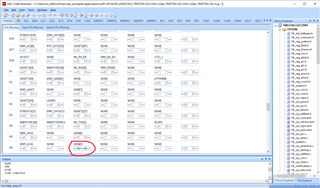
  • I played with setting PINMUX_R4_EMIF_nCAS (as in the loopback project) and behavior is no different.  In the LwIP project, the PINMUX_T4_MII_RXCLK and PINMUX_U7_MII_TX_CLK are connected, but Halcogen is showing these as Conflicts.  May or may not be a problem.  Don't know why they are conflicts.  It does look like if a given PINMUX_x_ has more than one connections, then it is a Conflict, but that's not the case with the MII clocks.

    Thank you.

  • In the LwIP project, the PINMUX_T4_MII_RXCLK and PINMUX_U7_MII_TX_CLK are connected, but Halcogen is showing these as Conflicts.  May or may not be a problem.

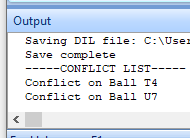
    I noticed that was getting conflicts reported for those pins in HalCoGen for hercules_examples\Application\LwIP\v00.04.00\LAUNCHXL2-TMS570LC43x\HALCoGen-TMS570LC43x\HALCoGen-TMS570LC43x.hcg. When press the List Conflicts button on the Pin Mixing tab get the following in the output window:

    Not sure of the significance of the reported conflict, but even with the conflict reported was able to get Ethernet communication to work. 

  • I built the project with PINMUXes MDIO and MDCLK connected, and the behavior remains the same (2+ minutes of dots, waiting to get phyID).

    I have seen the lwip example failing with an error to get the PHY ID only on power-up.

    If either press the RESET button, PORRST button or download the program haven't seen the LAUNCHXL2-570LC43 fails to the the PHY ID.

    I might be able to add some debug about when fails to get the PHY ID on power-up.

  • I have not been able to re-produce what you are experiencing with the PHY ID working when you press the RESET or PORRST button.  When I press RESET or PORRST, I see the same behavior as when doing the software Run->Reset, with the 2+ minutes of dots displaying, indicating the wait for PHY ID, followed by the "DEBUG - Getting PHY Alive Status... ERROR... DONE."

    I don't know why my setup does not do what yours does.  I don't know why your "hardware" reset (RESET or PORRST button) behaves differently from your "software" reset (Run->Reset).

  • Amazing.  It turns out the Launchpad I was working with just happens to have a "defective" PHY.  I ran the LwIP project on my other Launchpad and it indeed behaves as you described, with it always succeeding on the PHY ID and DHCP address request/reply when using PORRST and sometimes succeeding on PHY ID and DHCP when using Run->Reset.

    I didn't get the other Launchpad up and running before because I was experiencing the quirks of CCS handling multiple instances and debug sessions/probes, wherein the first Launchpad "hogged" resources while the second couldn't get up and running.  But, this is a quirk I've encountered quite often, which I usually have to close up both sessions and restart them, or reboot the Windows laptop altogether, to get the CCS multi-session stuff working again.

    So, I finally have a working/running LwIP, with which I can trace the sequence of events hdkif goes through to get a functioning MAC layer.  I will need to get my defective Launchpad replaced.

    BTW, my "good" Launchpad has the amber and green lights/LEDs on the 8-pin Ethernet connector always on, while my "bad" Launchpad has those lights always off (with or without connected cable).  I didn't think of this being any useful indicators of underlying hardware functioning or not, but perhaps it's a big indicator.  In most Ethernet gear, the LEDs  turn on only when the cable is connected and the link is alive (talking to partner), with amber indicating "low speed" (10Mbps?) and green indicating "high speed" (100Mbps?).

    Could you tell me how your Launchpad Ethernet connector LEDs behave?  Are they always on?

    Thank you very, very, much.  I will use the LwIP project to figure out what hdkif does.  Maybe the loopback-turned-onwire project can work on the "good" Launchpad.

    It just occurred to me that there is a possibility that running the loopback project on my first (now "bad") Launchpad may have damaged the Launchpad EMAC hardware, or put it in some "bad" state.  Is there some residual configuration on the Launchpad that prevents the Launchpad from going on the network (once loopback project has run on it)?  This seems to be a better possibility than the idea that the Launchpad just happens to have a bad EMAC.  Is there some way to set the Launchpad to "factory reset" mode?

    === Output of good Launchpad

    HERCULES MICROCONTROLLERS
    Texas Instruments
    Little Endian device
    Initializing ethernet (DHCP)
    DEBUG - Getting PHY ID....SUCCESS
    DEBUG - Getting PHY Alive Status...SUCCESS
    DEBUG - Getting PHY Link Status...SUCCESS
    DEBUG - Setting up Link...SUCCESS
    ..DONE
    Starting Web Server..DONE

    HERCULES MICROCONTROLLERS
    Texas Instruments
    Little Endian device
    Device IP Address: 192.168.0.86
    Webserver accessible @ http:\\192.168.0.86

  • In the LwIP project, the PINMUX_T4_MII_RXCLK and PINMUX_U7_MII_TX_CLK are connected, but Halcogen is showing these as Conflicts.  May or may not be a problem.

    I tried removing the "conflicts", by removing the links for MII_RX_CLK on ball T4, and MII_TX_CLK on ball U7, on the HALCoGen GUI. After re-generating the code with that change the example no longer worked on the LAUNCHXL2-570LC43, reporting the following error on the serial output:

    HERCULES MICROCONTROLLERS
    Texas Instruments
    Little Endian device
    Initializing ethernet (DHCP)
            DEBUG - Getting PHY ID....SUCCESS
            DEBUG - Getting PHY Alive Status...SUCCESS
            DEBUG - Getting PHY Link Status...SUCCESS
            DEBUG - Setting up Link...SUCCESS
    ..DONE
    
    
    -------- ERROR INITIALIZING HARDWARE --------

    Looking at pin muxing, on the LAUNCHXL2-570LC43 do need to connect PINMUX_T4_MII_RXCLK and PINMUX_U7_MII_TX_CLK to ensure the TX_CLK and RX_CLK to the DP83630 Ethernet Phy are driven.

    I.e. the HALCoGen warnings about conflicts appear false.

  • I ran the LwIP project on my other Launchpad and it indeed behaves as you described, with it always succeeding on the PHY ID and DHCP address request/reply when using PORRST and sometimes succeeding on PHY ID and DHCP when using Run->Reset.

    I think have found why the code was failing to read the Phy ID on power-up, and modified the hdkif_hw_init() function in hdkif.c to reset the DP83630 Phy before attempting to access the Phy. The code modification is:

    $ git diff Application/LwIP/v00.04.00/lwip-1.4.1/ports/hdk/netif/hdkif.c
    diff --git a/Application/LwIP/v00.04.00/lwip-1.4.1/ports/hdk/netif/hdkif.c b/Application/LwIP/v00.04.00/lwip-1.4.1/ports/hdk/netif/hdkif.c
    index 0f8cd15..c67592a 100644
    --- a/Application/LwIP/v00.04.00/lwip-1.4.1/ports/hdk/netif/hdkif.c
    +++ b/Application/LwIP/v00.04.00/lwip-1.4.1/ports/hdk/netif/hdkif.c
    @@ -62,6 +62,7 @@
     #include "HL_mdio.h"
     #include "HL_phy_dp83640.h"
     #include "HL_sci.h"
    +#include "HL_gio.h"
     #else
     #include "emac.h"
     #include "mdio.h"
    @@ -430,6 +431,38 @@ hdkif_hw_init(struct netif *netif)
       /* maximum transfer unit */
       netif->mtu = MAX_TRANSFER_UNIT;
    
    +  /* On a LAUNCHXL2-570LC43 the:
    +   * a. The TMS570LC4357 ECLK output is connected to the DP83630 Phy X1 oscillator input.
    +   * b. The TMS570LC4357 GIO4[4] GPIO is connected to the DP83630 RESETn input.
    +   *
    +   * The DP83630 datasheet for the "RESET pulse width" says:
    +   *   Clock must be stable for at min 1 us during RESET pulse low time
    +   *
    +   * I.e. the DP83630 datasheet implies the X1 clock must be running before reset is released.
    +   *
    +   * On a power-up of the LAUNCHXL2-570LC43 the TMS570LC4357 ECLK output won't be running until
    +   * the software in systemInit() has initialised the clocks.
    +   *
    +   * Therefore the following code:
    +   * a. First asserts the DP83630 RESETn input for at least 5 microseconds.
    +   *    The datasheet parameter T2.2.4 "RESET pulse width is a min of one microsecond.
    +   * b. After the reset delays for at least 167 milliseconds before initialising the MDIO,
    +   *    to give the DP83630 time to latch-in hardware configuration pins and be ready for
    +   *    the first MDIO access.
    +   *    The datasheet parameters T2.1.1 "Post Power Up Stabilization time prior to MDC preamble for register
    +   *    accesses" T2.1.2 "Hardware Configuration Latch-in Time from power up" parameters
    +   *    are both 167 milliseconds.
    +   *
    +   * Prior to adding this code to reset the DP83630 Phy, on power-up of the LAUNCHXL2-570LC43
    +   * found that the following code would fail to read the Phy ID, and require the RESET or RSTPOR
    +   * button to be pressed to recover.
    +   */
    +  gioSetBit (gioPORTA, 4, 0);
    +  __delay_cycles (PLL1_FREQ * 5);
    +  gioSetBit (gioPORTA, 4, 1);
    +
    +  __delay_cycles (PLL1_FREQ * 167000);
    +
       /* device capabilities */
       /* don't set NETIF_FLAG_ETHARP if this device is not an ethernet one */
       netif->flags = NETIF_FLAG_BROADCAST | NETIF_FLAG_ETHARP | NETIF_FLAG_LINK_UP;


    With my LAUNCHXL2-570LC43 the above change has allowed the Phy ID to read on power-up, avoiding the need to use a reset button (5 power-ups successful).

    It turns out the Launchpad I was working with just happens to have a "defective" PHY.

    Since the original code wasn't reseting the Phy it is possible that that the software change above might allow the "defective" Launchpad to work.

  • Thank you very much for fixing the PHY ID problem.  I applied your patch and indeed the Run->Reset seems to work fine, after many tries.  The software-reset mechanism needed to work, since having to push a hardware button is not feasible on a board that is enclosed in some box.

    Alas, my first board does not "revive" with this fix.  It's probably permanently or temporarily (something stuck) damaged.  Don't know if running the loopback project contributed to it or not, but I'm not taking chances with the second board.

    Did you have a chance to look into why the Web page is not served completely/properly?  I experienced the same thing using the Firefox browser.  While I don't really care about Web browsing, I want to know if it's due to some problem/limitation of the underlying transmit/receive facilities (hdkif).

    Thank you again.

  • Did you have a chance to look into why the Web page is not served completely/properly? 

    I have been trying to debug the cause. Started by trying to enable LWIP_DEBUGF mechanism for the httpd.c source file, which was re-directed to the serial output. That debug is invasive as slows down the program outputting debug information over a serial port (LWIP functions are called from interrupt handers). Enabling the httpd.c debug found the http_write() function getting an error.

    The LWIP_DEBUGF mechanism was then disabled and the following patch used to add some counters in global variables to the http_write() function:

    mr_halfword@DESKTOP-5DD8B6L MINGW64 ~/hercules_examples (master)
    $ git diff Application/LwIP/v00.04.00/lwip-1.4.1/apps/httpserver_raw/httpd.c
    diff --git a/Application/LwIP/v00.04.00/lwip-1.4.1/apps/httpserver_raw/httpd.c b/Application/LwIP/v00.04.00/lwip-1.4.1/apps/httpserver_raw/httpd.c
    index e53a5d3..04bdb45 100644
    --- a/Application/LwIP/v00.04.00/lwip-1.4.1/apps/httpserver_raw/httpd.c
    +++ b/Application/LwIP/v00.04.00/lwip-1.4.1/apps/httpserver_raw/httpd.c
    @@ -603,6 +603,10 @@ http_state_free(struct http_state *hs)
      * @param apiflags directly passed to tcp_write
      * @return the return value of tcp_write
      */
    +volatile unsigned int http_write_failures;
    +volatile unsigned int http_write_full_length;
    +volatile unsigned int http_write_partial_length;
    +
     static err_t
     http_write(struct tcp_pcb *pcb, const void* ptr, u16_t *length, u8_t apiflags)
     {
    @@ -631,7 +635,16 @@ http_write(struct tcp_pcb *pcb, const void* ptr, u16_t *length, u8_t apiflags)
    
        if (err == ERR_OK) {
          LWIP_DEBUGF(HTTPD_DEBUG | LWIP_DBG_TRACE, ("Sent %d bytes\n", len));
    +     if (len == *length)
    +     {
    +         http_write_full_length++;
    +     }
    +     else
    +     {
    +         http_write_partial_length++;
    +     }
        } else {
    +     http_write_failures++;
          LWIP_DEBUGF(HTTPD_DEBUG | LWIP_DBG_TRACE, ("Send failed with err %d (\"%s\")\n", err, lwip_strerr(err)));
        }


    The counters can be monitored as the program runs using the continuous refresh feature in the CCS debugger.

    When use a Windows 10 PC to view the webpage which is served correctly the counts are the following (i.e. no failures):

    When use a Linux PC to view the webpage, in which the /img/Hercules_block_diagram.gif file is only partially served then the counts are the following, in which there were 5 write failures:

    Set a breakpoint on the line which increments http_write_failures. The backtrace is:

    Texas Instruments XDS110 USB Debug Probe_0/CortexR5 (Suspended - HW Breakpoint)	
    	http_write(struct tcp_pcb *, void *, unsigned short *, int)() at httpd.c:647 0x000539F4	
    	http_send_data_nonssi(struct tcp_pcb *, struct http_state *)() at httpd.c:1,144 0x00053C74	
    	http_send(struct tcp_pcb *, struct http_state *)() at httpd.c:1,568 0x00053D20	
    	http_sent(void *, struct tcp_pcb *, int)() at httpd.c:2,258 0x000543D0	
    	tcp_input(struct pbuf *, struct netif *)() at tcp_in.c:333 0x00048B90	
    	ip_input(struct pbuf *, struct netif *)() at ip.c:575 0x0004E968	
    	ethernet_input(struct pbuf *, struct netif *)() at etharp.c:1,365 0x000506F8	
    	hdkif_rx_inthandler(struct netif *)() at hdkif.c:759 0x00051514	
    	lwIPRxIntHandler(unsigned int)() at lwiplib.c:283 0x00051EF8	
    	EMACCore0RxIsr() at lwip_main.c:244 0x0005A294	
    	<...more frames...>	
    

    What has happened is upon receiving an ACK of 2920 bytes from the PC, the http_write() is called to try and send more bytes. The value of pcb->sndbuf = 3080. As the number of bytes ACKed by the PC is less than the space in the send buffer, http_write() tries to send 2920 bytes of the file. However, the tcp_write() returns ERR_MEM (Out of memory error) for all sizes tried. If tcp_write() fails with ERR_MEM, http_write() tries to half the number of bytes until succeeds or even trying to send 1 byte fails with ERR_MEM.

    I haven't yet determined if the problem is in the lwip httpd server or underlying transmit/receive facilities (hdkif).

    Some other points of note:

    1. TivaWare_C_Series-2.2.0.295 uses lwip-1.4.1 as does the Hercules example. With the TivaWare_C_Series-2.2.0.295 lwip_enet example I can't repeat the failure. The TivaWare_C_Series-2.2.0.295 lwip_enet example was modified to serve the same /img/Hercules_block_diagram.gif file which causes the failure with the Hercules example; which was served successfully by the TivaWare_C_Series-2.2.0.295 lwip_enet to the Linux PC.
    2. The lwip httpd.c has a http_poll() function which is intended to be called from a timer, and check if there are connections with a file open to try and send some more data. Looking at the lwip-1.4.1 port for Hercules I can't see any code in the port which calls into the lwip timers. Whereas the TivaWare_C_Series-2.2.0.295 port does.

    Next steps are:

    • Try and determine why tcp_write() returns ERR_MEM, when there should be free send buffer space.
    • Try and add code to the Hercules port to call lwip timers.
  • Thank you so much for following up/through on this.  Although I'm in no position to know the inner workings of LwIP, your clear descriptions here are giving me ideas on how to work better with debugging under CCS.

    I will keep tracking your findings.

  • Try and determine why tcp_write() returns ERR_MEM, when there should be free send buffer space.

    The memp_malloc() function in hercules_examples\Application\LwIP\v00.04.00\lwip-1.4.1\src\core\memp.c has the following block which runs when there is a memory allocation error:

      } else {
        LWIP_DEBUGF(MEMP_DEBUG | LWIP_DBG_LEVEL_SERIOUS, ("memp_malloc: out of memory in pool %s\n", memp_desc[type]));
        MEMP_STATS_INC(err, type);
      }

    Setting a breakpoint on the above, when the first memory allocation error occurs when the Linux PC is used to view the webpage the callstack is:

    Texas Instruments XDS110 USB Debug Probe_0/CortexR5 (Suspended - HW Breakpoint)	
    	memp_malloc(int)() at memp.c:420 0x00044750	
    	pbuf_alloc(int, int, int)() at pbuf.c:326 0x00045174	
    	tcp_write(struct tcp_pcb *, void *, int, int)() at tcp_out.c:552 0x0004BBA8	
    	http_write(struct tcp_pcb *, void *, unsigned short *, int)() at httpd.c:622 0x00053A18	
    	http_send_data_nonssi(struct tcp_pcb *, struct http_state *)() at httpd.c:1,144 0x00053D44	
    	http_send(struct tcp_pcb *, struct http_state *)() at httpd.c:1,568 0x00053DF0	
    	http_sent(void *, struct tcp_pcb *, int)() at httpd.c:2,258 0x000544A0	
    	tcp_input(struct pbuf *, struct netif *)() at tcp_in.c:333 0x00048B90	
    	ip_input(struct pbuf *, struct netif *)() at ip.c:575 0x0004E968	
    	ethernet_input(struct pbuf *, struct netif *)() at etharp.c:1,365 0x000506F8	
    	hdkif_rx_inthandler(struct netif *)() at hdkif.c:759 0x00051514	
    	lwIPRxIntHandler(unsigned int)() at lwiplib.c:283 0x00051FC4	
    	EMACCore0RxIsr() at lwip_main.c:244 0x0005A364	

    The memory allocation error occurred with a type of MEMP_PBUF (6)

    There is the global variable lwip_stats which is a structure containing various lwip statistics.

    After the Windows PC has successfully viewed the webpage the memory statistics for MEMP_PBUF are the following. This means the maximum number of MEMP_PBUF allocations at any point was 5 out 48:

    lwip_stats.memp[6] struct stats_mem {avail=48,used=0,max=5,err=0,illegal=0}

    Whereas when the Linux PC fails to view the webpage the memory statistics are:

    lwip_stats.memp[6] struct stats_mem {avail=48,used=0,max=48,err=54,illegal=0}

    I.e. the memory allocation failure occurred after all MEMP_PBUF's were in use, but the MEMP_PBUF's did eventually get released.

    The number of MEMP_PBUF's is set by the value of MEMP_NUM_PBUF in hercules_examples\Application\LwIP\v00.04.00\example\hdk\inc\lwipopts.h. Tried increasing MEMP_NUM_PBUF from 48 to 480.

    With the increase of MEMP_NUM_PBUF the Linux PC can successfully view the webpage once after reset. However, after the webpage was viewed the launchad was no longer responding to the Ethernet - no response from ping and a web browser reported the server was no longer responding. In this failed state:

    1. The countEMACCore0TxIsr counter of the number of transmit interrupts is increasing at a high rate - 1613344 in 10 seconds. 
    2. If debug can see the hdkif_tx_inthandler() being called, but doesn't see the EMAC_BUF_DESC_SOP flag set and so thinks there is no start packet to process. I.e. the transmit interrupt handler is being called but doesn't clear the source of the interrupt leading to the software getting stuck spending all it's time in the transmit interrupt handler.

    Think there is an issue in the hdkif.c code around the processing of transmit descriptors resulting in:

    • With the original MEMP_NUM_PBUF value of 48 getting delayed in freeing PBUF's for transmitted frames leading to the TCP sending stalling to no free PBUF's for further transmits.
    • With the increased MEMP_NUM_PBUF value of 480 gets into a state where the software doesn't find a correct start of packet to be able to service a transmit interrupt.
  • Thank you so much for pursuing this issue.

    So in your expert opinion, is this hdkif problem a blocker, or something that could be resolved?  More importantly, is there some issue with the hardware/FPGA or just the software wrapped around the hardware?

    Thanks for insights.