This thread has been locked.

If you have a related question, please click the "Ask a related question" button in the top right corner. The newly created question will be automatically linked to this question.

MCU-PLUS-SDK-AM263X: How to debug a Flash region?

Part Number: MCU-PLUS-SDK-AM263X


Hi expert,

This query is regarding the previous thread that I had raised - on how to debug an External Flash region.
(+) MCU-PLUS-SDK-AM263X: How to debug a Flash region? - Arm-based microcontrollers forum - Arm-based microcontrollers - TI E2E support forums

At the end of the conversation, I was able to finally enter into debugging mode. But then the address seem to be RAM rather than External flash when viewed through the disassembly.
Image-1: Debugging attempt for SBL QSPI example:

Image-2: Debugging attempt for GPIO LED blink example:
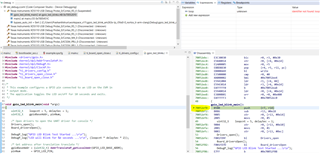

Is the intention of this below thread is to debug through QSPI into a RAM region, rather than debug through QSPI into an External Flash region?
(+) [FAQ] MCU-PLUS-SDK-AM243X: How to debug sbl_qspi (for am263 and am273) or sbl_ospi (for am243) or an application which is booted via OSPI/QSPI boot ? - Arm-based microcontrollers forum - Arm-based microcontrollers - TI E2E support forums

As stated in my initial thread, I am looking for an option to debug what has been flashed into the External flash region, rather than the RAM copy since it is of only 2MB size.


Kindly clarify.

Thanks & Regards,
Sharmili Narayanamurthy

  • Hi Sharmili Narayanamurthy,

    I think you are a little confused of how the device works.

    The ROM bootloader or the RBL boots the SBL which is programmed on the External Flash. It copies the SBL into the L2_SRAM and the SBL starts its execution from the L2_SRAM memory. Similarly, the application or the GPIO example was stored on external flash, but it was copied into the L2_SRAM by the SBL and the execution happens on L2_SRAM itself.

    This is because this device does not support XIP or in-place execution of application. Hence, the application is copied into L2 memory and then executed from that address space.

    That's is the reason why you will always see the program executing from L2 memory space.

    Hope this clears the confusion.

    Best Regards,
    Aakash

  • Hi Aakash,

    Yes, I get it. But this in turn points out to my initial concern - the RAM size is only 2MB.
    If the Application size is more than 2MB - what will be the behaviour?

    Thanks & Regards,
    Sharmili Narayanamurthy

  • Hi Sharmili,

    If the Application size is more than 2MB - what will be the behaviour?

    Unfortunately, the size of application cannot be more than 2MB.

    Flash - The Flash is not sufficient for XIP operation hence it cannot be used.
    GPMC - Added RAM cannot be used for execution (HW limitation on AM263x).

    I would suggest you to reach out to TI representative for better device if the size of your application > 2MB.

    BR,
    Aakash