This thread has been locked.

If you have a related question, please click the "Ask a related question" button in the top right corner. The newly created question will be automatically linked to this question.

LP-MSPM0L1306: Not able to recover after error in UniFlash

Part Number: LP-MSPM0L1306
Other Parts Discussed in Thread: UNIFLASH

I have a LP-MSPM0L1306 I am not able to recover after an error in UniFlash

I tried to recover with CCS using the: known_issues_FAQ_mspm0_sdk_0_52_00_03_eng.html

Nothing seems to be working.

CS_DAP_0: GEL Output: Attempting CS_DAP connection
CS_DAP_0: Error connecting to the target: DAP Connection Error. This could be caused by the device having gone to low power mode. Try forcing an external reset.If the error persists, try forcing BSL, a Mass erase or a Factory Reset. Check device FAQs for more information.
CS_DAP_0: GEL Output: Initiating Board Reset
CS_DAP_0: GEL Output: Reset line asserted
CS_DAP_0: GEL Output: Reset line de-asserted
CS_DAP_0: GEL Output: Board Reset Commplete
CS_DAP_0: GEL Output: Reset done
CS_DAP_0: Error connecting to the target: Connection Error persisted. Try forcing a mailbox Mass Erase.

Tried the  mailbox Mass Erase and Factory reset 

  • Hi Claus,

    It is possible to lock a device if a write to non-main memory occurs, but usually we see this error with low-power modes (See DEBUGSS_02 in the Early Samples Functional Differences Document).

    Are you using STOP or STANDBY mode at all in your program? 

    Are you intentionally programming non-main at all? 

    Have you tried invoking BSL as mentioned in Addendum B of the recovery options?

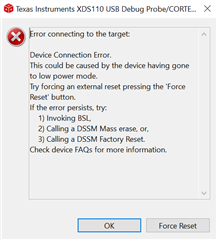
    You only have 10s after invoking BSL so sometimes the timing can be tricky. If you are able to try recovering the device in CCS, I've found the simplest way to get the timing right is to attempt to program once, and when the window below appears:

    Hold down the BSL Invoke button on the launchpad, and click the force reset button in the dialog box. You can just hold the switch down until the programming is complete. If the device is able to connect after that, then you most likely just ended up in STOP or STANDBY somehow. 

    Best Regards,
    Brandon Fisher

  • Hi,

    Yes, I tried all the suggestions above.

    Could it be that I selected the "Erase Configuration->Erase Method->Erase main and non-main memory" option?

    I am just trying to do a startup so no writes to any registers yet and I was able to flash and run the debugger multiple times.

    The issue did not appear before I cycled power.

    If I erased or wrote the non-main, there will be no recovery from it?

    BR,

    Claus Sørensen

  • Hi Claus,

    Yes it is possible. Modifying non-main, especially in these early sample devices, can lock you out of the part.

    If you have tried the DSSM Mass Erase and the DSSM Factory Reset already, I would recommend trying another device or launchpad, with your erase method returned to main memory only. 

    Best Regards,
    Brandon Fisher