This thread has been locked.

If you have a related question, please click the "Ask a related question" button in the top right corner. The newly created question will be automatically linked to this question.

TM4C1292NCPDT: I2C clock waveform comes randomly

Part Number: TM4C1292NCPDT


Hello,

I'm giving an I2C signal from the uC and SCL and SDA are pulled up.

But when I check on scope, I see the SCL signal sometimes and unable to see it sometimes.

All the signals shorting, and connections are fine.

Please suggest what could be the reason behind this on and off thing.

Best regards,

Kiranjit

  • Hi,

    I'm giving an I2C signal from the uC and SCL and SDA are pulled up.

      - Do you have external pullup on both the SCL and SDA buses? You must have pullup on your PCB for these two buses.

    But when I check on scope, I see the SCL signal sometimes and unable to see it sometimes.

      - Are you running any I2C code? If you are not running any code and unable to see SCL pullup'ed to the rail then it means you have a pullup issue. 

  • Hi Charles,

    As I've already written in my previous post, the SCL and SDA are pulled up with external resistances and running my I2C code but still having the above mentioned issues. 

    Best Regards,

    Kiran 

  • Hi Kiran,

      Can you show SCL and SDA on a logic analyzer or scope cap? Please elaborate what do you mean that you don't see SCL sometimes. Is SCL just always low or always high? A picture of the waveform will help clarify. 

  • Hi Charles,

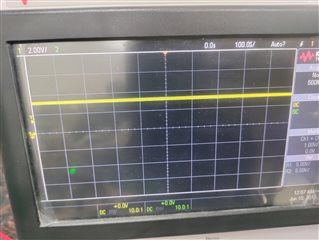
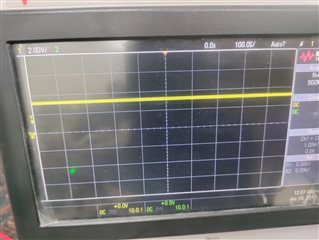
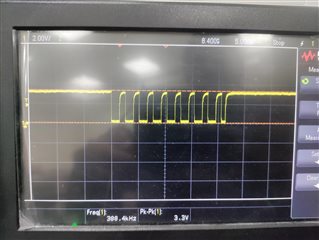
    Following is the scope capture of SCL line in general, which is always high in case of no communication.

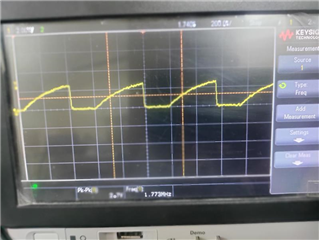
    So when I send some simple data on I2C line, this SCL line detects the following clock signal sometimes but unable to detect it every time.

    Another query is that I need I2C clock as 400kHz but as you can see above, clock rate is 1.77MHz with 4.7k pull-up. I tried different resistances from 1k to 10k range but the clock rate is in MHz range only. My code is to keep the I2C clock in Fast mode,i.e. 400kbps

    I'm calling the following function to set I2C clock
     
    I2CMasterInitExpClk(I2C0_BASE, SysCtlClockGet(), true)
     
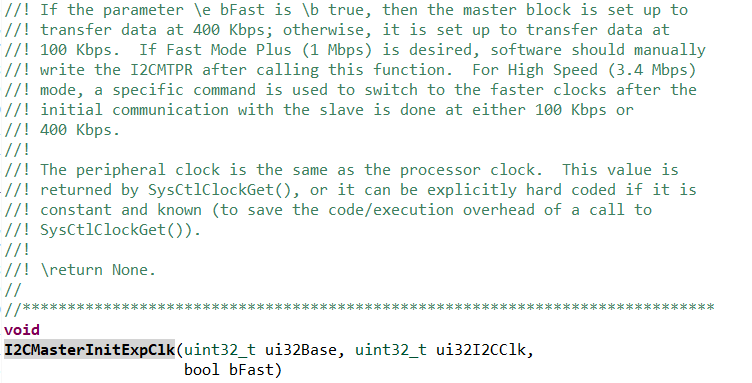
    'I2CMasterInitExpClk' is the function defined in Tivaware/driverlib/i2c.c (screenshot below)
    Software needs to manually write I2CMTPR after calling this function for going to Fast Mode Plus (which is not being done here).
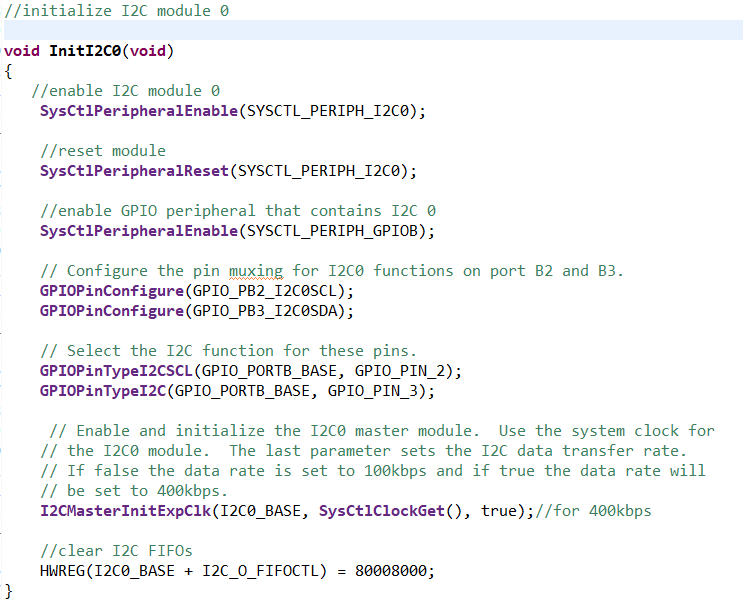
    Following is my code snippet of I2C initialization:
    Please guide how do I get the correct I2C clock frequency and why my signal doesn't come consistently.
    I'm checking it with evaluation board and my circuit is on zero PCB. So giving the I2C connections using jumpers from evaluation board to the zero PCB.
    Could that be the reason for the inconsistent signal?
    Thanks,
    Kiranjit
  • Hi,

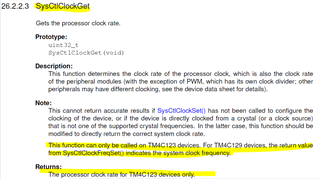
      You cannot use SysCtlClockGet() API. This is an API for TM4C123 MCU, not for TM4C129.  For TM4C129 MCU, you must use the return value from SysCtlClockFreqSet() to indicate the current system clock frequency. 

  • Hi Charles,

    Thanks for the suggestion, I'll try that function.

    I'm checking it with evaluation board and my circuit is on zero PCB. So giving the I2C connections using jumpers from evaluation board to the zero PCB.
    Could that be the reason for the inconsistent signal?

    But what could be the reason for the inconsistent signal?

    Best Regards,

    Kiranjit

  • Hi,

      What is zero PCB mean? Please elaborate. You have mis-configure the system clock and that can lead all sorts of problem. You said the I2C clock is 1.7Mhz which is totally wrong. Since it is running at such high speed and therefore you see the slow rise time given the external pullup resistor you use. 

  • Hi

    The zero PCB means general purpose board and not the fabricated PCB.

    Also, it is not happening for my other code as well (SPI), for which the clock is up and running. I tried checking on the evaluation board itself as well, but the signal doesn't come eveytime.(did the above change in the code as well,i.e. used SysCtlClockFreqSet function).

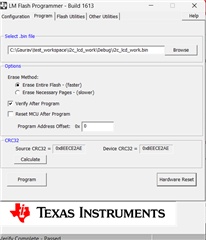
    I feel the code and hardware are not an issue here. I think the issue lies in the way I'm trying to check the signal i.e., by 'resetting' the microcontroller through LM Flash Programmer,i.e.pressing the 'Hardware Reset' button,but It hangs at times. I'm sending the signal on reset, hence I can see the clock signal every time it is reset.

    Is there any other way to reset it and check the signal?

    Best Regards,

    Kiran

  • Hi,

      I'm not not clear with your issue. 

    Also, it is not happening for my other code as well (SPI),

    Your issue is with the I2C. Therefore, SPI is irrelevant here in my opinion. 

    I tried checking on the evaluation board itself as well, but the signal doesn't come eveytime.(did the above change in the code as well,i.e. used SysCtlClockFreqSet function).

    Please show your entire I2C code. What do you mean the signal does not come every time. Which signal? The SCL or SDA or both? As I said before, you must use SysCtlClockFreqSet to configure the system clock for TM4C129 and use the return value of this function call for other APIs. You must not use SysCtlClockGet() API for TM4C129 MCU.

    I feel the code and hardware are not an issue here.

    After you change the code to use the return value of SysCtlClockFreqSet, what do you see on the SCL and SDA buses? Please show captures.

    I think the issue lies in the way I'm trying to check the signal i.e., by 'resetting' the microcontroller through LM Flash Programmer,i.e.pressing the 'Hardware Reset' button,but It hangs at times. I'm sending the signal on reset, hence I can see the clock signal every time it is reset.

    I think I'm lost here. LM flash programmer is used to load the code to the flash. After the code is loaded and if you press the Hardware Reset, it merely reset the device and the device is supposed to run from the beginning. What do you mean you are sending the signal on reset. What signal are you sending on reset? Who is sending what signal to who? I suppose you mean after reset the MCU is sending the SCL clock to the bus, right?


  • Hi Charles,

    Following is my reference I2C code:

    #include <stdarg.h>
    #include <stdbool.h>
    #include <stdint.h>
    #include "inc/hw_i2c.h"
    #include "inc/hw_memmap.h"
    #include "inc/hw_types.h"
    #include "inc/hw_gpio.h"
    #include "driverlib/i2c.h"
    #include "driverlib/sysctl.h"
    #include "driverlib/gpio.h"
    #include "driverlib/pin_map.h"

    //initialize I2C module 0
    //Slightly modified version of TI's example code
    void InitI2C0(void)
    {
    //enable I2C module 0
    SysCtlPeripheralEnable(SYSCTL_PERIPH_I2C0);

    //reset module
    SysCtlPeripheralReset(SYSCTL_PERIPH_I2C0);

    //enable GPIO peripheral that contains I2C 0
    SysCtlPeripheralEnable(SYSCTL_PERIPH_GPIOB);


    // Configure the pin muxing for I2C0 functions on port B2 and B3.
    GPIOPinConfigure(GPIO_PB2_I2C0SCL);
    GPIOPinConfigure(GPIO_PB3_I2C0SDA);

    // Select the I2C function for these pins.
    GPIOPinTypeI2CSCL(GPIO_PORTB_BASE, GPIO_PIN_2);
    GPIOPinTypeI2C(GPIO_PORTB_BASE, GPIO_PIN_3);

    // Enable and initialize the I2C0 master module. Use the system clock for
    // the I2C0 module. The last parameter sets the I2C data transfer rate.
    // If false the data rate is set to 100kbps and if true the data rate will
    // be set to 400kbps.
    I2CMasterInitExpClk(I2C0_BASE, SysCtlClockGet(), false);

    //clear I2C FIFOs
    HWREG(I2C0_BASE + I2C_O_FIFOCTL) = 80008000;
    }

    //sends an I2C command to the specified slave
    void I2CSend(uint8_t slave_addr, uint8_t num_of_args, ...)
    {
    uint8_t i;
    // Tell the master module what address it will place on the bus when
    // communicating with the slave.
    I2CMasterSlaveAddrSet(I2C0_BASE, slave_addr, false);

    //stores list of variable number of arguments
    va_list vargs;

    //specifies the va_list to "open" and the last fixed argument
    //so vargs knows where to start looking
    va_start(vargs, num_of_args);

    //put data to be sent into FIFO
    I2CMasterDataPut(I2C0_BASE, va_arg(vargs, uint32_t));

    //if there is only one argument, we only need to use the
    //single send I2C function
    if(num_of_args == 1)
    {
    //Initiate send of data from the MCU
    I2CMasterControl(I2C0_BASE, I2C_MASTER_CMD_SINGLE_SEND);

    // Wait until MCU is done transferring.
    while(!I2CMasterBusy(I2C0_BASE));
    while(I2CMasterBusy(I2C0_BASE));

    //"close" variable argument list
    va_end(vargs);
    }

    //otherwise, we start transmission of multiple bytes on the
    //I2C bus
    else
    {
    //Initiate send of data from the MCU
    I2CMasterControl(I2C0_BASE, I2C_MASTER_CMD_BURST_SEND_START);

    // Wait until MCU is done transferring.
    while(!I2CMasterBusy(I2C0_BASE));
    while(I2CMasterBusy(I2C0_BASE));

    //send num_of_args-2 pieces of data, using the
    //BURST_SEND_CONT command of the I2C module
    for( i = 1; i < (num_of_args - 1); i++)
    {
    //put next piece of data into I2C FIFO
    I2CMasterDataPut(I2C0_BASE, va_arg(vargs, uint32_t));
    //send next data that was just placed into FIFO
    I2CMasterControl(I2C0_BASE, I2C_MASTER_CMD_BURST_SEND_CONT);

    // Wait until MCU is done transferring.
    while(!I2CMasterBusy(I2C0_BASE));
    while(I2CMasterBusy(I2C0_BASE));
    }

    //put last piece of data into I2C FIFO
    I2CMasterDataPut(I2C0_BASE, va_arg(vargs, uint32_t));
    //send next data that was just placed into FIFO
    I2CMasterControl(I2C0_BASE, I2C_MASTER_CMD_BURST_SEND_FINISH);
    // Wait until MCU is done transferring.
    while(!I2CMasterBusy(I2C0_BASE));
    while(I2CMasterBusy(I2C0_BASE));

    //"close" variable args list
    va_end(vargs);
    }
    }

    //sends an array of data via I2C to the specified slave
    void I2CSendString(uint32_t slave_addr, char array[])
    {
    // Tell the master module what address it will place on the bus when
    // communicating with the slave.
    I2CMasterSlaveAddrSet(I2C0_BASE, slave_addr, false);

    //put data to be sent into FIFO
    I2CMasterDataPut(I2C0_BASE, array[0]);

    //if there is only one argument, we only need to use the
    //single send I2C function
    if(array[1] == '\0')
    {
    //Initiate send of data from the MCU
    I2CMasterControl(I2C0_BASE, I2C_MASTER_CMD_SINGLE_SEND);

    // Wait until MCU is done transferring.
    while(!I2CMasterBusy(I2C0_BASE));
    while(I2CMasterBusy(I2C0_BASE));
    }

    //otherwise, we start transmission of multiple bytes on the
    //I2C bus
    else
    {
    //Initiate send of data from the MCU
    I2CMasterControl(I2C0_BASE, I2C_MASTER_CMD_BURST_SEND_START);

    // Wait until MCU is done transferring.
    while(!I2CMasterBusy(I2C0_BASE));
    while(I2CMasterBusy(I2C0_BASE));

    //initialize index into array
    uint8_t i = 1;

    //send num_of_args-2 pieces of data, using the
    //BURST_SEND_CONT command of the I2C module
    while(array[i + 1] != '\0')
    {
    //put next piece of data into I2C FIFO
    I2CMasterDataPut(I2C0_BASE, array[i++]);

    //send next data that was just placed into FIFO
    I2CMasterControl(I2C0_BASE, I2C_MASTER_CMD_BURST_SEND_CONT);

    // Wait until MCU is done transferring.
    while(!I2CMasterBusy(I2C0_BASE));
    while(I2CMasterBusy(I2C0_BASE));
    }

    //put last piece of data into I2C FIFO
    I2CMasterDataPut(I2C0_BASE, array[i]);

    //send next data that was just placed into FIFO
    I2CMasterControl(I2C0_BASE, I2C_MASTER_CMD_BURST_SEND_FINISH);

    // Wait until MCU is done transferring.
    while(!I2CMasterBusy(I2C0_BASE));
    while(I2CMasterBusy(I2C0_BASE));
    }
    }

    //read specified register on slave device
    uint32_t I2CReceive(uint32_t slave_addr, uint8_t reg)
    {
    //specify that we are writing (a register address) to the
    //slave device
    I2CMasterSlaveAddrSet(I2C0_BASE, slave_addr, false);

    //specify register to be read
    I2CMasterDataPut(I2C0_BASE, reg);

    //send control byte and register address byte to slave device
    I2CMasterControl(I2C0_BASE, I2C_MASTER_CMD_BURST_SEND_START);

    //wait for MCU to finish transaction
    while(!I2CMasterBusy(I2C0_BASE));
    while(I2CMasterBusy(I2C0_BASE));

    //specify that we are going to read from slave device
    I2CMasterSlaveAddrSet(I2C0_BASE, slave_addr, true);

    //send control byte and read from the register we
    //specified
    I2CMasterControl(I2C0_BASE, I2C_MASTER_CMD_SINGLE_RECEIVE);

    //wait for MCU to finish transaction
    while(!I2CMasterBusy(I2C0_BASE));
    while(I2CMasterBusy(I2C0_BASE));

    //return data pulled from the specified register
    return I2CMasterDataGet(I2C0_BASE);
    }

    #define LCD_SLAVE_ADDR 0x28
    #define LCD_CMD 0xFE //used to send commands to the LCD

    //clear LCD
    void ClearScreen()
    {
    I2CSend(LCD_SLAVE_ADDR, 2, LCD_CMD, 0x58);
    }

    //set brightness of LCD
    void SetBrightness(uint8_t brightness)
    {
    I2CSend(LCD_SLAVE_ADDR, 3, LCD_CMD, 0x99, brightness);
    }

    //set contrast of LCD
    void SetContrast(uint8_t contrast)
    {
    I2CSend(LCD_SLAVE_ADDR, 3, LCD_CMD, 0x50, contrast);
    }

    //write single char to LCD
    void WriteChar(uint8_t character)
    {
    I2CSend(LCD_SLAVE_ADDR, 1, character);
    }

    //write string to LCD
    void WriteString(char string[255])
    {
    I2CSendString(LCD_SLAVE_ADDR, string);
    }

    //draw a line with start point (x1, y1) and endpoint (x2, y2)
    void DrawLine(uint8_t x1, uint8_t y1, uint8_t x2, uint8_t y2)
    {
    I2CSend(LCD_SLAVE_ADDR, 6, LCD_CMD, 0x6C, x1, y1, x2, y2);
    }

    //set coordinates (in exact pixels) of the cursor
    void SetCursorCoord(uint8_t x, uint8_t y)
    {
    I2CSend(LCD_SLAVE_ADDR, 4, LCD_CMD, 0x79, x, y);
    }

    //set position of the text cursor
    void SetCursorPos(uint8_t col, uint8_t row)
    {
    I2CSend(LCD_SLAVE_ADDR, 4, LCD_CMD, 0x47, col, row);
    }

    void main(void)
    {
    // Set the clocking to run directly from the external crystal/oscillator.
    SysCtlClockSet(SYSCTL_SYSDIV_1 | SYSCTL_USE_PLL | SYSCTL_OSC_INT | SYSCTL_XTAL_16MHZ);

    //initialize I2C module 0
    InitI2C0();

    //initialize display
    SetBrightness(0);

    while(1){};
    }

    It is just sending one I2C command of 3 bytes on reset after I2C initialisation.

    I'm just checking the data line SCL on the scope.

    Everytime it is reset,it should show the clock signal SCL but it not showing the same,even if I pull up the clock line on the evaluation board itself.

    The scope capture has already been shared in the previous post.

    Please guide why the signal isn't coming.

    Thanks,

    Kiran

  • Hi,

      I already told you multiple times that you cannot use SysCtlClockSet and SysCtlClockGet. You must fix this first. You need to use something like below example. Without fixing the fundamental flaw, we cannot debug your code. Why don't you look at an I2C example like C:\ti\TivaWare_C_Series-2.2.0.295\examples\boards\ek-tm4c1294xl-boostxl-senshub\humidity_sht21_simple\humidity_sht21_simple.c or other TM4C129 examples in TivaWare library on how the system clock is configured for TM4C129 MCU. 

    ui32SysClock = SysCtlClockFreqSet((SYSCTL_XTAL_25MHZ |
    SYSCTL_OSC_MAIN |
    SYSCTL_USE_OSC), 25000000);  // An example to configure the system clock for 25Mhz. You can configure for your own speed requirement. 

    I2CMasterInitExpClk(I2C0_BASE, ui32SysClock, false);

  • Hi,

    I'm sorry my bad. I had already fixed this and checked again but sent you the wrong code. 

    Even after doing the above clock fix I've same issues.

  • Hi,

      - Can you show your schematic? Perhaps take a picture of your setup. I suppose you are using the LaunchPad as the master I2C, correct? Or the I2C master is the custom board with TM4C1292NCPDT on it. Your LCD is mounted on the so-called zero PCB. Is that correct? A diagram will be helpful to understand the setup.

      - If you are using the I2C master from a custom board, can you change to the LaunchPad? Will the LaunchPad produce the same issue?

      - If you are using the custom board as the master, can you repeat the same problem on another custom board? In another word, is the problem seen on all custom boards?

      - Can you show a basic capture that shows the complete I2C transaction? A logic analyzer will be very helpful here. Show the START -> Slave Address -> ACK and the rest of data transactions and finally the STOP bit. 

      - Do you even succeed in one transaction? Does the slave reply ACK to the master?

      - I see you setting the I2C for 100k baudrate but you said you need 400k.

      - Can you comment out  HWREG(I2C0_BASE + I2C_O_FIFOCTL) = 80008000. You can put it back at a later stage. Let's keep it simple for the moment. 

  • Hi,

    I'm currently just checking the I2C clock signal PortB Pin2 on the launchpad (Eval Board) directly and it has been pulled up to 3.3V by a resistor (for a step by step debug).

  • Hi Charles,

    Following is my updated code (with 120MHz system clock and HWREG(I2C0_BASE + I2C_O_FIFOCTL) = 80008000 commented):

    #include <stdarg.h>
    #include <stdbool.h>
    #include <stdint.h>
    #include "inc/hw_i2c.h"
    #include "inc/hw_memmap.h"
    #include "inc/hw_types.h"
    #include "inc/hw_gpio.h"
    #include "driverlib/i2c.h"
    #include "driverlib/sysctl.h"
    #include "driverlib/gpio.h"
    #include "driverlib/pin_map.h"

    uint32_t g_ui32SysClock;
    uint32_t ui32SysClock;

    //initialize I2C module 0
    //Slightly modified version of TI's example code
    void InitI2C0(void)
    {
    //enable I2C module 0
    SysCtlPeripheralEnable(SYSCTL_PERIPH_I2C0);

    //reset module
    SysCtlPeripheralReset(SYSCTL_PERIPH_I2C0);

    //enable GPIO peripheral that contains I2C 0
    SysCtlPeripheralEnable(SYSCTL_PERIPH_GPIOB);

    // Configure the pin muxing for I2C0 functions on port B2 and B3.
    GPIOPinConfigure(GPIO_PB2_I2C0SCL);
    GPIOPinConfigure(GPIO_PB3_I2C0SDA);

    // Select the I2C function for these pins.
    GPIOPinTypeI2CSCL(GPIO_PORTB_BASE, GPIO_PIN_2);
    GPIOPinTypeI2C(GPIO_PORTB_BASE, GPIO_PIN_3);

    // Enable and initialize the I2C0 master module. Use the system clock for
    // the I2C0 module. The last parameter sets the I2C data transfer rate.
    // If false the data rate is set to 100kbps and if true the data rate will
    // be set to 400kbps.

    ui32SysClock = SysCtlClockFreqSet((SYSCTL_XTAL_25MHZ | SYSCTL_OSC_MAIN | SYSCTL_USE_PLL | SYSCTL_CFG_VCO_480),120000000);

    I2CMasterInitExpClk(I2C0_BASE, ui32SysClock, true);

    //clear I2C FIFOs
    // HWREG(I2C0_BASE + I2C_O_FIFOCTL) = 80008000;
    }

    //I2C Send Function

    //sends an I2C command to the specified slave
    void I2CSend(uint8_t slave_addr, uint8_t num_of_args, ...)
    {
    uint8_t i ;
    // Tell the master module what address it will place on the bus when
    // communicating with the slave.
    I2CMasterSlaveAddrSet(I2C0_BASE, slave_addr, false);

    //stores list of variable number of arguments
    va_list vargs;

    //specifies the va_list to "open" and the last fixed argument
    //so vargs knows where to start looking
    va_start(vargs, num_of_args);

    //put data to be sent into FIFO
    I2CMasterDataPut(I2C0_BASE, va_arg(vargs, uint32_t));

    //if there is only one argument, we only need to use the
    //single send I2C function
    if(num_of_args == 1)
    {
    //Initiate send of data from the MCU
    I2CMasterControl(I2C0_BASE, I2C_MASTER_CMD_SINGLE_SEND);

    // Wait until MCU is done transferring.
    while(!(I2CMasterBusy(I2C0_BASE)));
    while(I2CMasterBusy(I2C0_BASE));

    //"close" variable argument list
    va_end(vargs);
    }

    //otherwise, we start transmission of multiple bytes on the
    //I2C bus
    else
    {
    //Initiate send of data from the MCU
    I2CMasterControl(I2C0_BASE, I2C_MASTER_CMD_BURST_SEND_START);

    // Wait until MCU is done transferring.
    while(!(I2CMasterBusy(I2C0_BASE)));
    while(I2CMasterBusy(I2C0_BASE));

    //send num_of_args-2 pieces of data, using the
    //BURST_SEND_CONT command of the I2C module
    for( i = 1; i < (num_of_args - 1); i++)
    {
    //put next piece of data into I2C FIFO
    I2CMasterDataPut(I2C0_BASE, va_arg(vargs, uint32_t));
    //send next data that was just placed into FIFO
    I2CMasterControl(I2C0_BASE, I2C_MASTER_CMD_BURST_SEND_CONT);

    // Wait until MCU is done transferring.
    while(!(I2CMasterBusy(I2C0_BASE)));
    while(I2CMasterBusy(I2C0_BASE));
    }

    //put last piece of data into I2C FIFO
    I2CMasterDataPut(I2C0_BASE, va_arg(vargs, uint32_t));
    //send next data that was just placed into FIFO
    I2CMasterControl(I2C0_BASE, I2C_MASTER_CMD_BURST_SEND_FINISH);
    // Wait until MCU is done transferring.
    while(!(I2CMasterBusy(I2C0_BASE)));
    while(I2CMasterBusy(I2C0_BASE));

    //"close" variable args list
    va_end(vargs);
    }
    }

    //sends an array of data via I2C to the specified slave
    void I2CSendString(uint32_t slave_addr, char array[])
    {
    // Tell the master module what address it will place on the bus when
    // communicating with the slave.
    I2CMasterSlaveAddrSet(I2C0_BASE, slave_addr, false);

    //put data to be sent into FIFO
    I2CMasterDataPut(I2C0_BASE, array[0]);

    //if there is only one argument, we only need to use the
    //single send I2C function
    if(array[1] == '\0')
    {
    //Initiate send of data from the MCU
    I2CMasterControl(I2C0_BASE, I2C_MASTER_CMD_SINGLE_SEND);

    // Wait until MCU is done transferring.
    while(!(I2CMasterBusy(I2C0_BASE)));
    while(I2CMasterBusy(I2C0_BASE));
    }

    //otherwise, we start transmission of multiple bytes on the
    //I2C bus
    else
    {
    //Initiate send of data from the MCU
    I2CMasterControl(I2C0_BASE, I2C_MASTER_CMD_BURST_SEND_START);

    // Wait until MCU is done transferring.
    while(!(I2CMasterBusy(I2C0_BASE)));
    while(I2CMasterBusy(I2C0_BASE));

    //initialize index into array
    uint8_t i = 1;

    //send num_of_args-2 pieces of data, using the
    //BURST_SEND_CONT command of the I2C module
    while(array[i + 1] != '\0')
    {
    //put next piece of data into I2C FIFO
    I2CMasterDataPut(I2C0_BASE, array[i++]);

    //send next data that was just placed into FIFO
    I2CMasterControl(I2C0_BASE, I2C_MASTER_CMD_BURST_SEND_CONT);

    // Wait until MCU is done transferring.
    while(!(I2CMasterBusy(I2C0_BASE)));
    while(I2CMasterBusy(I2C0_BASE));
    }

    //put last piece of data into I2C FIFO
    I2CMasterDataPut(I2C0_BASE, array[i]);

    //send next data that was just placed into FIFO
    I2CMasterControl(I2C0_BASE, I2C_MASTER_CMD_BURST_SEND_FINISH);

    // Wait until MCU is done transferring.
    while(!(I2CMasterBusy(I2C0_BASE)));
    while(I2CMasterBusy(I2C0_BASE));
    }
    }

    //I2C Receive Function
    //read specified register on slave device
    uint32_t I2CReceive(uint32_t slave_addr, uint8_t reg)
    {
    //specify that we are writing (a register address) to the
    //slave device
    I2CMasterSlaveAddrSet(I2C0_BASE, slave_addr, false);

    //specify register to be read
    I2CMasterDataPut(I2C0_BASE, reg);

    //send control byte and register address byte to slave device
    I2CMasterControl(I2C0_BASE, I2C_MASTER_CMD_BURST_SEND_START);

    //wait for MCU to finish transaction
    while(I2CMasterBusy(I2C0_BASE));

    //specify that we are going to read from slave device
    I2CMasterSlaveAddrSet(I2C0_BASE, slave_addr, true);

    //send control byte and read from the register we
    //specified
    I2CMasterControl(I2C0_BASE, I2C_MASTER_CMD_SINGLE_RECEIVE);

    //wait for MCU to finish transaction
    while(!(I2CMasterBusy(I2C0_BASE)));
    while(I2CMasterBusy(I2C0_BASE));

    //return data pulled from the specified register
    return I2CMasterDataGet(I2C0_BASE);
    }

    //////LCD ////////
    #define LCD_SLAVE_ADDR 0x28
    #define LCD_CMD 0xFE //used to send commands to the LCD

    //clear LCD
    void ClearScreen()
    {
    I2CSend(LCD_SLAVE_ADDR, 2, LCD_CMD, 0x58);
    }

    //set brightness of LCD
    void SetBrightness(uint8_t brightness)
    {
    I2CSend(LCD_SLAVE_ADDR, 3, LCD_CMD, 0x99, brightness);
    }

    //set contrast of LCD
    void SetContrast(uint8_t contrast)
    {
    I2CSend(LCD_SLAVE_ADDR, 3, LCD_CMD, 0x50, contrast);
    }

    //write single char to LCD
    void WriteChar(uint8_t character)
    {
    I2CSend(LCD_SLAVE_ADDR, 1, character);
    }

    //write string to LCD
    void WriteString(char string[255])
    {
    I2CSendString(LCD_SLAVE_ADDR, string);
    }

    //draw a line with start point (x1, y1) and endpoint (x2, y2)
    void DrawLine(uint8_t x1, uint8_t y1, uint8_t x2, uint8_t y2)
    {
    I2CSend(LCD_SLAVE_ADDR, 6, LCD_CMD, 0x6C, x1, y1, x2, y2);
    }

    //set coordinates (in exact pixels) of the cursor
    void SetCursorCoord(uint8_t x, uint8_t y)
    {
    I2CSend(LCD_SLAVE_ADDR, 4, LCD_CMD, 0x79, x, y);
    }

    //set position of the text cursor
    void SetCursorPos(uint8_t col, uint8_t row)
    {
    I2CSend(LCD_SLAVE_ADDR, 4, LCD_CMD, 0x47, col, row);
    }
    /////////LCD////////////////
    //SCL_PERIOD = 2×(1 + TPR)×(SCL_LP + SCL_HP)×CLK_PRD
    //where:
    /* SCL_PRD is the SCL line period (I2C clock).
    TPR is the Timer Period register value (range of 1 to 127).
    SCL_LP is the SCL Low period (fixed at 6).
    SCL_HP is the SCL High period (fixed at 4).
    CLK_PRD is the system clock period in ns

    --> TPR =
    */

    void main(void)
    {
    // Set the clocking to run directly from the external crystal/oscillator.

    g_ui32SysClock = SysCtlClockFreqSet((SYSCTL_XTAL_25MHZ |
    SYSCTL_OSC_MAIN |
    SYSCTL_USE_PLL |
    SYSCTL_CFG_VCO_480),120000000);


    //initialize I2C module 0
    InitI2C0();

    SetBrightness(0);

    while(1){};

    }

    I'm checking on PB2 pin (SCL), which is pulled up to 3.3V by 1k resistance on the TI launchpad itself but I can't see any clock signal coming.

    Following is the scope capture of the SCL signal: 

    Best Regards,

    Kiranjit

  • Hi,

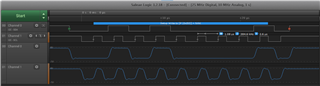
      I use the LaunchPad and external 3.3k pullup on both SCL and SDA bus. I do not have any slave device connected. I'm able to see waveforms on both SCL and SDA. See below logic analyzer. The NAK is expected because I don't have a slave device. Otherwise, the clock and data are both wiggling. As you can see the master is putting out the slave device address equal to 0x28 on the bus which is what you have in the code. The clock speed captured is close to 400k. I'm running the identical code you uploaded. I didn't modify anything. You need to check your connection. Perhaps, show a picture of setup. Make sure you have common ground between the LaunchPad board and your slave device. I will suggest you use a logic analyzer to capture the waveform. It is easier to troubleshoot the protocol. 

  • Hi,

    When and how are these signals coming? Does it come on pressing the 'Hardware reset' push button of the launchpad?

    I'm also not using any slave device currently, just pulled up SCL and SDA to 3.3V on the launchpad itself. 

    I've MSO but not logic analyser.

    Thanks,

    Kiran 

  • I can do a hardware reset by pressing the RST button on the LauchPad and still see the same waveform after MCU is released from reset. You might want to check how you setup the trigger on the scope. You should set the trigger for falling edge on SCL. 

  • Hi Charles,

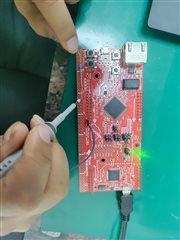
    Following is the image of my setup and currently, I'm only checking the clock SCL (pulled-up), at PB2. 

    I'm getting the correct clock on hardware reset, but it comes sometimes and doesn't always come

    Is there a possibility of loose USB connection with the PC which might cause this,I tried to change the USB cable as well.

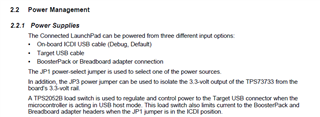
    Can I give 3.3V from external power supply and check the clock (instead of giving power through PC via USB)? If yes, then where should I connect the external 3.3V power and what should be the supply current? Additionaly,what are the jumper settings that I need for the same?

    Also can you share the picture of your setup.

    Thanks,

    Kiran

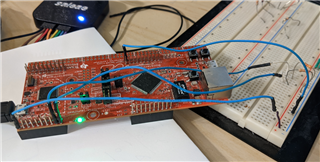
  • Hi,

     I have a simple setup using the breadboard. See below. 

  • Can I give 3.3V from external power supply and check the clock (instead of giving power through PC via USB)? If yes, then where should I connect the external 3.3V power and what should be the supply current? Additionaly,what are the jumper settings that I need for the same?

    Refer to the LaunchPad user's guide for details.