This thread has been locked.

If you have a related question, please click the "Ask a related question" button in the top right corner. The newly created question will be automatically linked to this question.

AM2634: Can the Lock-Step function be applied only to R5_0 and R5_1?

Part Number: AM2634
Other Parts Discussed in Thread: TMDSCNCD263,

To Expert

I am currently conducting pre-development using "TMDSCNCD263".

I confirmed that it works as Multi-Core by modifying the GEL file as follows.
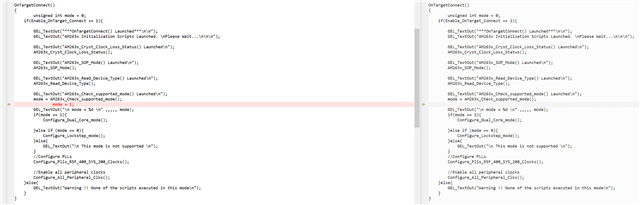
However, my final goal is to operate R5_0 and R5_1 as Lock-Step and R5_1 and R5_2 as Multi Core.

Therefore, finally, 3 SWs must operate simultaneously.

is this possible?

  • Hi

    The R5 Cores in Am2634 are divided as two clusters:

    Cluster_0 : R5_0 and R5_1

    Cluster_1 : R5_2 and R5_3.

    When R5_0 is configured as lockstep, that means only one core R5_0 in the Cluster_0 can be used for flashing the code. R5_1 cannot be connected to or used in the lockstep mode.

    Setting Cluster_1 to dual core, the R5_2 and R5_3 both can be used for code execution.

    THanks & regards

    Sri Vidya

  • Hi Sri Vidya

    Thank you for confirmation.

    Is it possible to make Cluster_0 operate in lock-step mode and Cluster_1 operate in dual-core mode by modifying the GEL file?

    Regards

    Jiung Choi

  • Hi Jiung Choi

    Currently it is not possible with the existing GELs. A slight modification is required to set it up.

    I will look into it and get back to you on this.

    Thanks & Regards

    Sri Vidya

  • Hi Sri Vidya

    thank you I will wait for your reply.

    Regards

    Jiung Cho

  • Hi Jiung Choi

    In the GELs, when you are configuring the mode to lockstep:

    1. R5F_SS0 is configured to lockstep.

    2. R5F_SS1 is configured to lockstep.

    when you are configuring the mode to dualcore:

    1. R5F_SS0 is configured to dualcore.

    2. R5F_SS1 is configured to dualcore.

    I got this information from GELs as shown below:

    Looking at this, we need to create another API which does the below according to your requirement:

    hotmenu Configure_Lockstep_Dual_Core_mode()
    {
    if(Enable_OnTarget_Connect == 1){

    MSS_CTRL_unlock();
    MSS_TOPRCM_unlock();
    MSS_RCM_unlock();
    MSS_IOMUX_Unlock();
    TOP_CTRL_unlock();
    R5F_SS0_Reset_Lockstep();
    R5F_SS1_Reset_Dualcore();
    R5F_ROM_eclipse();
    Unhalt_All_R5F_cores();
    MSS_L2_Mem_Init();
    MailBox_MEM_Init();
    GEL_TextOut("*********** R5FSS0 Lockstep mode /R5FSS1 Dual Core mode Configured********\n");
    }else{
    GEL_TextOut("Errrrr... Please Load Gel files\n");
    }

    }

    Please give me some more time to verify this change and cross-check it with the compiler team. If you are interested to test it, you can make the above change in your CCS and try it out too.

    Thanks & Regards

    Sri Vidya

  • Hi Jiung Choi

    I am facing a issue while testing this feature, I have contacted the internal team and updated them regarding this issue.

    I will update further once I get more information.

    Thanks for your patience.

    Regards

    Sri Vidya

  • Hi Sri Vidya

    Thank you for your support.

    I'll wait for updates.

    Regards

    Jiung Choi

  • Sure! Logged the Jira ID for this use-case. Adding it here to track - SITARAAPS-3160

    Regards

    Sri Vidya

  • Hi 

    Please make the following changes in your GEL files to enable lockstepmode and dual core for R50_0 and R51_0 respectively.

    Go to file C:\ti\ccs1210\ccs\ccs_base\emulation\gel\AM263x\AM263x.gel:

    Step1:

    check in which mode you are in: Lockstep or Dual Core, if you have not changed your GELs anytime, your default mode is lockstep.

    Step2:

    Now as discussed earlier make change is the Lockstep mode API like this:

  • Step 3:

    Go to File: C:\ti\ccs1210\ccs\ccs_base\emulation\gel\AM263x\AM263_common\AM263_common.gel

    Make the below change in the API - Change R5SS0 to R5SS1.

    API name: R5F_SS1_Reset_Dualcore

    Step 4: Save the Changes.

    Step 5: Re-configure the Target Configurations for your AM2634 So that the GELs are added again. Now load and launch the GELs.

    Run your program as usual.

    Step 6: Wile connecting to cores, you should be able to connect to all the cores except for the second core.

    Hope this helps.

    Thanks & Regards

    Sri Vidya

  • Hi Sri Vidya

    I will apply this and use it.

    Thank you for your support.

    Regards

    Jiung Choi