This thread has been locked.

If you have a related question, please click the "Ask a related question" button in the top right corner. The newly created question will be automatically linked to this question.

AM2432: Migration from AM2434 (4 cores) to AM2432 (2 cores)

Part Number: AM2432
Other Parts Discussed in Thread: AM2434, , AM2431, UNIFLASH, AM2632

Hi Expert,

I am working on a migration from AM2434 (4 cores) to AM2432 (2 cores). First I have a question about two CCS configurations as below.

1) For “variant and core”, our project using  AM2434 (4 cores) is configured as ASM243x_GP_EVM like below. Can we continue to use this for AM2432 (2 cores) as well? Otherwise, could you please share some details about how to change this?

2) For “target configuration”, our project using AM2434 (4 cores) is configured as AM2434_ALV like below. Can we continue to use this for AM2432 (2 cores) as well? Otherwise, could you please share some details about how to change this?

Please let me know if you need more information about our configuration to answer my questions, and also let me know if there are any other things I have to check for this migration.

I am looking forward to your reply.


Best,

Moonil

  • Hi

    Could you tell me what cores were you using in your 4 core project?

    We have two clusters:

    R50_0, R50_1

    R51_0, R51_1

    Regards

    Sri Vidya

  • Hi,

    Thanks for your prompt response.

    currently, only R50_0 is used in 4 core projects.

    regards,

    Moonil

  • Yeah you can then migrate easily to Am2432. Since the R50_0 core remains same for both the devices.

    The code doesnot need any changes to be made.

    The only change you require is to use AM2432 instead of Am2434 device type in your .ccxml configuration.

    Regards

    Sri Vidya

  • Hi Sri Vidya,

    Thanks for your confirmation. Could you please share some details about how to change this?

    Regards,

    Moonil

  • Hi

    Open your .ccxml file that you use for launching your target.

    After you change the configuration, you can save it and try launching the target.

    Then you will see 2 cores, since AM2432 is selected.

    Hope it works

    Regards

    Sri Vidya

  • Hi Sri Vidya,

    Thanks for the kind explanation.

    Q1) AM2431 and AM2432 are not found in the list in my ccs. Should I update those devices using the update manager? if yes, Can you let me know how to update.

    Q2) As you mentioned, there are two clusters. Which ones are for AM2432? According to the SBL code, CSL_CORE_ID_R5FSS1_0 and CSL_CORE_ID_R5FSS1_1 seem to be used for AM2432. Is this correct? We are using R50_0 for AM2434. Could you please clarify this confusion?

    We have two clusters:

    R50_0, R50_1

    R51_0, R51_1


    Regards,

    Moonil

  • Hi Moonil

    Will get back to you on this.

    Regards

    Sri Vidya

  • Hi Sri Vidya,

    Could you please update me on those two questions I asked?

    Regards,

    Moonil

  • Hi Moonil

    Q1) AM2431 and AM2432 are not found in the list in my ccs. Should I update those devices using the update manager? if yes, Can you let me know how to update.

    I have assigned the ticket to CCS Device package expert regarding this query.

    Could you tell which CCS version and which Device Support Package version you are currently using?

    As you mentioned, there are two clusters. Which ones are for AM2432?

    For AM2432,

    R50_0

    R51_0

    are the cores being used.

    This information is available in the AM243x data sheet. The same table I mentioned here also:

    Regards

    Sri Vidya

  • Hey Moonil,

    Please see screenshot below demonstrating how to ensure you have the latest Device Support Package installed.

    Best Regards,

    Zackary Fleenor

  • Hi Sri Vidya,

    According to the SBL code, CSL_CORE_ID_R5FSS1_0 and CSL_CORE_ID_R5FSS1_1 seem to be used for AM2432. Is this correct? We are using R50_0 for AM2434. Could you please clarify this confusion?

    Could you clarify this?

    Hi Zackary Fleenor,

    I clicked the menu "Install Device Support" as you guided, then CCS is closed but nothing happened.

    Could let me know what our expectation is after clicking the menu "Install Device Support"?

    I am using CCS version 12.1.0.00007 and SDK 08.02.00.31.

    Regards

    Moonil

  • Hi Moonil,

    Don't click on "install Device Support," this option is only to install support for device families that are currently not present in your CCS installation. In your case you want to select " Check for Updates" and then a window should open showing you the latest available version of the sitara_mcu_device_support. Select this one for installation and follow prompts. Please let me know if you run into any issues with this.

    Sri Vidya has also confirmed the presence of R50_0 and R51_0 in the AM2432 part, please check her previous answer to see if that helps clear up the confusion.

    Best,

    Daniel

  • Hi Daniel,

    Thank you for your clear explanation. I was able to see the device list update including AM2432_AVL.xml in C:\ti\ccs1210\ccs\ccs_base\common\targetdb\devices.

    I tried "CCS debug session" and "firmware upgrade" using uniflash through uart, and both failed as below.

    1) when I tried to start to debug session on our board with AM2432 instead of AM2434, I found the error in CCS like below. I am using NOBOOT mode, load_dmsc.js, and Blackhawk XDS560v2-USB System Trace Emulator. FYI, the same target config is working well on the board having AM2434.

    gel files are used for each core as below,

    2) when I tried to upgrade firmware via uart on the board, "uniflash.tiimage" seems to be loaded without problem but errors happened during sending sbl.tiimage as below. FYI, this uniflash.tiimage is modified to use our nor flash driver.

    Could you please share your knowledge and any checkpoints about how to resolve those errors in CCS and UART uniflash?

    Regards,

    Moonil

  • Hi Moonil,

    In the target configuration window are you able to get a successful pass when you click on "Test Connection"?

    Also, how far can you make it into the debug once you launch the target configuration? from the first picture, it seems like not even the cores show up before the ccxml crashes, correct?

    Best,

    Daniel

  • Hi Daniel, 

    Thank you for your prompt response.

    n the target configuration window are you able to get a successful pass when you click on "Test Connection"?

    yes, I can see "The JTAG DR Integrity scan-test has succeeded"

    how far can you make it into the debug once you launch the target configuration?

    as I added the previous image I captured, we can see only "Connecting to DMSC_Cortex_M3_0!" in "Scripting Console". I think dsDMSC_0.target.connect() failed in load_dmsc.js.

    Regards,

    Moonil

  • Hi Moonil,

    Which XML did you choose for your target configuration file? are you using THE GP_EVM one or one of the ones that end with _ALV/_ALX? 

    Best,

    Daniel 

  • Hi Daniel,

    I am using "AM2432_AVL.xml". please see "AM2432_XDS560V2_USB.ccxml" below.

    <?xml version="1.0" encoding="UTF-8" standalone="no"?>
    <configurations XML_version="1.2" id="configurations_0">


        <configuration XML_version="1.2" id="Blackhawk XDS560v2-USB System Trace Emulator_0">


            <instance XML_version="1.2" desc="Blackhawk XDS560v2-USB System Trace Emulator_0" href="connections/BH-XDS560v2-USB_Connection.xml" id="Blackhawk XDS560v2-USB System Trace Emulator_0" xml="BH-XDS560v2-USB_Connection.xml" xmlpath="connections"/>


            <connection XML_version="1.2" id="Blackhawk XDS560v2-USB System Trace Emulator_0">


                <instance XML_version="1.2" href="drivers/tixds560cs_dap.xml" id="drivers" xml="tixds560cs_dap.xml" xmlpath="drivers"/>


                <instance XML_version="1.2" href="drivers/tixds560cortexR.xml" id="drivers" xml="tixds560cortexR.xml" xmlpath="drivers"/>


                <instance XML_version="1.2" href="drivers/tixds560cortexM.xml" id="drivers" xml="tixds560cortexM.xml" xmlpath="drivers"/>


                <instance XML_version="1.2" href="drivers/tixds560pru.xml" id="drivers" xml="tixds560pru.xml" xmlpath="drivers"/>


                <instance XML_version="1.2" href="drivers/tixds560csstm.xml" id="drivers" xml="tixds560csstm.xml" xmlpath="drivers"/>


                <instance XML_version="1.2" href="drivers/tixds560ctset2.xml" id="drivers" xml="tixds560ctset2.xml" xmlpath="drivers"/>


                <instance XML_version="1.2" href="drivers/tixds560etbcs.xml" id="drivers" xml="tixds560etbcs.xml" xmlpath="drivers"/>


                <platform XML_version="1.2" id="platform_0">


                    <instance XML_version="1.2" desc="AM2432_ALV_0" href="devices/AM2432_ALV.xml" id="AM2432_ALV_0" xml="AM2432_ALV.xml" xmlpath="devices"/>


                    <device HW_revision="1" XML_version="1.2" description="AM2432 17x17 Package" id="AM2432_ALV_0" partnum="AM2432_ALV" simulation="no">


                        <router HW_revision="1.0" XML_version="1.2" description="CS_DAP Router" id="CS_DAP_0" isa="CS_DAP">


                            <subpath id="DMSC">


                                <cpu HW_revision="1.0" XML_version="1.2" desc="DMSC_Cortex_M3_0" description="Cortex_M3 CPU" deviceSim="false" id="Cortex_M3_0" isa="Cortex_M3">


                                    <property Type="filepathfield" Value="..\..\emulation\gel\AM24x\AM24x.gel" id="GEL File"/>


                                </cpu>


                            </subpath>


                            <subpath id="MAIN_PULSAR_0_0">


                                <cpu HW_revision="1.0" XML_version="1.2" description="Cortex_R5 CPU 0" deviceSim="false" id="MAIN_PULSAR_Cortex_R5_0_0" isa="Cortex_R5">


                                    <property Type="filepathfield" Value="..\..\emulation\gel\AM24x\AM24_DDRSS\AM24x_GP_EVM.gel" id="GEL File"/>


                                </cpu>


                            </subpath>


                        </router>


                    </device>


                </platform>


            </connection>


        </configuration>


    </configurations>
    

    Regards,

    Moonil

  • Hi Moonil,

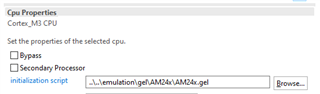
    that xml does not contain the gel path definition on the DMSC. Could you please add it the following way:

    1. open your target configuration file

    2. in the bottom of the window, click on the "Advanced" tab

    3. Click on the DMSC_Cortex_M3_0 core

    4. on the right, add the path to the initialization script (gel). This should be the path to the AM24x.gel, normally under: <ccs_root>/ccs_base/emulation/gel/AM24x/AM243x.gel

    5. Save target configuration file and test connection

    Please follow these steps and let me know if it fixes your problems while running the load_dmsc.js script

    Best,

    Daniel

  • Hi Daniel,

    I think it has /ccs_base/emulation/gel/AM24x/AM24x.gel. please see #95 and #100 in the .ccxml file I shared.

    I also checked it again but the same error happened.

    Regards,

    Moonil

  • Hi Moonil,

    I will take a look at this on my side, could you please share the exact target configuration file you are working with? 

    here are a few more things to try while I dig into this:

    1. could you please try changing the xml to either AM243x_GP_EVM or/and AM243x_LAUNCHPAD afterwards and try again? please let me know if that changes the behavior in any way

    2. Try to change the debug probe to XDS110 instead of blackhawk and try again,

    3. a combination of 1. and 2.

    Please let me know if any of this helps, I will try to replicate on my side.

    Best,

    Daniel

  • Hi Daniel,

    could you please share the exact target configuration file you are working with? 

    Please find the attached file below, which is the target config file (.ccxml) I am using.

    /cfs-file/__key/communityserver-discussions-components-files/908/AM2432_5F00_XDS560V2_5F00_USB.zip

    1. could you please try changing the xml to either AM243x_GP_EVM or/and AM243x_LAUNCHPAD afterwards and try again? please let me know if that changes the behavior in any way

    I tried both but the result is the same.

    2. Try to change the debug probe to XDS110 instead of blackhawk and try again,

    our product has only JTAG using Blackhawk but not using the XDS110 debugger.

    Could you please check the problem I found during firmware upgrade using uniflash below as well? I wonder if this is caused by the same reason as above.

    2) when I tried to upgrade firmware via uart on the board, "uniflash.tiimage" seems to be loaded without problem but errors happened during sending sbl.tiimage as below. FYI, this uniflash.tiimage is modified to use our nor flash driver.

    Regards,

    Moonil

  • Hi Moonil,

    I didn't have any luck replicating this problem from my side. I will investigate this further.

    You mentioned that you can't see the same issue with a AM2434 device correct? and only shows up with a AM2432 device?

    Best,

    Daniel

  • Hi Daniel,

    I didn't have any luck replicating this problem from my side. I will investigate this further.

    Do you mean, the target config I shared with you worked well on your AM2432 board? correct?

    You mentioned that you can't see the same issue with a AM2434 device correct? and only shows up with a AM2432 device?

    Yes, the target config for AM2432 I shared worked on the AM2434 board.

    I wonder if you have the test board having AM2432. if yes, please share your configuration information as well.

    Regards,

    Moonil

  • Hi Moonil,

    Let me update my findings, i was able to see the same error as you now:

    • the CCXML you shared does not work, I get same problem as you, but I am testing in XDS110 so this is expected
      • the CCXML works when I change to XDS110
    • I am testing on a Launchpad, so the current device is the superset AM2434

    SW team has also confirmed that the support for subset devices was added in the SDK release 8.05. Could you try updating your SDK and trying to update the firmware once again? After this, check if it helps with the CCS connection issue as well.

    Best,

    Daniel

  • Hi Daniel,

    SW team has also confirmed that the support for subset devices was added in the SDK release 8.05. Could you try updating your SDK and trying to update the firmware once again? After this, check if it helps with the CCS connection issue as well.

    I did test the same using TI example, "empty_am243x-evm_r5fss0-0_freertos_ti-arm-clang" with SDK release 08.05.00.24. Its result is the same as below,

    Do you think my test board has a problem? Could you share any other checkpoints to clarify the reason?

    Regards,

    Moonil

  • Hi Daniel,

    Can I ask you again if you or your team have any further guidance or checkpoints for this AM2432 migration?

    Regards,

    Moonil

  • Hi Moonil, 

    Yes, we have been looking into this and found a possible reason. It could be possible that you are working with Hight Security AM2632 samples, could you please tell me the full package markings on your AM2434 and AM2432 devices? 

    Best,

    Daniel

  • Hi Daniel,

    I am testing 3 packages below,

    1. AM2434ASFGGAALV - this has been used for development -> working.
    2. AM2432BSFFHIALV - we want to migrate from #1 to this for production. -> Not working with CCS and uniflash
    3. AM2434BSFFHIALV - we want to migrate from #1 to this for production. -> Not working with CCS and uniflash. the same problem with #2.   

    fyi, we have developed our product software with SDK 08.02.00.31.

    Please check both #2 and #3.

    Regards,

    Moonil 

  • Moonil,

    The AM243xB... samples are high secure samples that are not meant to be used with NOBOOT, and you won't have access to the M3 with this kind of device. Could you please refer to this Migration Guide: AM243x MCU+ SDK: HS FS Migration Guide and follow instructions in section "Application boot using CCS + GELs"? let me know if this fixes your issue.

    Best,

    Daniel

  • Hi Daniel,

    Thanks for the information. your guide works for ccs debug session. however, there is still an error and questions.

    The AM243xB... samples are high secure samples

    In the other email, TI team gave us an answer about the "B" you mentioned below,

    SE: What is the significance of moving from “A” to “B”? TI: this is “Silicone Revision", SR2.0 is the newer version – TI recommends using the newer version for any new developments.

    Q1) Do you mean, when we use this "B" revision, we cannot use NOBOOT? I found there is "H" of AM2432BSFFHIALV. I wonder only if this H is chosen, chipset is a "Secure Sample"  you mentioned. Please clarify which character of the device name is for "high secure" and make us use DEV boot and load_dmsc_hs_fs.js script.

    Q2) I tested CSS debug session with NOBOOT mode(11011110) and "load_dmsc_hsfs.js" from SDK 08.05.00.24.

    • AM2432BSFFHIALV - ccs debug session seems to work. under testing.
    • AM2434BSFFHIALV -  found an error below but ccs debug session works.
      • "MAIN_Cortex_R5_0_0: CIO: Encountered error while reading command and parameter blocks.  Check your program memory map."

    Could you let me know how to resolve this error?

    Q3) Still I need to know how to resolve uniflash error for uart upgrade.

    I am looking forward to your reply to my remaining questions again.

    Thanks,

    Moonil

  • Hi Moonil,

    Q1) For question regarding the nomenclature you can refer to the device's datasheet section 10.1.1 Standard Package Symbolization.

    Yes, to clarify what I said before, the "B" represents Silicon Revision 2, but here are only HS, SR2 subset devices so that prompted me to point you to the migration guide. The email sent before is correct. 

    Q2 Q3) I will find some experts to help you with these

    Best,

    Daniel

  • Hi ,

    Q2) I tested CSS debug session with NOBOOT mode(11011110) and "load_dmsc_hsfs.js" from SDK 08.05.00.24.

    https://software-dl.ti.com/mcu-plus-sdk/esd/AM243X/latest/exports/docs/api_guide_am243x/HSFS_MIGRATION_GUIDE.html

    Q3) Still I need to know how to resolve uniflash error for uart upgrade.

    If your device is HS-FS device, you should be using a uart_uniflash.hs_fs.tiimage

    From your logs, it seems like you are not using the correct image format.

    Can you try the same and let me know whats the update on this ?

    Best Regards,
    Aakash

  • Hi Daniel and Aakash,

    thanks for your kind explanation and support on this migration task.

    Q1) Which bits are different btw NO-BOOT mode and DEV-BOOT mode? the bit setting seems exactly the same. Could you please let me know the bit setting for both modes clearly?

    If your device is HS-FS device, you should be using a uart_uniflash.hs_fs.tiimage

    yes, I was able to make uniflash work using uart_uniflash.hs_fs.tiimage with our own flash driver.

    Q2) I also tested SBL. 4 core is working well but 2 core has some error during bootup below. I used the same binary for both test boards. Could you share your knowledge and experience to resolve this issue? Should we change some SBL code per core variant?


    Regards,

    Moonil

  • Hi ,

    Q1) Which bits are different btw NO-BOOT mode and DEV-BOOT mode? the bit setting seems exactly the same. Could you please let me know the bit setting for both modes clearly?

    These are images from the TRM -

    This is the difference between No Boot Mode and Dev Boot Mode.

    Q2) I also tested SBL. 4 core is working well but 2 core has some error during bootup below. I used the same binary for both test boards. Could you share your knowledge and experience to resolve this issue? Should we change some SBL code per core variant?

    This is the expected functionality. Seems like your appimage has the software for r51-1 but the set config for r51-1 is not a valid CPU. Can you check the same ? Does SBL Null works for you ? If yes, then it seems like there is some mistake in creating the appimage.

    Best Regards,
    Aakash

  • Hi Aakash,

    thank you for the details.

    This is the expected functionality. Seems like your appimage has the software for r51-1 but the set config for r51-1 is not a valid CPU. Can you check the same ? Does SBL Null works for you ? If yes, then it seems like there is some mistake in creating the appimage.

    as mentioned, our project still uses SDK 08.02.00.31. so, I updated SBL code and relevant code from SDK 08.05.00.24. however, I still found an error for AM2432. I think this was caused by a bug in SBL code of SDK 08.05.00.24. after adding the condition Bootloader_socIsR5FSSDual(BOOTLOADER_R5FSS0)" as below, the problem was resolved. please confirm whether or not this fix can be commonly applied to both AM2432 and AM2434 variants products.

    Regards,

    Moonil

  • Hi ,

    The official support for subset devices was added in 08.05 release. My very strong suggestion would be to migrate to latest version of SDK. If you find this effort too large for now, my suggestion is to migrate the bootloader sources to the latest.

    I think this was caused by a bug in SBL code of SDK 08.05.00.24. after adding the condition Bootloader_socIsR5FSSDual(BOOTLOADER_R5FSS0)" as below, the problem was resolved. please confirm whether or not this fix can be commonly applied to both AM2432 and AM2434 variants products.

    Yes, it seems like the issue was existing in AM2432 device however it got fixed in 08.06 RC (internal) release.

    However the fix that you are using is exactly, how should've been.

    Best Regards,
    Aakash

  • Hi Aakash,

    Thank you for your suggestion and confirmation.

    Could you let me know the date when SDK 08.06 is released? In addition, do you know if SDK 08.06 will include Lwip 2.1.3 update?

    Regards,

    Moonil