This thread has been locked.

If you have a related question, please click the "Ask a related question" button in the top right corner. The newly created question will be automatically linked to this question.

TM4C129ENCPDT: SCLK clock and SDO line issue

Part Number: TM4C129ENCPDT
Other Parts Discussed in Thread: TCA9555, TCA9534A, , EK-TM4C129EXL

Hi,

We are running a direct communication with TCA9555 I2C chip. The chip is at 4 inch distance on same board. The chip is directly connected without any buffer or isolators. We have 4.75kR pull ups. The firmware I have written is tested in another project and works fine when communicating to TCA9534A chip. The communication is at 100kHz.

We see randomly one of the clock pulse will go half-way and would appear to be spike. We know this is not a spike but an abnormal clock pulse because when we measure the period of the pulse with its neighbor pulses it is same period. When we see this spiky-clock pulse, the TCA9555 chip will not release the SDO line, which I assume because the TCA9555 when doesnt recognize the spiky-half-way clock pulse, the chip expects one more pulse from microntroller and hence doesn't release the SDO line.

Additionally, we also noted some pulses on the SDO data line are not normal either. See the two snapshots bellow. 

First Snapshot shoes one of the clock pulse is half-way and appears as a spike and hence SDO line will not transition from Low to High.

The following second snapshot shows all clock pulses are correct and hence the SDO line is released however some data pulses on the SDO line seems not normal.

Following is the schematic picture.
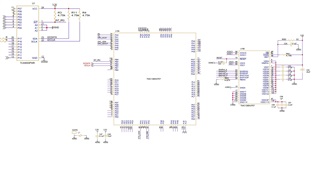
The i2c initialization, i2c_read code is bellow;

void Internal_I2C_Init(void)
{
    //I2C0 Module initialization
    ROM_SysCtlPeripheralDisable(SYSCTL_PERIPH_I2C0);
    SysCtlDelay(100);
    ROM_SysCtlPeripheralReset(SYSCTL_PERIPH_I2C0);
    SysCtlDelay(100);
    ROM_SysCtlPeripheralEnable(SYSCTL_PERIPH_I2C0);

    while(!SysCtlPeripheralReady(SYSCTL_PERIPH_I2C0)){} //Wait for I2C0 Module to stabilize
    I2CMasterEnable(IOChip_I2C_BASE);
    GPIOPinConfigure(GPIO_PB2_I2C0SCL);
    GPIOPinConfigure(GPIO_PB3_I2C0SDA);
    GPIOPinTypeI2CSCL(IOChip_I2C_BASE, IOChip_I2C_SCL_PIN);
    GPIOPinTypeI2C(IOChip_I2C_BASE, IOChip_I2C_SDA_PIN);
    ROM_I2CMasterInitExpClk(IOChip_I2C_BASE, sys_clock, I2C_100kHz_CLOCK);

}

uint32_t I2C_read(uint32_t ulBase, uint8_t chip_address, uint8_t internal_address)
{
    //Send Chip Hardware Address and Internal address of the register to write the date
    ROM_I2CMasterSlaveAddrSet(ulBase, chip_address, false); // Specify slave address with read request set to false
    ROM_I2CMasterDataPut(ulBase, internal_address); //Place the Internal register address
    ROM_I2CMasterControl(ulBase, I2C_MASTER_CMD_SINGLE_SEND); // Initiate send of 1Byte character from Master to Slave
    while (!(ROM_I2CMasterBusy(ulBase))); //Wait till end of transaction
    while(I2CMasterBusy(ulBase)); // not busy

    //Receive Data
    ROM_I2CMasterSlaveAddrSet(ulBase, chip_address, true); // Specify slave address with read request set to true
    ROM_I2CMasterControl(ulBase, I2C_MASTER_CMD_SINGLE_RECEIVE);// Initiate send of character from Master to Slave
    while (!(ROM_I2CMasterBusy(ulBase))); //Wait till end of transaction
    while(I2CMasterBusy(ulBase));

    //Read Receive Data from FIFO
    return (ROM_I2CMasterDataGet (ulBase)); //Read from FIFO
}

Thank you very much for your time.

  • I think the main issue is the half-way/missing clock that is probably resulting in out of sync situation between the io chip and microcontroller.

  • We are running a direct communication with TCA9555 I2C chip. The chip is at 4 inch distance on same board. The chip is directly connected without any buffer or isolators. We have 4.75kR pull ups. The firmware I have written is tested in another project and works fine when communicating to TCA9534A chip. The communication is at 100kHz.

    Hi,

      Normally for 100kHz, the bus length can be up to 1meter. So 4in is within range. 4.7kΩ is a reasonable value for 100k speed. 

    First Snapshot shoes one of the clock pulse is half-way and appears as a spike and hence SDO line will not transition from Low to High.

    Not really sure why the small clock pulse. Can you double check the slave is not pull the clock low? Slave is allowed to pull the clock low if it needs more time as a means to create wait state. If you are sure the slave is not pulling the clock then can you change the pullup resistor to something lower like 2kΩ? Will you see any difference?

    How is your board layout? Are there noises injecting to the bus?

    The following second snapshot shows all clock pulses are correct and hence the SDO line is released however some data pulses on the SDO line seems not normal

    I think these are fine. Your slave is reply a ACK by pulling the SDO low. If it is correctly recognized by the master as a valid ACK, I won't worry about it at this point. 

    Below is another scope shot from an I2C app note. You can see that a 9th bit is narrower perhaps due to the slave release SDO a bit sooner and the bus got pulled up again. 

  • Hi,

    I have changed the 4.75kR pull ups with 2kR but no luck. I still see the sharp spiky clock and the SDO will some time stay low. The signals are not noise either.

  • I can confirm the SDO line is hold low by any of the I2C chips connected. I have two I2C chips TCA9555 and Temp sensing chip TMP275AD. 

    I tried two cases. 

    Case1:  I removed TCA9555 chip and talking only to TMP275AD chip. I see the SDO line will some time stay low but then it would recover in few attempts.

    Case2: I installed TCA9555 chip and removed TMP275AD chip. I see the SDO line will stay Low and would not recover any more despite multiple attempts.

    Can you suggest if we can reduce the clock further down to 10kHz or so ?

  • Hi,

    I can confirm the SDO line is hold low by any of the I2C chips connected. I have two I2C chips TCA9555 and Temp sensing chip TMP275AD. 

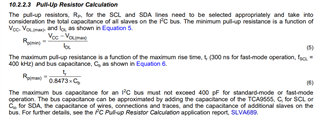
      Your schematic does not show TMP275AD. Is correct that the MCU (as a the master) only talks to two slave devices? Either a 4.7k or 2k should be sufficient as pullup unless there is a large capacitance due to the two slave chips and long traces on the board. I'm not familiar with these two slave chips. In doubt about the pull resistors, refer to the below description in TCA9555.

    The physical I 2C interface consists of the serial clock (SCL) and serial data (SDA) lines. Both SDA and SCL lines must be connected to VCC through a pull-up resistor. The size of the pull-up resistor is determined by the amount of capacitance on the I 2C lines. For further details, refer to I 2C Pull-up Resistor Calculation application report, SLVA689. Data transfer may be initiated only when the bus is idle. A bus is considered idle if both SDA and SCL lines are high after a STOP condition.

    I tried two cases. 

    Case1:  I removed TCA9555 chip and talking only to TMP275AD chip. I see the SDO line will some time stay low but then it would recover in few attempts.

    Case2: I installed TCA9555 chip and removed TMP275AD chip. I see the SDO line will stay Low and would not recover any more despite multiple attempts.

    What do you mean it will recover in few attempts. You already said that with a missing clock, the slave will just hang waiting for one extra clock. How does it recover?

    Can you show scope capture on how it recover when only device is connected. 

    What if disconnect both slave devices. Will you see missing clock?

    Can you suggest if we can reduce the clock further down to 10kHz or so ?

    By protocol, 100kHz is the standard I2C speed. 

    Do you have another board that shows the same problem or only this particular board has this behavior. 

  • When it is communicating to TMP275A(when TCA9555 is removed) the SDO line will occasionally stay low but then few attempts make it release back t High.

    However when the controller is communicating with TCA9555 (when TMP275A is removed) the SDO line will never recover.

    I have modified the code I shared earlier such that I commented out the following code and instead using a fix wait time.

    This helps me keeping poling the chip.

    //while (!(ROM_I2CMasterBusy(ulBase))); //Wait till end of transaction
    //while(I2CMasterBusy(ulBase)); // not busy

    Unfortunately I have only one proto-type board. I have one evaluation board. I am going to try that.

  • When it is communicating to TMP275A(when TCA9555 is removed) the SDO line will occasionally stay low but then few attempts make it release back t High.

    I'm a but confused now. Here you say SDO. SDO (I2CSDA) is the data line. I thought the problem is the clock (I2CSCL) getting pulled low for one of the clock pulses? SDO can stay low for multiple cycles because slave is driving to return the data. 

    However when the controller is communicating with TCA9555 (when TMP275A is removed) the SDO line will never recover.

    If this is due to a missing I2CSCL then can you tell if it is always the same clock pulse that is missing. Looking at your first scope capture, it is the 6th clock pulse in the data cycle. The address cycle seems fine. Is it always the 6th clock pulse that is missing or any clock pulse can be missing. From the master point of view, it has no reason to miss a particular clock pulse until the complete transaction is complete. I can't think of a reason why the master would ever do that. Think about it, the master is trying to write to the slave so it produces a address cycle and then the data cycle. Why would the master suddenly not produce the 6th clock pulse but not others. 

    Unfortunately I have only one proto-type board. I have one evaluation board. I am going to try that.

    So can you produce the same issue on the evaluation board?

    Can you swap in another MCU to your only proto-type board?

  • Hi,

    The SCLK position is very random and it can happen anywhere. Some transactions will go fine others will not and the Slave is out of sync and hence doesnt release the SDO line.

    I am going to try evaluation board today. I will be sharing result soon.

  • Hi,

      Yes, please try another board. Also try with all slave disconnected or maybe a dummy slave from another I2C module on the chip. Can you see any missing clocks?

      As I explained before, the slave can also hold the clock low as way to wait state the master. Can you confirm the clock is not stretched by the slave?

  • I have tried a dummy slave and I see it still misses the clock. I dont want to call it missing - clock because clock is there but it is not normal.

  • I have tried a dummy slave and I see it still misses the clock. I dont want to call it missing - clock because clock is there but it is not normal

    Is this on your own board or the LaunchPad? Can you try the LaunchPad as well?

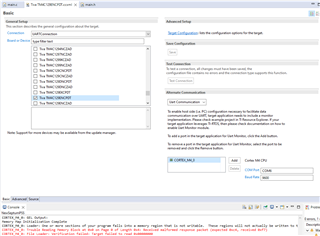
  • I am trying on Launchpad TM4C129ENCPDT. For my own board I use XDS110 Debug Probe but now since I am trying to download to the launchpad using the Launchpad own UART interface, I see following error. Any Idea ?

    CORTEX_M4_0: Loader: One or more sections of your program falls into a memory region that is not writable.  These regions will not actually be written to the target.  Check your linker configuration and/or memory map.
    CORTEX_M4_0: Trouble Reading Memory Block at 0x0 on Page 0 of Length 0x4: Received malformed response packet (expected 0xc4, received 0xf7)
    CORTEX_M4_0: File Loader: Verification failed: Target failed to read 0x00000000
    CORTEX_M4_0: GEL: File: C:\Users\iabid\Documents\CodeComposerStudio_WorkSpaces\Temp1WS\Project1.out: Load failed.

    See attached picture.

  • I am trying on Launchpad TM4C129ENCPDT. For my own board I use XDS110 Debug Probe but now since I am trying to download to the launchpad using the Launchpad own UART interface

    First of all, why over UART interface? Are you trying to load the code using the bootloader. Why don't you load the code using the JTAG through the on board ICDI debug probe?

    Can you try a simple example like hello or project0? Will you get the same issue? If yes, I think there is a problem with the board.

    Can you retry to load your code a few times? Do you always get the same error?

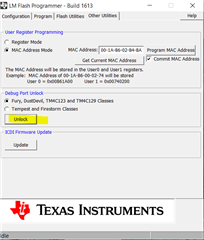
    Can you do a unlock operation using LM flash programmer. 

  • It is working now. I should have selected in circuit debugger option.

  • Hi,

    I am running with Launchpad and it seems the clocks are fine with Launchpad. Does it mean I have a layout issue ?

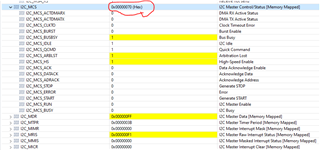
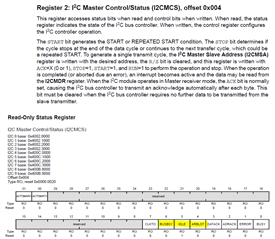
    However I see the bus will still stuck. However this time it seems a different issue. Debugger window shows I2C_MCS bits for HighSpeed MCS_HS and Arbitration Lost MCS_ARBLST bits turns High when the communication stops. Any idea why would this happen. The clock is set for 100KHz only.

    I am not sure how these bits will get set when my firmware is not setting them. Keep in mind I am using Launchpad this time.

    (A side note: MCS 0x0070 hex is not equal to the Yellow Highlighted Bits 0b00001111100000000)

    Also please suggest if you see any issue with my initialization sequence bellow;

    void Internal_I2C_Init(void)
    {
        //I2C0 Module initialization
        ROM_SysCtlPeripheralDisable(SYSCTL_PERIPH_I2C0);
    //
        SysCtlDelay(100);
        ROM_SysCtlPeripheralReset(SYSCTL_PERIPH_I2C0);
        SysCtlDelay(100);
        ROM_SysCtlPeripheralEnable(SYSCTL_PERIPH_I2C0);
    
        while(!SysCtlPeripheralReady(SYSCTL_PERIPH_I2C0)){} //Wait for I2C0 Module to stabilize
        I2CMasterEnable(IOChip_I2C_BASE);
        SysCtlDelay(100);
        I2CMasterGlitchFilterConfigSet(IOChip_I2C_BASE, I2C_MASTER_GLITCH_FILTER_8);
        GPIOPinConfigure(GPIO_PB2_I2C0SCL);
        GPIOPinConfigure(GPIO_PB3_I2C0SDA);
        GPIOPinTypeI2CSCL(GPIO_PORTB_BASE, IOChip_I2C_SCL_PIN);
        GPIOPinTypeI2C(GPIO_PORTB_BASE, IOChip_I2C_SDA_PIN);
    
        ROM_I2CMasterInitExpClk(IOChip_I2C_BASE, sys_clock, I2C_100kHz_CLOCK);
    
    }

    Please note, I have enabled the Glitch Filter.

    Please advise, how can I read and clear the I2C_MCS register ? 

  • I am running with Launchpad and it seems the clocks are fine with Launchpad. Does it mean I have a layout issue ?

    This certainly suggests to focus more on your board. 

    (A side note: MCS 0x0070 hex is not equal to the Yellow Highlighted Bits 0b00001111100000000)

    The MCS register has two views. When written it is used as a control register. When read, it shows the status. If you are reading 0x70 then it means it BUSBUSY, IDLE and ARLST are set. The bus is still busy but the controller (the I2C state machine) is idle. Not sure why ARBLST is set. 

      On the scope are you measuring 100k for SCL?

    Also please suggest if you see any issue with my initialization sequence bellow;

    What is your I2C_100kHz_CLOCK? Is it 0? What is your sys_clock? The third argument should be false for 100k Baud rate like below. 

    I2CMasterInitExpClk(I2C0_BASE, ui32SysClock, false);

    I suppose you enable GPIOB somewhere else. 

    Please note, I have enabled the Glitch Filter.

    I will suggest you disable the filter for the timing being. 

  • Hi Sahil,

      Have you resolved the issue yet? I will close this thread for now. If you have any updates, simply write back to this post. The post will be automatically reopened and I will be notified. 

  • Hi,

    I see the problem is related to board layout. Somehow the I2C clock pin is more sensitive to noise coupling. I made few temporary modification to the board and it started working. Thank you for your time and help.

  • Hi Charles,

    I am back with the some further information. Lets recall, a quick recap. As TI suggested to try the same firmware with the evaluation board. I downloaded the same firmware and the evaluation board was working well. The I2C clock signal was clean and there was no half-way spiky clock.

    However Today I repeated the same test with the evaluation board and I notice the I2C clock is clean when the USB debugger cable (please check the EK-TM4C129EXL Schematic page 6 connector U22) is plugged into on chip USB debugger U22 and providing power to the board.

    I disconnected the USB cable and instead provided 3.3V power externally. I noticed the Evaluation board I2C Clock shows that same Half-Way spiky signal same as we noticed on our controller board.

    If I just barely touch the Debugger cable connector to the shell of U22(see green circle in the following picture). The Half-Way spiky clock will disappear and starts working fine. 

    I see there is 3300pF (see C33) and 1M resistor (See R34) between the shell of the connector and the GND.

    It points more towards Common mode issue ? I tried installing multiple toroidal-beads on the input line but it didn't help either.

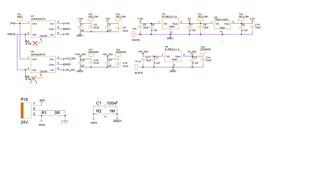
    Please see bellow how we are generating the 3.3V isolated power supply to our controller board. Please keep in mind, When I feed the same 3.3V from TP5 with respect to GND1 (TP6) to TI Evaluation board. It shows the same issue unless I touch the USB connector to U22 shell.

    Any suggestion ?

  • Hi,

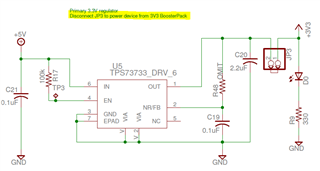
      Did you disconnect JP3 jumper when you power the board from th 3.3V boosterpack?