This thread has been locked.

If you have a related question, please click the "Ask a related question" button in the top right corner. The newly created question will be automatically linked to this question.

EK-TM4C123GXL: When i debug the code using ccs i get error "Error initializing emulator" how to resolve it ?

Part Number: EK-TM4C123GXL
Other Parts Discussed in Thread: UNIFLASH

Error initializing emulator:
(Error -2083 @ 0x0)
Unable to communicate with the debug probe. Confirm debug probe configuration and connections, reset the debug probe, and retry the operation.
(Emulation package 9.9.0.00040)

  • Hi,

      Please answer a few questions to help me understand your situation. 

      - Were you able to connect to the board before or this is a new board that you cannot connect to the target the first time you open the box?

      - Do you have the correct target configuration file?

      - Can you import a simple example into your CCS workspace? You can start with C:\ti\TivaWare_C_Series-2.2.0.295\examples\boards\ek-tm4c123gxl\blinky. Once you import the project, you should be able to simply click on the 'Debug' icon. See below. It will build the project, connect to the target and download the code to the flash. Do you have any problem with running this example?

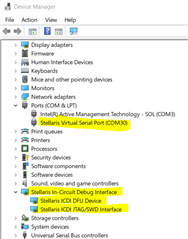
      - Go to your Windows Device Manager, do you see the Stellaris In-Circuit Debug Interface?


  • i am using linux. so kindly give me reply according. because in linux windows device manager not available. i am first time try to connect it using ccs on linux.

    1. what should i need to do get correct target configuration file ?
    2. i am using linux so how to use your example on linux ?
    3. i want to debug the my project not simple project. because i want to perform unit test. So can you suggest me what is best way to perform unit test on this board ?
    4. i am able to load binary into board. its working fine but what step will help me to debug code ?
  • In Linux the EK-TM4C123GXL should show up in the output of lsusb as a "Luminary Micro Inc. In-Circuit Debug Interface". E.g.:

    mr_halfword@Haswell-Ubuntu:~$ lsusb
    Bus 002 Device 002: ID 8087:8002 Intel Corp. 
    Bus 002 Device 001: ID 1d6b:0002 Linux Foundation 2.0 root hub
    Bus 001 Device 002: ID 8087:800a Intel Corp. 
    Bus 001 Device 001: ID 1d6b:0002 Linux Foundation 2.0 root hub
    Bus 004 Device 002: ID 0451:8140 Texas Instruments, Inc. 
    Bus 004 Device 001: ID 1d6b:0003 Linux Foundation 3.0 root hub
    Bus 003 Device 002: ID 0403:6010 Future Technology Devices International, Ltd FT2232C Dual USB-UART/FIFO IC
    Bus 003 Device 006: ID 1cbe:00fd Luminary Micro Inc. In-Circuit Debug Interface
    Bus 003 Device 004: ID 0451:8142 Texas Instruments, Inc. TUSB8041 4-Port Hub
    Bus 003 Device 005: ID 045e:07f8 Microsoft Corp. Wired Keyboard 600 (model 1576)
    Bus 003 Device 003: ID 0557:8021 ATEN International Co., Ltd CS1764A [CubiQ DVI KVMP Switch]
    Bus 003 Device 001: ID 1d6b:0002 Linux Foundation 2.0 root hub

  • Okay i will check it and reply. But can you give my 4 question answers.

    • what should i need to do get correct target configuration file ?
    • i am using linux so how to use your example on linux ?
    • i want to debug the my project not simple project. because i want to perform unit test. So can you suggest me what is best way to perform unit test on this board ?
    • i am able to load binary into board. its working fine but what step will help me to debug code ?

    Hi,

      This is why I asked for you to try out a simple example that is ready to run. The reason is that the simple example such as blinky or hello example  in TivaWare library already has the target configuration created. All you need to do is to click the 'Debug' button in CCS. There is no need to create a separate target configuration file. The best way to start your development is to first reference an example. Make sure you can bring up the example then you can simply replace the example source files (e.g. hello.c or blinky.c ) with your own project files. 

    i am able to load binary into board. its working fine but what step will help me to debug code ?

    This is where I'm confused. If you can already load the binary and it is working fine then I don't understand why you said you have the error message in the beginning. How did you successfully load the code then? Are you using CCS to load the code? I'm also not clear what step will help you to debug code. If you can connect to the target using CCS, you just use CCS to run the program and debug your code. CCS is just like any IDE debugger where you can single step code and install breakpoints on the source code to debug. 

  • Dear charles, i am using uniflash to load the my project binary.

    You may ask why ? i don't know because its what i got it from peers. i have checked that if i build code in debug mode at that time it gives me error or not.

    it not giving the error so i load it using uniflash.

    But now my work is to write unit test case. so for that i want to use debug option of ccs. but when i try using ccs it gives me error above. and i not know how to resolve it in linux.

    +

    1. suggested simple project will allow me to build and debug on linux ?
    2. if possible can you tell me when uniflash get used to load binary on target board instead ccs ?
    • suggested simple project will allow me to build and debug on linux ?

    You can use any simple project. I already suggest you started with the blinky example in  C:\ti\TivaWare_C_Series-2.2.0.295\examples\boards\ek-tm4c123gxl\blinky. Please go back to my very first reply.

    if possible can you tell me when uniflash get used to load binary on target board instead ccs ?

    Uniflash is a standalone flash programmer. People normally use it for production purpose because Uniflash has command-line interface which will be easier and quicker to program the final build of the firmware to the board. There is no issue for you to load your binary using Uniflash while using CCS for debug. But I will suggest you just use CCS to do all of them which is to build the project, connect to the target, load the binary and run the program. This is the purpose of a IDE. 

    If you can get Uniflash to load your binary then there is no reason that it will not work for CCS. Uniflash is more or less a subset of CCS in terms of flash programmer. Can you show which Uniflash version you use and which CCS version you use? If there is a CCS issue, I can forward your questions to our CCS experts. 

  • Bus 004 Device 001: ID 1d6b:0003 Linux Foundation 3.0 root hub
    Bus 003 Device 001: ID 1d6b:0002 Linux Foundation 2.0 root hub
    Bus 002 Device 002: ID 0bda:0316 Realtek Semiconductor Corp. Card Reader
    Bus 002 Device 001: ID 1d6b:0003 Linux Foundation 3.0 root hub
    Bus 001 Device 008: ID 5986:2113 Acer, Inc SunplusIT Integrated Camera
    Bus 001 Device 007: ID 8087:0a2b Intel Corp. Bluetooth wireless interface
    Bus 001 Device 011: ID 1cbe:00fd Luminary Micro Inc. In-Circuit Debug Interface
    Bus 001 Device 009: ID 2a94:464d G2Touch Multi-Touch by G2TSP
    Bus 001 Device 010: ID 17ef:608d Lenovo Optical Mouse
    Bus 001 Device 001: ID 1d6b:0002 Linux Foundation 2.0 root hub

  • Yes i can import simple project and it allows me to debug also.

    But now my question is to how to make correct configuration file ? i am asking this question again because my project code use c++.

    when load using uniflash it loads it into board.

    but when try using ccs i get below error :

    Error initializing emulator:
    (Error -2083 @ 0x0)
    Unable to communicate with the debug probe. Confirm debug probe configuration and connections, reset the debug probe, and retry the operation.
    (Emulation package 9.10.0.00080)

    on console it gives error:

    CS_DAP_0: Error initializing emulator: (Error -2083 @ 0x0) Unable to communicate with the debug probe. Confirm debug probe configuration and connections, reset the debug probe, and retry the operation. (Emulation package 9.10.0.00080)

    Note i am using ccs Version: 12.2.0.00009

  • But now my question is to how to make correct configuration file ?

    You can use the target configuration editor in CCS:

    https://software-dl.ti.com/ccs/esd/documents/users_guide/ccs_debug-main.html#manual-method

    If you are using the EK-TM4C123GXL LaunchPad, it should look like: