This thread has been locked.

If you have a related question, please click the "Ask a related question" button in the top right corner. The newly created question will be automatically linked to this question.

MSPM0G3507: RTC default configuration

Part Number: MSPM0G3507


Hi,

I am exploring MSP-M0G3607 MCU. I am using CCS Theia 0.9 with SDK 0.57. I was exploring the "rtc_calendar_alarm_standby" project. I am observing for every RTC profile, the default RTC date and time are set as shown in the below image.
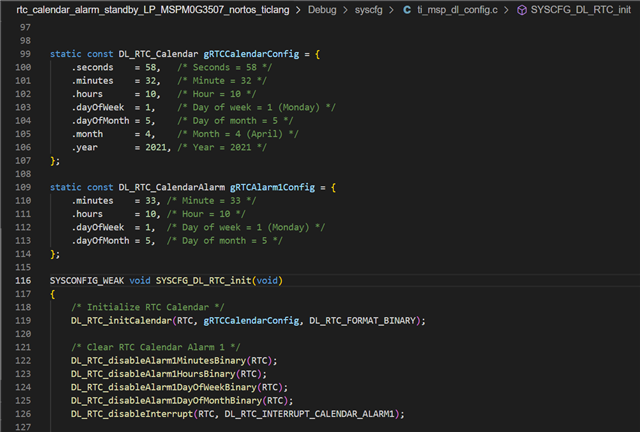
So, this will set the RTC time whenever MCU will be powered on or reset. Is there any way to skip setting of RTC date and time? For our custom application, We will need to power off and power on the MCU on the button event and get the RTC time whenever MCU is turned on for record keeping.

Thanks and regards,

Virendra Dalal

Einfochips

Einfochips 

  • Hello,

    There is no way to keep the RTC registers if you reset or power off the device. So, yes whatever start time you place in the code will be reset into the RTC registers on a reset or power off. RTC runs down to STANDBY low power modes, but does not run in SHUTDOWN mode. 

    If you know you are going to reset or lose power, you can of course, save off the current time in the RTC registers to memory (same places where default configuration is) to see the last known time before power loss/reset. Or periodically save it if you  don't know when such events will occur. The lower 32kB of memory has increased write cycle specification that can be used EEPROM emulation, that can help you here.