This thread has been locked.

If you have a related question, please click the "Ask a related question" button in the top right corner. The newly created question will be automatically linked to this question.

TM4C1292NCPDT: How to change project configuration from Active- Debug to Active - Flash

Part Number: TM4C1292NCPDT


Hello, 

I am following below links for CCS 

https://www.youtube.com/watch?v=xEBjObfW-8Y

How can i change project configuration from Active- Debug to Active -  Flash ?

Also below highlighted box is not in active state.

Please share your comments or suggestion.

Thanks,

Kiranjit 

  • Hi,

      Please see below instructions.

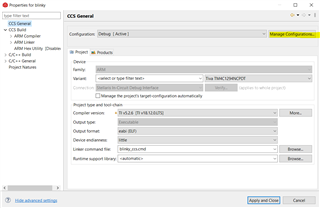
      1. First go to Manage Configurations. 

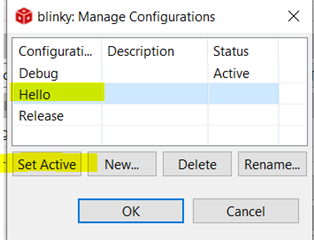
    2. Click 'New'.

    3. Specify the new configuration you want. Here I simply create a new configuration name called 'Hello'. You can call it 'Flash' or whatever you want. 

    4. You will then see 'Hello' as one of the configurations. You first select 'Hello' and then select 'Set active'.

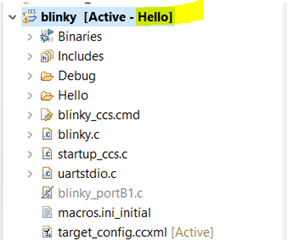
    5. Once you Apply and Close you will see 'Hello' as the active configuration. For a different configuration, you can uniquely specify different optimization level or include/exclude different files from compile.