This thread has been locked.

If you have a related question, please click the "Ask a related question" button in the top right corner. The newly created question will be automatically linked to this question.

EK-TM4C123GXL: USB Device (not USB Debug) port for COM interface

Part Number: EK-TM4C123GXL

I've got the EK-TM4C123GXL working using uartstdio.c functions such as UARTprintf and UARTgetc. I communicate over the USB-Debug port using a terminal emulator accessible through a COM port. Everything works fine, however I need to switch from the USB-Debug port to the USB-Device port. 

I've changed from:

// PA0-1 are used for UART0
GPIOPinConfigure(GPIO_PA0_U0RX);
GPIOPinConfigure(GPIO_PA1_U0TX);
GPIOPinTypeUART(GPIO_PORTA_BASE, GPIO_PIN_0 | GPIO_PIN_1);

UARTAStdioConfig(0, 230400, SysCtlClockGet());

to:

// PD4-5 are used for UART6
GPIOPinConfigure(GPIO_PD4_U6RX);
GPIOPinConfigure(GPIO_PD5_U6TX);
GPIOPinTypeUART(GPIO_PORTD_BASE, GPIO_PIN_4 | GPIO_PIN_5);

UARTBStdioConfig(6, 230400, SysCtlClockGet());

The problem is, when I connect a USB cable, Windows reports "USB device not recognized". Looking into Device Manager I get "Unknown USB Device (Port Reset Failed)"
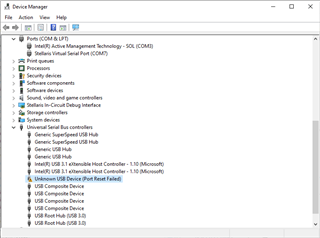
I recall for the USB-Debug port I needed to load a Stellaris driver. To me, it appears I need a Windows USB driver. I've searched the web, but cannot find anything.

Anyone know how to get an EK-TM4C123GXL USB-device port to work like a USB-debug port?

  • Hi,

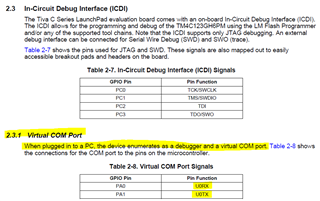
      The reason that UART0 works is because UART0 is routed to the on-board ICDI debug probe. The on-board ICDI debug probe acts as a USB to UART bridge and this is how the USB debug port can enumerate as as serial port.

    When you change to UART6, you need to have an external USB to UART bridge. Here is one example. I'm not endorsing any product. You can search one that best suits your needs. https://www.amazon.com/DSD-TECH-SH-U09C5-Converter-Support/dp/B07WX2DSVB/ref=sr_1_3?crid=48RECALFD0VW&keywords=usb+to+uart+bridge&qid=1684849346&sprefix=usb+to+uart%2Caps%2C138&sr=8-3

      The USB Device port is an entirely different thing. This is a USB port for the on-chip USB controller. TM4C123 MCU has an integrated USB controller that can be programmed for different USB classes such as bulk for storage application, HID for mouse/keyboard, CDC for serial communication just to name a few. If you are interested, you can configure the USB controller for CDC class that will enumerate as as COM port. Not sure if this is what you are looking for. Bear in mind that you are not using any UART module at all but the USB controller as a serial device. You can run the example C:\ti\TivaWare_C_Series-2.2.0.295\examples\boards\ek-tm4c123gxl\usb_dev_serial for demonstration. You will see a COM port in Device Manager when you connect the USB cable to the USB Device Port. 

      If your intention is to use a different UART (e.g. UART6) to do UARTPrintf() then you need a USB to UART bridge as mentioned above. 

  • Hi Charles,

    Thanks for your prompt and thorough response. This really makes the Tiva eco-system a great place to develop.

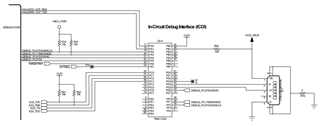
    It's a pity that the USB connector, which connects directly to the TM4C123's PD4 and PD5 then needs a converter to convert these TTL signals to a TTL signal!!! For the USB Debug port, it's a direct connection and all is fine. Ironically, the USB debug port uses PD4 and PD5:

    From a hardware perspective, everything is fine. Presumably the USB debug port magic happens in the code in the TM4C123's In-Circuit Debug Interface (ICDI) and the PC's Stellaris Virtual Port driver. I've worked with this for years and uartstdio.c provides me with everything I need to communicate with the USB Debug port. It would be great to do the same with the USB Device port.

    I will look into the CDC class as this may do what I need. I've printed out pages 44 to 78 of https://www.ti.com/lit/ug/spmu297e/spmu297e.pdf and will study them. It looks like I should be able to replicate the USB Debug port's functionality with the USB Device port. From that document:

    "The USB Communication Device Class (CDC) class driver supports the CDC Abstract Control Model variant and allows a client application to be seen as a virtual serial port to the USB host system."

    and:

    "Making your CDC serial device visible as a virtual COM port on a Windows system is very straightforward since Windows already includes a device driver supporting USB CDC devices. The device developer must merely provide a single INF file to associate the VID and PID of the new device with the Windows USB CDC driver, usbser.sys."

    Hopefully with a bit of understanding and coding, I'll be able to use uartstdio.c and it's useful functions to make the USB Device port behave just like the USB Debug port. I would think that such a "feature" would be useful to others and wonder if Texas Instruments thinks it's worthwhile providing instructions or code to make this happen.

    I think I've got enough to solve this problem and have marked it, "This resolved my issue". Many thanks for your help Charles.

  • Hi Vito,

    I would think that such a "feature" would be useful to others and wonder if Texas Instruments thinks it's worthwhile providing instructions or code to make this happen

    As mentioned, there is already a USB CDC example that you can find in C:\ti\TivaWare_C_Series-2.2.0.295\examples\boards\ek-tm4c123gxl\usb_dev_serial. It should work right out of the box.