This thread has been locked.

If you have a related question, please click the "Ask a related question" button in the top right corner. The newly created question will be automatically linked to this question.

MSP-EXP432E401Y: Flashing the launchpad using the XDS110 Debug Probe

Part Number: MSP-EXP432E401Y
Other Parts Discussed in Thread: MSP432E401Y, UNIFLASH, SEGGER, , TM4C1294NCPDT

Good morning,

I have a simple question! I've purchased an XDS110 Debug Probe, and was wondering if I am able to flash the MSP432E401Y launchpad with it. 

  1. I disconnected the RST, TMS, TCK, TDO, and TD1 pin jumpers from J101 on the launchpad.
  2. The launchpad is powered via usb plugged into the CDS-11 on-board emulator. The GND, 5V, and 3V3 jumpers on J101 are still populated.
  3. I connected the XDS110 Debug Probe's AUX functions cable to J11 on the Launchpad.

When I try to flash via UniFlash or CCS, I receive the following error: 

"Error connecting to the target: (Error -615 @ 0x0) The target failed to see a correctly formatted SWD header. The connection to the target may be unreliable. Try lowering the TCLK setting before trying again. (Emulation package 9.10.0.00080)"

Any help would be much appreciated!

I'm sure it's something stupid I've missed.

  • I have a simple question! I've purchased an XDS110 Debug Probe, and was wondering if I am able to flash the MSP432E401Y launchpad with it. 

    You should be able to use an external XDS110 debug probe to program/debug the LaunchPad although the board itself already has an on-board XDS110. There is no real performance benefit to debug the LaunchPad when there is already one onboard. Of course you can use your external debug probe to debug your custom board in the future. 

    2.3.1 XDS-110 Debug Interface
    The Ethernet LaunchPad development kit comes with an onboard XDS-110. The XDS-110 allows for the
    programming and debugging of the MSP432E401Y using Code Composer StudioTm IDE or any of the
    supported tool chains. Note that XDS-110 only supports JTAG debugging at this time.

    I disconnected the RST, TMS, TCK, TDO, and TD1 pin jumpers from J101 on the launchpad.

    Looks correct to me. 

    2.3.2 External Debugger
    The connector J11 is provided for the attachment of an external debug adapter such as the IAR I-Jet,
    Segger J-Link or Keil® ULINK. This connector follows the Arm 10-pin mini JTAG pinout. To use an
    external debugger, make sure the TDI, TDO, TCK, TMS, RST, and 3V3 jumpers are disconnected from
    J101. Many external debuggers do not provide a 3.3-V power rail through this adapter and require an
    external 3.3-V source to power the LaunchPad development kit.

    • The launchpad is powered via usb plugged into the CDS-11 on-board emulator. The GND, 5V, and 3V3 jumpers on J101 are still populated.

    Yes, you still need 3v3 volt to power the board. Do you see the power LED on?

    Did you connect the external debug probe to J11 connector?

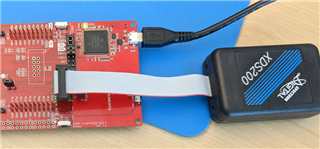
    Can you take a picture of all the jumpers and connections you remove and connect?

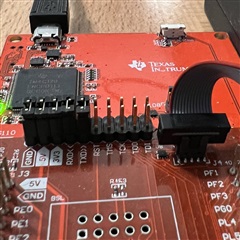
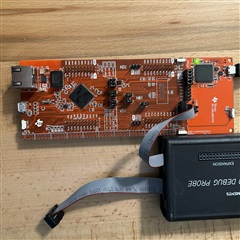
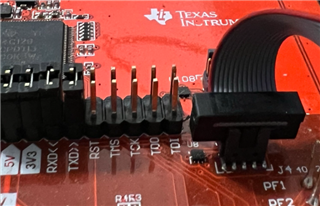
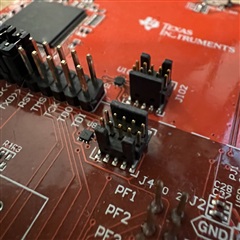
  • Here is my current setup (I removed project wires for clarity):

  • Hi,

      I don't have an external XDS100 but I will try with an XDS-200 probe and get back with you.

  • Hi,

      I have some new findings but I can't explain it. I will need to seek assistance from our XDS debug probe experts as I suspect it may have something to do with the emulation firmware but I'm not sure. Let me explain what I do. 

      Since I don't have an external XDS110, I use XDS200 to see if I can connect to the target device on the MSP-EXP432E401Y  LaunchPad. The Target Configuration file I setup is for XDS200 with target device for MSP432E401Y. With this target configuration, I fail to connect to the target. 

    However, if I use a target configuration file that uses TM4C1294NCPDT as the target then I have no issue connecting to the target. I can run the 'Test Connection' successfully and I can load a MSP432E blinky program from the SDK and it loads and runs successfully. 

    So this is what I would suggest you try before I move your post to our CCS and XDS experts. 

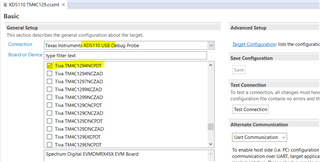
    First create a new target configuration file that uses XDS110 debug probe and TM4C1294NCPDT as the target device. TM4C129 MCU is the same silicon as MSP432E MCU. I want to know if you can connect to the MSP-EXP432E401Y  LaunchPad by fooling the emulator into thinking it is for TM4C129. 

    Please also make sure the orientation of the cable. Check for the red color on the cable to align with the connector. In any case, you should try both orientations as I don't have XDS110 to experiment with. 

    If you can successfully connect to the MSP432E LaunchPad by using TM4C129 as the target device then perhaps there is something wrong with the emulation package. 

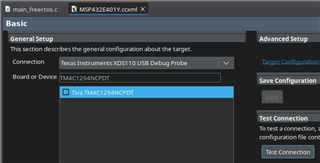
  • I altered my target configuration file to configure for the TM4C129NCPDT:

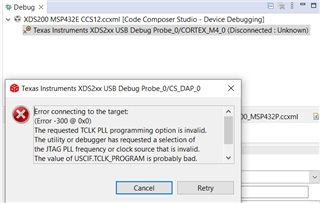
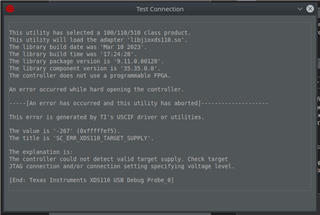
    And tried to test the connection:

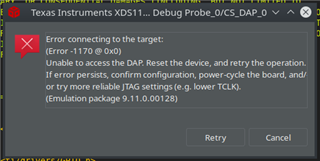
    I tried to flash the MSP432E401Y's "timerled" example to view the error:

    The debugger's housing is polarized, so I can only safely try it in it's current configuration:

  • Hi Daniel,

      I'm looking at your connection to J11. Can you change the orientation? You red wire seems to be on the opposite from my picture. 

  • J11 and the debugging connector are both polarized/keyed. I don't think I am able to reorient them without de-soldering J11.


  • On my XDS200 there is no key so I had to make sure I orient correctly. In your case, it is not the orientation problem.

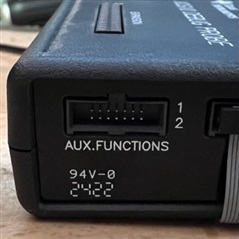
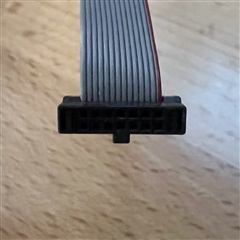
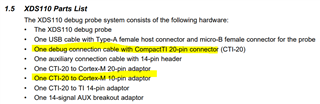
    Have you tried the main debug connection? It seems you are using the AUX connection. You can use the main debug connection with the CTI-20 to Arm 10pin adapter. What is the result?

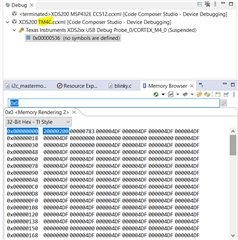
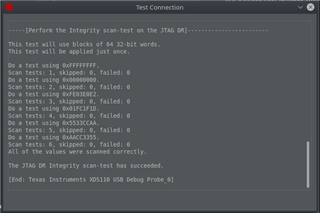
  • Oh I see haha. Sorry, I'm new to external JTAG flashing. I've located that board and plugged in it. Using the TM4C129NCPDT configuration, it passed the connection test, as well as sucessfully flashed the "timerled" demo to the MSP432E401Y.


  • I'm now able to flash using the MSP432E401Y target configuration. I appreciate your help, Charles Tsai.