This thread has been locked.

If you have a related question, please click the "Ask a related question" button in the top right corner. The newly created question will be automatically linked to this question.

MSP-EXP432E401Y: Issue with HTTPServer example project

Part Number: MSP-EXP432E401Y


I'm trying to run the httpserver example project found in the SimpleLink MSP432E4 SDK 4.20.00.12. However, when I connect to the HTTPServer on port 443 (via HTTPS), the server stalls while loading the "ti_ep_logo.jpg" file. The first few KB of the image make it to my web browser, and then the microcontroller doesn't send the remaining data. The webpage appears to be in a loading state forever, and the image never fully loads. I tried running the example project with both TI-RTOS and FreeRTOS, and encountered the same behavior. I tried increasing the number of memory pages in the NDK Stack configuration from 6 to 18, but this didn't resolve the issue. I can download the other two files in the webserver ("index.html" and "subdir/ti.jpg"), but those files are significantly smaller in size than the "ti_ep_logo.jpg" file. Is there an issue with the memory configuration in this project?

Also, the webpage loads just fine on port 80 (via HTTP). The issue only appears when using HTTPS.

  • I tried increasing the number of memory pages in the NDK Stack configuration from 6 to 18, but this didn't resolve the issue. I can download the other two files in the webserver ("index.html" and "subdir/ti.jpg"), but those files are significantly smaller in size than the "ti_ep_logo.jpg" file. Is there an issue with the memory configuration in this project?

    Hi,

      In parallel to HTTPserver project in your workspace, you should also find tirtos_builds_MSP_EXP432E401Y_release_ccs in the same workspace. This is a dependent project for HTTPserver as well as other examples. The tirtos_builds_MSP_EXP432E401Y_release_ccs project configures the TI-RTOS kernel parameters. I wonder if the problem you are seeing is due to insufficient heap memory. I suppose TLS stack will require a lot more heap and stack. I wonder if you increase the heap memory to a much larger value, will it have any effect on the result. Can you change to a larger value for both the stack and the heap. I will suggest you try 2048 for the stack and a large heap like 90112 for the heap. The 90112 is what I find for a https project that runs on another MCU. That https example uses a different TLS stack (WolfSSL) which is different from MSP432E's TLS stack. Therefore, it is not  really a apple to apple comparison as far as how much is really required for running HTTPServer project for MSP432E. 

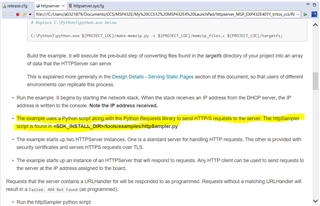
    Please also review the README.html for running this example. According to README.html, this example is designed to run with the Python script running on the client side. Did you have a chance to run the example as such? Does it work for you in HTTP and HTTPS this way?

  • Thanks Charles for your input. I tried increasing the stack and heap, but unfortunately, the behavior is still the same. I'm testing with the httpSampler.py script, and it works successfully when retrieving /index.html and /subdir/ti.jpg. However, when I use run the script with -s -u /ti_ep_logo.jpg, the script hangs and never completes the request.

  • Can you see the ROV panel in CCS, for the TI RTOS build - this can be really handy tool for these problems.

    Look at the task view, detailed option. Check each task stack size and max usage. Does any task show as running after each refresh - most of the time for most applications is spent in idle so, if you catch a task running, it is suspicious that it is the one that is stuck.

    If you suspend debug, where is the program counter. If it is on a line with a comment "spin here forever", you have probably hit an assert and the ROV task view call stack option may give a clue about which hole it went down to die.

    Just a few things I have found useful!

    Hope it helps.

    Jim

  • Hi Jim,

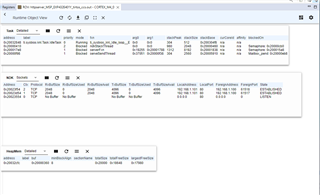
    I've tried increasing the stack size, as well as the size of various NDK buffers. However, the JPEG image still doesn't load over HTTPS. Here's a screenshot of the ROV output. I don't see anything that's obviously wrong.


    Has someone at Texas Instruments verified that this example project works as expected on this board?

    Thanks in advance for your help.

    Andy

  • Hi Andy,

    However, when I use run the script with -s -u /ti_ep_logo.jpg, the script hangs and never completes the request.

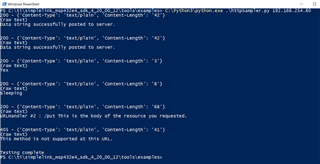
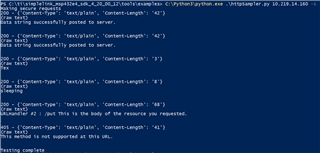
    I run the example as is. Please see below outputs for both HTTP and HTTPS. I don't see an issue. 

    HTTP without -s switch:

    HTTPS with -s switch:

    Please refer to Serving Static Pages in README.html. If you are going to change the static web pages (e.g. creating your own web pages), you would need to use make-memzip.py to convert the web pages into an C array memzip_data. memzip_data array is in memzip_files.c. This array ( which contains the web pages) is what the HTTP server will send to the client. I don't believe -u /ti_ep_logo.jpg is the right way to invoke the command. I'm not even sure what -u is for and how to use it. HTTPserver cannot dynamically send a webpage/image by reading a filesystem. Please follow the README instruction. If  ti_ep_logo.jpg is the only thing you want to send, you would first need to run make-memzip.py script to convert ti_ep_logo.jpg into a C array so that the image is stored in the flash statically after you rebuild the project. 

    [EDIT] I think I know what -u does now. It is for the client to request a specific item from the static image. However, I'm getting a security error when trying -s. Not sure if it has something to do with the network I'm running from. I will need to try a different network. My problem is different from what you see - not loading the specified item. Having said that, in real life I don't think clients would know a specific filename among all the webpage components and to only request a specific item. 

  • Hi Charles,

    When loading the web server's main page (index.html), the client browser will also load the images referenced in the HTML file. Therefore, the client web browser will also make a request for "ti_ep_logo.jpg" and "subdir/ti.jpg". These files are already present in the C memory array. The issue is that the MSP-EXP432E401Y doesn't send the larger image ("ti_ep_logo.jpg"). The web browser just waits forever for the image, but never receives it. I think you can test for this by running that Python script with the options: -s -u /ti_ep_logo.jpg. 

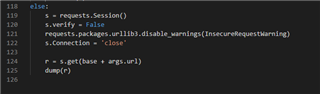
    To fix the security error in Python, you can modify the code as shown below to disable certificate verification.

  • To fix the security error in Python, you can modify the code as shown below to disable certificate verification.

    Hi Andy,

      Really appreciate your tips on the certificate issue I was getting. I will try and get back with you. 

  • Hi Andy,

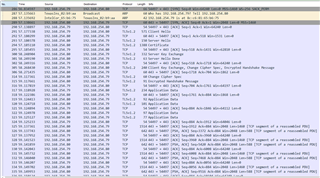
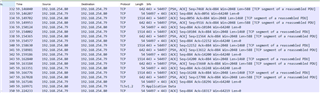
      Just to let you know that I have yet to understand the problem myself. With -s -u /ti_ep_logo.jpg, what I can see from Wireshark is that the packets are being transmitted from the server to the client but lastly the HTTP OK response is somehow not sent compared to the command without using the -s. 

  • what I can see from Wireshark is that the packets are being transmitted from the server to the client but lastly the HTTP OK response is somehow not sent

    I think that may be the issue. You can also see this problem when loading the example webpage from the microcontroller. If you navigate to http://192.168.254.80, the webpage loads fine. However, the secure webpage at https://192.168.254.80 never fully loads. I can see in the Chrome developer console that the image at https://192.168.254.80/ti_ep_logo.jpg never finishes the transfer. There seems to be a software issue that causes the microcontroller to incorrectly transfer the 47KB ti_ep_logo.jpg file with HTTPS. Perhaps the large size of the image is the problem?

  • Hi Andy,

      Yes, it looks like it has something to do with the size of the image. I tried to replace  ti_ep_logo.jpg with a smaller image. I used the same subdir/ti.jpg for ti_ep_logo.jpg. As you can see it works for https. However, I don't know what knobs to turn to make it work when the image is larger. I'm also puzzled as to why without -u /ti_ep_logo.jpg, it will work.   

    Using command line:  C:\Python3\python.exe .\httpSampler.py 10.219.14.160 -s -u /ti_ep_logo.jpg

    Using command line: C:\Python3\python.exe .\httpSampler.py 10.219.14.160 -s 

    Using browser:

  • Hi Charles,

    Yep, that's the issue I'm facing. Unfortunately, I'm unable to find a solution too. It appears that changing the stack/heap settings has no effect. This bug significantly limits the usability of the HTTPS server.

  • Hi Andy,

      I have been playing around with different sizes and it seems only a small image will work with the -u option. I really don't know what is the causing the problem without sufficient knowledge of the stack. 

     Below is what I play with in HTTP. I have several images of different sizes. Only the ti.jpg (6kB) will work with -s -u. That is all I can say at this moment. 

  • I think I found the issue. On line 1882 of slnetifndk.c (in the NDK), the SlNetIfNDK_sendSec function is calling mbedtls_ssl_write only once. Instead, it should keep track of nBytes and keep calling it until the entire buf has been sent.


    nBytes = mbedtls_ssl_write(sCtxPtr->ssl, (unsigned char *)buf,
                        len);

    Each call to mbedtls_ssl_write can write up to ~16KB, so multiple calls have to be made to send a file that is greater than 16KB. Unfortunately, I'm having a hard time building the NDK from source so I can't verify that this does indeed solve the issue.

  • Hi Andy,

      The other day, I was also tracing to the below function where I wasn't sure how to proceed further since mbedtls is a third party function and I'm really not an expert in what it tries to do. I do notice the same about the 16k size where it needs to split. 

    /*
     * Write application data, doing 1/n-1 splitting if necessary.
     *
     * With non-blocking I/O, ssl_write_real() may return WANT_WRITE,
     * then the caller will call us again with the same arguments, so
     * remember whether we already did the split or not.
     */
    #if defined(MBEDTLS_SSL_CBC_RECORD_SPLITTING)
    static int ssl_write_split( mbedtls_ssl_context *ssl,
                                const unsigned char *buf, size_t len )
    {
        int ret;
    
        if( ssl->conf->cbc_record_splitting ==
                MBEDTLS_SSL_CBC_RECORD_SPLITTING_DISABLED ||
            len <= 1 ||
            ssl->minor_ver > MBEDTLS_SSL_MINOR_VERSION_1 ||
            mbedtls_cipher_get_cipher_mode( &ssl->transform_out->cipher_ctx_enc )
                                    != MBEDTLS_MODE_CBC )
        {
            return( ssl_write_real( ssl, buf, len ) );
        }
    
        if( ssl->split_done == 0 )
        {
            if( ( ret = ssl_write_real( ssl, buf, 1 ) ) <= 0 )
                return( ret );
            ssl->split_done = 1;
        }
    
        if( ( ret = ssl_write_real( ssl, buf + 1, len - 1 ) ) <= 0 )
            return( ret );
        ssl->split_done = 0;
    
        return( ret + 1 );